
- 1linux 给用户授予目录权限_linux chmod username
- 2通过java代码实现ES中的常用搜索_java es搜索引擎
- 3Hive07:Hive的进阶操作03之Hive中的表类型:内部表、外部表、分区表、桶表以及视图_hive 查看表类型
- 4在使用IDEA提交git代码时,如何修改提交者的名字_git在idea中怎么设置提交的名字
- 5django 前端设计文件(模板语法)_django前端模板
- 6python输入多行linux命令_如何从python向终端(linux)发送多个命令? - python
- 7Vue代理模式和Nginx反向代理(Vue代理部署不生效)
- 8Pip安装指定版本的包_安装指定版本pip
- 9mac检查CPU温度和风扇速度软件:Macs Fan Control Pro 1.5.17中文版
- 10html动漫网页设计分享 紫罗兰永恒花园网页作业成品带视频,注册登录,表格,表单_网页设计与制作紫罗兰的永恒花园
基于SpringBoot+Redis的前后端分离外卖项目-苍穹外卖微信小程序端(九)
赞
踩
1. HttpClient
1.1 入门
在进行微信登录之前我们要先知道HttpClient是什么,它是Apache Jakarta Common 下的子项目,可以用来提供高效的、最新的、功能丰富的支持 HTTP 协议的客户端编程工具包,并且它支持 HTTP 协议最新的版本和建议。
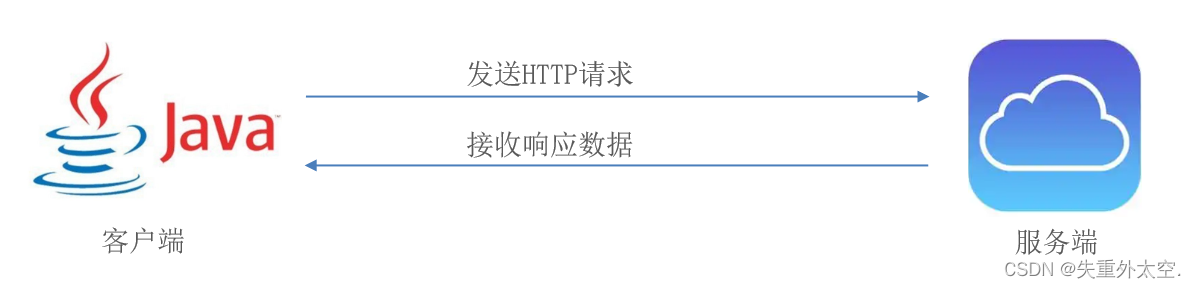
HttpClient作用:
- 发送HTTP请求
- 接收响应数据
HttpClient应用场景:
当我们在使用扫描支付、查看地图、获取验证码、查看天气等功能时
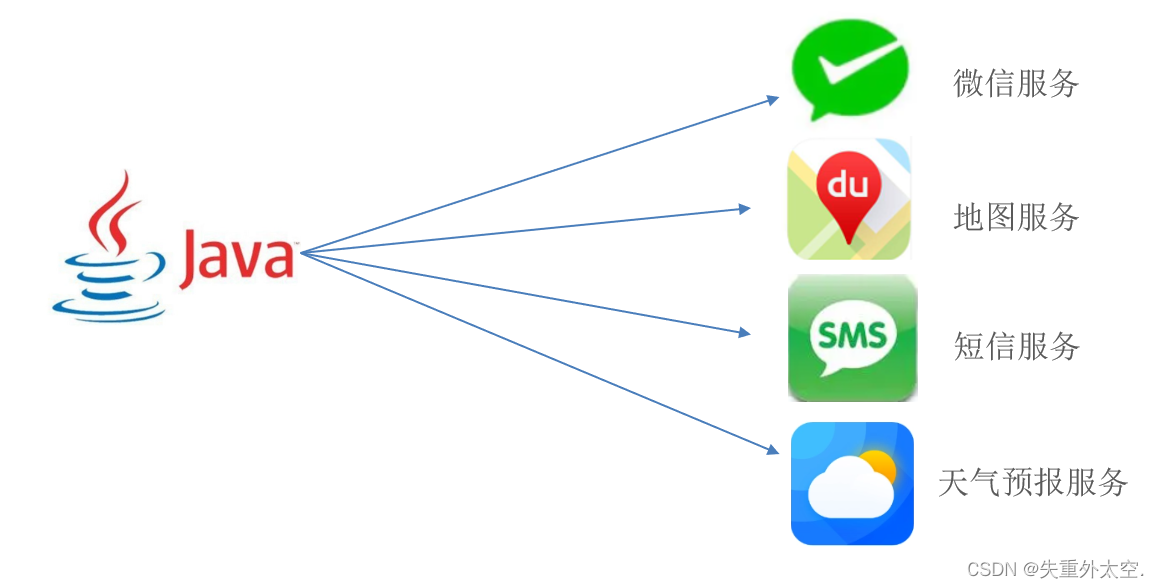
其实,应用程序本身并未实现这些功能,都是在应用程序里访问提供这些功能的服务,访问这些服务需要发送HTTP请求,并且接收响应数据,可通过HttpClient来实现。
HttpClient的maven坐标:
<dependency>
	<groupId>org.apache.httpcomponents</groupId>
	<artifactId>httpclient</artifactId>
	<version>4.5.13</version>
</dependency>
- 1
- 2
- 3
- 4
- 5
HttpClient的核心API:
- HttpClient:Http客户端对象类型,使用该类型对象可发起Http请求。
- HttpClients:可认为是构建器,可创建HttpClient对象。
- CloseableHttpClient:实现类,实现了HttpClient接口。
- HttpGet:Get方式请求类型。
- HttpPost:Post方式请求类型。
HttpClient发送请求步骤:
- 创建HttpClient对象
- 创建Http请求对象
- 调用HttpClient的execute方法发送请求
1.1.1 入门案例
1.2.1 GET方式请求
进入到sky-server模块,编写测试代码,发送GET请求。
实现步骤:
- 创建HttpClient对象
- 创建请求对象
- 发送请求,接受响应结果
- 解析结果
- 关闭资源
package com.sky.test;

@SpringBootTest
public class HttpClientTest {

    /**
     * 测试通过httpclient发送GET方式的请求
     */
    @Test
    public void testGET() throws Exception{
        //创建httpclient对象
        CloseableHttpClient httpClient = HttpClients.createDefault();

        //创建请求对象
        HttpGet httpGet = new HttpGet("http://localhost:8080/user/shop/status");

        //发送请求,接受响应结果
        CloseableHttpResponse response = httpClient.execute(httpGet);

        //获取服务端返回的状态码
        int statusCode = response.getStatusLine().getStatusCode();
        System.out.println("服务端返回的状态码为:" + statusCode);

        HttpEntity entity = response.getEntity();
        String body = EntityUtils.toString(entity);
        System.out.println("服务端返回的数据为:" + body);

        //关闭资源
        response.close();
        httpClient.close();
    }
}

- 1
- 2
- 3
- 4
- 5
- 6
- 7
- 8
- 9
- 10
- 11
- 12
- 13
- 14
- 15
- 16
- 17
- 18
- 19
- 20
- 21
- 22
- 23
- 24
- 25
- 26
- 27
- 28
- 29
- 30
- 31
- 32
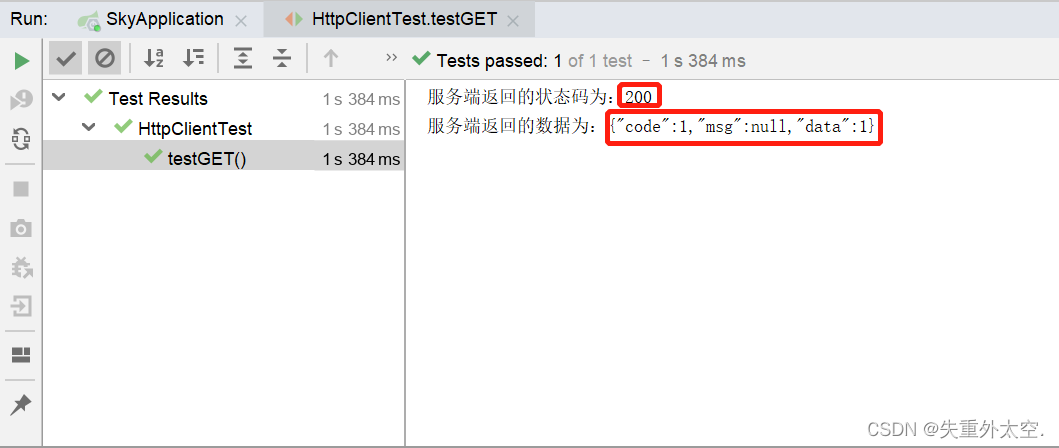
在访问http://localhost:8080/user/shop/status请求时,需要提前启动项目。
测试结果:
1.2.2 POST方式请求
在HttpClientTest中添加POST方式请求方法,相比GET请求来说,POST请求若携带参数需要封装请求体对象,并将该对象设置在请求对象中。
实现步骤:
- 创建HttpClient对象
- 创建请求对象
- 发送请求,接收响应结果
- 解析响应结果
- 关闭资源
	/**
     * 测试通过httpclient发送POST方式的请求
     */
    @Test
    public void testPOST() throws Exception{
        // 创建httpclient对象
        CloseableHttpClient httpClient = HttpClients.createDefault();

        //创建请求对象
        HttpPost httpPost = new HttpPost("http://localhost:8080/admin/employee/login");

        JSONObject jsonObject = new JSONObject();
        jsonObject.put("username","admin");
        jsonObject.put("password","123456");

        StringEntity entity = new StringEntity(jsonObject.toString());
        //指定请求编码方式
        entity.setContentEncoding("utf-8");
        //数据格式
        entity.setContentType("application/json");
        httpPost.setEntity(entity);

        //发送请求
        CloseableHttpResponse response = httpClient.execute(httpPost);

        //解析返回结果
        int statusCode = response.getStatusLine().getStatusCode();
        System.out.println("响应码为:" + statusCode);

        HttpEntity entity1 = response.getEntity();
        String body = EntityUtils.toString(entity1);
        System.out.println("响应数据为:" + body);

        //关闭资源
        response.close();
        httpClient.close();
    }
- 1
- 2
- 3
- 4
- 5
- 6
- 7
- 8
- 9
- 10
- 11
- 12
- 13
- 14
- 15
- 16
- 17
- 18
- 19
- 20
- 21
- 22
- 23
- 24
- 25
- 26
- 27
- 28
- 29
- 30
- 31
- 32
- 33
- 34
- 35
- 36
- 37
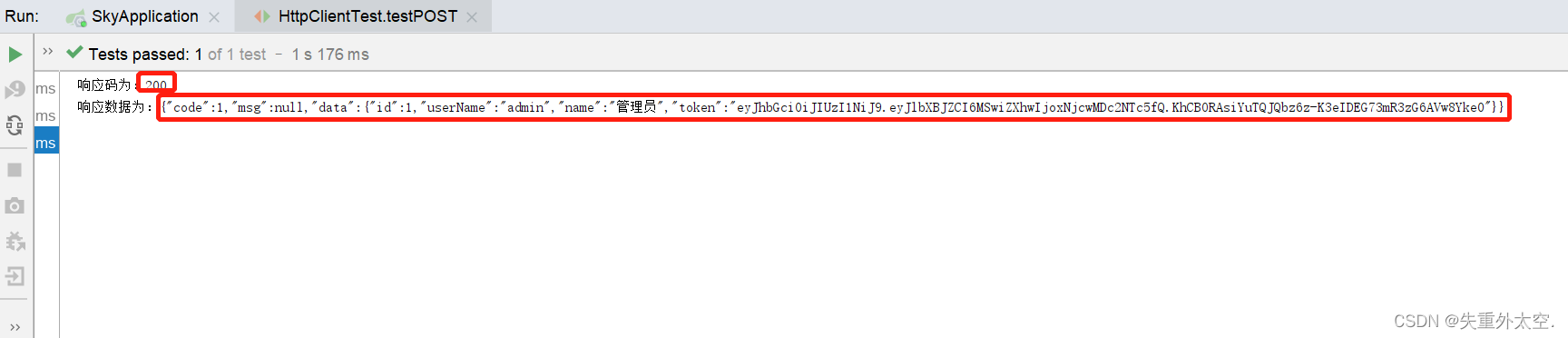
测试结果:
1.2 微信登录流程
微信登录:https://developers.weixin.qq.com/miniprogram/dev/framework/open-ability/login.html
流程图:
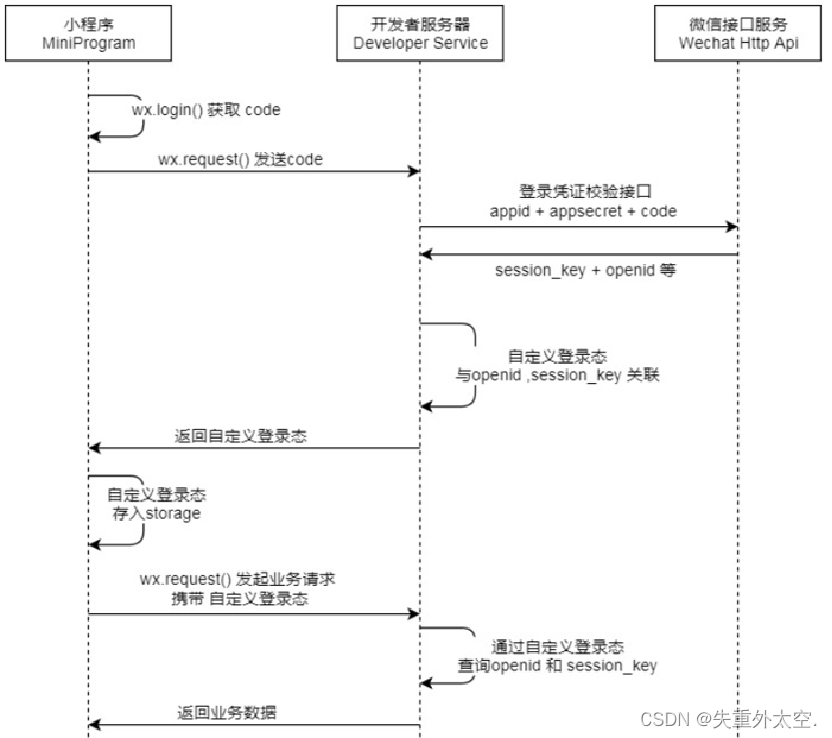
步骤分析:
- 小程序端,调用wx.login()获取code,就是授权码。
- 小程序端,调用wx.request()发送请求并携带code,请求开发者服务器(自己编写的后端服务)。
- 开发者服务端,通过HttpClient向微信接口服务发送请求,并携带appId+appsecret+code三个参数。
- 开发者服务端,接收微信接口服务返回的数据,session_key+opendId等。opendId是微信用户的唯一标识。
- 开发者服务端,自定义登录态,生成令牌(token)和openid等数据返回给小程序端,方便后绪请求身份校验。
- 小程序端,收到自定义登录态,存储storage。
- 小程序端,后绪通过wx.request()发起业务请求时,携带token。
- 开发者服务端,收到请求后,通过携带的token,解析当前登录用户的id。
- 开发者服务端,身份校验通过后,继续相关的业务逻辑处理,最终返回业务数据。
接下来,使用Postman进行测试。
说明:
- 调用 wx.login() 获取 临时登录凭证code ,并回传到开发者服务器。
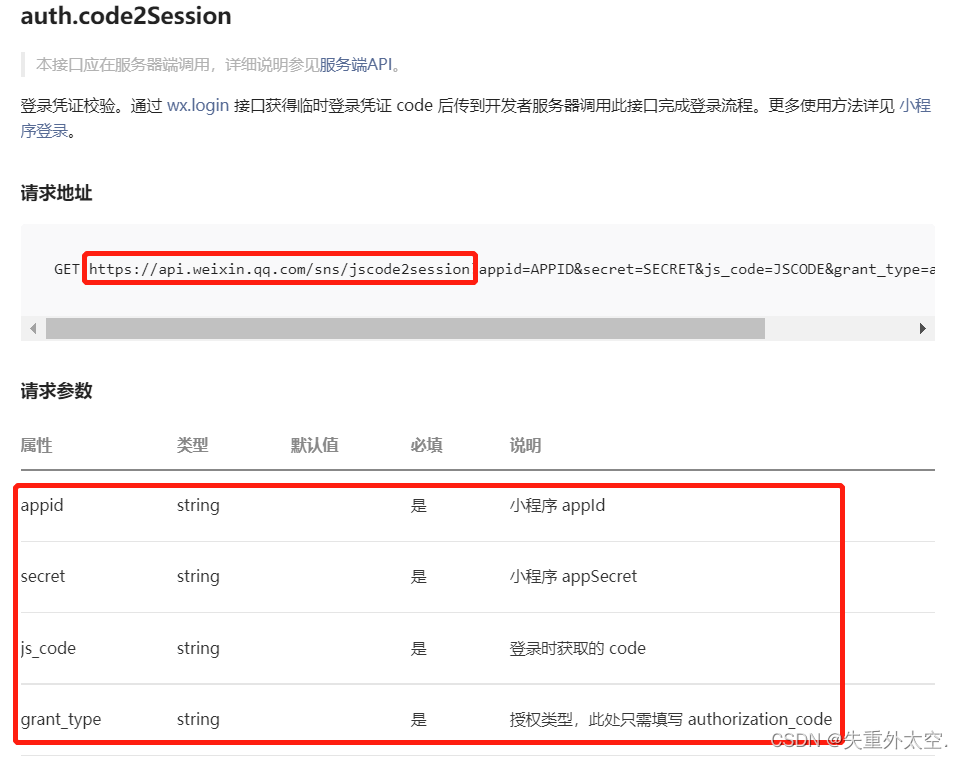
- 调用 auth.code2Session 接口,换取 用户唯一标识 OpenID 、 用户在微信开放平台帐号下的唯一标识UnionID(若当前小程序已绑定到微信开放平台帐号) 和 会话密钥 session_key。
之后开发者服务器可以根据用户标识来生成自定义登录态,用于后续业务逻辑中前后端交互时识别用户身份。
实现步骤:
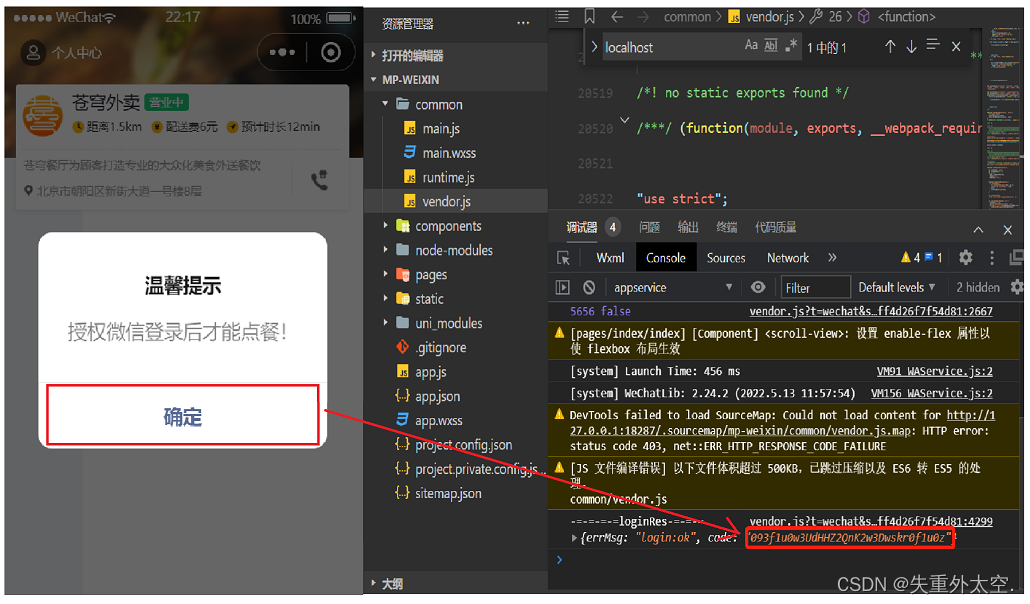
1). 获取授权码
点击确定按钮,获取授权码,每个授权码只能使用一次,每次测试,需重新获取。
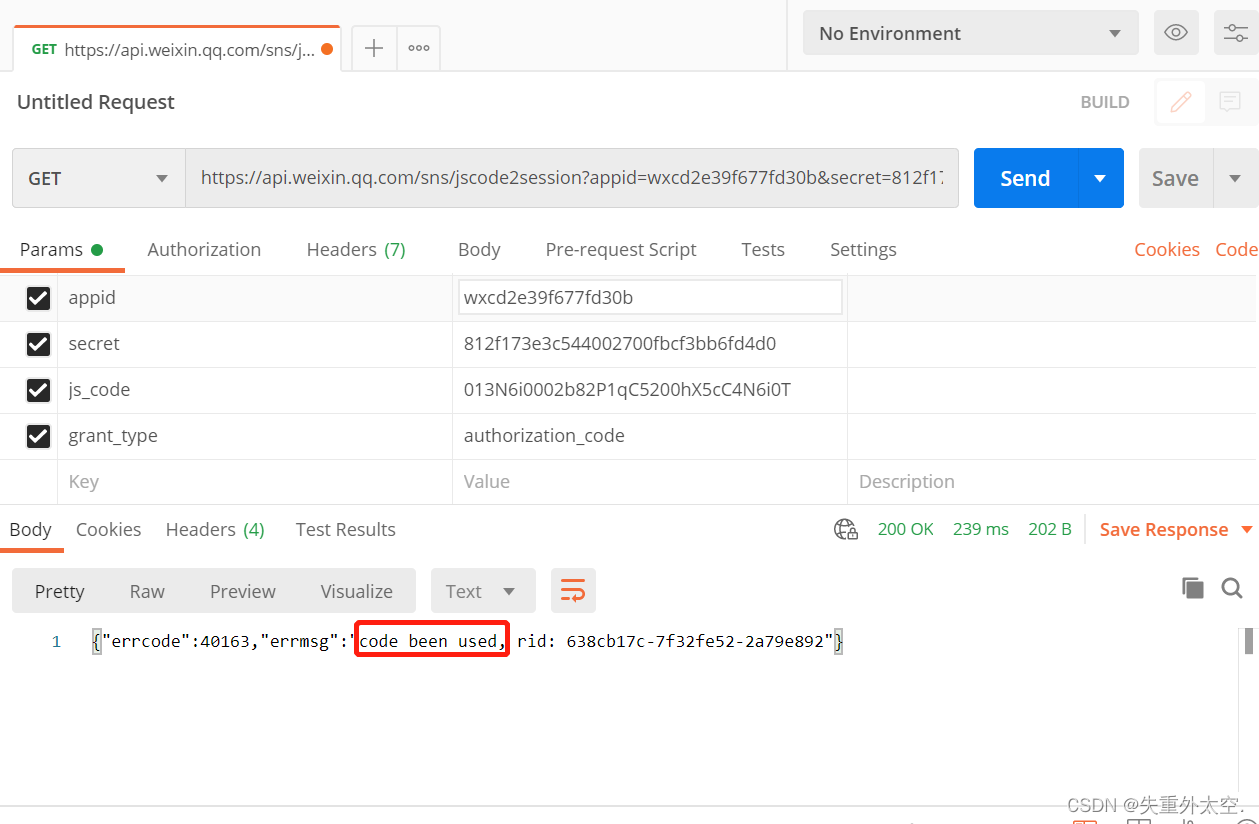
2). 明确请求接口
请求方式、请求路径、请求参数
3). 发送请求
获取session_key和openid
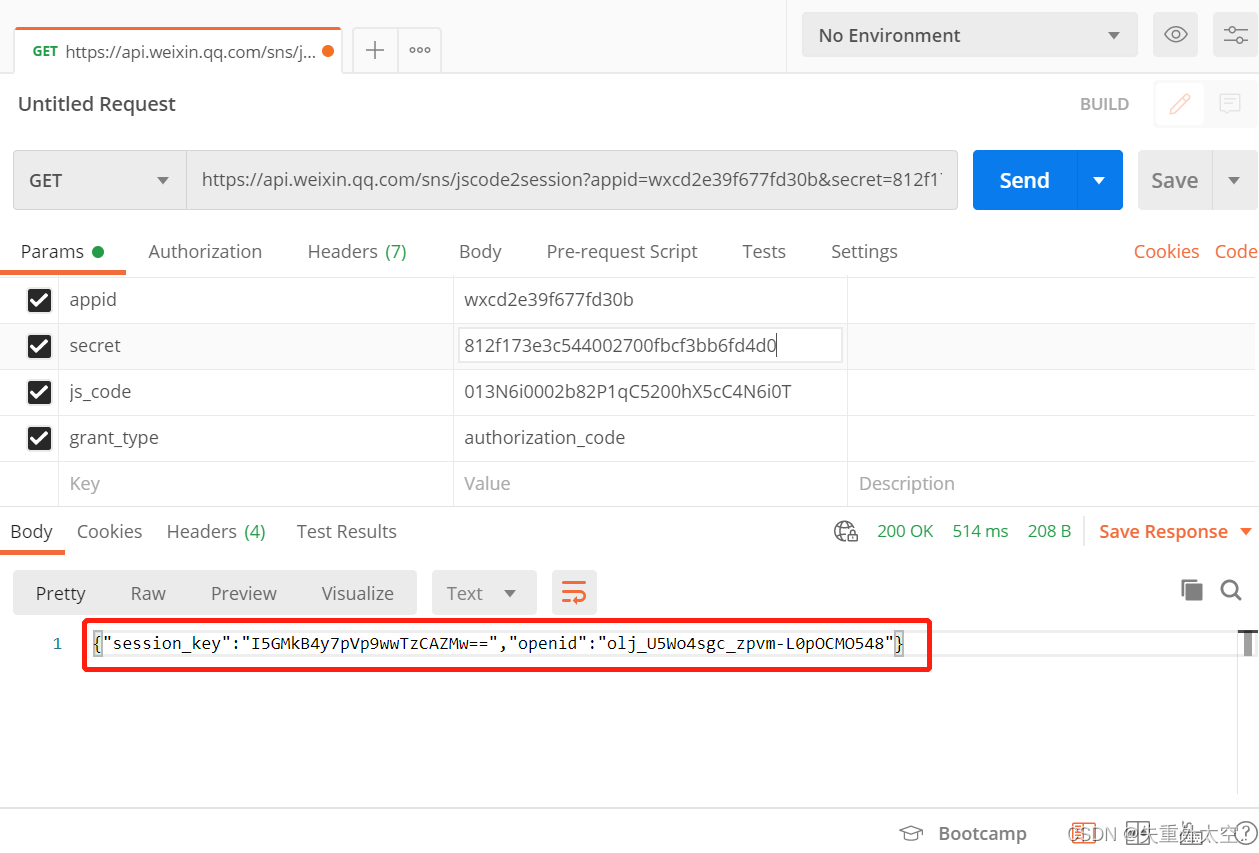
若出现code been used错误提示,说明授权码已被使用过,请重新获取
1.3 需求分析和设计
1.3.1 产品原型
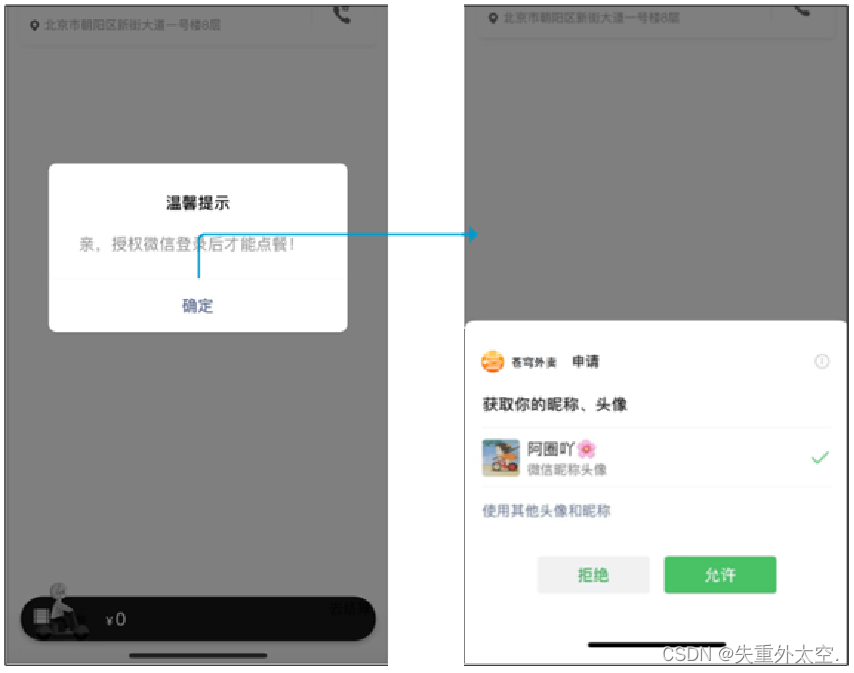
用户进入到小程序的时候,微信授权登录之后才能点餐。需要获取当前微信用户的相关信息,比如昵称、头像等,这样才能够进入到小程序进行下单操作。是基于微信登录来实现小程序的登录功能,没有采用传统账户密码登录的方式。若第一次使用小程序来点餐,就是一个新用户,需要把这个新的用户保存到数据库当中完成自动注册。
登录功能原型图:
业务规则:
- 基于微信登录实现小程序的登录功能
- 如果是新用户需要自动完成注册
1.3.2 接口设计
通过微信登录的流程,如果要完成微信登录的话,最终就要获得微信用户的openid。在小程序端获取授权码后,向后端服务发送请求,并携带授权码,这样后端服务在收到授权码后,就可以去请求微信接口服务。最终,后端向小程序返回openid和token等数据。
基于上述的登录流程,就可以设计出该接口的请求参数和返回数据。
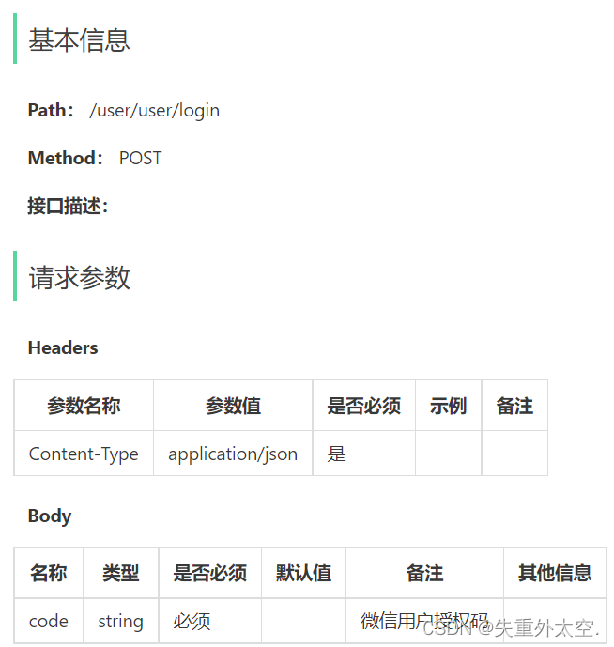
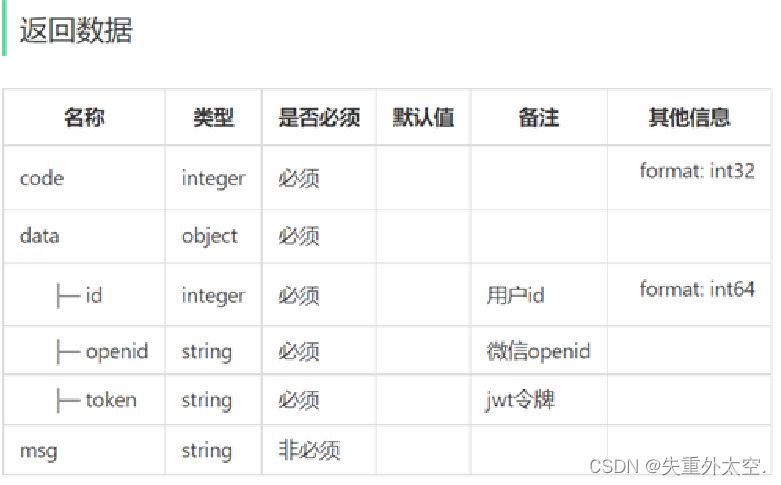
说明:请求路径/user/user/login,第一个user代表用户端,第二个user代表用户模块。
1.3.3 表设计
当用户第一次使用小程序时,会完成自动注册,把用户信息存储到user表中。
| 字段名 | 数据类型 | 说明 | 备注 |
|---|---|---|---|
| id | bigint | 主键 | 自增 |
| openid | varchar(45) | 微信用户的唯一标识 | |
| name | varchar(32) | 用户姓名 | |
| phone | varchar(11) | 手机号 | |
| sex | varchar(2) | 性别 | |
| id_number | varchar(18) | 身份证号 | |
| avatar | varchar(500) | 微信用户头像路径 | |
| create_time | datetime | 注册时间 |
1.4 代码开发
1.4.1 定义相关配置
配置微信登录所需配置项:
application-dev.yml
sky:
  wechat:
    appid: ***********
    secret: ***********************
- 1
- 2
- 3
- 4
application.yml
sky:
  wechat:
    appid: ${sky.wechat.appid}
    secret: ${sky.wechat.secret}
- 1
- 2
- 3
- 4
配置为微信用户生成jwt令牌时使用的配置项:
application.yml
sky:
  jwt:
    # 设置jwt签名加密时使用的秘钥
    admin-secret-key: itcast
    # 设置jwt过期时间
    admin-ttl: 7200000
    # 设置前端传递过来的令牌名称
    admin-token-name: token
    user-secret-key: test
    user-ttl: 7200000
    user-token-name: authentication
- 1
- 2
- 3
- 4
- 5
- 6
- 7
- 8
- 9
- 10
- 11
1.4.2 DTO设计
根据传入参数设计DTO类:
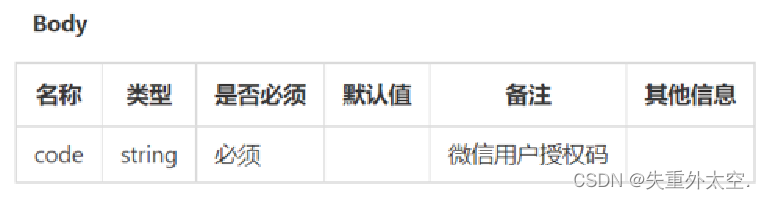
在sky-pojo模块,UserLoginDTO.java已定义
package com.sky.dto;
/**
 * C端用户登录
 */
@Data
public class UserLoginDTO implements Serializable {

    private String code;

}
- 1
- 2
- 3
- 4
- 5
- 6
- 7
- 8
- 9
- 10
1.4.3 VO设计
根据返回数据设计VO类:
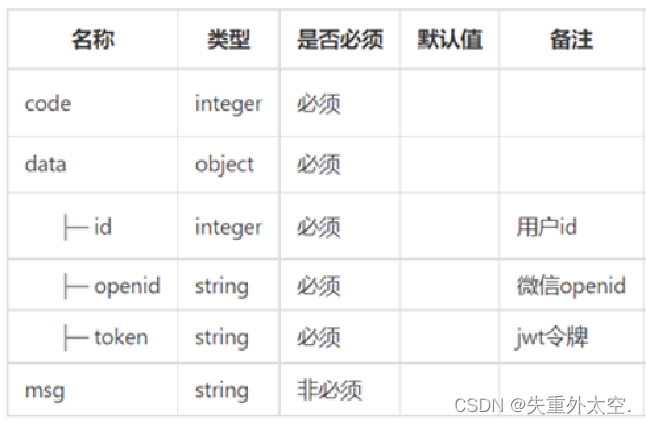
在sky-pojo模块,UserLoginVO.java已定义
package com.sky.vo;
@Data
@Builder
@NoArgsConstructor
@AllArgsConstructor
public class UserLoginVO implements Serializable {

    private Long id;
    private String openid;
    private String token;

}
- 1
- 2
- 3
- 4
- 5
- 6
- 7
- 8
- 9
- 10
- 11
- 12
1.4.4 Controller层
根据接口定义创建UserController的login方法:
package com.sky.controller.user;

@RestController
@RequestMapping("/user/user")
@Api(tags = "C端用户相关接口")
@Slf4j
public class UserController {

    @Autowired
    private UserService userService;
    @Autowired
    private JwtProperties jwtProperties;

    /**
     * 微信登录
     * @param userLoginDTO
     * @return
     */
    @PostMapping("/login")
    @ApiOperation("微信登录")
    public Result<UserLoginVO> login(@RequestBody UserLoginDTO userLoginDTO){
        log.info("微信用户登录:{}",userLoginDTO.getCode());

        //微信登录
        User user = userService.wxLogin(userLoginDTO);//后绪步骤实现

        //为微信用户生成jwt令牌
        Map<String, Object> claims = new HashMap<>();
        claims.put(JwtClaimsConstant.USER_ID,user.getId());
        String token = JwtUtil.createJWT(jwtProperties.getUserSecretKey(), jwtProperties.getUserTtl(), claims);

        UserLoginVO userLoginVO = UserLoginVO.builder()
                .id(user.getId())
                .openid(user.getOpenid())
                .token(token)
                .build();
        return Result.success(userLoginVO);
    }
}
- 1
- 2
- 3
- 4
- 5
- 6
- 7
- 8
- 9
- 10
- 11
- 12
- 13
- 14
- 15
- 16
- 17
- 18
- 19
- 20
- 21
- 22
- 23
- 24
- 25
- 26
- 27
- 28
- 29
- 30
- 31
- 32
- 33
- 34
- 35
- 36
- 37
- 38
- 39
其中,JwtClaimsConstant.USER_ID常量已定义。
1.4.5 Service层接口
创建UserService接口:
package com.sky.service;

import com.sky.dto.UserLoginDTO;
import com.sky.entity.User;

public interface UserService {

    /**
     * 微信登录
     * @param userLoginDTO
     * @return
     */
    User wxLogin(UserLoginDTO userLoginDTO);
}
- 1
- 2
- 3
- 4
- 5
- 6
- 7
- 8
- 9
- 10
- 11
- 12
- 13
- 14
1.4.6 Service层实现类
创建UserServiceImpl实现类:实现获取微信用户的openid和微信登录功能
package com.sky.service.impl;

@Service
@Slf4j
public class UserServiceImpl implements UserService {

    //微信服务接口地址
    public static final String WX_LOGIN = "https://api.weixin.qq.com/sns/jscode2session";

    @Autowired
    private WeChatProperties weChatProperties;
    @Autowired
    private UserMapper userMapper;

    /**
     * 微信登录
     * @param userLoginDTO
     * @return
     */
    public User wxLogin(UserLoginDTO userLoginDTO) {
        String openid = getOpenid(userLoginDTO.getCode());

        //判断openid是否为空,如果为空表示登录失败,抛出业务异常
        if(openid == null){
            throw new LoginFailedException(MessageConstant.LOGIN_FAILED);
        }

        //判断当前用户是否为新用户
        User user = userMapper.getByOpenid(openid);

        //如果是新用户,自动完成注册
        if(user == null){
            user = User.builder()
                    .openid(openid)
                    .createTime(LocalDateTime.now())
                    .build();
            userMapper.insert(user);//后绪步骤实现
        }

        //返回这个用户对象
        return user;
    }

    /**
     * 调用微信接口服务,获取微信用户的openid
     * @param code
     * @return
     */
    private String getOpenid(String code){
        //调用微信接口服务,获得当前微信用户的openid
        Map<String, String> map = new HashMap<>();
        map.put("appid",weChatProperties.getAppid());
        map.put("secret",weChatProperties.getSecret());
        map.put("js_code",code);
        map.put("grant_type","authorization_code");
        String json = HttpClientUtil.doGet(WX_LOGIN, map);

        JSONObject jsonObject = JSON.parseObject(json);
        String openid = jsonObject.getString("openid");
        return openid;
    }
}
- 1
- 2
- 3
- 4
- 5
- 6
- 7
- 8
- 9
- 10
- 11
- 12
- 13
- 14
- 15
- 16
- 17
- 18
- 19
- 20
- 21
- 22
- 23
- 24
- 25
- 26
- 27
- 28
- 29
- 30
- 31
- 32
- 33
- 34
- 35
- 36
- 37
- 38
- 39
- 40
- 41
- 42
- 43
- 44
- 45
- 46
- 47
- 48
- 49
- 50
- 51
- 52
- 53
- 54
- 55
- 56
- 57
- 58
- 59
- 60
- 61
- 62
1.4.7 Mapper层
创建UserMapper接口:
package com.sky.mapper;

@Mapper
public interface UserMapper {

    /**
     * 根据openid查询用户
     * @param openid
     * @return
     */
    @Select("select * from user where openid = #{openid}")
    User getByOpenid(String openid);

    /**
     * 插入数据
     * @param user
     */
    void insert(User user);
}
- 1
- 2
- 3
- 4
- 5
- 6
- 7
- 8
- 9
- 10
- 11
- 12
- 13
- 14
- 15
- 16
- 17
- 18
- 19
创建UserMapper.xml映射文件:
<?xml version="1.0" encoding="UTF-8" ?>
<!DOCTYPE mapper PUBLIC "-//mybatis.org//DTD Mapper 3.0//EN"
        "http://mybatis.org/dtd/mybatis-3-mapper.dtd" >
<mapper namespace="com.sky.mapper.UserMapper">

    <insert id="insert" useGeneratedKeys="true" keyProperty="id">
        insert into user (openid, name, phone, sex, id_number, avatar, create_time)
        values (#{openid}, #{name}, #{phone}, #{sex}, #{idNumber}, #{avatar}, #{createTime})
    </insert>

</mapper>
- 1
- 2
- 3
- 4
- 5
- 6
- 7
- 8
- 9
- 10
- 11
1.4.8 编写拦截器
编写拦截器JwtTokenUserInterceptor:统一拦截用户端发送的请求并进行jwt校验
package com.sky.interceptor;

/**
 * jwt令牌校验的拦截器
 */
@Component
@Slf4j
public class JwtTokenUserInterceptor implements HandlerInterceptor {

    @Autowired
    private JwtProperties jwtProperties;

    /**
     * 校验jwt
     *
     * @param request
     * @param response
     * @param handler
     * @return
     * @throws Exception
     */
    public boolean preHandle(HttpServletRequest request, HttpServletResponse response, Object handler) throws Exception {
        //判断当前拦截到的是Controller的方法还是其他资源
        if (!(handler instanceof HandlerMethod)) {
            //当前拦截到的不是动态方法,直接放行
            return true;
        }

        //1、从请求头中获取令牌
        String token = request.getHeader(jwtProperties.getUserTokenName());

        //2、校验令牌
        try {
            log.info("jwt校验:{}", token);
            Claims claims = JwtUtil.parseJWT(jwtProperties.getUserSecretKey(), token);
            Long userId = Long.valueOf(claims.get(JwtClaimsConstant.USER_ID).toString());
            log.info("当前用户的id:", userId);
            BaseContext.setCurrentId(userId);
            //3、通过,放行
            return true;
        } catch (Exception ex) {
            //4、不通过,响应401状态码
            response.setStatus(401);
            return false;
        }
    }
}
- 1
- 2
- 3
- 4
- 5
- 6
- 7
- 8
- 9
- 10
- 11
- 12
- 13
- 14
- 15
- 16
- 17
- 18
- 19
- 20
- 21
- 22
- 23
- 24
- 25
- 26
- 27
- 28
- 29
- 30
- 31
- 32
- 33
- 34
- 35
- 36
- 37
- 38
- 39
- 40
- 41
- 42
- 43
- 44
- 45
- 46
- 47
在WebMvcConfiguration配置类中注册拦截器:
	@Autowired
    private JwtTokenUserInterceptor jwtTokenUserInterceptor;
	/**
     * 注册自定义拦截器
     * @param registry
     */
    protected void addInterceptors(InterceptorRegistry registry) {
        log.info("开始注册自定义拦截器...");
        //.........

        registry.addInterceptor(jwtTokenUserInterceptor)
                .addPathPatterns("/user/**")
                .excludePathPatterns("/user/user/login")
                .excludePathPatterns("/user/shop/status");
    }
- 1
- 2
- 3
- 4
- 5
- 6
- 7
- 8
- 9
- 10
- 11
- 12
- 13
- 14
- 15
1.5 功能测试
重新编译小程序,进行登录,获取到openid和token数据
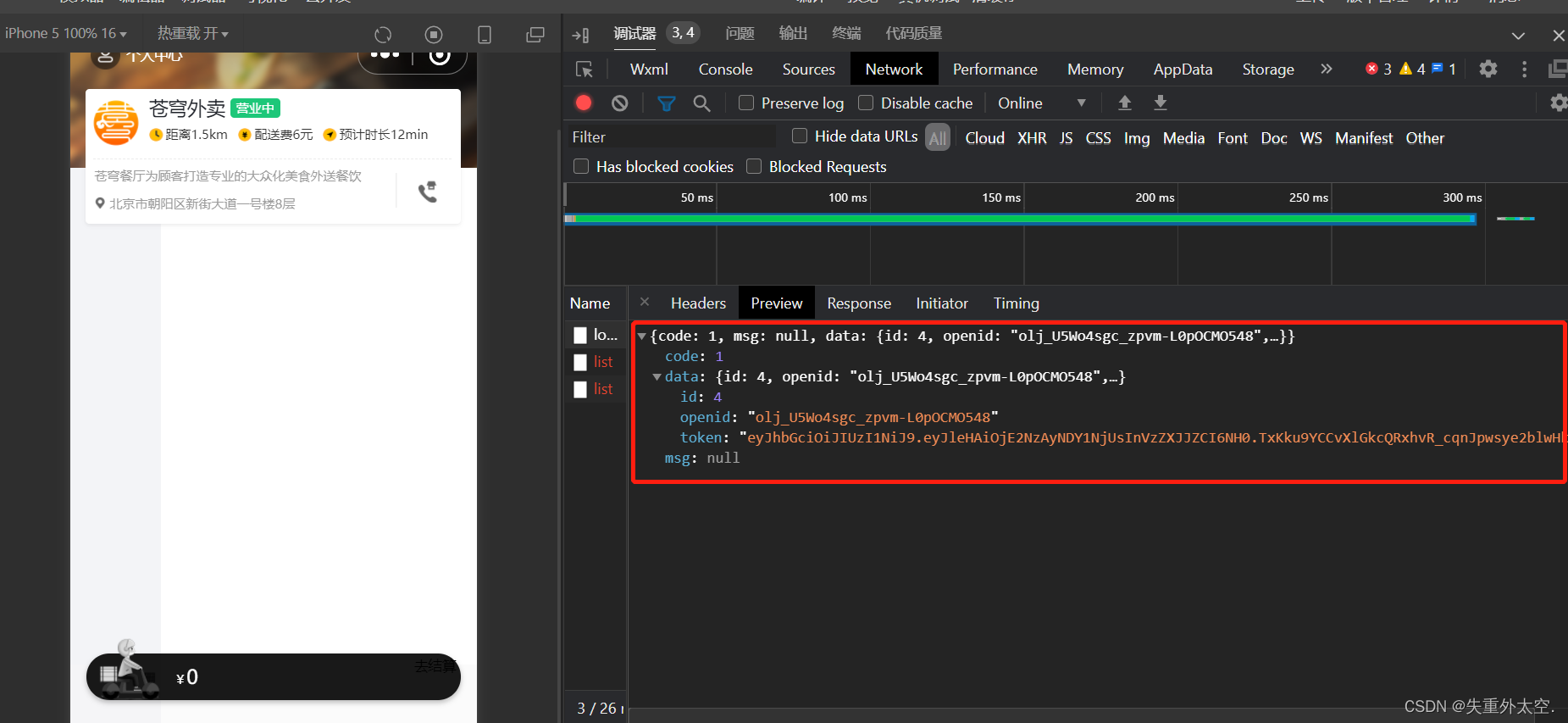
查看后台日志

查看数据库user表,第一次登录,会自动注册

后记
本文内容由网友自发贡献,转载请注明出处:https://www.wpsshop.cn/article/detail/38083
- 微信小程序案例 ...
赞
踩



Copyright © 2003-2013 www.wpsshop.cn 版权所有,并保留所有权利。

