
热门标签
热门文章
- 1安装配置fcitx输入法
- 2Unity3D RPG实现 2 —— 背包系统_unity背包系统
- 3图像锐化处理之一阶微分算子
- 4Opencv拼接两张不同尺寸的图像(Python)_cv2 在一个显示多幅不同尺寸的小图
- 5Centos7.4常用基本命令----持续更新_centos7.4全部命令
- 6linux设置每天自动关机crontab,【树莓派】crontab设置Linux设备定时重启
- 7iOS:详解MJRefresh刷新加载更多数据的第三方库_ios 无痕加载更多数据
- 8Qt 中的动画(Animations)_qt animation
- 9[CSP冲刺]代码常见错误总结_csp next,max,min等 可能出错的变量名
- 10opencv+yolov8实现监控画面报警功能_利用opencv实时获取图像并识别文字发送报警信息
当前位置: article > 正文
Unity功能测试3D物体和UI的点击事件_unity辅助功能测试
作者:代码创新者 | 2024-01-03 09:05:48
赞
踩
unity辅助功能测试
我们在功能开发中 当UI和3D物体在一起的时候点击事件通常会有这么几种情况
1、UI和3D物体同时响应事件
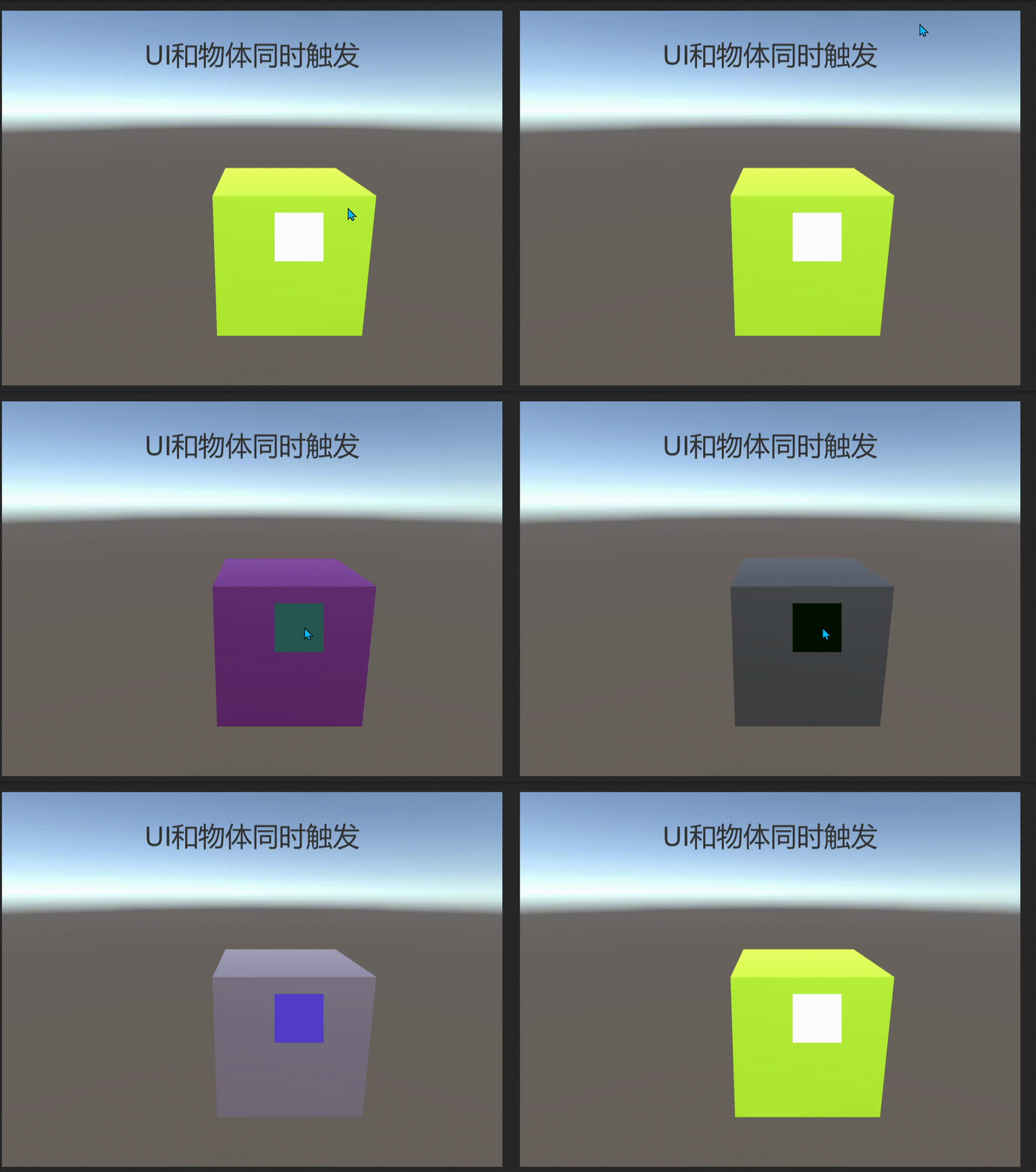
这种情况很常见,如果是故意有次功能需求那将不需要改动.实现代码
3D物体上挂载
- using System.Collections;
- using System.Collections.Generic;
- using UnityEngine;
-
- public class PointObjClick : MonoBehaviour
- {
- // Start is called before the first frame update
- void Start()
- {
-
- }
- private void OnMouseDown()
- {
- Click();
- }
- private void Click()
- {
- transform.GetComponent<MeshRenderer>().material.color = Random.ColorHSV();
- }
- }

UI上挂载
- using System.Collections;
- using System.Collections.Generic;
- using UnityEngine;
- using UnityEngine.UI;
- using UnityEngine.EventSystems;
-
- public class PointUIClick : MonoBehaviour, IPointerClickHandler
- {
- public void OnPointerClick(PointerEventData eventData)
- {
- Click();
-
- //实现穿透的事件效果
- // ExecuteAll(eventData);
- }
-
- private void Click()
- {
- transform.GetComponent<Image>().color = Random.ColorHSV();
- }
- private void ExecuteAll(PointerEventData eventData)
- {
- //UGUI 底层会对射线射到的所有物体进行排序 只触发最前面的物体
- List<RaycastResult> results = new List<RaycastResult>();
- //拿到射线下所有的物体 放到集合里
- EventSystem.current.RaycastAll(eventData, results);
- foreach (var item in results)
- {
- if (item.gameObject != gameObject)
- {
- //触发 1、触发对象 2、触发事件 3、触发方式
- ExecuteEvents.Execute(item.gameObject, eventData, ExecuteEvents.pointerClickHandler);
- }
- }
- }
- }
这里面ExecuteAll这个方法也可以处理同理响应事件的问题(已注释)
2、UI和3D物体分别响应事件
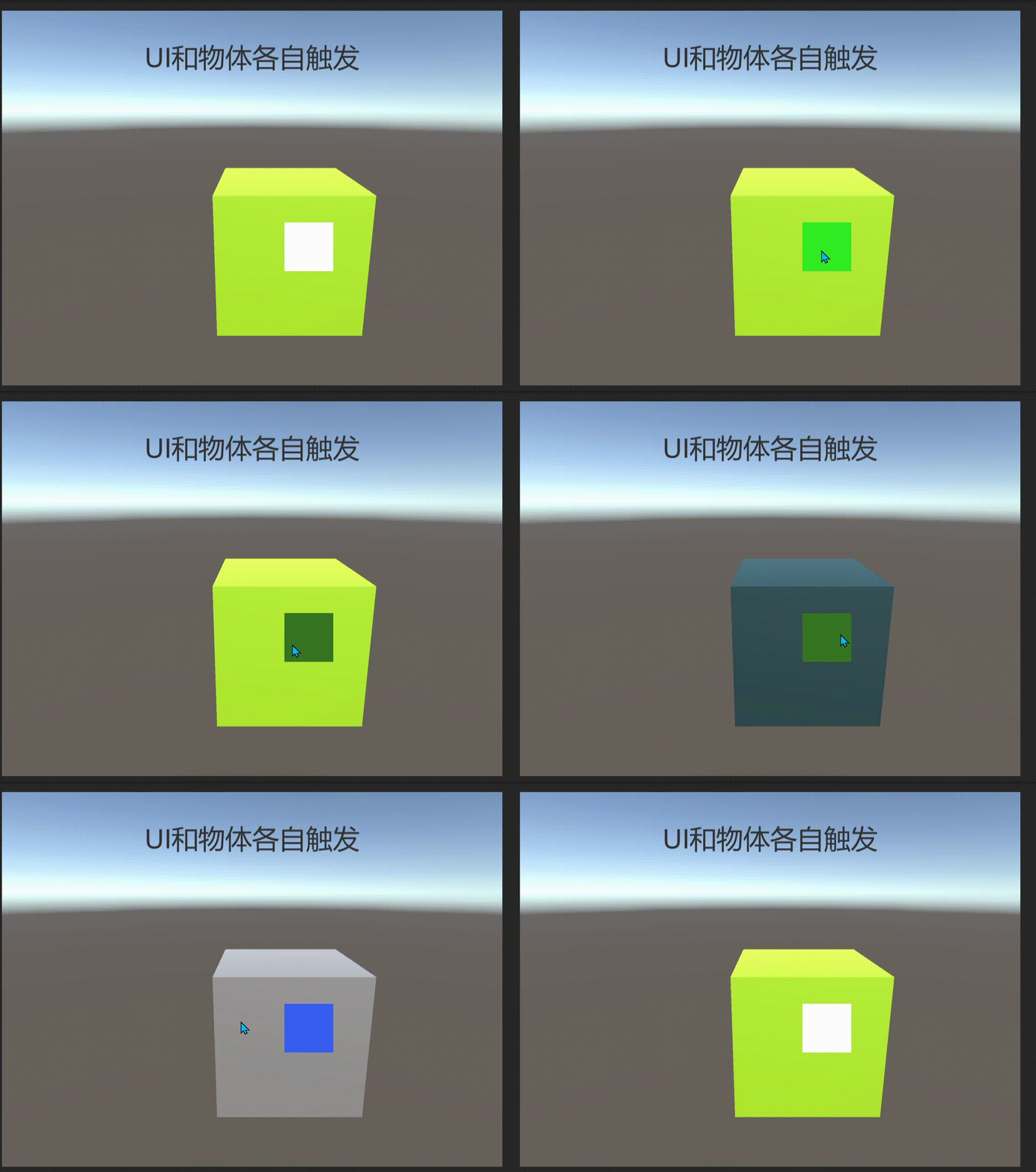
这种情况应该是我们理想中的效果,看代码是如何实现的
首先在主相机上添加Physics RayCaster组件
1. 什么是PhysicsRaycaster组件?
PhysicsRaycaster是Unity UGUI中的一个组件,用于在UI元素上进行物理射线检测。它可以检测鼠标或触摸事件是否发生在UI元素上,并将事件传递给相应的UI元素。
2. PhysicsRaycaster的工作原理
PhysicsRaycaster通过发射一条射线来检测UI元素。当射线与UI元素相交时,PhysicsRaycaster会将事件传递给相应的UI元素。
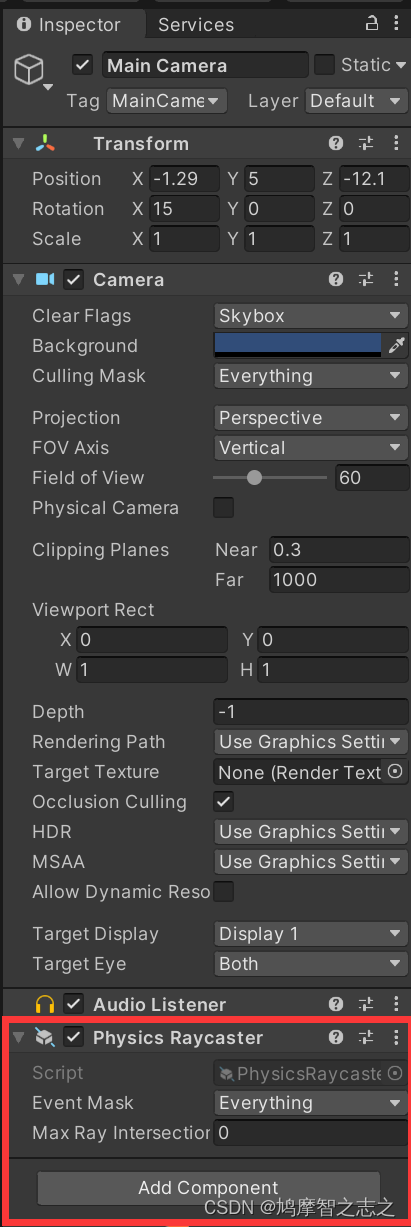
利用Physics Raycaster这个特性 我们可以把UI和3D的点击事件分开
3D物体挂载
- using System.Collections;
- using System.Collections.Generic;
- using UnityEngine;
- using UnityEngine.EventSystems;
-
- public class PointCubeClick : MonoBehaviour, IPointerClickHandler
- {
- public void OnPointerClick(PointerEventData eventData)
- {
- Click();
- }
- private void Click()
- {
- transform.GetComponent<MeshRenderer>().material.color = Random.ColorHSV();
- }
- }
UI上挂载
- using System.Collections;
- using System.Collections.Generic;
- using UnityEngine;
- using UnityEngine.UI;
- using UnityEngine.EventSystems;
-
- public class PointUIClick : MonoBehaviour, IPointerClickHandler
- {
- public void OnPointerClick(PointerEventData eventData)
- {
- Click();
-
- //实现穿透的事件效果
- // ExecuteAll(eventData);
- }
-
- private void Click()
- {
- transform.GetComponent<Image>().color = Random.ColorHSV();
- }
- private void ExecuteAll(PointerEventData eventData)
- {
- //UGUI 底层会对射线射到的所有物体进行排序 只触发最前面的物体
- List<RaycastResult> results = new List<RaycastResult>();
- //拿到射线下所有的物体 放到集合里
- EventSystem.current.RaycastAll(eventData, results);
- foreach (var item in results)
- {
- if (item.gameObject != gameObject)
- {
- //触发 1、触发对象 2、触发事件 3、触发方式
- ExecuteEvents.Execute(item.gameObject, eventData, ExecuteEvents.pointerClickHandler);
- }
- }
- }
- }
3、检测点击的游戏对象是UII还是3D物体

来看代码实现
UI上挂载
- using System.Collections;
- using System.Collections.Generic;
- using UnityEngine;
- using UnityEngine.EventSystems;
- using UnityEngine.UI;
-
- public class PointIsUI : MonoBehaviour
- {
- //GraphicRaycaster是专门用于Canvas下UI的射线检测的
- private GraphicRaycaster _raycaster;
- // Start is called before the first frame update
- void Start()
- {
- _raycaster = FindObjectOfType<GraphicRaycaster>();
- }
-
- // Update is called once per frame
- void Update()
- {
- if (Input.GetMouseButtonDown(0))
- {
- if (IsUI())
- {
- Debug.LogError("是UI");
- }
- else
- {
- Debug.LogError("不是UI");
- }
- }
- }
- private bool IsUI()
- {
- //New一个点击事件 传入当前事件
- PointerEventData eventData = new PointerEventData(EventSystem.current);
- eventData.pressPosition = Input.mousePosition;
- //PointerEventData.pressPosition
- //按下的时候的指针位置,同样的一次点击事件只有一个
- eventData.position = Input.mousePosition;
- //PointerEventData .position当前指针的位置,
- //返回一个vector2向量,这个值是一个屏幕坐标,
- //左下角为原点(0, 0),右上角为(屏幕宽, 屏幕高),
- //这个屏幕是根据当前分辨率来的
- List<RaycastResult> results = new List<RaycastResult>(); //拿到射线点击的物体
- _raycaster.Raycast(eventData, results); //射线赋值 到集合里
- return results.Count > 0; //true是UI false不是UI
- }
- }
谢谢观看!
声明:本文内容由网友自发贡献,不代表【wpsshop博客】立场,版权归原作者所有,本站不承担相应法律责任。如您发现有侵权的内容,请联系我们。转载请注明出处:https://www.wpsshop.cn/article/detail/37747
推荐阅读
相关标签

