
热门标签
热门文章
- 1Egret UI Editor 1.7 正式发布,支持UI动画编辑
- 2maven命令排除jar包冲突(简单高效)_maven排除jar包
- 3“挑战杯”中国大学生创业计划竞赛创业企划书100篇(二)- 武汉思睿锦程环保建材科技有限公司创业计划书(材料类)..._挑战杯大学生创业大赛材料类
- 4iGibson:Python就能玩的3D环境仿真
- 5docker部署jar包找不到资源文件-jar包报错找不到资源文件_docker拷贝jar文件到临时目录失败
- 62017春招互联网产品经理笔试题整理|腾讯,阿里,京东,网易,头条,去哪儿,携程,人人_互联网产品经理考试选择题
- 7docker: Error response from daemon: failed to create shim task: OCI runtime
- 8java8新特性十大特性详解(全)_java8优秀特性
- 9STM32呼吸灯(基于PWM脉冲宽度调制)_mx_tim1_init
- 10机器学习系列(7):目标检测YOLO算法及Python实现以自动驾驶为例_yolo人脸检测python
当前位置: article > 正文
python中应用requests库模拟postman请求携带token,使用get和post方法请求头携带token
作者:思考机器5 | 2023-12-31 22:08:07
赞
踩
请求头携带token
背景:
实际开发中,Python程序中需要调用后台接口,充当前端,后端规定请求头需要携带token
封装的get和post类:
- class RequestMethodCarryJson:
- """
- 定义请求类型
- 以json方式传递参数
- """
-
- def __init__(self):
-
- """初始化参数"""
- self.data = {}
- self.files = {}
-
- def get(self, url, data, headers):
- """
- 定义get方法请求
- :return:
- """
- try:
- return requests.get(url=url, data=data, headers=headers, timeout=60)
- except TimeoutError:
- return print('%s get request timeout!' % url)
-
- def getCarryToken(self, url, data, headers):
- """
- 定义get方法请求
- :return:
- """
- try:
- return requests.get(url=url, json=data, headers=headers, timeout=60)
- except TimeoutError:
- return print('%s get request timeout!' % url)
-
- def post(self, url, data, headers):
- """
- 定义post方法请求
- post携带token,看起来不需要像get那样添加一个getCarryToken特有的识别方法
- :return:
- """
- try:
- return requests.post(url=url, data=json.dumps(data), headers=headers, timeout=60)
- except TimeoutError:
- return print('%s post request timeout!' % url)

- class RequestMethodCarryFormData:
- """
- 定义请求类型
- 以表单方式form-data传递参数
- """
-
- def __init__(self):
-
- """初始化参数"""
- self.data = {}
- self.files = {}
-
- def get(self, url, data, headers):
- """
- 定义get方法请求
- :return:
- """
- try:
- return requests.get(url=url, data=data, headers=headers, timeout=60)
- except TimeoutError:
- return print('%s get request timeout!' % url)
-
- def getCarryToken(self, url, data, headers):
- """
- 定义get方法请求,额外添加token
- :return:
- """
- try:
- return requests.get(url=url, json=data, headers=headers, timeout=60)
- except TimeoutError:
- return print('%s get request timeout!' % url)
-
- def post(self, url, data, headers):
- """
- 定义post方法请求
- 这个携带json应该不需要额外改
- :return:
- """
- try:
- return requests.post(url=url, data=data, headers=headers, timeout=60)
- except TimeoutError:
- return print('%s post request timeout!' % url)
应用场景:
场景1——get请求时Headers携带token[传递参数以json格式]:
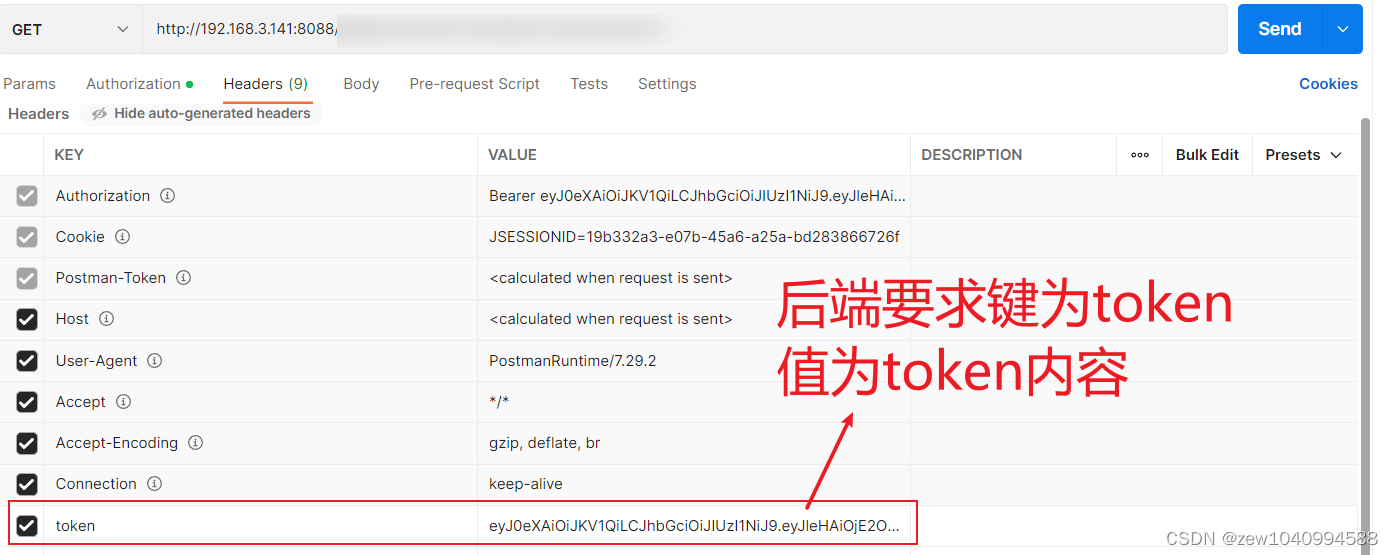

- token="里面填token内容"
- test1Info = test1(token)
-
- def test1(token):
- """
- 携带token,
- 访问平台已经存在的数据库,
- 以json格式传递数据
- :param token:
- :return:
- """
- url = "http://127.0.0.1:8088/backup/url1"
- headers = {'Content-Type': 'application/json;charset=utf-8', 'token': token}
- data = dict()
- data["param1"] = "param1"
- data["param2"] = "param2"
- resp = RequestMethodCarryJson().getCarryToken(url, data, headers).json()
- dbInfo = resp["items"]
- return dbInfo
场景2——post请求时Headers携带token[传递参数以application/x-www-form-urlencoded(表单)格式]:
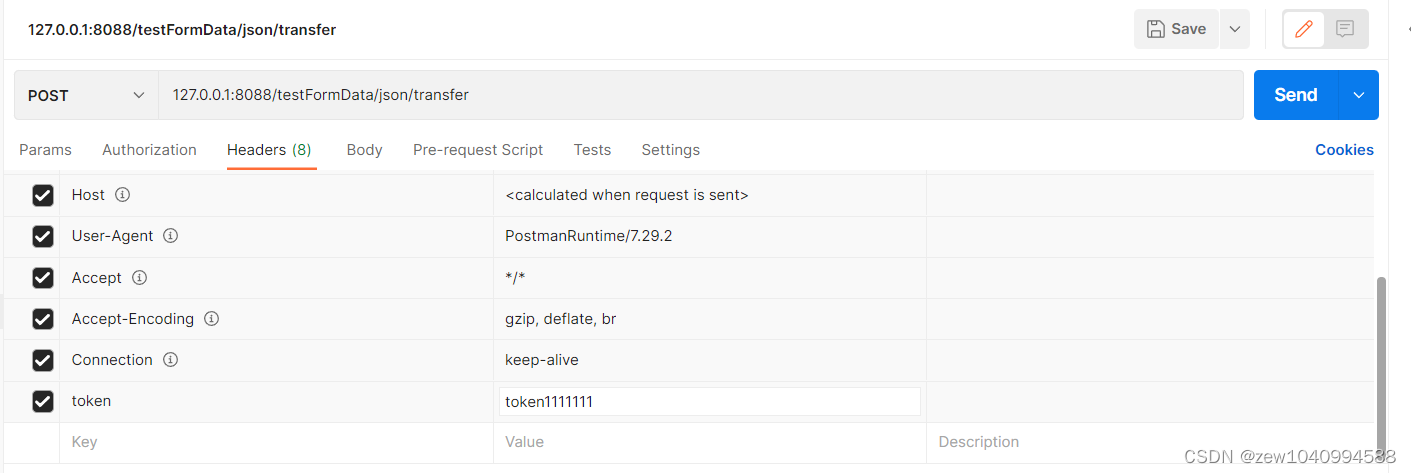

- token="里面填token内容"
- test2Info = test2(token)
-
- def test2(token):
- url = "http://127.0.0.1:8088/testFormData/json/transfer"
- headers = {'Content-Type': 'application/x-www-form-urlencoded', 'token': token}
- data = dict()
- data["param1"] = "param1"
- """
- 这里不接受状态码
- """
- resp = RequestMethodCarryFormData().post(url, data, headers).json()
- info = resp["items"]
- if info == "格式正确":
- return True
- else:
- return False
场景3——踩坑后总结成功的代码:
- """
- 请求头携带token拿取信息:
- 1-post-以json格式传递数据,请求头携带token成功
- 形如:
- # resp = requests.post(url,json=data,headers=headers).json()
- resp = RequestMethodCarryJson().post(url, data, headers).json()
- 2-get-以json格式传递数据,请求头携带token成功
- # resp = requests.get(url,json=data,headers=headers).json()
- resp = RequestMethodCarryJson().getCarryToken(url, data, headers).json()
- :param platformInfo:
- :return:
- """
延伸理解:

相关资料参考:
postman中 form-data、x-www-form-urlencoded的区别_叫我峰兄的博客-CSDN博客
python requests 带请求头Token发起http请求_python request token_软件测试李同学的博客-CSDN博客
python发送requests请求时,使用登录的token值,作为下一个接口的请求头信息 - 大海一个人听 - 博客园 (cnblogs.com)
声明:本文内容由网友自发贡献,不代表【wpsshop博客】立场,版权归原作者所有,本站不承担相应法律责任。如您发现有侵权的内容,请联系我们。转载请注明出处:https://www.wpsshop.cn/article/detail/37174
推荐阅读


相关标签

