
热门标签
热门文章
- 1redis分片集群
- 2在Unity3D中控制动画播放_u3d的多个animation动画
- 3自动化测试是什么?为什么要做自动化测试?自动化测试现状怎么样?
- 4降维(Dimensionality Reduction)
- 5Kong工作原理 - 健康检查和断路器 - 健康检查的类型
- 6uniapp设置手机通知权限以及uniapp-push2.0推送_uniapp关闭状态下接收通知
- 7C语言——求一个4X4矩阵的主对角线(从矩阵的左上角到右下角的元素)元素之和_计算一个4×4矩阵的对角线元素之和。
- 8vscode推送gitee方法_vscode 推送到git
- 9A*算法-详细图文_混a*开源代码
- 10怀念一代传奇,陈皓与他的《左耳听风:传奇程序员练级攻略》_左耳听风:传奇程序员练级攻略 pdf
当前位置: article > 正文
数据提取之jsonpath_jsonpath中提取[{ sadsa}]
作者:代码独立开发者 | 2024-02-04 20:14:43
赞
踩
jsonpath中提取[{ sadsa}]
爬虫中数据的分类
在爬虫爬取的数据中有很多不同类型的数据,我们需要了解数据的不同类型来有规律的提取和解析数据。
结构化数据:json,xml等
处理方式:直接转化为python类型
非结构化数据:HTML
处理方式:正则表达式、xpath等
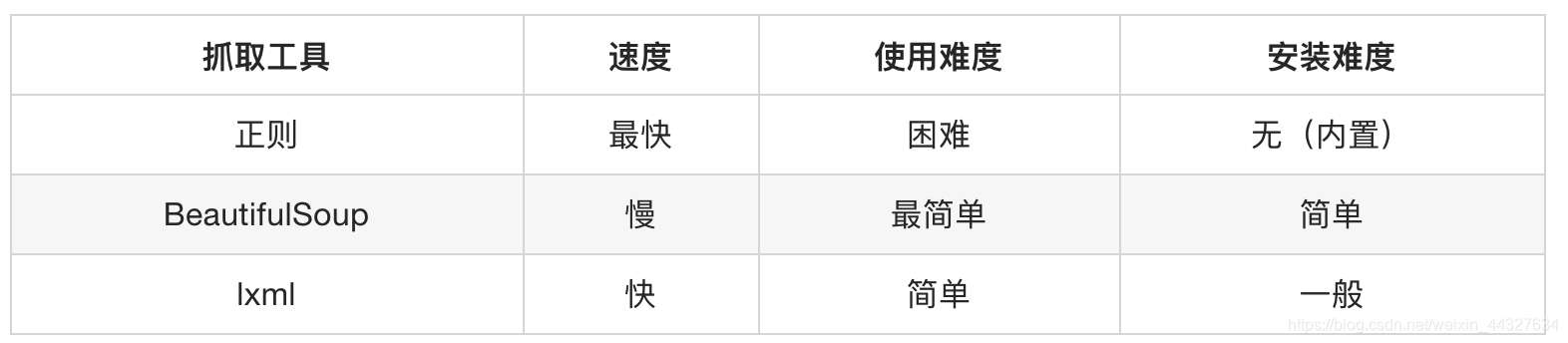
其实每个方法都不难,看看使用文档都很容易理解,我一般遇到html,xml数据使用lxml里的xpath语法解析提取,遇到json数据用jsonpath语法提取。
json的数据提取
JSON(JavaScript Object Notation) 是一种轻量级的数据交换格式,它使得人们很容易的进行阅读和编写。同时也方便了机器进行解析和生成。适用于进行数据交互的场景,比如网站前台与后台之间的数据交互。
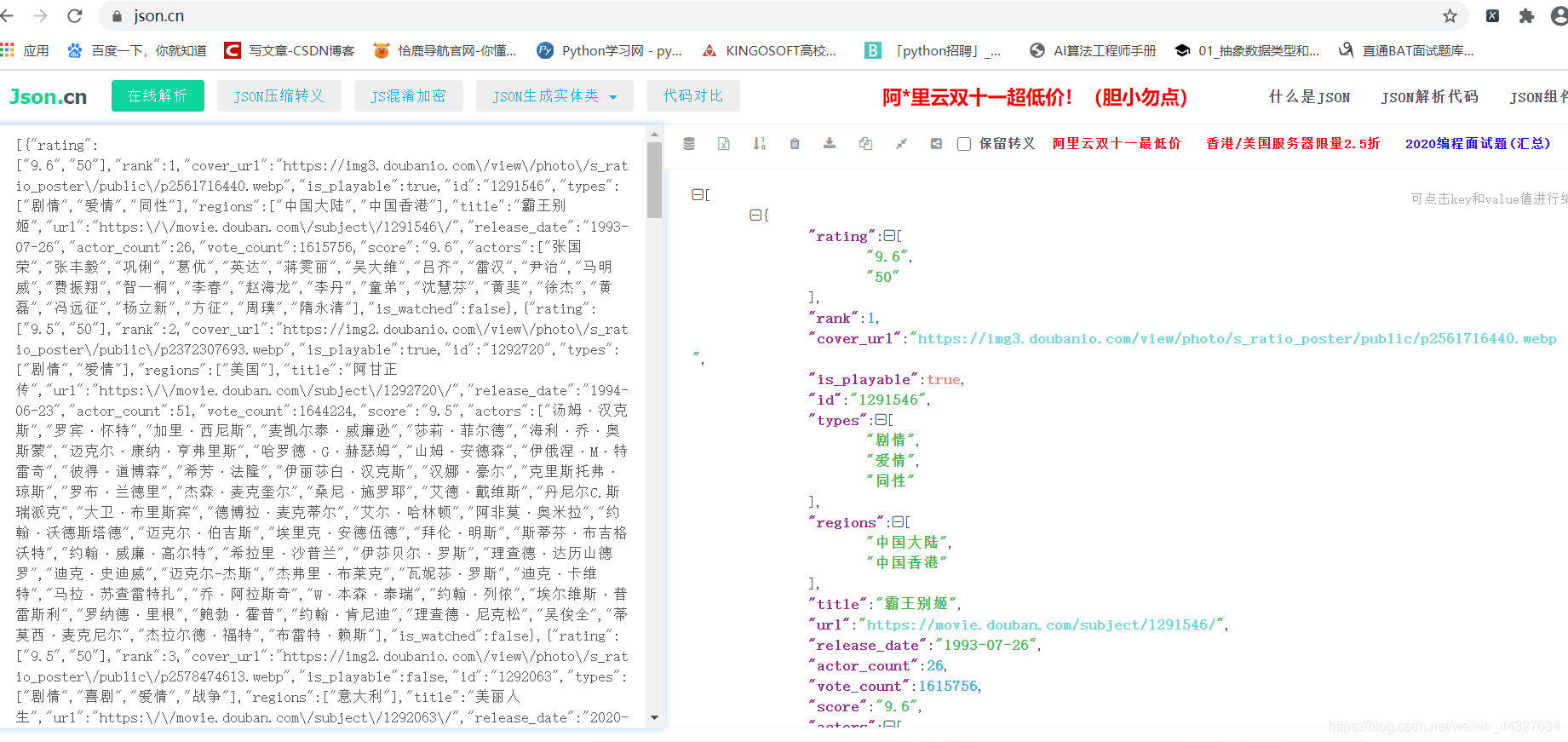
在网站提取的json数据比较乱,如豆瓣的一条json数据:豆瓣电影影评json数据
可以放到json.cn,这个网站去解析,方便查看结构,示例:
json模块中的方法
import json
#json.dumps 实现python类型转化为json字符串
#indent实现换行和空格
#ensure_ascii=False实现让中文写入的时候保持为中文
json_str = json.dumps(mydict,indent=2,ensure_ascii=False)

#json.loads 实现json字符串转化为python的数据类型
my_dict = json.loads(json_str)


#json.dump 实现把python类型写入类文件对象
# 具有read()或者write()方法的对象就是类文件对象,
#比如f = open(“a.txt”,”r”) f就是类文件对象
with open("1.txt","w") as f:
    json.dump(mydict,f,ensure_ascii=False,indent=2)

# json.load 实现类文件对象中的json字符串转化为python类型
with open("1.txt","r") as f:
    my_dict = json.load(f)

- 1
- 2
- 3
- 4
- 5
- 6
- 7
- 8
- 9
- 10
- 11
- 12
- 13
- 14
- 15
- 16
- 17
- 18
- 19
jsonpath模块的学习
jsonpath是用来解析多层嵌套的json数据;JsonPath 是一种信息抽取类库,是从JSON文档中抽取指定信息的工具,提供多种语言实现版本,包括:Javascript, Python, PHP 和 Java。
安装方法:pip install jsonpath
官方文档:http://goessner.net/articles/JsonPath
jsonpath语法
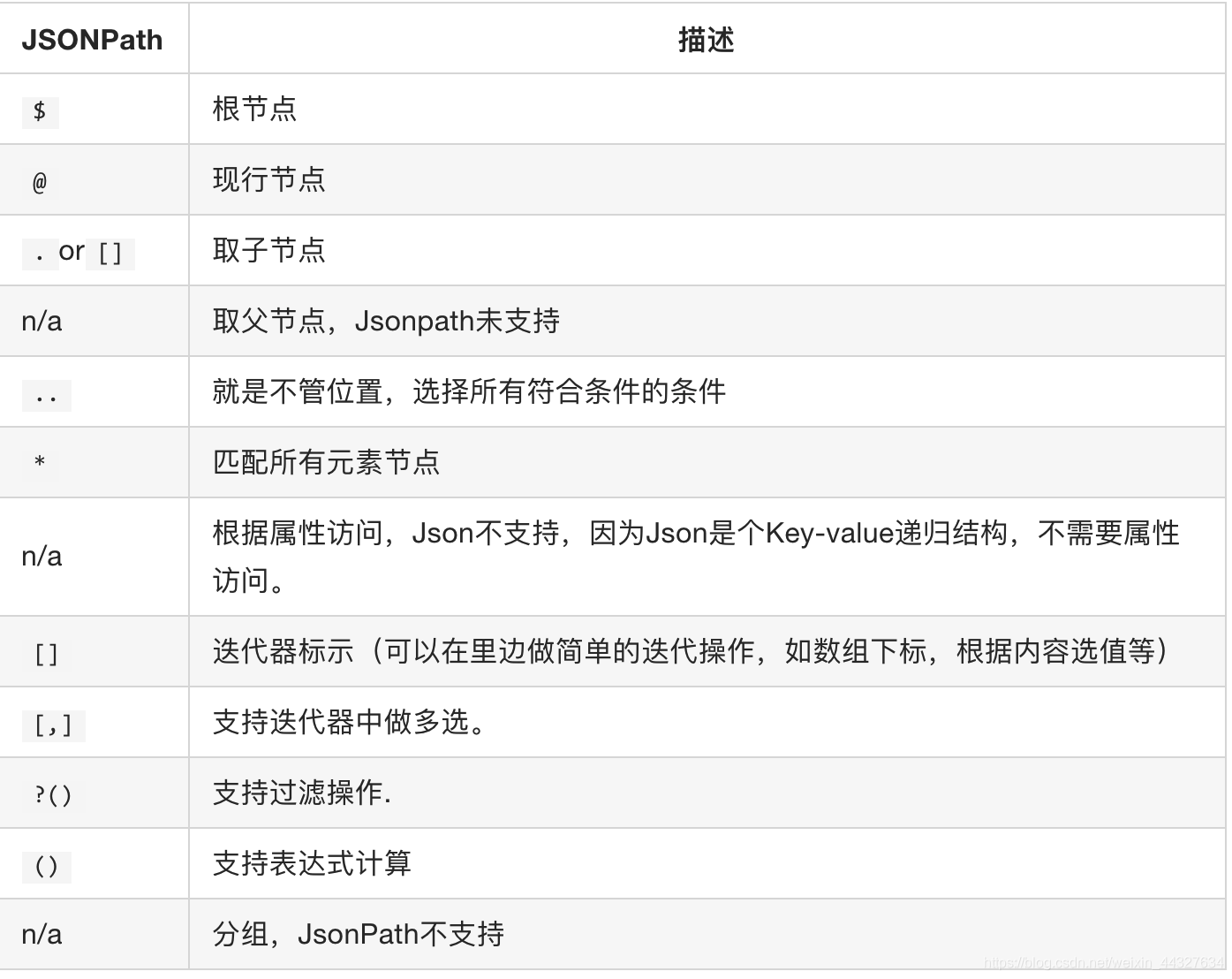
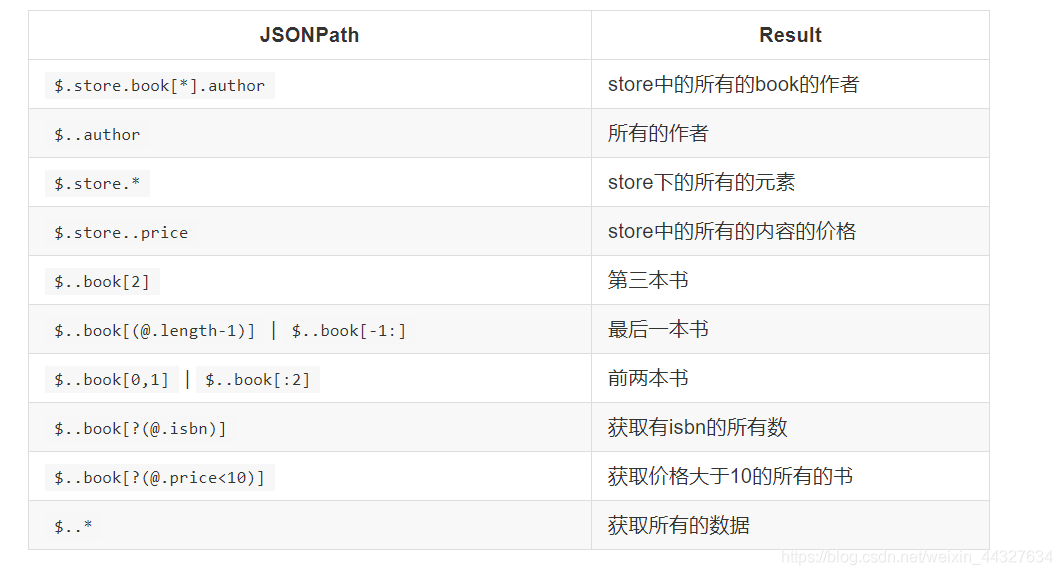
使用示例,如下面:
{ "store": {
    "book": [
      { "category": "reference",
        "author": "Nigel Rees",
        "title": "Sayings of the Century",
        "price": 8.95
      },
      { "category": "fiction",
        "author": "Evelyn Waugh",
        "title": "Sword of Honour",
        "price": 12.99
      },
      { "category": "fiction",
        "author": "Herman Melville",
        "title": "Moby Dick",
        "isbn": "0-553-21311-3",
        "price": 8.99
      },
      { "category": "fiction",
        "author": "J. R. R. Tolkien",
        "title": "The Lord of the Rings",
        "isbn": "0-395-19395-8",
        "price": 22.99
      }
    ],
    "bicycle": {
      "color": "red",
      "price": 19.95
    }
  }
}
- 1
- 2
- 3
- 4
- 5
- 6
- 7
- 8
- 9
- 10
- 11
- 12
- 13
- 14
- 15
- 16
- 17
- 18
- 19
- 20
- 21
- 22
- 23
- 24
- 25
- 26
- 27
- 28
- 29
- 30
- 31
小案例1拉钩json解析
简单示例,如获取拉钩网[拉钩json数据],(https://www.lagou.com/lbs/getAllCitySearchLabels.json)所有城市名字,数据在json.cn网站上解析是这样的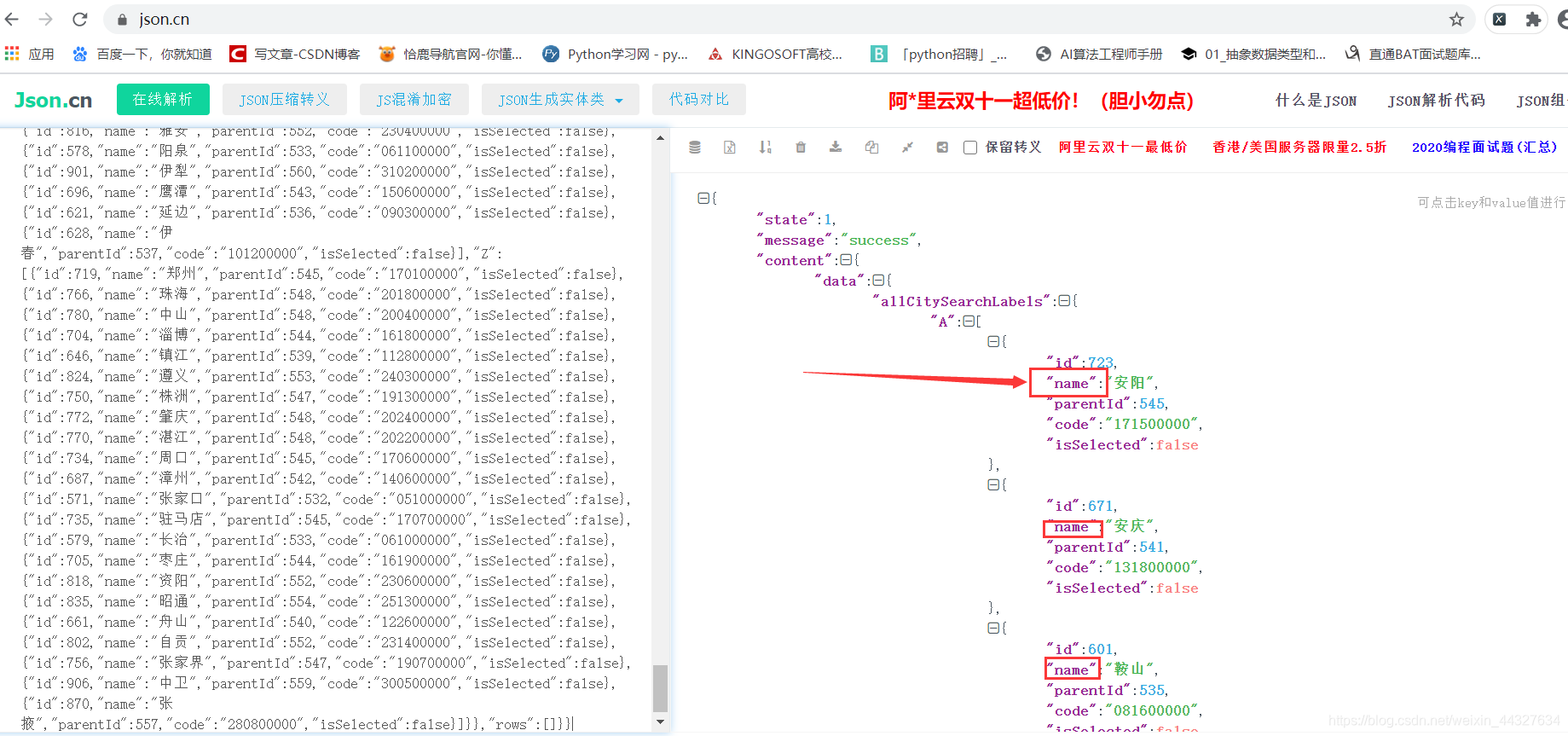
因此获取城市名字的jsonpath语法可以这样写$..name,python代码示例:
import jsonpath
import json
import requests

url = 'https://www.lagou.com/lbs/getAllCitySearchLabels.json'
headers_ = {
            'User-Agent': 'Mozilla/5.0 (Windows NT 10.0; Win64; x64) AppleWebKit/537.36 (KHTML, like Gecko) Chrome/84.0.4147.105 Safari/537.36'
        }

str_data = requests.get(url,headers = headers_).text
dict_data = json.loads(str_data)
# 第一个参数是字典对象,第二个参数是jsonpath表达式
ret = jsonpath.jsonpath(dict_data, '$..name')
print(ret)
- 1
- 2
- 3
- 4
- 5
- 6
- 7
- 8
- 9
- 10
- 11
- 12
- 13
- 14
小案例2 豆瓣影评案例:
import requests
import json
import jsonpath
import time


class DouBanSpider:
    # 初始化设置url,用户代理
    def __init__(self):
        """
        1:https://movie.douban.com/j/chart/top_list?type=13&interval_id=100%3A90&action=&start=0&limit=20
        2:https://movie.douban.com/j/chart/top_list?type=13&interval_id=100%3A90&action=&start=20&limit=20
        3:https://movie.douban.com/j/chart/top_list?type=13&interval_id=100%3A90&action=&start=40&limit=20
        """
        # 把发生变化的参数部分 start 拿掉
        self.url_ = 'https://movie.douban.com/j/chart/top_list?type=13&interval_id=100%3A90&action=&&limit=20'
        # 用户代理UA
        self.headers_ = {
            'User-Agent': 'Mozilla/5.0 (Windows NT 10.0; Win64; x64) AppleWebKit/537.36 (KHTML, like Gecko) Chrome/84.0.4147.105 Safari/537.36'
        }

    # 发送请求,得到相应,提取内容
    def send_request(self, page):  # 只发送一个请求,翻页不再这里做
        # url参数字典的设置
        page_params = {
            'start': int(page) * 20
        }
        # 发送get请求, 得到对象的响应对象
        response_ = requests.get(self.url_, headers=self.headers_, params=page_params)
        py_data = response_.json()  # 直接把响应对象的json str 转换成了 python类型的数据
        return py_data  # 还没有解析过的整个json的数据

    # 解析完保存再本地
    def save_data(self, data_):  # 接受的json数据之后 解析保存
        title_list = jsonpath.jsonpath(data_, '$..title')  # 取到名称 列表
        score_list = jsonpath.jsonpath(data_, '$..score')  # 取到评分 列表

        # 保存在本地
        for i in range(len(title_list)):
            dict_ = {}
            dict_[title_list[i]] = score_list[i]  # 是一个字典
            # 保存成json格式
            json_data = json.dumps(dict_, ensure_ascii=False) + ',\n'  # 为了每条数据换行
            with open('douban.json', 'a', encoding='utf-8') as f:
                f.write(json_data)

    # 调度方法

    def run(self):
        pages = int(input('请输入你想要抓取的页数:'))
        for page in range(pages):
            # 调用发送请求的方法
            data_ = self.send_request(page)
            #    保存
            self.save_data(data_)
            print(f'第{page+1}页数据保存完毕......')
            time.sleep(1)


if __name__ == '__main__':
    douban_ = DouBanSpider()
    douban_.run()
- 1
- 2
- 3
- 4
- 5
- 6
- 7
- 8
- 9
- 10
- 11
- 12
- 13
- 14
- 15
- 16
- 17
- 18
- 19
- 20
- 21
- 22
- 23
- 24
- 25
- 26
- 27
- 28
- 29
- 30
- 31
- 32
- 33
- 34
- 35
- 36
- 37
- 38
- 39
- 40
- 41
- 42
- 43
- 44
- 45
- 46
- 47
- 48
- 49
- 50
- 51
- 52
- 53
- 54
- 55
- 56
- 57
- 58
- 59
- 60
- 61
- 62
- 63
声明:本文内容由网友自发贡献,不代表【wpsshop博客】立场,版权归原作者所有,本站不承担相应法律责任。如您发现有侵权的内容,请联系我们。转载请注明出处:https://www.wpsshop.cn/article/detail/59794
推荐阅读
相关标签

