
热门标签
热门文章
- 1ONNX生成模型遇到的问题_onnx.onnx_cpp2py_export.checker.validationerror: n
- 25个实用的自动化Python脚本_python自动化脚本
- 3flask_django基于python的城市轨道交通公交线路查询系统vue
- 4个人建站前端篇(二)项目采用服务端渲染SSR
- 5图论之各种找环
- 6BAT的薪资待遇大解密_成都bat的薪资待遇
- 7js正则表达式限制文本框只能输入数字,小数点,英文字母,汉字等各类代码_js正则 允许数字+字母(大小写)+特殊符号(@ # - ),不允许空格
- 8【转载】Z-STACK中关于非易失性存储器Nv操作实例_z-stack重新下载程序为什么nv还能读出来
- 9对称二叉树_二叉树对称
- 10Centos7 服务器基线检查处理汇总_centos7.9 基线配置除root用户超时时间tmout
当前位置: article > 正文
MATLAB程序设计教程 第3版 第四章实验指导、思考练习答案(个人版)
作者:数据科学灵魂 | 2024-02-04 16:37:35
赞
踩
MATLAB程序设计教程 第3版 第四章实验指导、思考练习答案(个人版)
注:本系列文章仅仅用于交流学习,杜绝作业抄袭
第一章:MATLAB程序设计教程 第3版 第一章实验指导、思考练习答案(个人版)-CSDN博客
第二章:MATLAB程序设计教程 第3版 第二章实验指导、思考练习答案(个人版)-CSDN博客
第三章:MATLAB程序设计教程 第3版 第三章实验指导、思考练习答案(个人版)-CSDN博客
第四章:MATLAB程序设计教程 第3版 第四章实验指导、思考练习答案(个人版)-CSDN博客
第五章:MATLAB程序设计教程 第3版 第五章实验指导、思考练习答案(个人版)-CSDN博客
第六章:MATLAB程序设计教程 第3版 第六章实验指导、思考练习答案(个人版)-CSDN博客
实验指导:

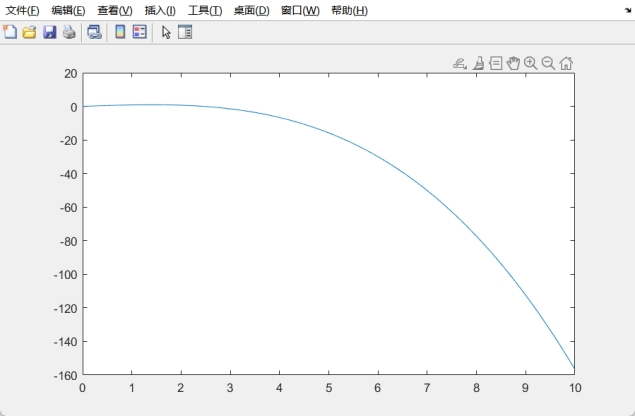
x=0:1/1000:10;

y=x-x.^3./6;

plot(x,y)
- 1
- 2
- 3
- 4
- 5
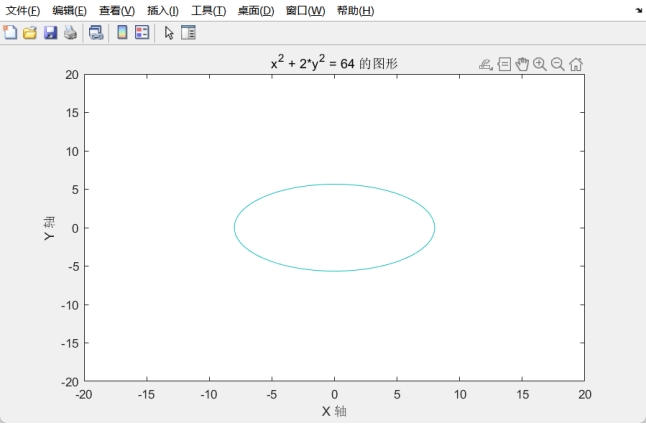
ezplot(@(x, y) x.^2 + 2*y.^2 - 64, [-20, 20, -20, 20]); % 范围可能需要根据方程进行调整

title('x^2 + 2*y^2 = 64 的图形');

xlabel('X 轴');

ylabel('Y 轴');
- 1
- 2
- 3
- 4
- 5
- 6
- 7

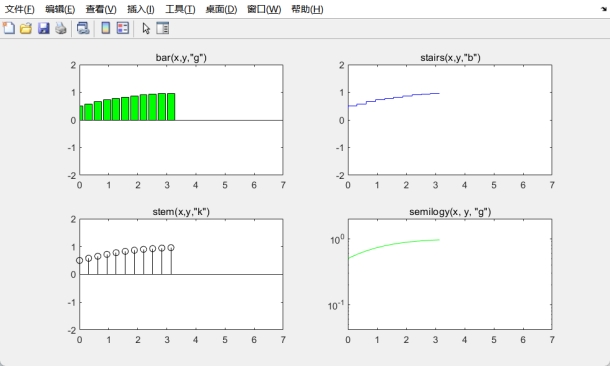
 x=-pi:pi/10:pi;

y=1./(1+exp(-1*x));

subplot(2,2,1);bar(x,y,'g');

title('bar(x,y,"g")');axis([0,7,-2,2]);

subplot(2,2,2);stairs(x,y,'b');

title('stairs(x,y,"b")');axis([0,7,-2,2])

subplot(2,2,3);stem(x,y,'k');

title('stem(x,y,"k")');axis([0,7,-2,2]);


subplot(2,2,4);semilogy(x, y, 'g');

title('semilogy(x, y, "g")');axis([0,7,-2,2]);

%subplot(2,2,5);semilogx(x, y, 'b');

%title('semilogx(x, y, "b")');axis([0,7,-2,2]);
- 1
- 2
- 3
- 4
- 5
- 6
- 7
- 8
- 9
- 10
- 11
- 12
- 13
- 14
- 15
- 16
- 17
- 18
- 19
- 20
- 21
- 22
- 23
- 24
- 25

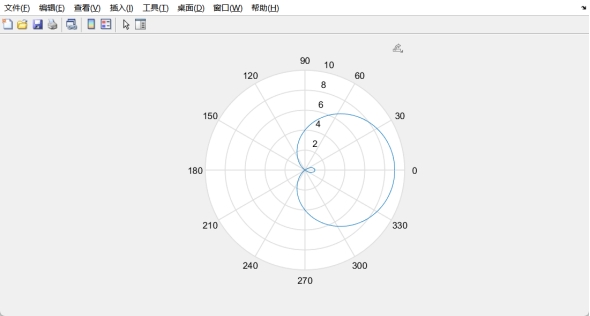
theta=0:0.01:2*pi;

rho=5.*cos(theta)+4;

polar(theta,rho)
- 1
- 2
- 3
- 4
- 5
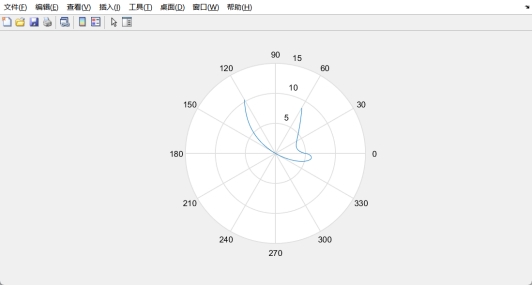
theta=-pi/3:0.01:pi/3;

rho=(5*sin(theta).^sin(theta))./cos(theta);

polar(theta,rho)
- 1
- 2
- 3
- 4
- 5
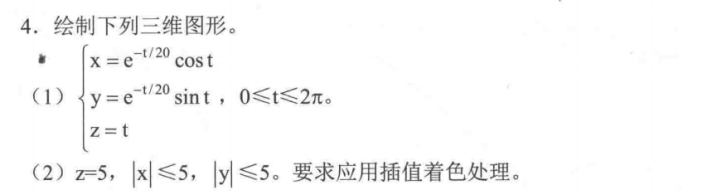
t = 0:pi/100:2*pi;

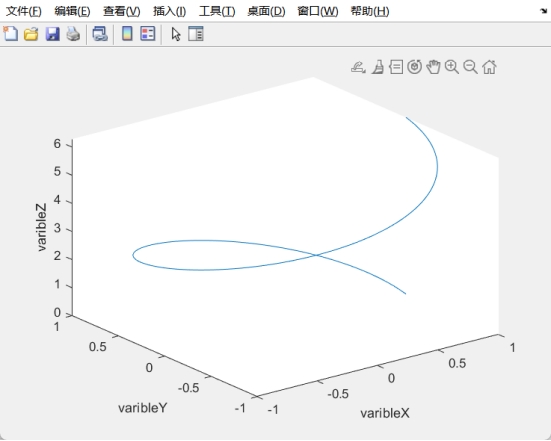
x = exp(0).^(-t/20).*cos(t);

y = exp(0).^(-t/20).*sin(t);

z = t;

plot3(x,y,z);


xlabel('varibleX');

ylabel('varibleY');

zlabel('varibleZ');
- 1
- 2
- 3
- 4
- 5
- 6
- 7
- 8
- 9
- 10
- 11
- 12
- 13
- 14
- 15
- 16
- 17
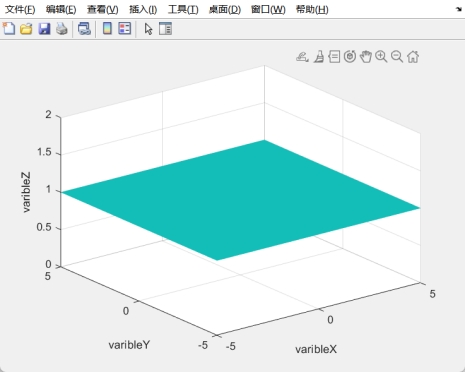
x = -5:0.01:5;

y = -5:0.01:5;

[X, Y] = meshgrid(x, y);

Z = ones(size(X));

surf(X, Y, Z);

shading interp;


xlabel('varibleX');

ylabel('varibleY');

zlabel('varibleZ');
- 1
- 2
- 3
- 4
- 5
- 6
- 7
- 8
- 9
- 10
- 11
- 12
- 13
- 14
- 15
- 16
- 17
- 18
- 19

% 创建一个时间向量

t = linspace(0, 4*pi, 100);


% 创建一个新的图形窗口

figure;


for i = 1:length(t)

% 计算球体的半径,这里使用正弦函数使得半径随时间变化

radius = 1 + 0.5*sin(t(i));

% 创建球体的坐标

[x, y, z] = sphere(50); % 创建球体坐标数据

x = x * radius; % 根据半径调整 x 坐标

y = y * radius; % 根据半径调整 y 坐标

z = z * radius; % 根据半径调整 z 坐标

% 绘制球体并设置一些属性

surf(x, y, z, 'EdgeColor', 'none'); % 绘制球体

axis([-2 2 -2 2 -2 2]); % 设置坐标轴范围

title(sprintf('Frame: %d', i)); % 显示当前帧数

drawnow; % 更新绘图窗口

% 添加适当的延时,控制动画播放速度

pause(0.1);

% 在绘制下一帧前清除图形

clf;

end
- 1
- 2
- 3
- 4
- 5
- 6
- 7
- 8
- 9
- 10
- 11
- 12
- 13
- 14
- 15
- 16
- 17
- 18
- 19
- 20
- 21
- 22
- 23
- 24
- 25
- 26
- 27
- 28
- 29
- 30
- 31
- 32
- 33
- 34
- 35
- 36
- 37
- 38
- 39
- 40
- 41
- 42
- 43
- 44
- 45
- 46
- 47

思考练习
一、填空题
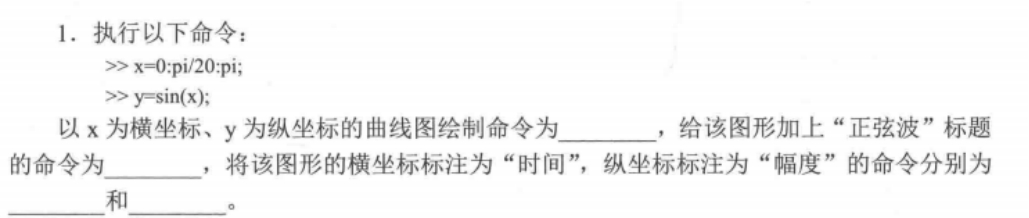
plot(x,y) title(‘正弦波’) xlable(‘时间’) ylable(‘幅度’)

3

hold on axis([-3 3 -5 20])
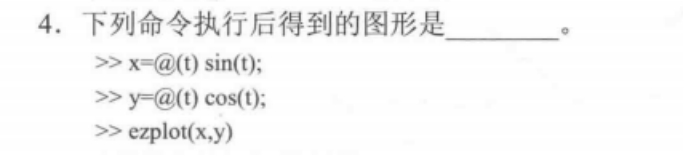
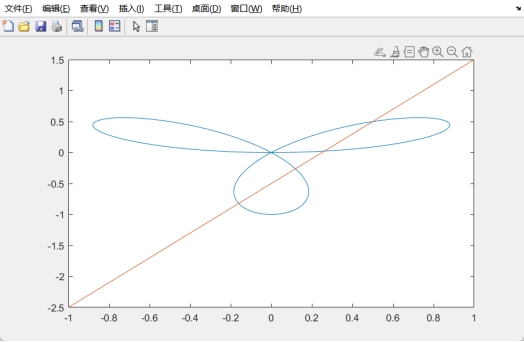
单位圆

五个同心圆,半径依次为1,3,5,7,9
二、问答题

1、使用plot函数:使用多次plot函数调用来绘制多条曲线。每次调用plot函数时,指定不同的数据点作为曲线的 x 和 y 值。例如:
x1 = 0:0.1:2*pi;
y1 = sin(x1);
x2 = 0:0.1:2*pi;
y2 = cos(x2);
plot(x1, y1, x2, y2)
- 1
- 2
- 3
- 4
- 5
2、使用hold on和hold off:使用hold on命令来保持当前的坐标轴,并允许多次绘制,然后使用hold off命令来恢复默认行为。例如:
x = 0:0.1:2*pi;
y1 = sin(x);
y2 = cos(x);
plot(x, y1)
hold on
plot(x, y2)
hold off
- 1
- 2
- 3
- 4
- 5
- 6
- 7
3、使用数组方式:将要绘制的曲线数据存储在一个矩阵或向量中,然后使用plot函数一次性绘制所有的曲线。每一列或每一个元素表示一条曲线的数据。例如:
x = 0:0.1:2*pi;
y = [sin(x); cos(x); tan(x)];
plot(x, y)

x=0:0.01:10;
y=1/(2*pi)*exp(-0.5.*x.*x);
plot(x,y)

t=0:0.1:2*pi;
x=t.*sin(t);
y=t.*cos(t);
plot(x,y);
- 1
- 2
- 3
- 4
- 5
- 6
- 7
- 8
- 9
- 10
- 11
- 12
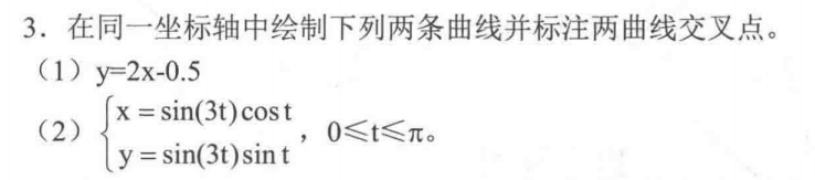
t=0:0.01:2*pi;

x=sin(3*t).*cos(t);

y=sin(3*t).*sin(t);

plot(x,y);

hold on;

x=-1:0.01:1;

y=2*x-0.5;

plot(x,y);

hold off
- 1
- 2
- 3
- 4
- 5
- 6
- 7
- 8
- 9
- 10
- 11
- 12
- 13
- 14
- 15
- 16
- 17

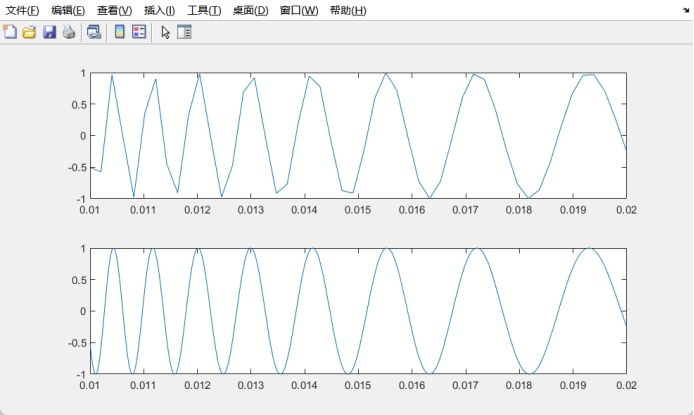
x=linspace(0.01,0.02,50);

y=sin(1./x);

subplot(2,1,1),plot(x,y);

subplot(2,1,2),fplot(@(x)sin(1./x),[0.01,0.02]);
- 1
- 2
- 3
- 4
- 5
- 6
- 7

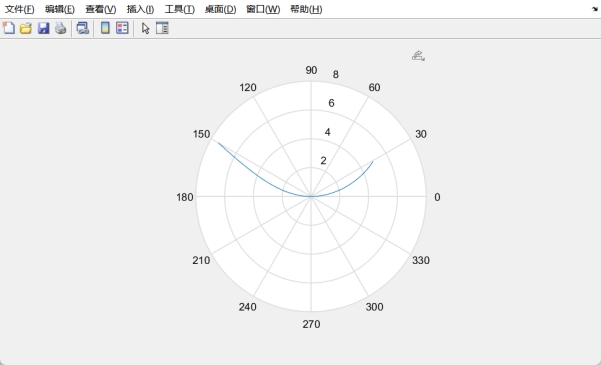
t = 0:pi/100:2*pi;

r = 12./sqrt(t);

polar(t,r);
- 1
- 2
- 3
- 4
- 5

a = 3;

t = -pi/6:pi/100:pi/6;

r = 3*a*sin(t).*cos(t)./(sin(t).^3+cos(t).^3);

polar(t,r);
- 1
- 2
- 3
- 4
- 5
- 6
- 7

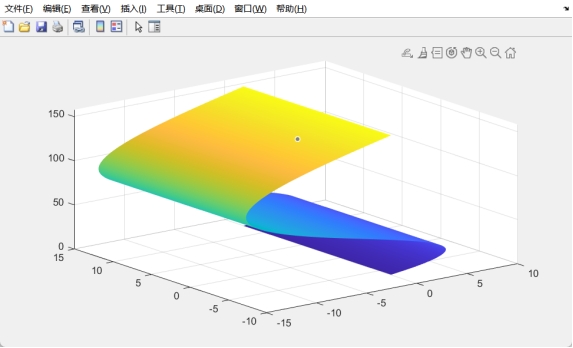
u = 0:pi/100:2*pi;

v= 0:pi/100:2*pi;

x = 3 * u.*sin(v);

y = 2*u.*cos(v);

[U,V] = meshgrid(u,v);

z = 4*U.^2;

surf(x,y,z);shading interp;
- 1
- 2
- 3
- 4
- 5
- 6
- 7
- 8
- 9
- 10
- 11
- 12
- 13
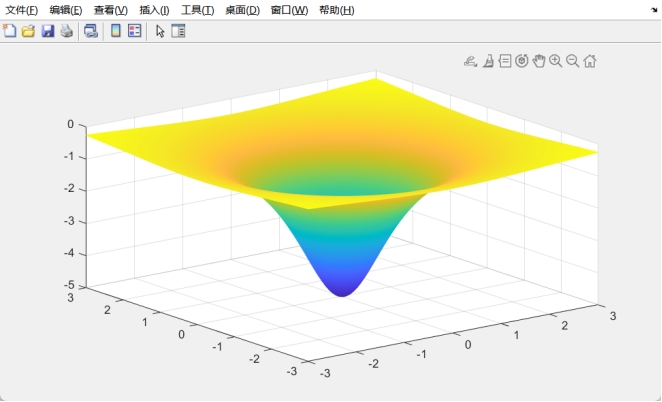
x = -3:0.01:3;

y = -3:0.01:3;


[X,Y] = meshgrid(x,y);

z = -5./(1+X.^2+Y.^2);

mesh(x,y,z);shading interp;
- 1
- 2
- 3
- 4
- 5
- 6
- 7
- 8
- 9
- 10
- 11
声明:本文内容由网友自发贡献,不代表【wpsshop博客】立场,版权归原作者所有,本站不承担相应法律责任。如您发现有侵权的内容,请联系我们。转载请注明出处:https://www.wpsshop.cn/article/detail/59386
推荐阅读
相关标签

