
热门标签
热门文章
- 1【Ruff学习1】Ruff是一个物联网的操作系统,可以让开发者使用JS高效且迅速地开发物联网应用_ruff js
- 2C#使用RabbitMQ-3_发布订阅模式(扇形交换机)
- 3数据库阿里连接池 druid配置详解_maxopenpreparedstatements
- 4Android开发基础(二)
- 5C/C++学习笔记:变量的作用域和变量的引用_vs的length如何引用
- 6MySQL数据库连接池 :Druid_mysql druid
- 7数据结构与算法-003.双向链表和循环链表_构造void addbefore(t data,node
succ) 怎么调用 - 8面向对象三大特性---继承_面向对象程序设计继承性
- 9微信小程序在线儿童有声读物系统设计与实现
- 10Codeforces Round 919 (Div. 2)C同余的同余
当前位置: article > 正文
easy-captcha
作者:代码秘术家 | 2024-02-04 13:19:53
赞
踩
easy-captcha
easy-captcha是生成图形验证码的Java类库,支持gif、中文、算术等类型,可用于Java Web、JavaSE等项目。参考地址:https://gitee.com/whvse/EasyCaptcha
maven坐标:
<dependency>
    <groupId>com.github.whvcse</groupId>
    <artifactId>easy-captcha</artifactId>
    <version>1.6.2</version>
</dependency>
- 1
- 2
- 3
- 4
- 5
效果展示:
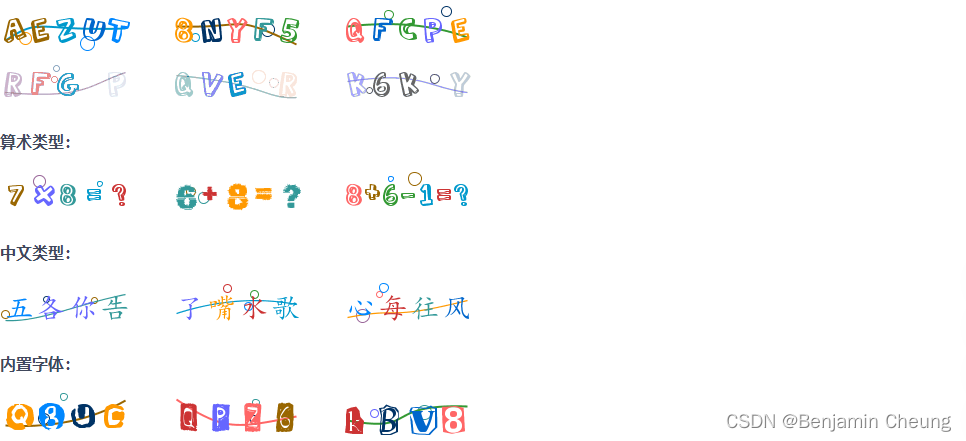
使用方式:
import com.wf.captcha.ArithmeticCaptcha;
import com.wf.captcha.ChineseCaptcha;
import com.wf.captcha.base.Captcha;

import java.io.File;
import java.io.FileNotFoundException;
import java.io.FileOutputStream;

public class CaptchaTest {
    public static void main(String[] args) throws FileNotFoundException {
        //中文验证码
        Captcha captcha = new ChineseCaptcha();
        //获取本次生成的验证码
        String text = captcha.text();
        System.out.println(text);

        //输出验证码图片到d盘
        captcha.out(new FileOutputStream(new File("d:\\test.png")));

        //算术验证码
        Captcha captcha1 = new ArithmeticCaptcha();
        //获取本次生成的验证码
        String text1 = captcha1.text();
        System.out.println(text1);

        //输出验证码图片到d盘
        captcha1.out(new FileOutputStream(new File("d:\\test1.png")));
    }
}

- 1
- 2
- 3
- 4
- 5
- 6
- 7
- 8
- 9
- 10
- 11
- 12
- 13
- 14
- 15
- 16
- 17
- 18
- 19
- 20
- 21
- 22
- 23
- 24
- 25
- 26
- 27
- 28
- 29
开发验证码接口
1,创建LoginController并提供生成验证码的方法
import com.itheima.pinda.authority.biz.service.auth.ValidateCodeService;
import io.swagger.annotations.Api;
import io.swagger.annotations.ApiOperation;
import lombok.extern.slf4j.Slf4j;
import org.springframework.beans.factory.annotation.Autowired;
import org.springframework.web.bind.annotation.GetMapping;
import org.springframework.web.bind.annotation.RequestMapping;
import org.springframework.web.bind.annotation.RequestParam;
import org.springframework.web.bind.annotation.RestController;

import javax.servlet.http.HttpServletResponse;
import java.io.IOException;

/**
 * 登录
 * 配置文件pd-auth-server.yml中,"权限模块"扫描的包com.itheima.pinda.authority.controller.auth
 * 所以在swagger中可以在"权限模块"中查看
 */
@RestController
@RequestMapping("/anno")
@Api(value = "UserAuthController", tags = "登录控制器")
@Slf4j
public class LoginController {

    @Autowired
    private ValidateCodeService validateCodeService;

	/**
     * 生成验证码
     */
    @ApiOperation(value = "验证码", notes = "验证码")
    @GetMapping(value = "/captcha", produces = "image/png")
    public void captcha(@RequestParam(value = "key") String key,
                        HttpServletResponse response) throws IOException {
        validateCodeService.create(key, response);
    }

	 /**
     * 校验验证码
     */
    @ApiOperation(value = "校验验证码", notes = "校验验证码")
    @PostMapping(value = "/check")
    public boolean check(@RequestBody LoginParamDTO login)
            throws BizException {
        //校验验证码是否正确
        boolean check = validateCodeService.check(login.getKey(), login.getCode());
        return check;
    }
}
- 1
- 2
- 3
- 4
- 5
- 6
- 7
- 8
- 9
- 10
- 11
- 12
- 13
- 14
- 15
- 16
- 17
- 18
- 19
- 20
- 21
- 22
- 23
- 24
- 25
- 26
- 27
- 28
- 29
- 30
- 31
- 32
- 33
- 34
- 35
- 36
- 37
- 38
- 39
- 40
- 41
- 42
- 43
- 44
- 45
- 46
- 47
- 48
- 49
2,创建ValidateCodeService接口
import java.io.IOException;
import javax.servlet.http.HttpServletResponse;
/**
 * 验证码
 */
public interface ValidateCodeService {
    /**
     * 生成验证码
     */
    void create(String key, HttpServletResponse response) throws IOException;

	/**
     * 校验验证码
     * @param key   前端上送 key
     * @param value 前端上送待校验值
     */
    boolean check(String key, String value);
}
- 1
- 2
- 3
- 4
- 5
- 6
- 7
- 8
- 9
- 10
- 11
- 12
- 13
- 14
- 15
- 16
- 17
- 18
3,创建ValidateCodeServiceImpl
import com.itheima.pinda.authority.biz.service.auth.ValidateCodeService;
import com.itheima.pinda.common.constant.CacheKey;
import com.itheima.pinda.exception.BizException;
import com.wf.captcha.ArithmeticCaptcha;
import com.wf.captcha.base.Captcha;
import net.oschina.j2cache.CacheChannel;
import org.apache.commons.lang3.StringUtils;
import org.springframework.beans.factory.annotation.Autowired;
import org.springframework.http.HttpHeaders;
import org.springframework.http.MediaType;
import org.springframework.stereotype.Service;

import javax.servlet.http.HttpServletResponse;
import java.io.IOException;

/**
 * 验证码服务
 */
@Service
public class ValidateCodeServiceImpl implements ValidateCodeService {
    @Autowired
    //通过当前对象可以操作j2cache缓存
    private CacheChannel cache;
    @Override
    //生成算术验证码,同时将验证码进行缓存
    public void create(String key, HttpServletResponse response) throws IOException {

        if (StringUtils.isBlank(key)) {
            throw BizException.validFail("验证码key不能为空");
        }

        Captcha captcha = new ArithmeticCaptcha(115, 42);
        captcha.setCharType(2);
        //本次产生的验证码
        String text = captcha.text();
        //将验证码进行缓存
        cache.set(CacheKey.CAPTCHA,key,text);

        response.setContentType(MediaType.IMAGE_PNG_VALUE);
        response.setHeader(HttpHeaders.PRAGMA, "No-cache");
        response.setHeader(HttpHeaders.CACHE_CONTROL, "No-cache");
        response.setDateHeader(HttpHeaders.EXPIRES, 0L);
		//将生成的验证码图片通过输出流写回客户端浏览器页面
        captcha.out(response.getOutputStream());
    }

	@Override
	//value前端需要验证的验证码
	//key,生成验证时,前端传过来的,存到缓存中的key
    public boolean check(String key, String value) {
        if (StringUtils.isBlank(value)) {
            throw BizException.validFail("请输入验证码");
        }
        //从指定区域CacheKey.CAPTCHA获取缓存key
        CacheObject cacheObject = cache.get(CacheKey.CAPTCHA, key);
        if (cacheObject.getValue() == null) {
            throw BizException.validFail("验证码已过期");
        }
        if (!StringUtils.equalsIgnoreCase(value, String.valueOf(cacheObject.getValue()))) {
            throw BizException.validFail("验证码不正确");
        }
        //验证通过,立即从缓存中删除验证码
        cache.evict(CacheKey.CAPTCHA, key);
        return true;
    }
}
- 1
- 2
- 3
- 4
- 5
- 6
- 7
- 8
- 9
- 10
- 11
- 12
- 13
- 14
- 15
- 16
- 17
- 18
- 19
- 20
- 21
- 22
- 23
- 24
- 25
- 26
- 27
- 28
- 29
- 30
- 31
- 32
- 33
- 34
- 35
- 36
- 37
- 38
- 39
- 40
- 41
- 42
- 43
- 44
- 45
- 46
- 47
- 48
- 49
- 50
- 51
- 52
- 53
- 54
- 55
- 56
- 57
- 58
- 59
- 60
- 61
- 62
- 63
- 64
- 65
- 66
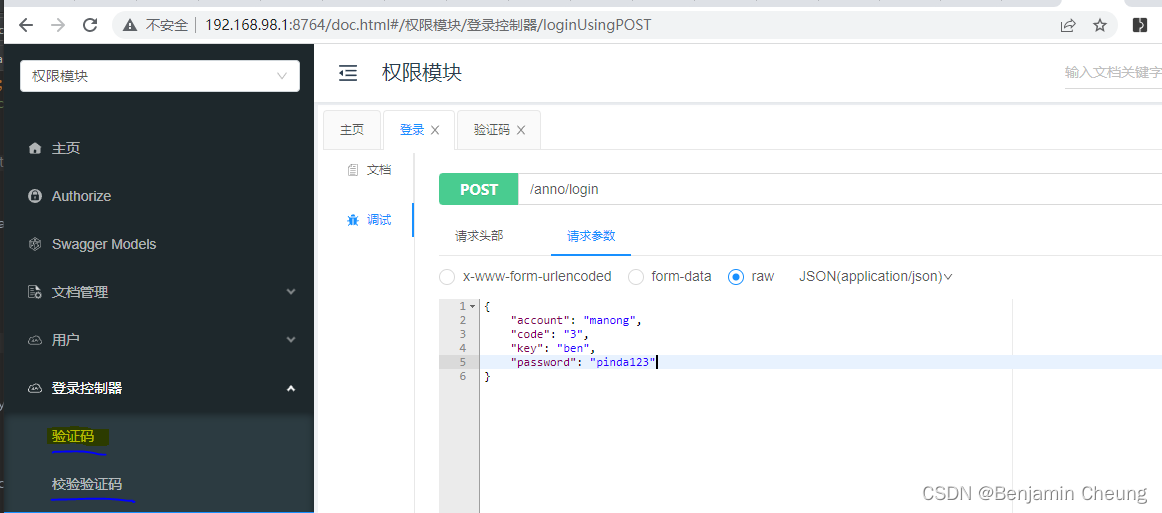
4,验证码接口开发完成后可以启动服务,通过接口文档进行测试:
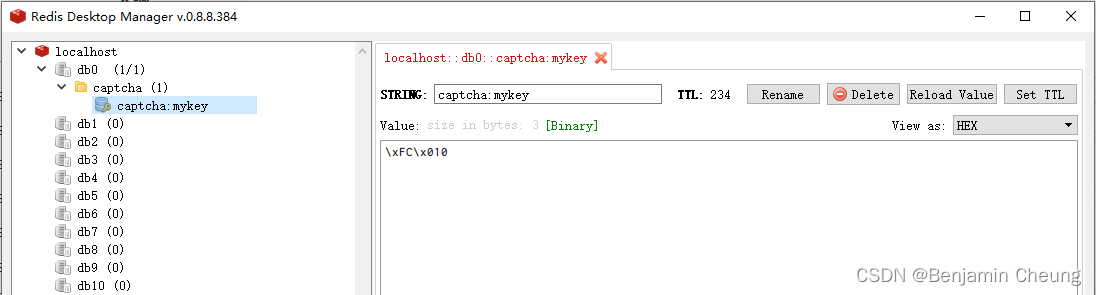
可以看到已经将验证码缓存到redis:
声明:本文内容由网友自发贡献,不代表【wpsshop博客】立场,版权归原作者所有,本站不承担相应法律责任。如您发现有侵权的内容,请联系我们。转载请注明出处:https://www.wpsshop.cn/article/detail/58747
推荐阅读
相关标签

