- 1qconshanghai2015
- 2给甲骨文云免费ARM实例安装带magisk的Redroid_云服务器 redroid
- 32017-2018-2 20179306《网络攻防技术》第七周作业
- 4人才引进都选什么大学,哪些世界大学排名更靠谱?_人才引进qs排名看哪一年的
- 5vue中大文件上传webuploader前端用法_vue a-upload 使用 webuploader
- 6利用下标获取指针的数值_取指针的值
- 7嵌入式 CC2543 RF中断详解_网程里254c3f
- 8linux服务器监控性能测试_linux服务器监控平台监控项
- 9归并排序(详解代码实现)_归并排序代码
- 10OpenCV-高斯低通&高通滤波器(C++)_c++进行高通滤波
docker 使用Dockerfile生成镜像文件_sending build context to docker daemon 208.9kb ste
赞
踩
使用 Dockerfile 生成镜像文件
dockerfile文件指令不区分大小写
from:基础镜像,首行必须为该指令,可设置多个
maintainer:作者信息,如邮箱地址:maintainer user@163.com
******************************
run :构建镜像时运行
指令格式:
run command:默认在bin/sh 终端执行,执行格式 bin/sh -c command
run ["executable","param1","param2"]:执行格式 executable param1 param2
示例:run echo hello world、run echo "hello world"
- #Dockerfile
- from centos
- run echo hello world
- run echo "hello world"
-
-
- #构建镜像输出
- [root@centos test2]# docker build -t test .
- Sending build context to Docker daemon 2.048kB
- Step 1/3 : from centos
- ---> 0d120b6ccaa8
- Step 2/3 : run echo hello world
- ---> Running in 46c168ea687f
- hello world //输出:hello world
- Removing intermediate container 46c168ea687f
- ---> e55a98be540c
- Step 3/3 : run echo "hello world"
- ---> Running in 78b7f219ffd4
- hello world //输出:hello world
- Removing intermediate container 78b7f219ffd4
- ---> 0cce29370946
- Successfully built 0cce29370946
- Successfully tagged test:latest

示例 2:run ["echo","hello world"]
- #Dockerfile
- from centos
- run ["echo","hello world"]
- run ["echo","hello world","hello world2"]
-
-
- #构建镜像输出
- [root@centos test2]# docker build -t test .
- Sending build context to Docker daemon 2.048kB
- Step 1/3 : from centos
- ---> 0d120b6ccaa8
- Step 2/3 : run ["echo","hello world"]
- ---> Running in dfbfe1474f0b
- hello world //输出:hello world
- Removing intermediate container dfbfe1474f0b
- ---> 5f46fd188430
- Step 3/3 : run ["echo","hello world","hello world2"]
- ---> Running in cc7888f08910
- hello world hello world2 //输出:hello world hello world2
- Removing intermediate container cc7888f08910
- ---> afab2dbd1e2e
- Successfully built afab2dbd1e2e
- Successfully tagged test:latest
示例 3:run ["bin/bash","-c","echo hello world"]
- #Dockerfile
- from centos
- run ["bin/bash","-c","echo hello world"]
-
-
- #构建镜像输出
- [root@centos test2]# docker build -t test .
- Sending build context to Docker daemon 2.048kB
- Step 1/2 : from centos
- ---> 0d120b6ccaa8
- Step 2/2 : run ["bin/bash","-c","echo hello world"]
- ---> Running in 9d2db05532ee
- hello world //输出:hello world
- Removing intermediate container 9d2db05532ee
- ---> 6fdebf83d666
- Successfully built 6fdebf83d666
- Successfully tagged test:latest
说明:-c 表示后面接命令行,第一个空格前的为命令,后面为参数
******************************
cmd :容器运行时执行
命令格式:
cmd command:执行格式 bin/sh -c command
cmd ["executable", "param1", "param2"]:执行格式 executable param1 param2
说明:如果指定多个cmd,只有最后一个执行;docker run如果指定启动命令,则忽略cmd
******************************
entrypoint :容器运行时执行,优先级较cmd高
命令格式:
entrypoint command param1 param2:执行格式 bin/sh -c command param1 param2
entrypoint ["executable", "param1", "param2"]:执行格式 executable param1 param2
******************************
cmd、entrypoint同时使用
cmd command、entrypoint command:忽略cmd command
cmd command、entrypoint ["executable","param","param2"]:cmd command转做做字符串"bin/sh -c command"传递给entrypoint,放在param2后面
cmd ["executable","param","param2"]、entrypoint command:忽略cmd ["executable","param","param2"]
cmd ["executable","param","param2"]、entrypoint ["executable","param","param2"]:将cmd的executable、param、param2当做字符串参数传递给entrypoint
示例:cmd echo "hello world"
- #Dockerfile
- from centos
- cmd echo "hello world"
-
-
- #构建镜像
- docker build -t test .
-
-
- #创建容器输出
- [root@centos test2]# docker run -it --name test test
- hello world
示例 2:cmd ["echo","hello world"]
- #Dockerfile
- from centos
- cmd ["echo","hello world"]
-
-
- #构建镜像
- docker build -t test .
-
-
- #创建容器
- [root@centos test2]# docker run -it --name test test
- hello world
示例 3:cmd ["echo","hello world","hello world2"]、entrypoint ["echo","瓜田李下"]
- #Dockerfile
- from centos
- cmd ["echo","hello world","hello world2"]
- entrypoint ["echo","瓜田李下"]
-
-
- #构建镜像
- docker build -t test .
-
-
- #创建容器
- [root@centos test2]# docker run -it --name test test
- 瓜田李下 echo hello world hello world2
示例 4:cmd echo "hello world"、entrypoint ["echo","瓜田李下"]
- #Dockerfile
- from centos
- cmd echo "hello world"
- entrypoint ["echo","瓜田李下"]
-
-
- #构建镜像
- docker build -t test .
-
-
- #创建容器
- [root@centos test2]# docker run -it --name test test
- 瓜田李下 /bin/sh -c echo "hello world"
******************************
其他指令
label :声明镜像的元数据信息,格式为:label key=value,如label version="1.0"
arg :指定镜像内使用的参数,格式为:arg name=default_value,运行时docker run --build-arg name=value传入参数
expose :声明镜像内服务监听的端口
env :声明环境变量,格式为:env key value、env key=value
add :复制主机目录内容到容器相应目录,如果是tar文件,会自动解压到对应目录,格式为: add src dest
copy :复制主机目录内容到对应目录,格式为:copy src dest
volume :创建数据卷挂载点,格式为:volume ["/data"]
user :指定容器运行时的用户名,格式为:user user_name
workdir :容器初始工作目录,格式为:workdir path
onbuild :创建的镜像为其他镜像的基础镜像时,执行的命令,格式为 :onbuild command
如:onbuild echo "hello world"
stopsignal :指定镜像创建的容器接收的退出信号
shell :指定shell的默认类型,默认为:["bin/sh", "-c"]
healthcheck :容器健康监测,命令格式:
healthcheck [options] cmd command:根据执行的命令返回只是否为0判断
healthcheck none:没有健康检查
options选项:
--interval=30s(默认为30s):间隔多久检查一次
--timeout=30s(默认为30s):检查等待的超时时间
--retries=3:检查失败时的重试次数
********************************
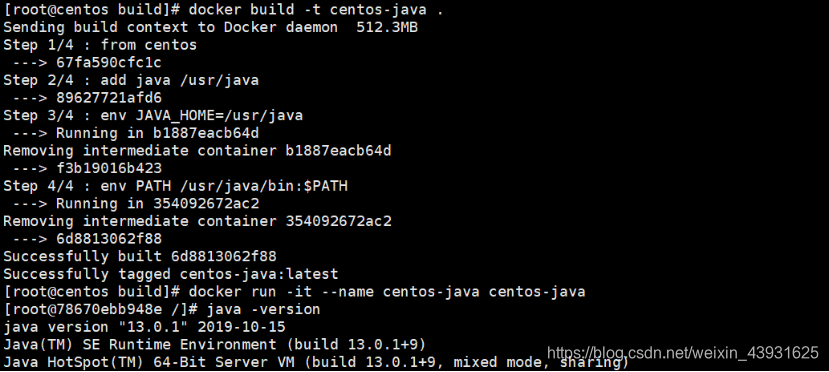
示例:centos 为基础镜像,制作java镜像
Dockerfile 文件
- from centos
- add java /usr/java
- env JAVA_HOME=/usr/java
- env PATH $JAVA_HOME/bin:$PATH
构造镜像并创建容器