
热门标签
热门文章
- 1探秘亚马逊云科技海外服务器 | 解析跨境云计算的前沿技术与应用
- 2Leetcode Solutions - Part 2_let x1, x2 are solutions to (at a + 碌ii)x = 鈭扐t r,
- 3dubbo源码分析第十六篇一dubbo集群容错策略-BroadcastCluster广播_dubbo broadcast cluster
- 4简单易懂深入PyTorch中RNN、LSTM和GRU使用和理解
- 5《成为一名优秀的架构师:从基础到实践》_现代c++软件架构:方法与实践 pdf
- 6(附源码)基于Java SpringBoot的电影院管理系统设计与实现 毕业设计 011633_电影管理系统java源码
- 7黑马程序员——Objective-C——定义类、方法、创建对象
- 8HTML小游戏13 —— 仿《神庙逃亡》3D风格跑酷游戏《墓地逃亡》(附完整源码)_html神庙逃亡制作代码
- 9chatgpt赋能python:Python量化交易:为什么Python是最好的选择_pyalgotrade optimizer cuda
- 10二战华为成功上岸,准备了小半年,要个27k应该也算不上很高吧~
当前位置: article > 正文
SpringBoot——实现WebService接口服务端以及客户端开发_springboot写webservice接口
作者:编程挑战者 | 2024-02-03 19:04:58
赞
踩
springboot写webservice接口
我们经常需要在两个系统之间进行一些数据的交互,这时候我们就需要开发数据交互接口。
一般来说,遇到比较多的接口有HTTP接口、WebService接口、FTP文件传输。今天我要来学习一下在SpringBoot框架下进行简单的webservice接口的开发。
一、服务端代码开发
创建了两个wbservice接口TestService和CatService。
1、pom依赖
导入相关的依赖包。
        <dependency>
            <groupId>org.springframework.boot</groupId>
            <artifactId>spring-boot-starter-web-services</artifactId>
        </dependency>
        <dependency>
            <groupId>org.apache.cxf</groupId>
            <artifactId>cxf-rt-frontend-jaxws</artifactId>
            <version>3.1.6</version>
        </dependency>
        <dependency>
            <groupId>org.apache.cxf</groupId>
            <artifactId>cxf-rt-transports-http</artifactId>
            <version>3.1.6</version>
        </dependency>
- 1
- 2
- 3
- 4
- 5
- 6
- 7
- 8
- 9
- 10
- 11
- 12
- 13
- 14
2、接口类
import javax.jws.WebMethod;
import javax.jws.WebParam;
import javax.jws.WebResult;
import javax.jws.WebService;
import javax.xml.ws.WebServiceProvider;

@WebService(name = "TestService", // 暴露服务名称
        targetNamespace = "http://server.webservice.Bag.admin.com"// 命名空间,一般是接口的包名倒序
)
public interface TestService {
    @WebMethod
    public String sendMessage(@WebParam(name = "username") String username);

    @WebMethod
    public boolean getFlag(@WebParam(name = "username") String username);
}

- 1
- 2
- 3
- 4
- 5
- 6
- 7
- 8
- 9
- 10
- 11
- 12
- 13
- 14
- 15
- 16
import javax.jws.WebMethod;
import javax.jws.WebParam;
import javax.jws.WebService;

@WebService(name = "CatService", // 暴露服务名称
        targetNamespace = "http://server.webservice.Bag.admin.com"// 命名空间,一般是接口的包名倒序
)
public interface CatService {
    @WebMethod
    public String message(@WebParam(name = "name") String name);
}
- 1
- 2
- 3
- 4
- 5
- 6
- 7
- 8
- 9
- 10
- 11
3、接口实现类
import com.admin.Bag.webservice.server.TestService;
import org.springframework.stereotype.Component;

import javax.jws.WebService;

@WebService(serviceName = "TestService", // 与接口中指定的name一致
        targetNamespace = "http://server.webservice.Bag.admin.com", // 与接口中的命名空间一致,一般是接口的包名倒
        endpointInterface = "com.admin.Bag.webservice.server.TestService"// 接口地址
)
@Component
public class TestServiceImpl implements TestService {

    @Override
    public String sendMessage(String username) {
        return "=====Hello! " + username + "=====";
    }

    @Override
    public boolean getFlag(String username) {
        //
        return true;
    }
}
- 1
- 2
- 3
- 4
- 5
- 6
- 7
- 8
- 9
- 10
- 11
- 12
- 13
- 14
- 15
- 16
- 17
- 18
- 19
- 20
- 21
- 22
- 23
import com.admin.Bag.webservice.server.CatService;
import org.springframework.stereotype.Component;

import javax.jws.WebService;

@WebService(serviceName = "CatService", // 与接口中指定的name一致
        targetNamespace = "http://server.webservice.Bag.admin.com", // 与接口中的命名空间一致,一般是接口的包名倒
        endpointInterface = "com.admin.Bag.webservice.server.CatService"// 接口地址
)
@Component
public class CatServiceImpl implements CatService {

    @Override
    public String message(String name) {
        //
        return "一只小猫猫";
    }
}
- 1
- 2
- 3
- 4
- 5
- 6
- 7
- 8
- 9
- 10
- 11
- 12
- 13
- 14
- 15
- 16
- 17
- 18
4、webservice配置文件
import com.admin.Bag.webservice.server.impl.CatServiceImpl;
import com.admin.Bag.webservice.server.impl.TestServiceImpl;
import org.apache.cxf.Bus;
import org.apache.cxf.bus.spring.SpringBus;
import org.apache.cxf.jaxws.EndpointImpl;
import org.apache.cxf.transport.servlet.CXFServlet;
import org.springframework.boot.web.servlet.ServletRegistrationBean;
import org.springframework.context.annotation.Bean;
import org.springframework.context.annotation.Configuration;

import javax.xml.ws.Endpoint;

@Configuration
public class cxfConfig {
    @Bean
    public ServletRegistrationBean disServlet() {
        ServletRegistrationBean servletRegistrationBean = new ServletRegistrationBean(new CXFServlet(), "/webService/*");
        return servletRegistrationBean;
    }
    @Bean(name = Bus.DEFAULT_BUS_ID)
    public SpringBus springBus() {
        return new SpringBus();
    }
    @Bean
    public Endpoint endpoint() {
        EndpointImpl endpoint = new EndpointImpl(springBus(), new TestServiceImpl());
        endpoint.publish("/TestService");
        return endpoint;
    }
    @Bean
    public Endpoint endpoint2() {
        EndpointImpl endpoint = new EndpointImpl(springBus(), new CatServiceImpl());
        endpoint.publish("/CatService");
        return endpoint;
    }

}
- 1
- 2
- 3
- 4
- 5
- 6
- 7
- 8
- 9
- 10
- 11
- 12
- 13
- 14
- 15
- 16
- 17
- 18
- 19
- 20
- 21
- 22
- 23
- 24
- 25
- 26
- 27
- 28
- 29
- 30
- 31
- 32
- 33
- 34
- 35
- 36
- 37
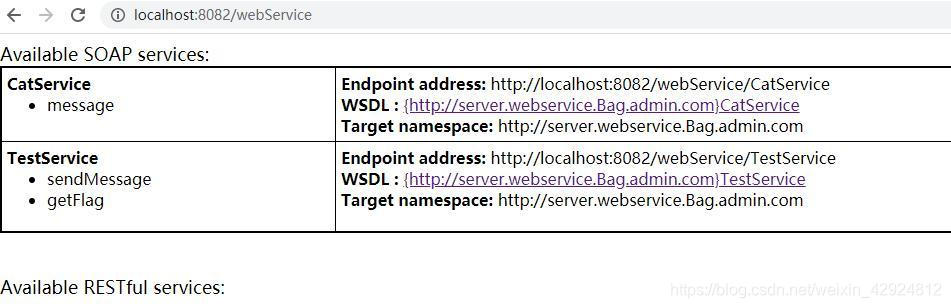
启动项目。我的项目端口号是8080。浏览器访问地址:http://localhost:8082/webService
可见接口信息CatService和TestService,点进链接可以看每个接口的wsdl文档。
2、客户端开发
客户端是一个单独的项目。
(1)pom依赖
不同的SpringBoot版本对应的依赖版本也不一样,我也是试了好久终于成了。我的SpringBoot版本号是2.3.0.RELEASE。
  <!-- 进行jaxes 服务开发 -->
        <dependency>
            <groupId>org.apache.cxf</groupId>
            <artifactId>cxf-rt-frontend-jaxws</artifactId>
            <version>3.0.1</version>
        </dependency>
        <!-- 内置jetty web服务器 -->
        <dependency>
        <groupId>org.apache.cxf</groupId>
        <artifactId>cxf-rt-transports-http-jetty</artifactId>
        <version>3.0.1</version>
        </dependency>
- 1
- 2
- 3
- 4
- 5
- 6
- 7
- 8
- 9
- 10
- 11
- 12
(2)封装客户端方法clientUtil
import org.apache.cxf.endpoint.Client;
import org.apache.cxf.jaxws.endpoint.dynamic.JaxWsDynamicClientFactory;

public class clientUtil {

    public static String callWebSV(String wsdUrl, String operationName, String... params) throws Exception {
        JaxWsDynamicClientFactory dcf = JaxWsDynamicClientFactory.newInstance();
        Client client = dcf.createClient(wsdUrl);
        //client.getOutInterceptors().add(new ClientLoginInterceptor(USER_NAME, PASS_WORD));
        Object[] objects;
        // invoke("方法名",参数1,参数2,参数3....);
        objects = client.invoke(operationName, params);
        return objects[0].toString();
    }
}
- 1
- 2
- 3
- 4
- 5
- 6
- 7
- 8
- 9
- 10
- 11
- 12
- 13
- 14
- 15
(3)调用接口类
使用定时调用webservice接口。
import com.admin.webAppoint.webservice.client.clientUtil;
import org.springframework.scheduling.annotation.Scheduled;
import org.springframework.stereotype.Component;
import org.springframework.web.bind.annotation.RestController;

@RestController
@Component
public class TestController {
    //在一个方法中连续调用多次WebService接口,每次调用前需要重置上下文。
    ClassLoader classLoader = Thread.currentThread().getContextClassLoader();

    @Scheduled(cron="*/15 * * * * ?")
    public String getMessage()  {
        Thread.currentThread().setContextClassLoader(classLoader);//在获取连接之前 还原上下文
        System.out.println("======开始调用webservice接口=====");
        String url = "http://localhost:8082/webService/CatService?wsdl";
        String methodName = "message";
        System.out.println("Calling" + url);
        String result="";
        try {
            result=clientUtil.callWebSV(url, methodName, "name");
        } catch (Exception e) {
            System.err.println("接口调用失败!!!!");
            return "失败";
        }
        System.out.println("===Finished!===恭喜你啊!!!CatService接口调用成功!!!===获得的数据是:"+result);
        return "Finished!";
    }

    @Scheduled(cron="*/5 * * * * ?")
    public String getMessage2()  {
        Thread.currentThread().setContextClassLoader(classLoader);//在获取连接之前 还原上下文
        System.out.println("======开始调用webservice接口=====");
        String url = "http://localhost:8082/webService/TestService?wsdl";
        String methodName = "sendMessage";
        System.out.println("Calling" + url);
        String result="";
        try {
            result=clientUtil.callWebSV(url, methodName, "username");
        } catch (Exception e) {
            System.err.println("接口调用失败!!!!");
            return  "失败";
        }
        System.out.println("===Finished!===恭喜你啊!!!TestService接口调用成功!!!===获得的数据是:"+result);
        return "Finished!";
    }
}
- 1
- 2
- 3
- 4
- 5
- 6
- 7
- 8
- 9
- 10
- 11
- 12
- 13
- 14
- 15
- 16
- 17
- 18
- 19
- 20
- 21
- 22
- 23
- 24
- 25
- 26
- 27
- 28
- 29
- 30
- 31
- 32
- 33
- 34
- 35
- 36
- 37
- 38
- 39
- 40
- 41
- 42
- 43
- 44
- 45
- 46
- 47
(4)运行结果
首先启动服务端。启动客户端。
遇到过报错:
报错——使用cxf时报错:org.apache.cxf.interceptor.Fault: Marshalling Error: XXX is not known to this context
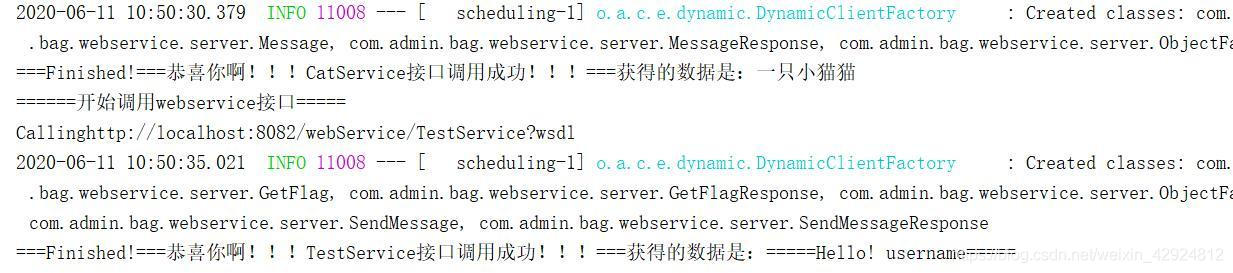
最终成功调用服务端的webservice接口:
声明:本文内容由网友自发贡献,不代表【wpsshop博客】立场,版权归原作者所有,本站不承担相应法律责任。如您发现有侵权的内容,请联系我们。转载请注明出处:https://www.wpsshop.cn/article/detail/57733
推荐阅读


相关标签

