
- 1(附源码)Springboot 点餐系统 毕业设计 100908_基于springboot点餐系统的论文
- 2【Shell 命令集合 磁盘管理 】Linux 取消挂载 umount命令使用教程
- 3关于Android Studio无法检测到夜神模拟器的原因及解决方案_为什么打开android studio 识别不到夜神模拟器
- 4爆肝整理,企业级性能测试-性能方案设计详细总结(一)
- 5很多工程师,最后都是被生活裹挟,没法一直在技术路径走到极致
- 6AI为文档图像安全注入新力量_如何预防ai用文本生成图片的安全问题
- 7Python 安装 包时 VC 14 找不到错误终极解决办法_python setup.py msvc
- 8史上最详细微信小程序授权登录与后端SprIngBoot交互操作说明,附源代码,有疑惑大家可以直接留言,蟹蟹 2021.11.29 完善更新小程序代码,2022.4.27 更新_微信小程序登录
- 9QIODevice :: read:设备未打开(QIODevice::read : device not open)_qiodevice::read (qprocess): device not open
- 10用Python编写的小游戏:探索游戏世界的乐趣_python制作小游戏
Springboot入门级教程详解_springboot教程
赞
踩
一.Springboot的实现
1.什么是Springboot
springboot可以帮你简化spring的搭建,并且快速创建一个spring的应用程序。该框架使用了特定的方式来进行配置,从而使开发人员不再需要定义样板化的配置
2.Springboot特点有哪些
(1)可以创建独立的Spring应用程序,并且基于其Maven或Gradle插件,可以创建可执行的JARs和WARs;
(2)内嵌Tomcat或Jetty等Servlet容器;
(3)提供自动配置的“starter”项目对象模型(POMS)以简化Maven配置;
(4)尽可能自动配置Spring容器;
(5)提供准备好的特性,如指标、健康检查和外部化配置;
(6)绝对没有代码生成,不需要XML配置。
二.创建springboot工程
1.JDK必须为1.8以上
2.spring的jar必须5.0以上
3.maven必须3.3以


创建一个controller类
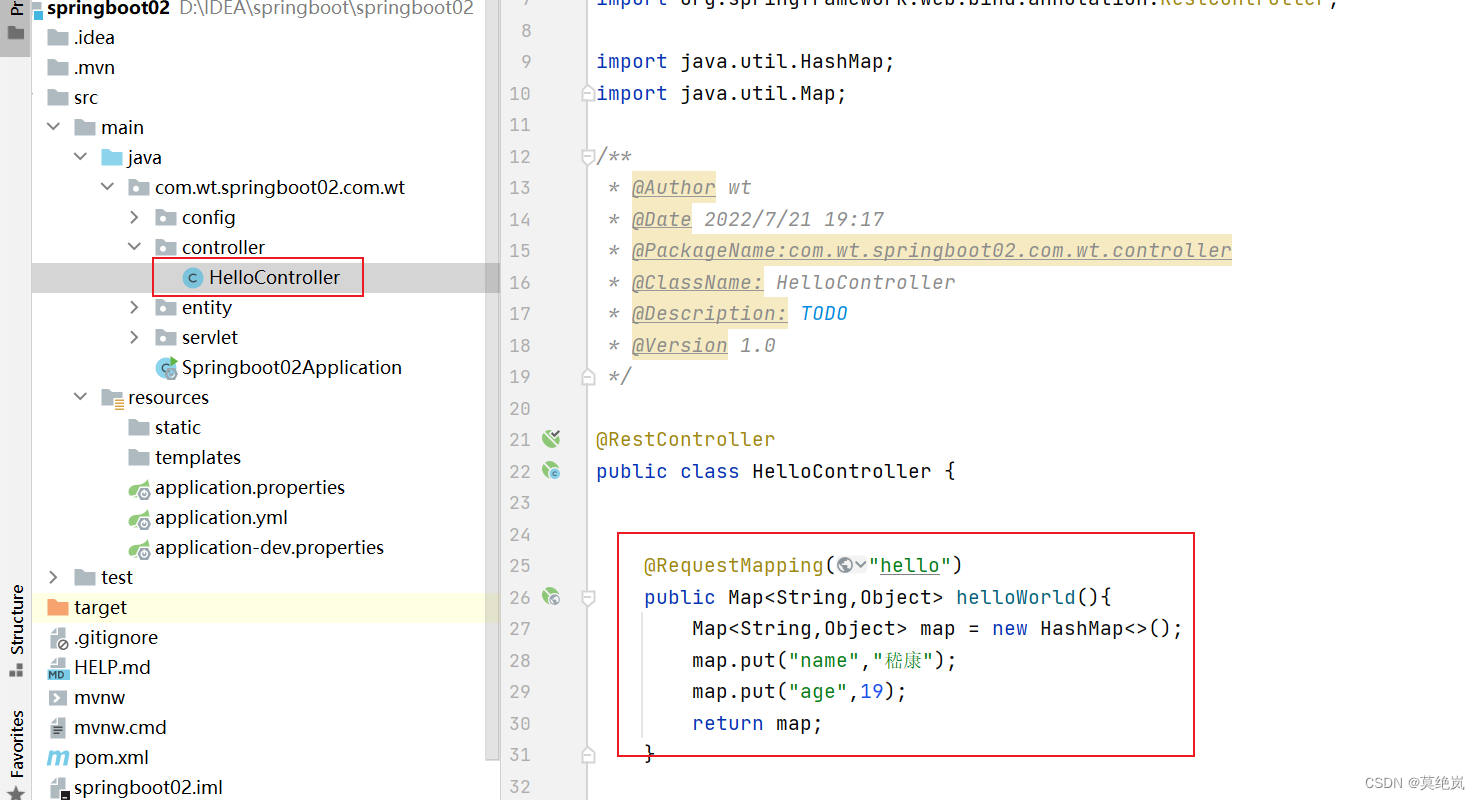
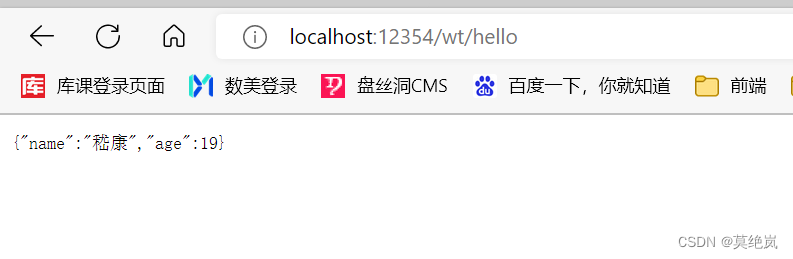
1.介绍springboot中pom文件
- <?xml version="1.0" encoding="UTF-8"?>
- <project xmlns="http://maven.apache.org/POM/4.0.0" xmlns:xsi="http://www.w3.org/2001/XMLSchema-instance"
- xsi:schemaLocation="http://maven.apache.org/POM/4.0.0 https://maven.apache.org/xsd/maven-4.0.0.xsd">
- <modelVersion>4.0.0</modelVersion>
- <!--parent: 继承
- 如果你的maven项目想成为springboot工程必须继承SpringBoot父依赖
- -->
- <parent>
- <groupId>org.springframework.boot</groupId>
- <artifactId>spring-boot-starter-parent</artifactId>
- <version>2.3.12.RELEASE</version>
- <relativePath/> <!-- lookup parent from repository -->
- </parent>
- <groupId>com.ykq</groupId>
- <artifactId>qy151-springboot</artifactId>
- <version>0.0.1-SNAPSHOT</version>
- <name>qy151-springboot</name>
- <description>Demo project for Spring Boot</description>
- <properties>
- <java.version>1.8</java.version>
- </properties>
- <dependencies>
- <!--web的启动依赖 把spring中常见的jar都集成到该依赖中,集成了springmvc的启动配置类 -->
- <dependency>
- <groupId>org.springframework.boot</groupId>
- <artifactId>spring-boot-starter-web</artifactId>
- </dependency>
-
- <dependency>
- <groupId>org.projectlombok</groupId>
- <artifactId>lombok</artifactId>
- <optional>true</optional>
- </dependency>
- <dependency>
- <groupId>org.springframework.boot</groupId>
- <artifactId>spring-boot-starter-test</artifactId>
- <scope>test</scope>
- </dependency>
- </dependencies>
-
- <build>
- <plugins>
- <plugin>
- <groupId>org.springframework.boot</groupId>
- <artifactId>spring-boot-maven-plugin</artifactId>
- <configuration>
- <excludes>
- <exclude>
- <groupId>org.projectlombok</groupId>
- <artifactId>lombok</artifactId>
- </exclude>
- </excludes>
- </configuration>
- </plugin>
- </plugins>
- </build>
-
- </project>


默认springboot扫描的包为主启动类所在的包以及子包。
2.springboot的配置文件
有两种格式的配置文件:
第一种: properties属性文件
# 修改springboot中tomcat端口号. server.port=8888第二种: yml文件
server:
  port: 9090
不管是哪种,他们的名字必须以application开始。
如果两个配置文件同时存在,而且有些内容一样。按照properties的优先级高。如果有些不一样,两个配置文件不一样的会合并在一起。

3.读取springboot配置文件中的内容
OSS文件上传
密钥和bucket名称等---密钥和bucket都写死在java代码中。如果后期修改密钥和bucket的值,你必须修改源码代码。 我们要写在配置文件。然后通过代码在读取配置文件中的密钥和bucket.
如何读取springboot配置文件的内容呢?
通过@PropertiesConfiguration或者@Value注解。
@PropertiesConfiguration该注解使用在类上。
(1) 创建实体类
- @Data
- @Component //该类对象的创建和销毁都有spring容器来管理
- @ConfigurationProperties(prefix = "student") //读取springboot中的配置内容
- public class Student {
- private String name;
- private Integer age;
- private String[] hobby;
- private Map<String,Object> map;
- }
(2) 给application.properties配置信息
- #配置数据
- student.name=jk
- student.age = 15
- student.hobby[0] = sing
- student.hobby[1] = swimming
- student.map.claszz = aaa
- student.map.stusex = f
(3)读取配置内容
- package com.wt.springboot02.com.wt.controller;
-
- import com.wt.springboot02.com.wt.entity.Student;
- import org.springframework.beans.factory.annotation.Autowired;
- import org.springframework.beans.factory.annotation.Value;
- import org.springframework.web.bind.annotation.RequestMapping;
- import org.springframework.web.bind.annotation.RestController;
-
- import java.util.HashMap;
- import java.util.Map;
-
- /**
- * @Author wt
- * @Date 2022/7/21 19:17
- * @PackageName:com.wt.springboot02.com.wt.controller
- * @ClassName: HelloController
- * @Description: TODO
- * @Version 1.0
- */
-
- @RestController
- public class HelloController {
-
- //通过value获取指定内容,但只能获取基本数据类型和String
- @Value("${student.name}")
- private String stuName;
-
- @Autowired
- private Student student;
-
- @RequestMapping("stu")
- public Student fun(){
- System.out.println(stuName);
- return student;
- }
- }

4.profiles文件的介绍
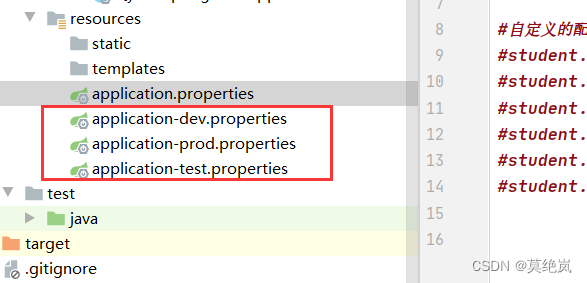
思考: 我们在实际开发中,环境有哪些?
开发环境---->测试环境---->线上环境 由于环境的不同,那么就会有不同的配置内容。
难道我们不断的修改配置内容。----不会
实际工作中,针对不同的环境配置不同的配置文件,然后再总的配置文件中激活相应的配置文件。

5.Springboot注册web三大组件
什么是web的三个组件?
Servlet和Filter以及Linstener监听器。
为什么要注册这三个组件呢?
因为后面springboot有可能要集成第三方框架,而第三方框架的底层可能就依赖于过滤器或者servlet.
如何注册呢?
思考: 早期:
<1>Servlet类
<2>注册到Tomcat容器web.xml
(1)Servlet类
早期注册
<servlet>
<servlet-name></servlet-name>
<servlet-class>Servlet类</servlet-class>
</servlet>
<servlet-mapping>
<servlet-name></servlet-name>
</url-parterrn>/</url-parterrn>
</servlet-mapping>
现在:都没有web.xml
创建一个配置类:

- package com.wt.springboot02.com.wt.config;
-
- import com.wt.springboot02.com.wt.servlet.MyFilter;
- import com.wt.springboot02.com.wt.servlet.MyServlet;
- import org.springframework.boot.web.servlet.FilterRegistrationBean;
- import org.springframework.boot.web.servlet.ServletRegistrationBean;
- import org.springframework.context.annotation.Bean;
- import org.springframework.context.annotation.Configuration;
-
- import javax.servlet.Filter;
- import javax.servlet.Servlet;
-
- /**
- * @Author wt
- * @Date 2022/7/21 20:34
- * @PackageName:com.wt.springboot02.com.wt.config
- * @ClassName: MyConfig
- * @Description: TODO
- * @Version 1.0
- */
-
- @Configuration //该类为配置类xml文件
- public class MyConfig {
- @Bean //理解为配置文件中的Bean
- public ServletRegistrationBean<Servlet> registrationBean(){
- //创建一个Servlet注册器.
- ServletRegistrationBean<Servlet> registrationBean = new ServletRegistrationBean<>();
- registrationBean.setName("myServlet");
- registrationBean.setServlet(new MyServlet());
- registrationBean.addUrlMappings("/my");
- return registrationBean;
- }
- }
(2) 过滤器
以前如何注册过滤器: web.xml
<filter>
<filter-name></filter-name>
<filter-class></filter-class>
</filter>
<filter-mapping>
<filter-name></filter-name>
<url-partter></url-partter>
</filter-mapping>

- package com.wt.springboot02.com.wt.config;
-
- import com.wt.springboot02.com.wt.servlet.MyFilter;
- import com.wt.springboot02.com.wt.servlet.MyServlet;
- import org.springframework.boot.web.servlet.FilterRegistrationBean;
- import org.springframework.boot.web.servlet.ServletRegistrationBean;
- import org.springframework.context.annotation.Bean;
- import org.springframework.context.annotation.Configuration;
-
- import javax.servlet.Filter;
- import javax.servlet.Servlet;
-
-
- @Configuration //该类为配置类xml文件
- public class MyConfig {
-
- @Bean
- public FilterRegistrationBean<Filter> filterFilterRegistrationBean(){
- FilterRegistrationBean<Filter> filterFilterRegistrationBean = new FilterRegistrationBean<>();
- filterFilterRegistrationBean.setName("myfilter");
- filterFilterRegistrationBean.setFilter(new MyFilter());
- filterFilterRegistrationBean.addUrlPatterns("/*");
- return filterFilterRegistrationBean;
- }
-
- }
三.Springboot的整合
1.springboot自动装配原理
什么是自动装配?
无需手动加载某些配置,而由Springboot自动加载进来。
譬如: 自己加载DispatcherServlet.
如何完成自动装配?
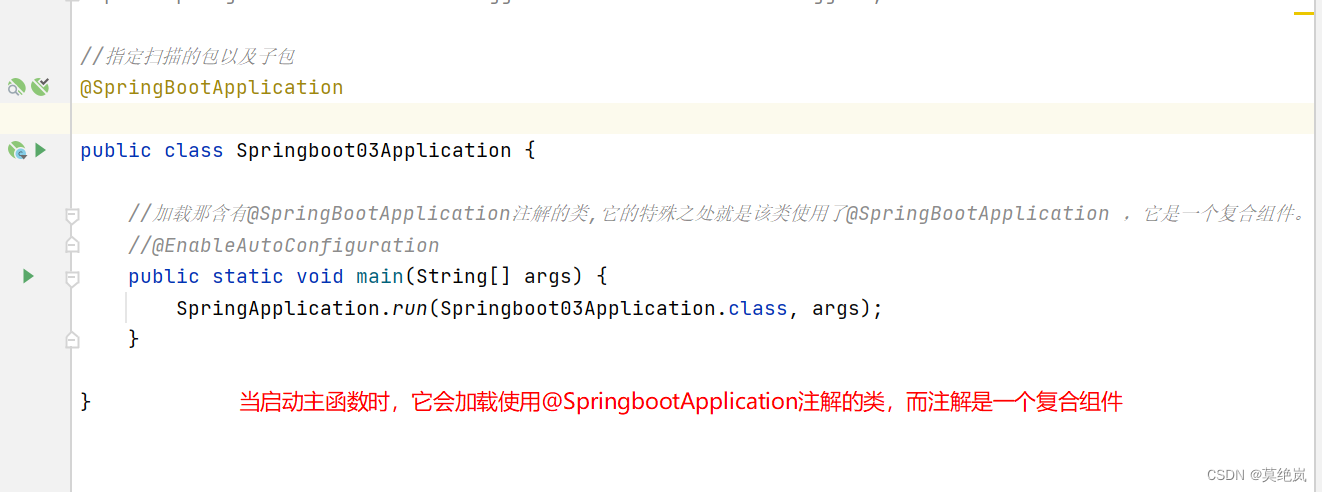
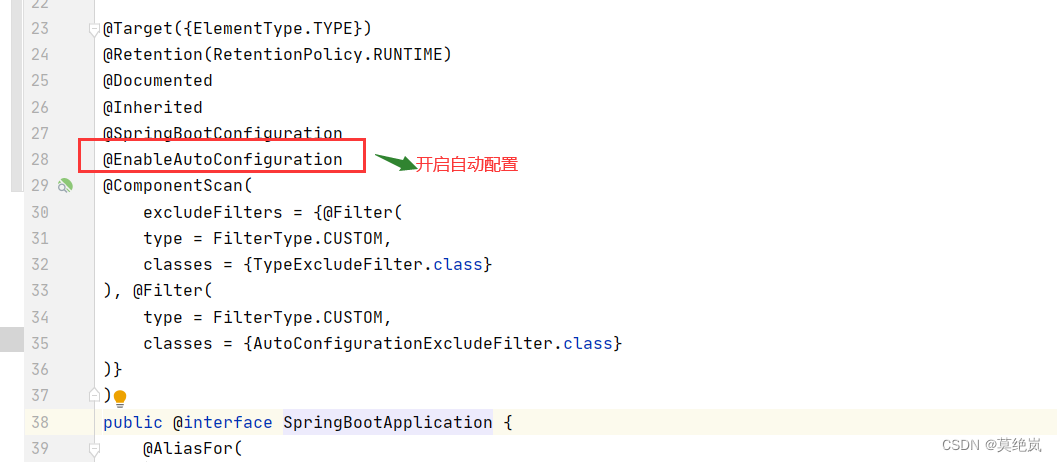
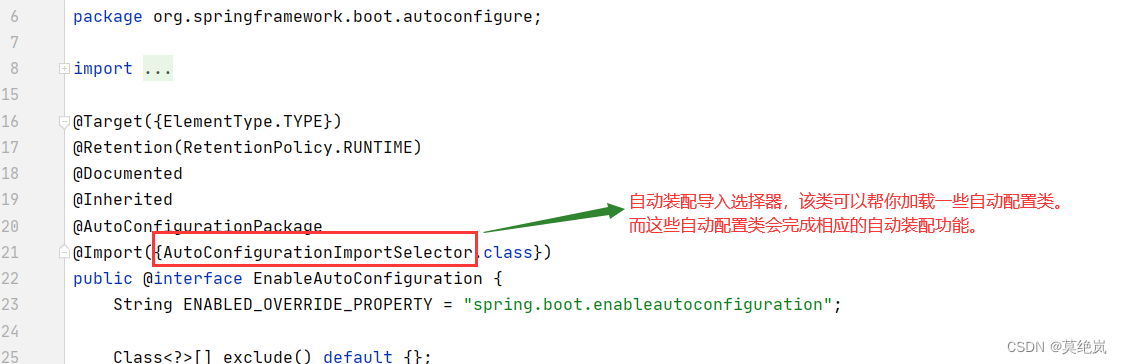

为什么总的自动装配类由127个。因为这些自动装配类都在某个文件中写死了。

看DispatcherServlet如何完成自动装配。

2.springboot整合数据源
a.默认数据配置
数据源: 指的是数据源。即是: springboot框架连接数据库。
(1)引入依赖
- <!--加入数据源的启动依赖: springboot启动时会加载对应的自动装配类。-->
- <dependency>
- <groupId>org.springframework.boot</groupId>
- <artifactId>spring-boot-starter-jdbc</artifactId>
- </dependency>
- <dependency>
- <groupId>mysql</groupId>
- <artifactId>mysql-connector-java</artifactId>
- </dependency>
(2)配置数据源信息---application.properties
- # 配置数据源
- spring.datasource.driver-class-name=com.mysql.cj.jdbc.Driver
- spring.datasource.url=jdbc:mysql://localhost:3306/mybatis?serverTimezone=Asia/Shanghai
- spring.datasource.username=root
- spring.datasource.password=root
(3)测试
- package com.wt.springboot03;
-
- import com.github.pagehelper.PageHelper;
- import com.github.pagehelper.PageInfo;
- import com.wt.springboot03.dao.DeptMapper;
- import com.wt.springboot03.entity.Dept;
- import org.apache.ibatis.annotations.Mapper;
- import org.junit.jupiter.api.Test;
- import org.springframework.beans.factory.annotation.Autowired;
- import org.springframework.boot.test.context.SpringBootTest;
-
- import javax.sql.DataSource;
- import java.sql.SQLException;
- import java.util.List;
-
- //添加主体类注解
- @SpringBootTest(classes = Springboot03Application.class)
-
- class Springboot03ApplicationTests {
-
- @Autowired
- private DataSource dataSource;
-
- @Test
- public void test01() throws SQLException {
- //System.out.println(dataSource);
- System.out.println(dataSource.getConnection());
- }
-
-
-
-
-
- }
上面默认这个数据源使用的连接池Hikari。如果不想使用默认的连接池,我们可以引入第三方的连接池。
b.集成druid数据源
(1)引入依赖
- <!--引入数据库连接池druid-->
- <dependency>
- <groupId>com.alibaba</groupId>
- <artifactId>druid-spring-boot-starter</artifactId>
- <version>1.2.8</version>
- </dependency>
(2)配置数据源信息---application.properties
- spring.datasource.druid.url=jdbc:mysql://localhost:3306/mydb?serverTimezone=Asia/Shanghai
- spring.datasource.druid.driver-class-name=com.mysql.cj.jdbc.Driver
- spring.datasource.druid.username=root
- spring.datasource.druid.password=root
- #初始化的个数
- spring.datasource.druid.initial-size=5
- # 最大活跃数
- spring.datasource.druid.max-active=10
- # 最大等待时间
- spring.datasource.druid.max-wait=3000
- # 最小的闲置个数
- spring.datasource.druid.min-idle=5
(3)测试
- @SpringBootTest(classes = Springboot01Lx02Application.class)
- class Springboot01Lx02ApplicationTests {
-
-
- @Autowired
- private DataSource dataSource;
-
- @Test
- public void test01() throws SQLException {
- //验证了springboot可以帮你完成数据源的自动装配功能
- System.out.println(dataSource.getConnection());
- }
-
- }
3.springboot整合mybatis
(1)引入mybatis启动依赖类
- <!--引入mybatis的启动依赖-->
- <dependency>
- <groupId>org.mybatis.spring.boot</groupId>
- <artifactId>mybatis-spring-boot-starter</artifactId>
- <version>2.2.2</version>
- </dependency>
(2) 修改配置文件
在application文件中进行配置
- #指定映射文件的路径
- mybatis.mapper-locations=classpath:mapper/*.xml


(4)测试
- @RestController
- public class DeptController {
-
-
- @GetMapping("hello")
- public void fun(){
- System.out.println("111");
- }
-
- public CommonResult login(String name, String password){
- return new CommonResult(2000,"登录成功",null);
- }
-
-
-
-
- }
4.springboot整合PageHelper分页插件
(1)引入依赖
- <!--pageHelper的启动依赖 自动装配拦截器-->
- <dependency>
- <groupId>com.github.pagehelper</groupId>
- <artifactId>pagehelper-spring-boot-starter</artifactId>
- <version>1.4.2</version>
- </dependency>
(2)测试:
- @Test
- public void test03(){
- PageHelper.startPage(1,3);
- List<Dept> all = deptMapper.findAll();
- PageInfo<Dept> pageInfo = new PageInfo<>(all);
- System.out.println(pageInfo);
- System.out.println("当前页码"+pageInfo.getPageNum());
- System.out.println("总页码:"+pageInfo.getPages());
- System.out.println("总条数:"+pageInfo.getTotal());
- System.out.println("当前页码:"+pageInfo.getList());
-
- }
5.springboot整合swagger2
什么是swagger2
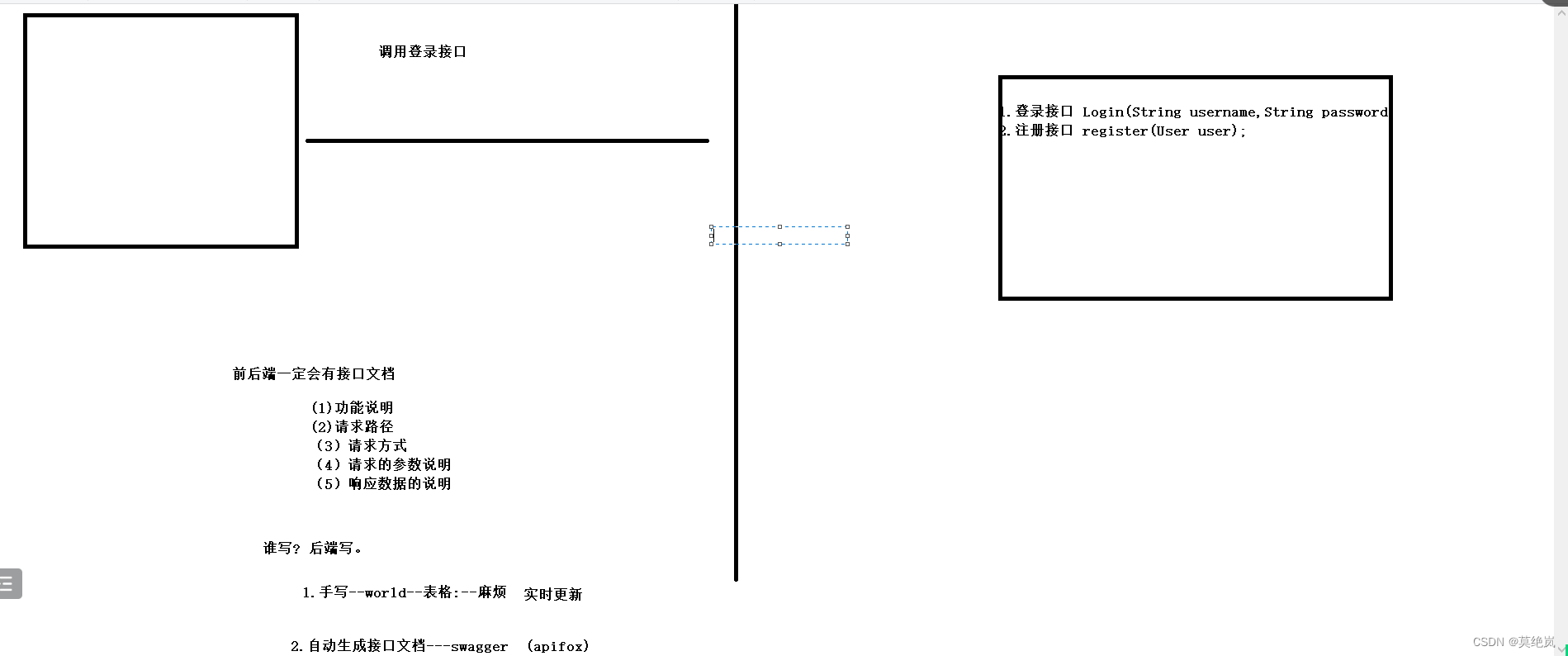
它是一个接口文档----用来前后端分离的一款文档。
(1)引入swagger依赖
-
- <dependency>
- <groupId>com.spring4all</groupId>
- <artifactId>swagger-spring-boot-starter</artifactId>
- <version>1.9.1.RELEASE</version>
- </dependency>
- <dependency>
- <groupId>com.github.xiaoymin</groupId>
- <artifactId>swagger-bootstrap-ui</artifactId>
- <version>1.7.8</version>
- </dependency>
(2)创建swagger配置类
- package com.wt.springboot03.config;
-
-
- import io.swagger.annotations.Api;
- import org.springframework.context.annotation.Bean;
- import org.springframework.context.annotation.Configuration;
- import springfox.documentation.builders.RequestHandlerSelectors;
- import springfox.documentation.service.ApiInfo;
- import springfox.documentation.service.Contact;
- import springfox.documentation.service.VendorExtension;
- import springfox.documentation.spi.DocumentationType;
- import springfox.documentation.spring.web.plugins.Docket;
-
- import java.util.ArrayList;
-
- /**
- * @Author wt
- * @Date 2022/7/22 19:52
- * @PackageName:com.wt.springboot03.config
- * @ClassName: MySwagger
- * @Description: TODO
- * @Version 1.0
- */
- @Configuration
- public class MySwagger {
-
-
- @Bean //swagger中所有的功能都封装再Docket类中
- public Docket docket(){
- Docket docket = new Docket(DocumentationType.SWAGGER_2)
- .apiInfo(apiInfo())
- .select()
- .apis(RequestHandlerSelectors.basePackage("com.wt.springboot03.controller")) //为指定包下的路径生成接口
- .build();
- return docket;
- }
-
- //定义自己的接口文档信息
- private ApiInfo apiInfo(){
- Contact DEFAULT_CONTACT = new Contact("", "", "");
-
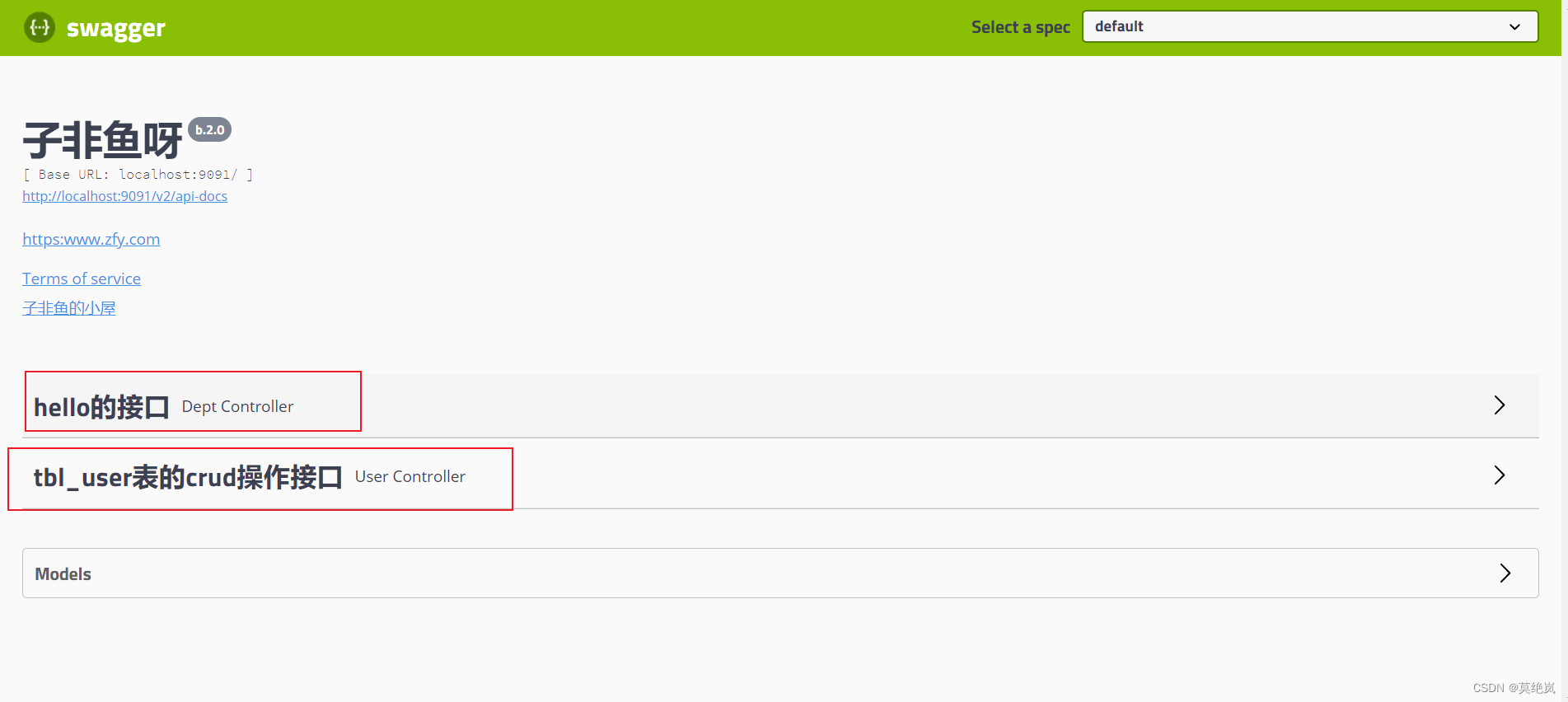
- ApiInfo apiInfo = new ApiInfo("子非鱼呀", "https:www.zfy.com", "b.2.0", "urn:tos",
- DEFAULT_CONTACT, "子非鱼的小屋", "http:www.baidu.com", new ArrayList<VendorExtension>());
- return apiInfo;
- }
- }
(3)开启swagger注解

(4)使用swagger注解
@Api 接口类的注解---接口类上 tag属性
@ApiOperation 接口方法的注解---接口方法上 value:
@ApiImplicitParams( 接口参数的说明
{
ApiImplicitParam() //单个参数的说明
}
)@ApiModel---- 实体类接口注解
@ApiModelProperty---->实体类属性的说明
 实体返回类上的注解

(5)访问
第一种: http://localhost:8080/swagger-ui.html
第二种: http://localhost:8080/doc.html

(6) 使用springboot-mybatis整合进行简单的crud操作
- package com.wt.springboot03.controller;
-
- import com.github.pagehelper.PageHelper;
- import com.github.pagehelper.PageInfo;
- import com.wt.springboot03.dao.DeptMapper;
- import com.wt.springboot03.dao.UserMapper;
- import com.wt.springboot03.entity.Dept;
- import com.wt.springboot03.entity.User;
- import com.wt.springboot03.service.UserService;
- import com.wt.springboot03.util.CommonResult;
- import io.swagger.annotations.Api;
- import io.swagger.annotations.ApiImplicitParam;
- import io.swagger.annotations.ApiImplicitParams;
- import io.swagger.annotations.ApiOperation;
- import org.springframework.beans.factory.annotation.Autowired;
- import org.springframework.beans.factory.annotation.Value;
- import org.springframework.web.bind.annotation.GetMapping;
- import org.springframework.web.bind.annotation.RequestMapping;
- import org.springframework.web.bind.annotation.RestController;
-
- import java.util.List;
-
- /**
- * @Author wt
- * @Date 2022/7/22 21:00
- * @PackageName:com.wt.springboot03.controller
- * @ClassName: UserController
- * @Description: TODO
- * @Version 1.0
- */
- @RestController
- @Api(tags = "tbl_user表的crud操作接口") //类api注解
- public class UserController {
-
- @Autowired
- private UserMapper userMapper;
-
-
- //查询所有
- @GetMapping("findAll")
- @ApiOperation(value = "查询所有")
- public CommonResult findAll(){
- PageHelper.startPage(1,3);
- List<User> all = userMapper.findAll();
- PageInfo<User> pageInfo = new PageInfo<>(all);
- if (all!=null){
- return new CommonResult(2000,"查询成功",pageInfo);
- }
- return new CommonResult(5000,"查询失败",null);
- }
- //添加
- @GetMapping("insert")
- @ApiOperation(value = "添加一条数据")
- @ApiImplicitParams(
- {
- @ApiImplicitParam(value = "添加新的账号",name = "username",required = true),
- @ApiImplicitParam(value = "添加密码",name = "password",required = true)
- }
- )
- public CommonResult insert(String username,String password){
- int i = userMapper.insertUser(username,password);
- if (i>0){
- return new CommonResult(2000,"添加成功",null);
- }
- return new CommonResult(5000,"添加失败",null);
- }
- //修改
- @GetMapping("update")
- @ApiOperation("修改接口")
- @ApiImplicitParams(
- {
- @ApiImplicitParam(value = "要修改的数据id",name = "id",required = true),
- @ApiImplicitParam(value = "修改数据username",name = "username",required = true),
- @ApiImplicitParam(value = "要修改数据password",name = "password",required = true)
- }
- )
- public CommonResult update(Integer id,String username,String password){
- int i = userMapper.updateUser(id,username,password);
- if (i>0){
- return new CommonResult(2000,"修改成功",null);
- }
- return new CommonResult(5000,"修改失败",null);
- }
- @GetMapping("delete")
- @ApiOperation("删除接口,根据id删除单条数据")
- @ApiImplicitParam(value = "指定数据id",name = "id",required = true)
- //删除
- public CommonResult delete(Integer id){
- int i = userMapper.deleteUser(id);
- if (i>0){
- return new CommonResult(2000,"删除成功",null);
- }
- return new CommonResult(5000,"删除失败",null);
- }
- }



