
热门标签
热门文章
- 1华为云云耀云服务器L实例评测|Python Selenium加Chrome Driver构建UI自动化测试实践_华为浏览器driver
- 2使用Flutter的image_picker插件实现设备的相册的访问和拍照
- 3[点云学习] 一、点云相关知识了解
- 4HarmonyOS云开发基础认证【最新题库 满分答案】
- 5aigc修复美颜学习笔记
- 6Java 算法篇-深入了解单链表的反转(实现:用 5 种方式来具体实现)
- 7华为 ensp SSL VPN 史诗级配置
- 8如何解决大模型的「幻觉」问题
- 9【动态规划】【广度优先搜索】LeetCode:2617 网格图中最少访问的格子数
- 10视觉机械臂自主抓取全流程_机械臂视觉抓取
当前位置: article > 正文
【CV学习笔记】tensorrt加速篇centernet_trt加速
作者:程序自动化专家 | 2024-02-03 18:46:18
赞
踩
trt加速
1、前言
在学习过程中发现,基于anchor base的模型十分常见,如yolov系列,但其实基于anchor frre的模型也有很多,效果也不错,如yolox、centerner等。本文主要介绍centernet的后处理方法方式,对比之前的代码,并在cpp和python中进行部分优化了,在python中使用tensorrt推理,在cpp中使用tensorr推理,并在cpu中和gpu中进行了后处理。
欢迎正在学习或者想学的CV的同学进群一起讨论与学习,v:Rex1586662742,q群:468713665
centernet学习地址:centertnet
个人学习tensorrt代码: https://github.com/Rex-LK/tensorrt_learning
2、centeret基本结构
网络结构图见原cententrt链接
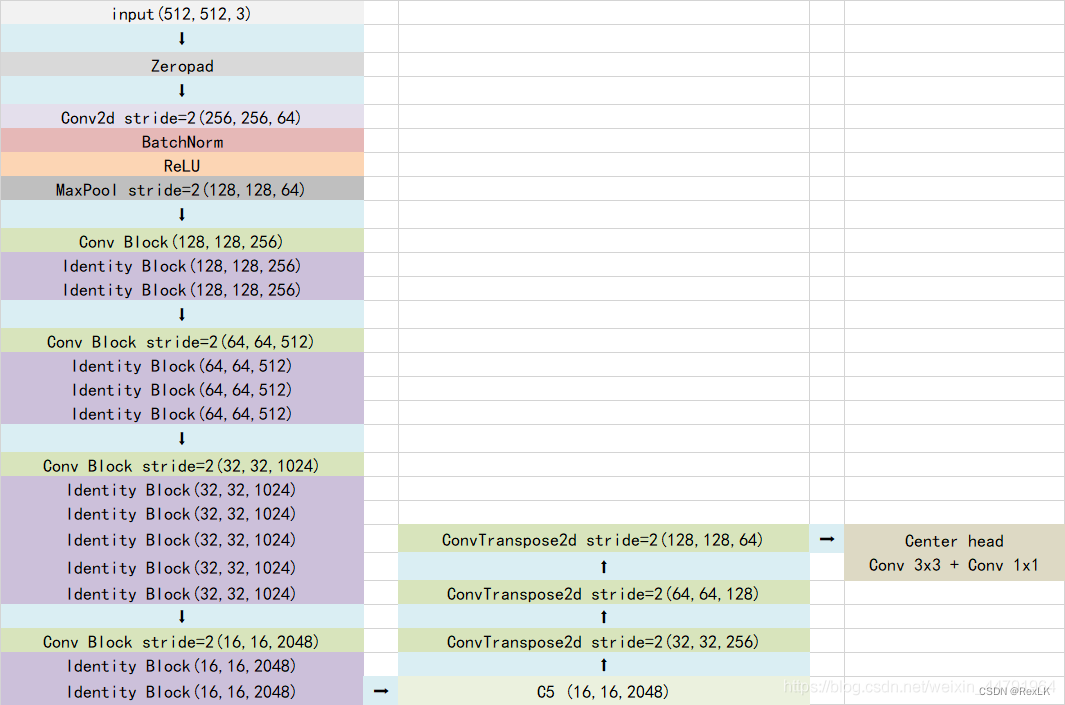
从图中可以看出,经过一系列的特征提取,最终得到了一个128x128x64的高分辨率特征图,网络会对这个特征层进行三个卷积,其作用分别是:
1、热力图hms,(128,128,num_classes),表示将图片分成128*128个点,每一个点表示物体是否存在,及其类别
2、中心点xys,(128,128,2),表示每个热力点的偏移量
3、框高whs,(128,128,2),表示每个热力图的宽高
在后处理中,上面三个部分都是需要的,但在原项目中,直接导出onnx是有问题的,关于centernet导出onnx的方法可以参考,https://blog.csdn.net/weixin_42108183/article/details/124969680。
cpp编译,cmake 使用绝对路径,makefile使用基于workspace的相对路径
int main(){
    //cmake和make是不同的路径
    if(!BaiscTools::build_model("/home/rex/Desktop/tensorrt_learning/trt_cpp/workspace/centernet",1)){
        return -1;
    }
    demoInfer demo;
    string demo_name = "centernet_gpu";
    demo.do_infer(demo_name);
    return 0;
}
- 1
- 2
- 3
- 4
- 5
- 6
- 7
- 8
- 9
- 10
3、python-trt加速
3.1 build_engine
在导出onnx后,可以在python下进行engine的转化, 在trt_py/buildengine/batch_1/build_engine_b1.py中可以进行onnx转tensorrt模型
3.3、预处理、推理
在trt_py/centernet/center
3.4、python后处理
后处理的方式有很多,我是先熟悉了原仓库的python代码之后,然后写了cpp的后处理代码,然后觉得python的后处理代码有部分可以优化的地方,首先看看源代码中的后处理方式
def decode_bbox(pred_hms, pred_whs, pred_offsets, confidence, cuda):
    b, c, output_h, output_w = pred_hms.shape
    detects = []
    for batch in range(b):
        heat_map    = pred_hms[batch].permute(1, 2, 0).view([-1, c])
        pred_wh     = pred_whs[batch].permute(1, 2, 0).view([-1, 2])
        pred_offset = pred_offsets[batch].permute(1, 2, 0).view([-1, 2])
        yv, xv      = torch.meshgrid(torch.arange(0, output_h), torch.arange(0, output_w))
        xv, yv      = xv.flatten().float(), yv.flatten().float()
        if cuda:
            xv      = xv.cuda()
            yv      = yv.cuda()
        class_conf, class_pred  = torch.max(heat_map, dim = -1)
        mask                    = class_conf > confidence
        print("mask.shape:  ",mask.shape)
        pred_wh_mask        = pred_wh[mask]
        pred_offset_mask    = pred_offset[mask]
        if len(pred_wh_mask) == 0:
            detects.append([])
            continue
        xv_mask = torch.unsqueeze(xv[mask] + pred_offset_mask[..., 0], -1)
        yv_mask = torch.unsqueeze(yv[mask] + pred_offset_mask[..., 1], -1)
        half_w, half_h = pred_wh_mask[..., 0:1] / 2, pred_wh_mask[..., 1:2] / 2
        bboxes = torch.cat([xv_mask - half_w, yv_mask - half_h, xv_mask + half_w, yv_mask + half_h], dim=1)
        bboxes[:, [0, 2]] /= output_w
        bboxes[:, [1, 3]] /= output_h
        detect = torch.cat([bboxes, torch.unsqueeze(class_conf[mask],-1), torch.unsqueeze(class_pred[mask],-1).float()], dim=-1)
        detects.append(detect)

    return detects
def postprocess(prediction, need_nms, image_shape, input_shape, letterbox_image, nms_thres=0.4):
    output = [None for _ in range(len(prediction))]

    for i, image_pred in enumerate(prediction):
        detections      = prediction[i]
        if len(detections) == 0:
            continue
        unique_labels   = detections[:, -1].cpu().unique()
        if detections.is_cuda:
            unique_labels = unique_labels.cuda()
            detections = detections.cuda()

        for c in unique_labels:

            detections_class = detections[detections[:, -1] == c]
            if need_nms:
                keep = nms(
                    detections_class[:, :4],
                    detections_class[:, 4],
                    nms_thres
                )
                max_detections = detections_class[keep]
            else:
                max_detections  = detections_class

            output[i] = max_detections if output[i] is None else torch.cat((output[i], max_detections))

        if output[i] is not None:
            output[i]           = output[i].cpu().numpy()
            box_xy, box_wh      = (output[i][:, 0:2] + output[i][:, 2:4])/2, output[i][:, 2:4] - output[i][:, 0:2]
            output[i][:, :4]    = centernet_correct_boxes(box_xy, box_wh, input_shape, image_shape, letterbox_image)
    return output

- 1
- 2
- 3
- 4
- 5
- 6
- 7
- 8
- 9
- 10
- 11
- 12
- 13
- 14
- 15
- 16
- 17
- 18
- 19
- 20
- 21
- 22
- 23
- 24
- 25
- 26
- 27
- 28
- 29
- 30
- 31
- 32
- 33
- 34
- 35
- 36
- 37
- 38
- 39
- 40
- 41
- 42
- 43
- 44
- 45
- 46
- 47
- 48
- 49
- 50
- 51
- 52
- 53
- 54
- 55
- 56
- 57
- 58
- 59
- 60
- 61
- 62
后来发现源代码的后处理方式需要花点时间才能了解清楚,可能没那么直观,后面就想着怎么优化或者用更加简洁一点的方式来进行centernet的后处理。从导出的onnx中可以看出,最终得到了输出 的维度为 (batch_size,128*128,24),在tensorrt推理下,最后得到的结果是一个一维的数组,因此只要将结果rehshape成对应的维度即可。可以看成现在有128*128 行 24列的矩阵,每一个点表示当前热力图的预测结果。每一行有24个值,前20个值为类别概率,后四个值代表whxy,现在要将里面满足条件的热力点拿出来。
    pred = torch.from_numpy(pred.reshape(batch_size, 128 * 128, 24))[0]
    pred_hms = pred[:, 0:20]
    pred_whs = pred[:, 20:22]
    pred_xys = pred[:, 22:]
- 1
- 2
- 3
- 4
首先阈值过滤,将得分小于设定值的直接过滤掉
    keep = pred_hms.max(-1).values > 0.3
    hms = pred_hms[keep]
    whs = pred_whs[keep]
    xys = pred_xys[keep]
- 1
- 2
- 3
- 4
现在已经拿到了满足阈值条件的热力点了,接着就是将这些点的原图尺寸恢复到原始尺寸,前面提到,这里的xy是相对热力点的偏移量,那么首先要计算满足条件的热力点在 128×128 这个二位矩阵中的坐标
    #labels为 1~128*128里面的位置索引
    scores, labels = torch.max(hms, 1)
    #idx表示 在128*128中满足条件的 点的索引
    idx = torch.nonzero(keep == True).squeeze()
    score = hms.argmax()
- 1
- 2
- 3
- 4
- 5
想了很久才明白这种方法,直到画了图才逐渐明白,如果要计算x,可以认为这128*128个点是上面这种排布方式,如果要计算y,则是下面这种方式,由此可以计算出热力点在128×128这个二位矩阵中的坐标点。
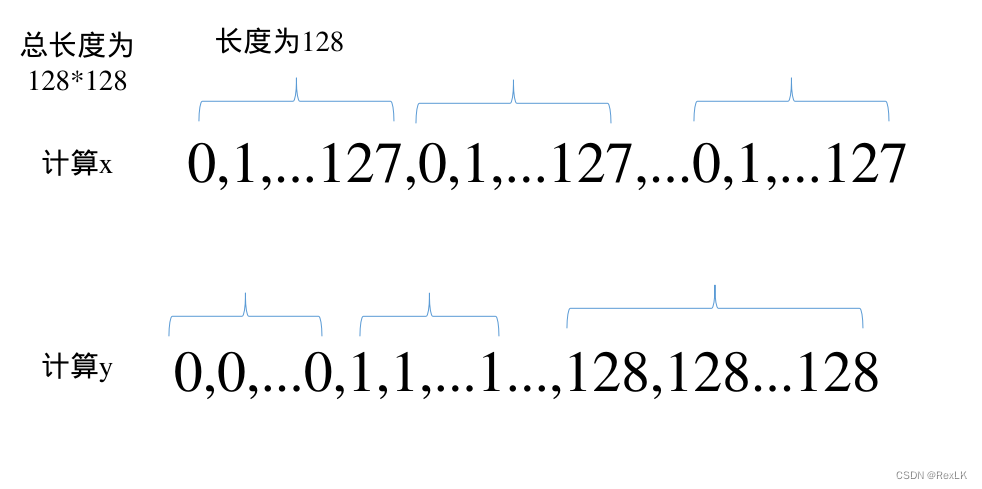
    #热力点坐标加上偏移量
    xys[:, 0] += idx % 128
    xys[:, 1] += idx / 128
    #缩放回原图尺寸,因为当前特征图大小为128*128 ,原图大小为 image_o_size[0]*image_o_size[0]
    left = (xys[:, 0] - whs[:, 0] / 2) * image_o_size[1] / 128
    top = (xys[:, 1] - whs[:, 1] / 2) * image_o_size[0] / 128
    right = (xys[:, 0] + whs[:, 0] / 2) * image_o_size[1] / 128
    bottom = (xys[:, 1] + whs[:, 1] / 2) * image_o_size[0] / 128
    bboxs = torch.stack((left, top, right, bottom), dim=1)
    #nms
    nms_keep = nms(bboxs, scores, iou_threshold=0.5)
    bboxs = bboxs[nms_keep]
- 1
- 2
- 3
- 4
- 5
- 6
- 7
- 8
- 9
- 10
- 11
- 12
看上去后处理方式确实简洁了很多,也方便移植到类似的模型上,同时也方便自己进行回顾。
3.5、cpp后处理
cpp后处理与Python的后处理十分相似,因为毕竟是按照cpp的后处理来写的python,下面是筛选出热力图的代码
 vector<bbox> boxes;
/预测结果指针
float* prob = output->cpu<float>();
//类别数量
 int num = 20;
 float *start = prob;
//总元素个数 128*128*24
 int count = output->count();
 for(int i=0;i<count;i+=24){
 //现在有128*128个点  就有128*128行,每行24个,前20个为类别,后四个为 w,h,x,y
 start = prob+i;
 //得分最高的点的类别
 int label = max_element(start,start+num) - start;
 //d得分
 float confidence = start[label];
 if(confidence<0.3)
 	continue;
float w = start[ num];
float h = start[num+1];
//热力点的坐标加上偏移量
float x = start[num+2] + (i/24)%128;
float y = start[num+3] + (i/24)/128;
//恢复到原图尺寸
float left   = (x - w * 0.5) /128 * img_h;
float top    = (y - h * 0.5) /128 * img_w;
float right  = (x + w * 0.5) /128 * img_h;
float bottom = (y + h * 0.5) /128 * img_w;
boxes.emplace_back(left, top, right, bottom, confidence, (float)label);
//接下来是nms
- 1
- 2
- 3
- 4
- 5
- 6
- 7
- 8
- 9
- 10
- 11
- 12
- 13
- 14
- 15
- 16
- 17
- 18
- 19
- 20
- 21
- 22
- 23
- 24
- 25
- 26
- 27
- 28
- 29
进一步的,现在把cpu解码放在gpu上,下面是解码的核函数
static __global__ void decode_kernel(
    float* predict,int im_h,int im_w,int num_bboxes, int num_classes, float confidence_threshold,
    float* invert_affine_matrix, float* parray, int max_objects, int NUM_BOX_ELEMENT
){
    int position = blockDim.x * blockIdx.x + threadIdx.x;
    if (position >= num_bboxes) return;
    // 每隔24个位置跳到下一行
    float* pitem     = predict + (4 + num_classes) * position;
    //pitem 前20个位置表示概率,后四个位置表示whxy
    int label = 0;
    //第一个位置的socre
    float* class_confidence = pitem;
    float confidence  = *class_confidence;
    //找到20个位置中最大的score和label
    for(int i = 1; i < num_classes; ++i, ++class_confidence){
        if(*class_confidence > confidence){
            confidence = *class_confidence;
            label      = i;
        }
    }

    if(confidence < confidence_threshold)
        return;

    int index = atomicAdd(parray, 1);
    if(index >= max_objects)
        return;
    float* pwhxy = pitem;
    float width      = *(pwhxy+20);
    float height     = *(pwhxy+21);
    //偏移量,还需要加上 当前热力点的坐标
    float cx         = *(pwhxy+22) + position%128;
    float cy         = *(pwhxy+23) + position/128;

    float left   = (cx - width * 0.5f) * im_h / 128;
    float top    = (cy - height * 0.5f) * im_w / 128;
    float right  = (cx + width * 0.5f) * im_h / 128;
    float bottom = (cy + height * 0.5f) * im_w / 128;

    // 第一个位置用来计数
    // left, top, right, bottom, confidence, class, keepflag
    float* pout_item = parray + 1 + index * NUM_BOX_ELEMENT;
    *pout_item++ = left;
    *pout_item++ = top;
    *pout_item++ = right;
    *pout_item++ = bottom;
    *pout_item++ = confidence;
    *pout_item++ = label;
    *pout_item++ = 1; // 1 = keep, 0 = ignore
}
- 1
- 2
- 3
- 4
- 5
- 6
- 7
- 8
- 9
- 10
- 11
- 12
- 13
- 14
- 15
- 16
- 17
- 18
- 19
- 20
- 21
- 22
- 23
- 24
- 25
- 26
- 27
- 28
- 29
- 30
- 31
- 32
- 33
- 34
- 35
- 36
- 37
- 38
- 39
- 40
- 41
- 42
- 43
- 44
- 45
- 46
- 47
- 48
- 49
- 50
4、总结
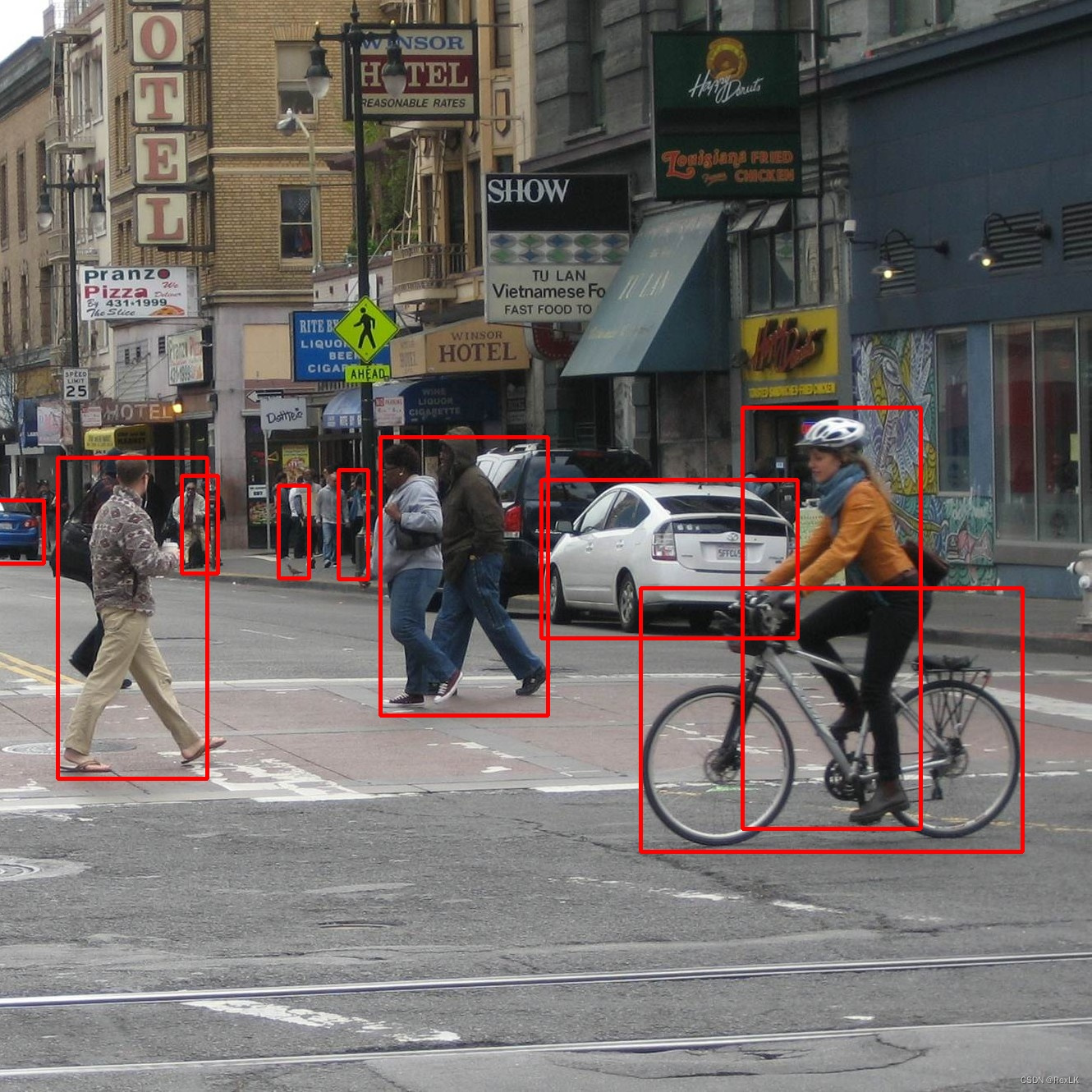
本次学习了centernet的后处理方式,并在python、cpu和gpu上进行了后处理,这种后处理方式只要弄清楚了一种,还是很方便的移植到其他模型的后处理上的。拿一张gup解码的效果图作为结尾把。
声明:本文内容由网友自发贡献,不代表【wpsshop博客】立场,版权归原作者所有,本站不承担相应法律责任。如您发现有侵权的内容,请联系我们。转载请注明出处:https://www.wpsshop.cn/article/detail/57647
推荐阅读
相关标签

