
- 1CURL post json 使用说明_curl post json请求
- 2头歌大数据——MapReduce 基础实战 答案 无解析_成绩统计头歌
- 3OpenHarmony/HarmonyOS中如何进行Http请求
- 4YOLOv8进行改进并训练自定义的数据集
- 5【Cisco Packet Tracer】验证IP数据包的分组与转发流程
- 6HC-05蓝牙模块--------手机与STM32通信(代码编写)(上位机配置)保姆级教程_蓝牙上位机开发
- 7【毕业季·进击的技术er】自己的选择,跪着也要走
- 8绩效考核-项目经理绩效考核指标_项目经理月度绩效考核指标
- 9算法精品讲解(2)——DP问题入门(适合零基础者,一看就会)
- 10在Spring Boot项目中连接SQL Server的几种方式_springboot连接sqlserver
SpringBoot基础流程_基于springboot框架的web软件系统的基本工作(业务)流程
赞
踩
Spring Boot是一个全新的Java软件开发框架,其设计目的是用来简化Spring项目的初始搭建以及开发过程,并为后面的Spring Cloud 微服务实践提供更加便利条件。该框架使用了特定的注解方式来进行配置,从而使开发人员不再需要大量的xml配置。不再需要大量的手动依赖管理。Spring Boot基于快速构建理念,通过约定大于配置,开箱即用的方式,希望能够在蓬勃发展的快速应用开发领域成为其领导者。
SpringBoot Web服务基本流程为:
- 数据库建表,建立DO
- MyBatis配置Dao层的Mapper类,配置对应的xml将sql与Dao进行映
- Service层建立需要控制的Model实体,调用Dao层的接口提供服务
- Controller层调用Service层提供的数据服务,必要的话创建VO仅返回给前端有限的信息
整体目录架构为:
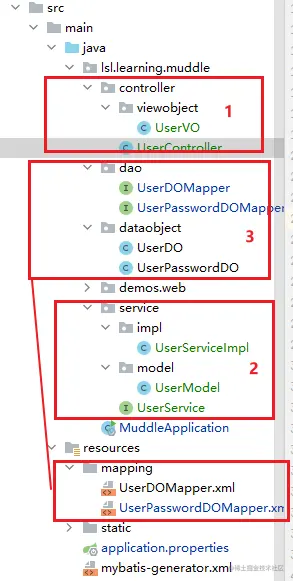
启动类
通常以项目名称为启动类,通过SpringApplication.run(Application.class, args); 方式启动SpringBoot应用程序
- import org.springframework.boot.SpringApplication;
- import org.springframework.boot.autoconfigure.SpringBootApplication;
-
- @SpringBootApplication
- public class MuddleApplication {
- public static void main(String[] args) {
- SpringApplication.run(MuddleApplication.class, args);
- }
- }
- 复制代码
SpringBoot会自动启动配置的相应的服务,如内置的Tomcat

配置文件
SpringBoot支持一系列组件的配置,只需要在resource目录下编写配置文件即可,默认的配置文件为application.properties
- # 应用服务 WEB 访问端口
- server.port=8080
- # MyBatis配置
- # 指定xml映射路径,对应为resources/mapping/*.xml
- mybatis.mapper-locations = classpath:mapping/*.xml
- # 数据库url
- spring.datasource.url=jdbc:mysql://localhost:3306/miaosha?characterEncoding=utf8&serverTimezone=UTC
- # 数据库用户名
- spring.datasource.username=root
- # 数据库密码
- spring.datasource.password=123456
- # 数据库驱动
- spring.datasource.driver-class-name=com.mysql.cj.jdbc.Driver
- # 使用druid
- spring.datasource.type=com.alibaba.druid.pool.DruidDataSource
- 复制代码

控制层Controller
使用@Controller标注,提供针对url的处理与返回的具体信息,调用服务层Service提供的服务接口
- 在主应用程序上添加
@RestController注解,添加控制层控制,表明提供Restful API服务 - 在控制层API的类上添加
@Controller注解,表明这是一个控制层的Bean,系统启动时会自动实例化该类 - 在控制层API(
@Controller)的方法上添加@RequestMapping注解,用于将请求与处理方法一一对应
- @SpringBootApplication
- @RestController
- public class MuddleApplication {
-
- @RequestMapping
- public String home(){
- return "hello";
- }
-
- public static void main(String[] args) {
- SpringApplication.run(MuddleApplication.class, args);
- }
-
- }
- 复制代码
访问指定路径会自动映射url并访问对应方法提供的service

针对具体的业务对应的url需要单独的Controller返回信息,控制层通过调用服务返回结果信息
- @Controller
- @RequestMapping("/user")
- public class UserController {
-
- @Autowired
- private UserService userService;
-
- @RequestMapping("/get")
- @ResponseBody
- public UserModel getUser(@RequestParam(name = "id") Integer id) {
- UserModel userModel = userService.getUserById(id);
- return userModel;
- }
- }
- 复制代码
之后访问指定url即可获取返回信息
- http://localhost:8080/user/get?id=1
- {"id":1,"name":"第一个用户","gender":1,"age":30,"telphone":"13521234859","registerMode":"byphone","thirdPartyId":"","encrptPassword":"ddlsjfjfjfjlf"}
- 复制代码
在更细一层的企业级代码中,通常不会直接返回给前端数据Model,Controller层还需要做一层VO,仅返回前端需要展示的数据即可

用户显示信息实体
- public class UserVO {
- private Integer id;
- private String name;
- private Byte gender;
- private Integer age;
- private String telphone;
- }
- 复制代码
对应的Controller做一层转换即可
- @Controller
- @RequestMapping("/user")
- public class UserController {
-
- @Autowired
- private UserService userService;
-
- @RequestMapping("/get")
- @ResponseBody
- public UserVO getUser(@RequestParam(name = "id") Integer id) {
- UserModel userModel = userService.getUserById(id);
- return convertFromModel(userModel);
- }
-
- private UserVO convertFromModel(UserModel userModel) {
- if (userModel == null) {
- return null;
- }
- UserVO userVO = new UserVO();
- BeanUtils.copyProperties(userModel, userVO);
- return userVO;
- }
- }
- 复制代码
服务层Service
使用@Service标注,服务层包含服务接口与其具体的实现impl,通常提供的就是对数据实体的增删查改服务
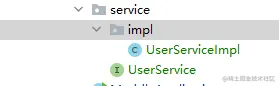
在服务接口中定义服务API
- public interface UserService {
- void getUserById(Integer id);
- }
- 复制代码
在对应的impl中实现服务接口
- @Service
- public class UserServiceImpl implements UserService {
-
- @Autowired
- private UserDOMapper userDOMapperl;
-
- @Override
- public void getUserById(Integer id) {
- UserDO userDo = userDOMapperl.selectByPrimaryKey(id);
-
- }
- }
- 复制代码
在企业级代码中,与数据库表对应的实体DO不能透传给前端,前端返回的信息实体应该单独定义,也就是与系统交互的Model,该Model可以是多个数据库表信息组合而成的数据模型
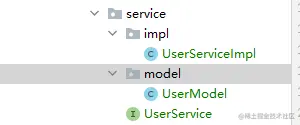
服务层操控的数据实体
- public class UserModel {
- private Integer id;
- private String name;
- private Byte gender;
- private Integer age;
- private String telphone;
- private String registerMode;
- private String thirdPartyId;
- private String encrptPassword;
- // getter与setter
- }
- 复制代码
该Model可以由多个DO组合而成,因此需要定义单独的方法将从数据库中查询出来的DO组装成Model并返回,此时用户服务接口为
- public interface UserService {
- UserModel getUserById(Integer id);
- }
- 复制代码
服务实现为
- @Service
- public class UserServiceImpl implements UserService {
-
- @Autowired
- private UserDOMapper userDOMapperl;
-
- @Autowired
- private UserPasswordDOMapper userPasswordDOMapper;
-
- /**
- * 返回用户信息
- *
- * @param id 用户id
- * @return 用户信息与密码
- */
- @Override
- public UserModel getUserById(Integer id) {
- UserDO userDo = userDOMapperl.selectByPrimaryKey(id);
- if (userDo == null) {
- return null;
- }
- // 获取用户密码
- UserPasswordDO userPasswordDO = userPasswordDOMapper.selectByUserId(userDo.getId());
- return convertFromDataObject(userDo, userPasswordDO);
- }
-
- private UserModel convertFromDataObject(UserDO userDO, UserPasswordDO userPasswordDO) {
- if (userDO == null) {
- return null;
- }
- UserModel userModel = new UserModel();
- BeanUtils.copyProperties(userDO, userModel);
- if (userPasswordDO != null) {
- userModel.setEncrptPassword(userPasswordDO.getEncrptPassword());
- }
- return userModel;
- }
- }
- 复制代码
该服务的API就可以交给Controller层使用
持久层DAO
配合持久层框架使用,如常用的MyBatis,以MyBatis为例
- 首先创建与数据库表对应的数据实体DO,
- 然后创建与每个DO对应的mapper类,提供增删查改,在DAO目录下存放
- 创建与每个mapper对应的xml文件,配置sql语句信息,在mapper目录下存放
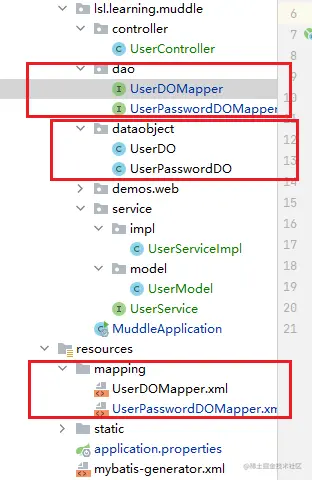
用户信息实体:
- public class UserPasswordDO {
-
- private Integer id;
- private String encrptPassword;
- private Integer userId;
- // getter与setter
- }
- 复制代码
对应的dao,dao中的方法与mapper.xml中的id相对应
- @Repository
- public interface UserPasswordDOMapper {
-
- int deleteByPrimaryKey(Integer id);
-
- int insert(UserPasswordDO row);
-
- int insertSelective(UserPasswordDO row);
-
- UserPasswordDO selectByPrimaryKey(Integer id);
- UserPasswordDO selectByUserId(Integer userId);
-
- int updateByPrimaryKeySelective(UserPasswordDO row);
-
- int updateByPrimaryKey(UserPasswordDO row);
- }
- 复制代码
对应的mapper.xml
- <?xml version="1.0" encoding="UTF-8"?>
- <!DOCTYPE mapper PUBLIC "-//mybatis.org//DTD Mapper 3.0//EN" "http://mybatis.org/dtd/mybatis-3-mapper.dtd">
- <mapper namespace="lsl.learning.muddle.dao.UserPasswordDOMapper">
- <resultMap id="BaseResultMap" type="lsl.learning.muddle.dataobject.UserPasswordDO">
- <id column="id" jdbcType="INTEGER" property="id" />
- <result column="encrpt_password" jdbcType="VARCHAR" property="encrptPassword" />
- <result column="user_id" jdbcType="INTEGER" property="userId" />
- </resultMap>
- <sql id="Base_Column_List">
- id, encrpt_password, user_id
- </sql>
- <select id="selectByPrimaryKey" parameterType="java.lang.Integer" resultMap="BaseResultMap">
- select
- <include refid="Base_Column_List" />
- from user_password
- where id = #{id,jdbcType=INTEGER}
- </select>
- <!--通过user id查询-->
- <select id="selectByUserId" parameterType="java.lang.Integer" resultMap="BaseResultMap">
- select
- <include refid="Base_Column_List" />
- from user_password
- where user_id = #{userId,jdbcType=INTEGER}
- </select>
-
- <delete id="deleteByPrimaryKey" parameterType="java.lang.Integer">
- delete from user_password
- where id = #{id,jdbcType=INTEGER}
- </delete>
- <insert id="insert" parameterType="lsl.learning.muddle.dataobject.UserPasswordDO">
- insert into user_password (id, encrpt_password, user_id
- )
- values (#{id,jdbcType=INTEGER}, #{encrptPassword,jdbcType=VARCHAR}, #{userId,jdbcType=INTEGER}
- )
- </insert>
- <insert id="insertSelective" parameterType="lsl.learning.muddle.dataobject.UserPasswordDO">
- insert into user_password
- <trim prefix="(" suffix=")" suffixOverrides=",">
- <if test="id != null">
- id,
- </if>
- <if test="encrptPassword != null">
- encrpt_password,
- </if>
- <if test="userId != null">
- user_id,
- </if>
- </trim>
- <trim prefix="values (" suffix=")" suffixOverrides=",">
- <if test="id != null">
- #{id,jdbcType=INTEGER},
- </if>
- <if test="encrptPassword != null">
- #{encrptPassword,jdbcType=VARCHAR},
- </if>
- <if test="userId != null">
- #{userId,jdbcType=INTEGER},
- </if>
- </trim>
- </insert>
- <update id="updateByPrimaryKeySelective" parameterType="lsl.learning.muddle.dataobject.UserPasswordDO">
- update user_password
- <set>
- <if test="encrptPassword != null">
- encrpt_password = #{encrptPassword,jdbcType=VARCHAR},
- </if>
- <if test="userId != null">
- user_id = #{userId,jdbcType=INTEGER},
- </if>
- </set>
- where id = #{id,jdbcType=INTEGER}
- </update>
- <update id="updateByPrimaryKey" parameterType="lsl.learning.muddle.dataobject.UserPasswordDO">
- update user_password
- set encrpt_password = #{encrptPassword,jdbcType=VARCHAR},
- user_id = #{userId,jdbcType=INTEGER}
- where id = #{id,jdbcType=INTEGER}
- </update>
- </mapper>



