
热门标签
热门文章
- 1简历上的项目经历怎么写?这3条原则不可忽视!
- 2Jmeter,如何从数组参数中取值_jmeter 怎么使用变量捕获组里的第一个值
- 3Python语言编写生成随机数(猜字游戏)_随机生成一个[1,10]的数字,然后从键盘上输入数字,判断该数字大、小、相同,如
- 4小米linux内核(Xiaomi_Kernel_OpenSource)编译指南_小米内核编译
- 5推荐一款Linux、数据库、Redis、MongoDB统一管理平台!_可以同时连接redis\mongodb\dm的工具
- 6【云原生-Harbor】企业级搭建镜像仓库Harbor最佳教程_harbor-online-installer-v2.6.1
- 72023年全国职业院校技能大赛高职组“区块链技术应用”赛项赛卷(6卷)解析_区块链技能竞赛
- 8堪称灾难级攻击的 UDP FLOOD洪水攻击,应该如何防护?
- 9通过Math函数生成随机数_利用math对象,搭配math.floor()来获取用户输入数字范围内的随机整数,其中对非数字
- 10MAC上安装软件报错Could not resolve host github.com且ping不通github.com_could not resolve com.github.azhon:appupdate:3.0.4
当前位置: article > 正文
(一)spring Boot菜鸟教程-搭建开发环境_springboot菜鸟教程
作者:数据流舞者 | 2024-02-03 18:39:05
赞
踩
springboot菜鸟教程
下载eclipse(不知道在哪下载就百度吧,在未来离不开搜索引擎的社会下,你即便学不会开发只是知道如何找资料_!)
下载JDK1.8
下载Maven最新版本
- 第一步:好的开始先规范自己
创建目录Development
将JDK和Maven安装或复制到改目录下 - 第二步:配置eclipse
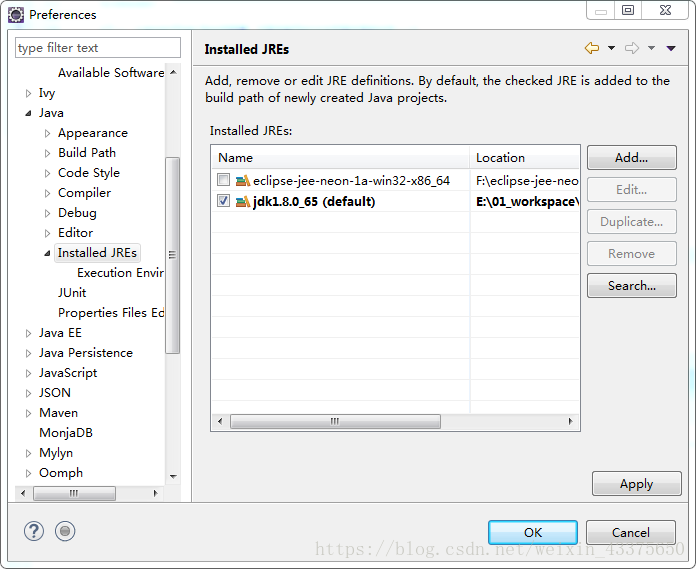
菜单->window->Preferences
配置好JDK - 第三步:配置Maven
修改apache-maven-x.x.x\conf目录下的settings.xml文件,增加
<localRepository>F://Development//repository</localRepository>
- 1
指向本地建立的目录,建议将repository目录建在Development下,将来可以直接复制走。
进入eclipse
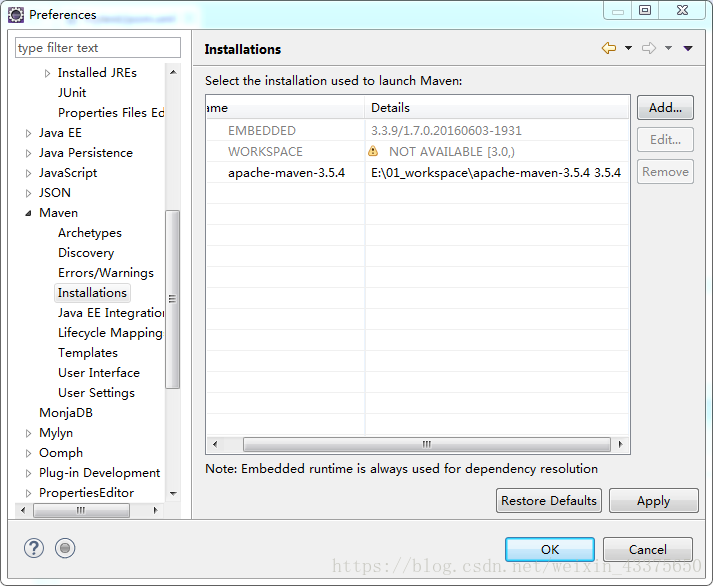
菜单->window->Preferences
add->选择Maven的目录
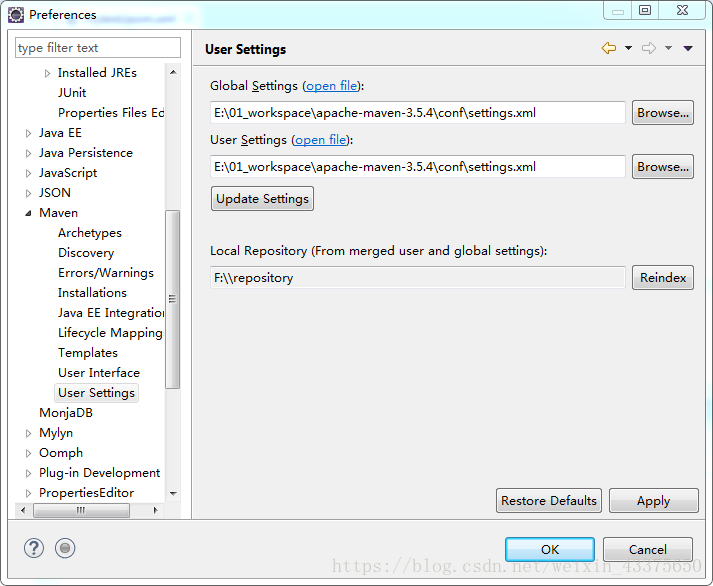
Global Settings->选择Maven目录下conf的settings.xml
User Settings同上
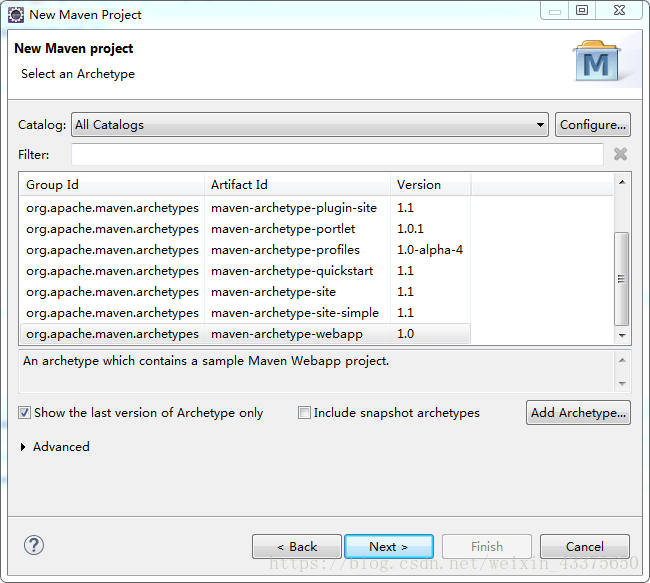
- 第四步:创建Maven Project
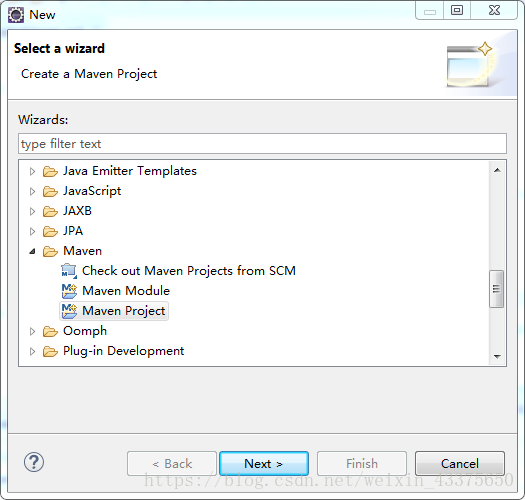
File->new->Other
Next->Next
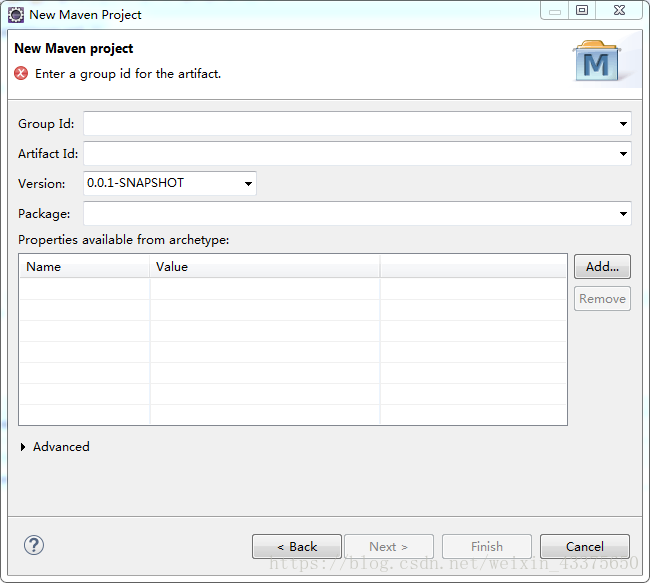
Group Id:项目的包名,命名规则公司名倒写+项目名
例com.compayname.projectname
artifactId:项目的名字,创建后的工程名
Package:选择jar
Finish->项目开始创建
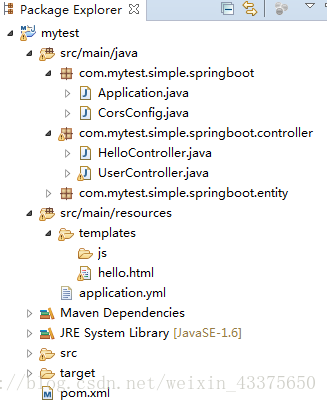
SpringBoot的目录结构是(没有自己创建)
src/main/java#java代码
src/main/test#junit测试代码
src/main/resource#所以资源和页面文件
src/main/resource/templates#页面文件
src/main/resource/static#静态页面文件 - 第五步:开始第一个例子
打开pom.xml文件
添加下面内容
<!-- 公共spring-boot配置,下面依赖jar文件不用在写版本号 -->
<parent>
 	<groupId>org.springframework.boot</groupId>
 	<artifactId>spring-boot-starter-parent</artifactId>
    <!-- spring boot 1.x最后稳定版本 -->
    <version>1.4.1.RELEASE</version>
    <!-- 表示父模块pom的相对路径,这里没有值 -->
    <relativePath /> </parent>

 <properties>
 	<project.build.sourceEncoding>UTF-8</project.build.sourceEncoding>>
 	<java.version>1.8</java.version>
    <!-- set thymeleaf version -->
 	<thymeleaf.version>3.0.0.RELEASE</thymeleaf.version>
 	<thymeleaf-layout-dialect.version>2.0.0</thymeleaf-layout-dialect.version>
 </properties>

 <dependencies>
 <!-- web -->
 <dependency>
 		<groupId>org.springframework.boot</groupId>
 		<artifactId>spring-boot-starter-web</artifactId>
 </dependency>
 <!-- 测试 -->
 <dependency>
 		<groupId>org.springframework.boot</groupId>
 		<artifactId>spring-boot-starter-test</artifactId>
 <!-- 只在test测试里面运行 -->
 <scope>test</scope>
 </dependency>
 <dependency>
 		<groupId>org.springframework.boot</groupId>
 		<artifactId>spring-boot-starter-thymeleaf</artifactId>
 </dependency>
 </dependencies>

- 1
- 2
- 3
- 4
- 5
- 6
- 7
- 8
- 9
- 10
- 11
- 12
- 13
- 14
- 15
- 16
- 17
- 18
- 19
- 20
- 21
- 22
- 23
- 24
- 25
- 26
- 27
- 28
- 29
- 30
- 31
- 32
- 33
- 34
- 35
创建包com.mytest.simple.springboot
创建类Application
package com.mytest.simple.springboot;

import org.springframework.boot.SpringApplication;
import org.springframework.boot.autoconfigure.SpringBootApplication;
/**
* Spring Boot 应用启动类
*
* @author Administrator
*
*/
// Spring Boot应用标识
@SpringBootApplication
public class Application {

	public static void main(String[] args) {
		// TODO Auto-generated method stub
		SpringApplication.run(Application.class, args);
	}
}
- 1
- 2
- 3
- 4
- 5
- 6
- 7
- 8
- 9
- 10
- 11
- 12
- 13
- 14
- 15
- 16
- 17
- 18
- 19
创建包com.mytest.simple.springboot.controller
创建类HelloController
package com.mytest.simple.springboot.controller;
import org.springframework.stereotype.Controller;
import org.springframework.ui.Model;
import org.springframework.web.bind.annotation.GetMapping;
/**
* 第一个简单的例子HelloController
*
* @author administrator
**/
@Controller
public class HelloController {
@GetMapping(value = "/hello")
	public String hello(Model model) {
		String name = "jiangbei";
		model.addAttribute("name", name);
		return "hello";
	}
}
- 1
- 2
- 3
- 4
- 5
- 6
- 7
- 8
- 9
- 10
- 11
- 12
- 13
- 14
- 15
- 16
- 17
- 18
创建hello.html页面
<!DOCTYPE HTML>
<html xmlns:th="http://www.thymeleaf.org">
<head>
<title>hello</title>
<meta http-equiv="Content-Type" content="text/html; charset=UTF-8" />
<link
	href="https://cdn.bootcss.com/bootstrap/4.1.1/css/bootstrap.min.css"
	rel="stylesheet">
</head>
<body>
	<!--/*@thymesVar id="name" type="java.lang.String"*/-->
	<p th:text="'Hello!, ' + ${name} + '!'">3333</p>
</body>
</html>
- 1
- 2
- 3
- 4
- 5
- 6
- 7
- 8
- 9
- 10
- 11
- 12
- 13
- 14
- 15
在src/main/resource目录下创建文件application.yml文件
# 开发环境配置
server:
  # 服务端口
  port: 80
  servlet:
    # 项目contextPath
    context-path: /
  tomcat:
    # tomcat的URI编码
    uri-encoding: UTF-8
    # tomcat最大线程数,默认为200
    max-threads: 20
    # Tomcat启动初始化的线程数,默认值25
    min-spare-threads: 20

# Spring配置
spring:
  # 模板引擎
  thymeleaf:
    mode: HTML
    encoding: utf-8
    # 禁用缓存
    cache: false
- 1
- 2
- 3
- 4
- 5
- 6
- 7
- 8
- 9
- 10
- 11
- 12
- 13
- 14
- 15
- 16
- 17
- 18
- 19
- 20
- 21
- 22
- 23
配置文件中定义了http端口是80
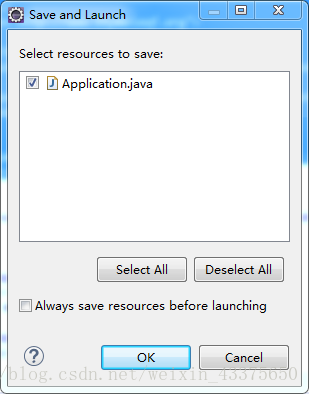
选择Application,右键->Run as->Java Application
OK

声明:本文内容由网友自发贡献,不代表【wpsshop博客】立场,版权归原作者所有,本站不承担相应法律责任。如您发现有侵权的内容,请联系我们。转载请注明出处:https://www.wpsshop.cn/article/detail/57616
推荐阅读

相关标签

