
热门标签
热门文章
- 1【Ruff学习1】Ruff是一个物联网的操作系统,可以让开发者使用JS高效且迅速地开发物联网应用_ruff js
- 2C#使用RabbitMQ-3_发布订阅模式(扇形交换机)
- 3数据库阿里连接池 druid配置详解_maxopenpreparedstatements
- 4Android开发基础(二)
- 5C/C++学习笔记:变量的作用域和变量的引用_vs的length如何引用
- 6MySQL数据库连接池 :Druid_mysql druid
- 7数据结构与算法-003.双向链表和循环链表_构造void addbefore(t data,node
succ) 怎么调用 - 8面向对象三大特性---继承_面向对象程序设计继承性
- 9微信小程序在线儿童有声读物系统设计与实现
- 10Codeforces Round 919 (Div. 2)C同余的同余
当前位置: article > 正文
Mybatis源码解析(三):映射配置文件的解析_什么事源码映射文件
作者:代码独立开发者 | 2024-02-03 15:58:45
赞
踩
什么事源码映射文件
Mybatis源码系列文章
Mybatis源码解析(四):sql语句及#{}、${}的解析
Mybatis源码解析(五):SqlSession会话的创建
前言
- Mybatis框架中有两种类型xml文件,核心配置文件以及实体类映射配置文件
- 映射配置文件的路径在核心配置的<mappers>标签中配置(这样就可以只解析一个核心配置文件即可)
- 从本系列Mybatis源码解析(二):全局配置文件的解析第四章节可知,解析<configuration>标签的子标签<mappers>即使解析映射配置文件
一、映射配置文件解析入口
- 如下为核心配置类<configuration>标签下所有子标签的解析方法入口
XMLConfigBuilder.java
private void parseConfiguration(XNode root) {
  try {
    // issue #117 read properties first
    // 解析</properties>标签
    propertiesElement(root.evalNode("properties"));
    // 解析</settings>标签
    Properties settings = settingsAsProperties(root.evalNode("settings"));
    loadCustomVfs(settings);
    loadCustomLogImpl(settings);
    // 解析</typeAliases>标签
    typeAliasesElement(root.evalNode("typeAliases"));
    // 解析</plugins>标签
    pluginElement(root.evalNode("plugins"));
    // 解析</objectFactory>标签
    objectFactoryElement(root.evalNode("objectFactory"));
    // 解析</objectWrapperFactory>标签
    objectWrapperFactoryElement(root.evalNode("objectWrapperFactory"));
    // 解析</reflectorFactory>标签
    reflectorFactoryElement(root.evalNode("reflectorFactory"));
    settingsElement(settings);
    // read it after objectFactory and objectWrapperFactory issue #631
    // 解析</environments>标签
    environmentsElement(root.evalNode("environments"));
    // 解析</databaseIdProvider>标签
    databaseIdProviderElement(root.evalNode("databaseIdProvider"));
    // 解析</typeHandlers>标签
    typeHandlerElement(root.evalNode("typeHandlers"));
    // 解析</mappers>标签 加载映射文件流程主入口
    mapperElement(root.evalNode("mappers"));
  } catch (Exception e) {
    throw new BuilderException("Error parsing SQL Mapper Configuration. Cause: " + e, e);
  }
}

- 1
- 2
- 3
- 4
- 5
- 6
- 7
- 8
- 9
- 10
- 11
- 12
- 13
- 14
- 15
- 16
- 17
- 18
- 19
- 20
- 21
- 22
- 23
- 24
- 25
- 26
- 27
- 28
- 29
- 30
- 31
- 32
- 33
进入mapperElement(root.evalNode(“mappers”));
-
root.evalNode(“mappers”)返回XNode对象,标签及其子标签都被封装到parent对象中
-
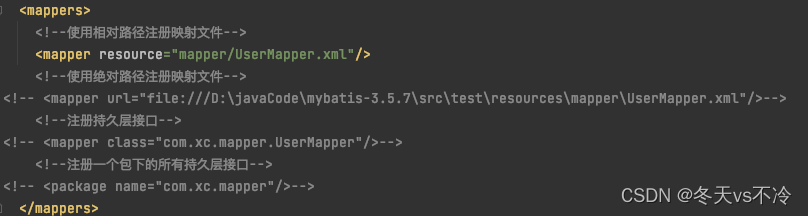
<package>标签为代理模式,引入包名,解析代理接口对应的映射配置文件(后续篇章单独讲)
-
<mapper>标签引入映射配置文件的方式,resource、url、class;前两种是加载资源构建XMLMapperBuilder解析,最后一种则是代理模式解析(后续篇章单独讲)
-
这里与解析核心配置文件方式一样,先创建XMLMapperBuilder解析类,再调用其解析方法parse()
private void mapperElement(XNode parent) throws Exception {
  if (parent != null) {
    // 获取<mappers>标签的子标签
    for (XNode child : parent.getChildren()) {
      // <package>子标签
      if ("package".equals(child.getName())) {
        // 获取mapper接口和mapper映射文件对应的package包名
        String mapperPackage = child.getStringAttribute("name");
        // 将包下所有的mapper接口以及它的代理工厂对象存储到一个Map集合中,key为mapper接口类型,value为代理对象工厂
        configuration.addMappers(mapperPackage);
      } else {// <mapper>子标签
        // 获取<mapper>子标签的resource属性
        String resource = child.getStringAttribute("resource");
        // 获取<mapper>子标签的url属性
        String url = child.getStringAttribute("url");
        // 获取<mapper>子标签的class属性
        String mapperClass = child.getStringAttribute("class");
        // 它们是互斥的
        if (resource != null && url == null && mapperClass == null) {
          ErrorContext.instance().resource(resource);
          try(InputStream inputStream = Resources.getResourceAsStream(resource)) {
            // 专门用来解析mapper映射文件
            XMLMapperBuilder mapperParser = new XMLMapperBuilder(inputStream, configuration, resource, configuration.getSqlFragments());
            // 通过XMLMapperBuilder解析mapper映射文件
            mapperParser.parse();
          }
        } else if (resource == null && url != null && mapperClass == null) {
          ErrorContext.instance().resource(url);
          try(InputStream inputStream = Resources.getUrlAsStream(url)){
            XMLMapperBuilder mapperParser = new XMLMapperBuilder(inputStream, configuration, url, configuration.getSqlFragments());
            // 通过XMLMapperBuilder解析mapper映射文件
            mapperParser.parse();
          }
        } else if (resource == null && url == null && mapperClass != null) {
          Class<?> mapperInterface = Resources.classForName(mapperClass);
          // 将指定mapper接口以及它的代理对象存储到一个Map集合中,key为mapper接口类型,value为代理对象工厂
          configuration.addMapper(mapperInterface);
        } else {
          throw new BuilderException("A mapper element may only specify a url, resource or class, but not more than one.");
        }
      }
    }
  }
}
- 1
- 2
- 3
- 4
- 5
- 6
- 7
- 8
- 9
- 10
- 11
- 12
- 13
- 14
- 15
- 16
- 17
- 18
- 19
- 20
- 21
- 22
- 23
- 24
- 25
- 26
- 27
- 28
- 29
- 30
- 31
- 32
- 33
- 34
- 35
- 36
- 37
- 38
- 39
- 40
- 41
- 42
- 43
- 44
二、创建【映射配置文件解析类】
进入XMLMapperBuilder构建函数
- inputStream:由映射配置文件xml加载而来的字节输入流
- 将字节输入流转换为Document对象,存入XPathParser,而XPathParser对象引用放到XMLMapperBuilder对象parser属性中
- 然后就是configuration赋值XMLMapperBuilder的父类BaseBuilder等一些其他属性
public XMLMapperBuilder(InputStream inputStream, Configuration configuration, String resource, Map<String, XNode> sqlFragments) {
  this(new XPathParser(inputStream, true, configuration.getVariables(), new XMLMapperEntityResolver()),
      configuration, resource, sqlFragments);
}

private XMLMapperBuilder(XPathParser parser, Configuration configuration, String resource, Map<String, XNode> sqlFragments) {
  super(configuration);
  this.builderAssistant = new MapperBuilderAssistant(configuration, resource);
  this.parser = parser;
  this.sqlFragments = sqlFragments;
  this.resource = resource;
}
- 1
- 2
- 3
- 4
- 5
- 6
- 7
- 8
- 9
- 10
- 11
- 12
三、调用【映射配置文件解析类】的解析方法
进入XMLMapperBuilder的parse()方法
- 资源属性resource字符串即映射配置文件的resource或url,解析过则放入集合
- addLoadedResource:添加到集合中;isResourceLoaded:判断集合中是否有解析的resource
public void parse() {
  // mapper映射文件是否已经加载过
  if (!configuration.isResourceLoaded(resource)) {
    // 从映射文件中的<mapper>根标签开始解析,直到完整的解析完毕
    configurationElement(parser.evalNode("/mapper"));
    // 标记已经解析
    configuration.addLoadedResource(resource);
    // 为命名空间绑定映射
    bindMapperForNamespace();
  }

  // 解析ResultMap
  parsePendingResultMaps();
  // 解析缓存
  parsePendingCacheRefs();
  // 解析statement
  parsePendingStatements();
}
- 1
- 2
- 3
- 4
- 5
- 6
- 7
- 8
- 9
- 10
- 11
- 12
- 13
- 14
- 15
- 16
- 17
- 18
1、<mapper>标签解析方法
- <mapper>标签的namespace属性是必输值,空则报错
- MappedStatement对象由sql语句、入参、返回值等标签内属性组成
- MapperBuilderAssistant builderAssistant:构建MappedStatement对象的Builder类,因为其属性繁多,通过Builder类一点一点的的去构建对象
- 缓存标签等后续单独讲一二级缓存时候讲
- <parameterMap>标签和<resultMap>标签也就是将标签内属性解析到ParameterMap和ResultMap对象,然后再添加到builderAssistant中,为以后创建MappedStatement对象做准备
- 主要部分看下增删改查sql语句的解析部分
private void configurationElement(XNode context) {
  try {
    // 获取<mapper>标签的namespace值,也就是命名空间
    String namespace = context.getStringAttribute("namespace");
    // 命名空间不能为空
    if (namespace == null || namespace.isEmpty()) {
      throw new BuilderException("Mapper's namespace cannot be empty");
    }
    // MapperBuilderAssistant:构建MappedStatement对象的构建助手,设置当前的命名空间为namespace的值
    builderAssistant.setCurrentNamespace(namespace);
    // 解析<cache-ref>子标签
    cacheRefElement(context.evalNode("cache-ref"));
    // 解析<cache>子标签
    cacheElement(context.evalNode("cache"));

    // 解析<parameterMap>子标签
    parameterMapElement(context.evalNodes("/mapper/parameterMap"));
    // 解析<resultMap>子标签
    resultMapElements(context.evalNodes("/mapper/resultMap"));
    // 解析<sql>子标签,也就是SQL片段
    sqlElement(context.evalNodes("/mapper/sql"));
    // 解析<select>\<insert>\<update>\<delete>子标签
    // 将cache对象封装到MappedStatement中
    buildStatementFromContext(context.evalNodes("select|insert|update|delete"));
  } catch (Exception e) {
    throw new BuilderException("Error parsing Mapper XML. The XML location is '" + resource + "'. Cause: " + e, e);
  }
}
- 1
- 2
- 3
- 4
- 5
- 6
- 7
- 8
- 9
- 10
- 11
- 12
- 13
- 14
- 15
- 16
- 17
- 18
- 19
- 20
- 21
- 22
- 23
- 24
- 25
- 26
- 27
- 28
2、<select><insert><update><delete>标签的解析
- 四个标签都解析成XNode对象,组装成list,后续遍历解析
- 一共有多少增删改查标签,最终就会构建多少MappedStatement
private void buildStatementFromContext(List<XNode> list) {
  if (configuration.getDatabaseId() != null) {
    buildStatementFromContext(list, configuration.getDatabaseId());
  }
  // 构建MappedStatement
  buildStatementFromContext(list, null);
}
- 1
- 2
- 3
- 4
- 5
- 6
- 7
进入buildStatementFromContext构建MappedStatement方法
- 这里的操作和解析核心配置类和映射配置类一样,创建一个专门解析MappedStatement类的Builder对象
- XMLStatementBuilder类构造函数则是将入参赋值对应属性,无逻辑代码
private void buildStatementFromContext(List<XNode> list, String requiredDatabaseId) {
  for (XNode context : list) {
    // MappedStatement解析器
    final XMLStatementBuilder statementParser = new XMLStatementBuilder(configuration, builderAssistant,
    context, requiredDatabaseId);
    try {
      //  // 解析select等4个标签,创建MappedStatement对象
      statementParser.parseStatementNode();
    } catch (IncompleteElementException e) {
      configuration.addIncompleteStatement(statementParser);
    }
  }
}
- 1
- 2
- 3
- 4
- 5
- 6
- 7
- 8
- 9
- 10
- 11
- 12
- 13
进入parseStatementNode解析select等4个标签,循环遍历创建MappedStatement对象
- 通过遍历创建MappedStatement对象也证明了,有多少增删改查标签,就有多少该对象
- 这个方法的作用就是将<select><insert><update><delete>标签内的属性全部解析出来封装成MappedStatement对象
- 如:id,则是<select>标签的id值,一般这个值我们会和Mapper接口的方法名设置成一致
- SqlSource对象:由sql语句(带?号)、替换?的#{}属性值、入参的对象或Map、动态sql标签等组成;创建过程复杂,后续系列单独讲
- 最后一步,通过builderAssistant构建助手创建MappedStatement对象
public void parseStatementNode() {
    // 获取statement的id属性(特别关键的值)
    String id = context.getStringAttribute("id");
    String databaseId = context.getStringAttribute("databaseId");

    if (!databaseIdMatchesCurrent(id, databaseId, this.requiredDatabaseId)) {
      return;
    }

    String nodeName = context.getNode().getNodeName();
    // 解析SQL命令类型是什么?确定操作是CRUD中的哪一种 后续执行器操作时会用到
    SqlCommandType sqlCommandType = SqlCommandType.valueOf(nodeName.toUpperCase(Locale.ENGLISH));
    //是否查询语句
    boolean isSelect = sqlCommandType == SqlCommandType.SELECT;
    boolean flushCache = context.getBooleanAttribute("flushCache", !isSelect);
    boolean useCache = context.getBooleanAttribute("useCache", isSelect);
    boolean resultOrdered = context.getBooleanAttribute("resultOrdered", false);

    // Include Fragments before parsing
    // <include>标签解析
    XMLIncludeTransformer includeParser = new XMLIncludeTransformer(configuration, builderAssistant);
    includeParser.applyIncludes(context.getNode());

    // 获取入参类型
    String parameterType = context.getStringAttribute("parameterType");
    // 别名处理,获取入参对应的Java类型
    Class<?> parameterTypeClass = resolveClass(parameterType);

    String lang = context.getStringAttribute("lang");
    LanguageDriver langDriver = getLanguageDriver(lang);

    // Parse selectKey after includes and remove them.
    // 解析<selectKey>标签
    processSelectKeyNodes(id, parameterTypeClass, langDriver);

    // Parse the SQL (pre: <selectKey> and <include> were parsed and removed)
    KeyGenerator keyGenerator;
    String keyStatementId = id + SelectKeyGenerator.SELECT_KEY_SUFFIX;
    keyStatementId = builderAssistant.applyCurrentNamespace(keyStatementId, true);
    if (configuration.hasKeyGenerator(keyStatementId)) {
      keyGenerator = configuration.getKeyGenerator(keyStatementId);
    } else {
      keyGenerator = context.getBooleanAttribute("useGeneratedKeys",
          configuration.isUseGeneratedKeys() && SqlCommandType.INSERT.equals(sqlCommandType))
          ? Jdbc3KeyGenerator.INSTANCE : NoKeyGenerator.INSTANCE;
    }

    // *******创建SqlSource,解析SQL,封装SQL语句(未参数绑定)和入参信息
    // 问题:sql占位符如何进行的替换?动态sql如何进行的解析?
    SqlSource sqlSource = langDriver.createSqlSource(configuration, context, parameterTypeClass);

    // 设置默认StatementType为Prepared,该参数指定了后面的JDBC处理时,采用哪种Statement
    StatementType statementType = StatementType.valueOf(context.getStringAttribute("statementType", StatementType.PREPARED.toString()));
    Integer fetchSize = context.getIntAttribute("fetchSize");
    Integer timeout = context.getIntAttribute("timeout");
    String parameterMap = context.getStringAttribute("parameterMap");
    // 获取结果映射类型
    String resultType = context.getStringAttribute("resultType");
    // 别名处理,获取返回值对应的Java类型
    Class<?> resultTypeClass = resolveClass(resultType);
    // 获取ResultMap
    String resultMap = context.getStringAttribute("resultMap");
    String resultSetType = context.getStringAttribute("resultSetType");
    ResultSetType resultSetTypeEnum = resolveResultSetType(resultSetType);
    if (resultSetTypeEnum == null) {
      resultSetTypeEnum = configuration.getDefaultResultSetType();
    }
    String keyProperty = context.getStringAttribute("keyProperty");
    String keyColumn = context.getStringAttribute("keyColumn");
    String resultSets = context.getStringAttribute("resultSets");

    // 通过构建者助手,创建MappedStatement对象
    builderAssistant.addMappedStatement(id, sqlSource, statementType, sqlCommandType,
        fetchSize, timeout, parameterMap, parameterTypeClass, resultMap, resultTypeClass,
        resultSetTypeEnum, flushCache, useCache, resultOrdered,
        keyGenerator, keyProperty, keyColumn, databaseId, langDriver, resultSets);
}
- 1
- 2
- 3
- 4
- 5
- 6
- 7
- 8
- 9
- 10
- 11
- 12
- 13
- 14
- 15
- 16
- 17
- 18
- 19
- 20
- 21
- 22
- 23
- 24
- 25
- 26
- 27
- 28
- 29
- 30
- 31
- 32
- 33
- 34
- 35
- 36
- 37
- 38
- 39
- 40
- 41
- 42
- 43
- 44
- 45
- 46
- 47
- 48
- 49
- 50
- 51
- 52
- 53
- 54
- 55
- 56
- 57
- 58
- 59
- 60
- 61
- 62
- 63
- 64
- 65
- 66
- 67
- 68
- 69
- 70
- 71
- 72
- 73
- 74
- 75
- 76
- 77
进入addMappedStatement构建MappedStatement对象的方法
- applyCurrentNamespace方法:创建的id即statementId = namespace.id
- statementBuilder通过构建者模式一个属性一个属性的构建对象,最后.build()方法返回构建的MappedStatement对象本身
- addMappedStatement方法:将MappedStatement对象添加到全局对象Configuration对象中
public MappedStatement addMappedStatement(
    String id,
    SqlSource sqlSource,
    StatementType statementType,
    SqlCommandType sqlCommandType,
    Integer fetchSize,
    Integer timeout,
    String parameterMap,
    Class<?> parameterType,
    String resultMap,
    Class<?> resultType,
    ResultSetType resultSetType,
    boolean flushCache,
    boolean useCache,
    boolean resultOrdered,
    KeyGenerator keyGenerator,
    String keyProperty,
    String keyColumn,
    String databaseId,
    LanguageDriver lang,
    String resultSets) {

  if (unresolvedCacheRef) {
    throw new IncompleteElementException("Cache-ref not yet resolved");
  }

  id = applyCurrentNamespace(id, false);
  boolean isSelect = sqlCommandType == SqlCommandType.SELECT;

  //利用构建者模式,去创建MappedStatement.Builder,用于创建MappedStatement对象
  MappedStatement.Builder statementBuilder = new MappedStatement.Builder(configuration, id, sqlSource, sqlCommandType)
      .resource(resource)
      .fetchSize(fetchSize)
      .timeout(timeout)
      .statementType(statementType)
      .keyGenerator(keyGenerator)
      .keyProperty(keyProperty)
      .keyColumn(keyColumn)
      .databaseId(databaseId)
      .lang(lang)
      .resultOrdered(resultOrdered)
      .resultSets(resultSets)
      .resultMaps(getStatementResultMaps(resultMap, resultType, id))
      .resultSetType(resultSetType)
      .flushCacheRequired(valueOrDefault(flushCache, !isSelect))
      .useCache(valueOrDefault(useCache, isSelect))
      .cache(currentCache);// 将cache对象存入到MappedStatement中

  ParameterMap statementParameterMap = getStatementParameterMap(parameterMap, parameterType, id);
  if (statementParameterMap != null) {
    statementBuilder.parameterMap(statementParameterMap);
  }

  // 通过MappedStatement.Builder,构建一个MappedStatement
  MappedStatement statement = statementBuilder.build();
  // 将MappedStatement对象存储到Configuration中的Map集合中,key为statement的id,value为MappedStatement对象
  configuration.addMappedStatement(statement);
  return statement;
}
- 1
- 2
- 3
- 4
- 5
- 6
- 7
- 8
- 9
- 10
- 11
- 12
- 13
- 14
- 15
- 16
- 17
- 18
- 19
- 20
- 21
- 22
- 23
- 24
- 25
- 26
- 27
- 28
- 29
- 30
- 31
- 32
- 33
- 34
- 35
- 36
- 37
- 38
- 39
- 40
- 41
- 42
- 43
- 44
- 45
- 46
- 47
- 48
- 49
- 50
- 51
- 52
- 53
- 54
- 55
- 56
- 57
- 58
- 59
1)applyCurrentNamespace方法:构建statementId
- 中间是一些属性判断,省略,核心代码就最后一句
- currentNamespace是<mapper>标签解析方法里构建助手builderAssistant给其属性设置namesapce
- 所有返回的id即statementid=命名空间(一般设置全限定类名)+“.”+增删改查标签id(一般设置为Mapper接口方法名)
  public String applyCurrentNamespace(String base, boolean isReference) {
	...
	//属性判断
	...
    return currentNamespace + "." + base;
  }
- 1
- 2
- 3
- 4
- 5
- 6
2)addMappedStatement方法:添加对象到Configuration
- MappedStatement对象以Map形式存在,key则是其id:statementid=namespace.id,value是MappedStatement对象本身
- Configuration对象与MappedStatement对象是一对多的关系,因为全局对象下有多个映射配置文件,而每个映射配置文件下又有多个增删改查标签即MappedStatement对象
  protected final Map<String, MappedStatement> mappedStatements = new StrictMap<MappedStatement>("Mapped Statements collection")
      .conflictMessageProducer((savedValue, targetValue) ->
          ". please check " + savedValue.getResource() + " and " + targetValue.getResource());
  ...

  public void addMappedStatement(MappedStatement ms) {
    mappedStatements.put(ms.getId(), ms);
  }
- 1
- 2
- 3
- 4
- 5
- 6
- 7
- 8
至此,<mapper>标签增删改查标签解析成多个MappedStatement对象,映射配置文件解析完毕
总结
- 映射配置文件的解析是全局配置文件解析的一部分,本篇内容只是将其单独拎出来了
- 映射配置文件的解析就是将<select><insert><update><delete>每个标签内容封装成一个MappedStatement对象
- 所有MappedStatement对象以key为statementId=namespaceId.id的map形式挂在全局配置类Configuration下
声明:本文内容由网友自发贡献,不代表【wpsshop博客】立场,版权归原作者所有,本站不承担相应法律责任。如您发现有侵权的内容,请联系我们。转载请注明出处:https://www.wpsshop.cn/article/detail/57271
推荐阅读
相关标签

