
热门标签
热门文章
- 1【软考】系统集成项目管理工程师【总】_系统集成项目管理中级
- 2使用Flutter的image_picker插件实现设备的相册的访问和拍照
- 3[Oracle] instant client 21 和 PLSQL Developer 14 安装与详细配置_plsqldeveloper安装配置教程
- 4HSRP(热备份路由选择协议)的概念,原理与配置实验_简述hsrp的基本原理
- 5【2023 英特尔On技术创新大会直播 |我与英特尔的初次相遇】—— AIPC探索下一代的物联网时代
- 6数据结构-二叉树(2)
- 7【微服务】mysql + elasticsearch数据双写设计与实现
- 8华为认证HCIA+HCIP题库(超500题含答案解析)_hcia题库
- 9【Linux】命令expect使用详解_expect 参数
- 10UniApp已经接了手机数据线,但运行工具警告 “没有检查到设备“ (华为手机为例 进行解决)_uniapp检测不到手机
当前位置: article > 正文
springboot2.1.0、MongoDB简单使用_springboot 2.1 mongodb
作者:程序安全守护者 | 2024-02-02 18:28:24
赞
踩
springboot 2.1 mongodb
一)在pom.xml文件中引入MongoDB需要的jar
- <?xml version="1.0" encoding="UTF-8"?>
- <project xmlns="http://maven.apache.org/POM/4.0.0" xmlns:xsi="http://www.w3.org/2001/XMLSchema-instance"
- xsi:schemaLocation="http://maven.apache.org/POM/4.0.0 http://maven.apache.org/xsd/maven-4.0.0.xsd">
- <modelVersion>4.0.0</modelVersion>
-
- <groupId>com.oysept.springboot</groupId>
- <artifactId>oysept-springboot-mongodb</artifactId>
- <version>0.0.1-SNAPSHOT</version>
- <packaging>jar</packaging>
-
- <name>oysept-springboot-mongodb</name>
-
- <parent>
- <groupId>org.springframework.boot</groupId>
- <artifactId>spring-boot-starter-parent</artifactId>
- <version>2.1.0.RELEASE</version>
- <relativePath/>
- </parent>
-
- <properties>
- <project.build.sourceEncoding>UTF-8</project.build.sourceEncoding>
- <project.reporting.outputEncoding>UTF-8</project.reporting.outputEncoding>
- <java.version>1.8</java.version>
- </properties>
-
- <dependencies>
- <dependency>
- <groupId>org.springframework.boot</groupId>
- <artifactId>spring-boot-starter</artifactId>
- </dependency>
-
- <dependency>
- <groupId>org.springframework.boot</groupId>
- <artifactId>spring-boot-starter-test</artifactId>
- <scope>test</scope>
- </dependency>
-
- <dependency>
- <groupId>org.springframework.boot</groupId>
- <artifactId>spring-boot-starter-web</artifactId>
- </dependency>
-
- <!-- mongodb -->
- <dependency>
- <groupId>org.springframework.boot</groupId>
- <artifactId>spring-boot-starter-data-mongodb</artifactId>
- </dependency>
- </dependencies>
-
- <build>
- <plugins>
- <plugin>
- <groupId>org.springframework.boot</groupId>
- <artifactId>spring-boot-maven-plugin</artifactId>
- </plugin>
- </plugins>
- </build>
- </project>

二)在application.properties中添加MongoDB配置
- server.port=8080
-
- spring.data.mongodb.uri=mongodb://localhost:27017/newdb
- #spring.data.mongodb.uri=mongodb://name:password@localhost:27017/newdb
三)添加一个MongoDB中的Entity类
- package com.oysept.springboot.entity;
-
- import org.springframework.data.annotation.Id;
- import org.springframework.data.mongodb.core.mapping.Document;
-
- /**
- * 实体类,默认命名customerEntity,也可以指定命名@Document(collection="customer")
- * @author ouyangjun
- */
- @Document(collection="customer")
- public class CustomerEntity {
-
- @Id
- private String id;
- private String firstName;
- private String lastName;
-
- public CustomerEntity() {}
-
- public CustomerEntity (String firstName, String lastName) {
- this.firstName = firstName;
- this.lastName = lastName;
- }
-
- public String getId() {return id;}
- public void setId(String id) {this.id = id;}
-
- public String getFirstName() {return firstName;}
- public void setFirstName(String firstName) {this.firstName = firstName;}
-
- public String getLastName() {return lastName;}
- public void setLastName(String lastName) {this.lastName = lastName;}
- }
四)添加一个MongoDB接口Repository操作工具类
- package com.oysept.springboot.repository;
-
- import java.util.List;
-
- import org.springframework.data.mongodb.repository.MongoRepository;
-
- import com.oysept.springboot.entity.CustomerEntity;
-
- /**
- * mongodb自定义查询
- * @author ouyangjun
- */
- public interface CustomerRepository extends MongoRepository<CustomerEntity, String> {
-
- public CustomerEntity findByFirstName(String firstName);
-
- public List<CustomerEntity> findByLastName(String lastName);
- }
五)新增一个MongoDB main方法测试工具类
- package com.oysept.springboot.test;
-
- import org.junit.Test;
- import org.junit.runner.RunWith;
- import org.springframework.beans.factory.annotation.Autowired;
- import org.springframework.boot.test.context.SpringBootTest;
- import org.springframework.test.context.junit4.SpringRunner;
-
- import com.oysept.springboot.entity.CustomerEntity;
- import com.oysept.springboot.repository.CustomerRepository;
-
- @RunWith(SpringRunner.class)
- @SpringBootTest
- public class MongoDBTest {
-
- @Autowired
- private CustomerRepository repository;
-
- @Test
- public void addMongoDB() {
- // 删除
- repository.deleteAll();
-
- // 添加
- repository.save(new CustomerEntity("ouyangjun", "oysept"));
- repository.save(new CustomerEntity("liujie", "oysept"));
-
- // 查询
- System.out.println("查询-------------------------------");
- for (CustomerEntity entity : repository.findAll()) {
- System.out.println("firstName: "+entity.getFirstName()+",\t lastName: "+entity.getLastName());
- }
-
- // 根据firstName查询
- System.out.println("\n根据firstName查询--------------------------------");
- CustomerEntity et = repository.findByFirstName("ouyangjun");
- System.out.println("firstName: "+et.getFirstName()+",\t lastName: "+et.getLastName());
-
- // 根据lastName查询
- System.out.println("\n根据lastName查询--------------------------------");
- for (CustomerEntity entity : repository.findByLastName("oysept")) {
- System.out.println("firstName: "+entity.getFirstName()+",\t lastName: "+entity.getLastName());
- }
- }
- }
六)添加一个springboot启动类,并展示项目结构图
- package com.oysept.springboot;
-
- import org.springframework.boot.SpringApplication;
- import org.springframework.boot.autoconfigure.SpringBootApplication;
-
- /**
- * springboot启动类
- * @author ouyangjun
- */
- @SpringBootApplication
- public class MongoDBApplication {
-
- public static void main(String[] args) {
- SpringApplication.run(MongoDBApplication.class, args);
- }
- }
项目结构图:
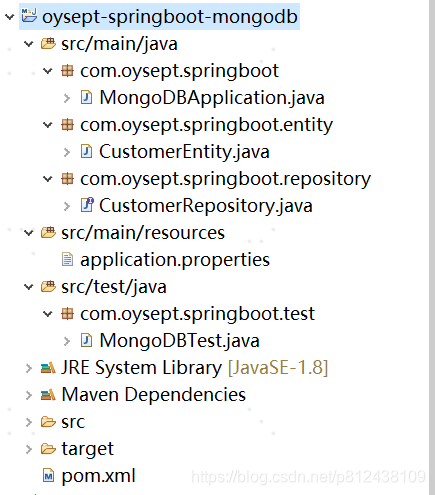
最后启动MongoDBApplication类,可用main方法测试类测试。
识别二维码关注个人微信公众号

本章完结,待续,欢迎转载!
本文说明:该文章属于原创,如需转载,请标明文章转载来源!
声明:本文内容由网友自发贡献,不代表【wpsshop博客】立场,版权归原作者所有,本站不承担相应法律责任。如您发现有侵权的内容,请联系我们。转载请注明出处:https://www.wpsshop.cn/article/detail/55997
推荐阅读



相关标签

