
热门标签
热门文章
- 1docker desktop 阿里云镜像加速_docker desktop 加速
- 2全国职业院校技能大赛-GZ037工业互联网集成应用赛项-赛题3~4_山东省技改提级职业技能竞赛工业互联网标识解析赛项
- 3华为OD机试真题-执行时长-2023年OD统一考试(C卷)
- 4【华为鸿蒙系统学习】- HarmonyOS4.0开发|自学篇_harmonyos4.0 pdf
- 5批量上传本地Maven仓库jar包到Nexus私服_nexus的包批量上传
- 6用GitHub Copilot在Vs Code里快速写代码,最详细使用教程_github copilot vscode
- 7opencv中的Mat与数组互转_cv::mat 指向一个buffer
- 8第十一届蓝桥杯省赛第一场真题【Python】_elsess
- 9HarmonyOS从基础到实战-高性能华为在线答题元服务_arkts在ts的基础上主要扩展了如下能力
- 10SVM支持向量机的多输入单输出预测模型
当前位置: article > 正文
2024-01-29 ubuntu 用脚本设置安装交叉编译工具链路径方法,设置PATH环境变量
作者:cm456 | 2024-02-02 12:00:50
赞
踩
2024-01-29 ubuntu 用脚本设置安装交叉编译工具链路径方法,设置PATH环境变量
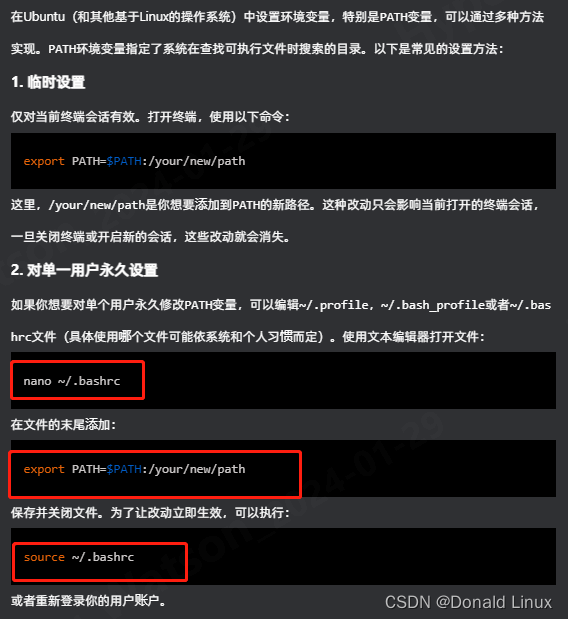
一、设置PATH环境变量的方法,建议用~/.bash_profile的方法,不然在ssh登录的时候可能没有设置PATH.
二、下面的完整的脚本,里面的echo "export PATH=$build_toolchain_path:\$PATH" >> $HOME/.bashrc 就是把交叉编译路径写写到.bashrc设置PATH环境变量。
- #!/bin/bash
-
- # command to install toolchain in the "dirname" which you Specified.
- # source ./env_install_toolchain.sh dirname
- INSTALL_TARGET_DIR=
- toolchain_cross=`pwd`
- toolchain_cross=$(basename ${toolchain_cross})
- if [ -n "$1" ]; then
- if [ -d "$1" ]; then
- INSTALL_TARGET_DIR=$1
- build_toolchain_path="${INSTALL_TARGET_DIR}/$toolchain_cross/bin"
- else
- echo "error: not found dir $1"
- echo "command format: source $0 [dirname]"
- echo " [dirname] is optional"
- return 1
- fi
- else
- build_toolchain_path="${PWD}/bin"
- fi
-
- # default 1
- selectopt=1
-
- case $selectopt in
- 0)
- if [ -n "$INSTALL_TARGET_DIR" ]; then
- sudo cp -rfa $PWD $INSTALL_TARGET_DIR
- fi
- sudo echo "export PATH=$build_toolchain_path/:\$PATH" >> /etc/profile
- source /etc/profile
- ;;
- 1)
- if [ -n "$INSTALL_TARGET_DIR" ]; then
- cp -rfa $PWD $INSTALL_TARGET_DIR
- fi
- cmdsed="sed -i '/^export PATH.*${toolchain_cross}\/bin/d' \$HOME\/.bashrc"
- eval $cmdsed
- echo "export PATH=$build_toolchain_path:\$PATH" >> $HOME/.bashrc
- source $HOME/.bashrc
- cmdsed="sed -i '/^export PATH.*${toolchain_cross}\/bin/d' \$HOME\/.bash_profile"
- eval $cmdsed
- echo "export PATH=$build_toolchain_path:\$PATH" >> $HOME/.bash_profile
- source $HOME/.bash_profile
- ;;
- *)
- echo "Please check input."
- ;;
- esac

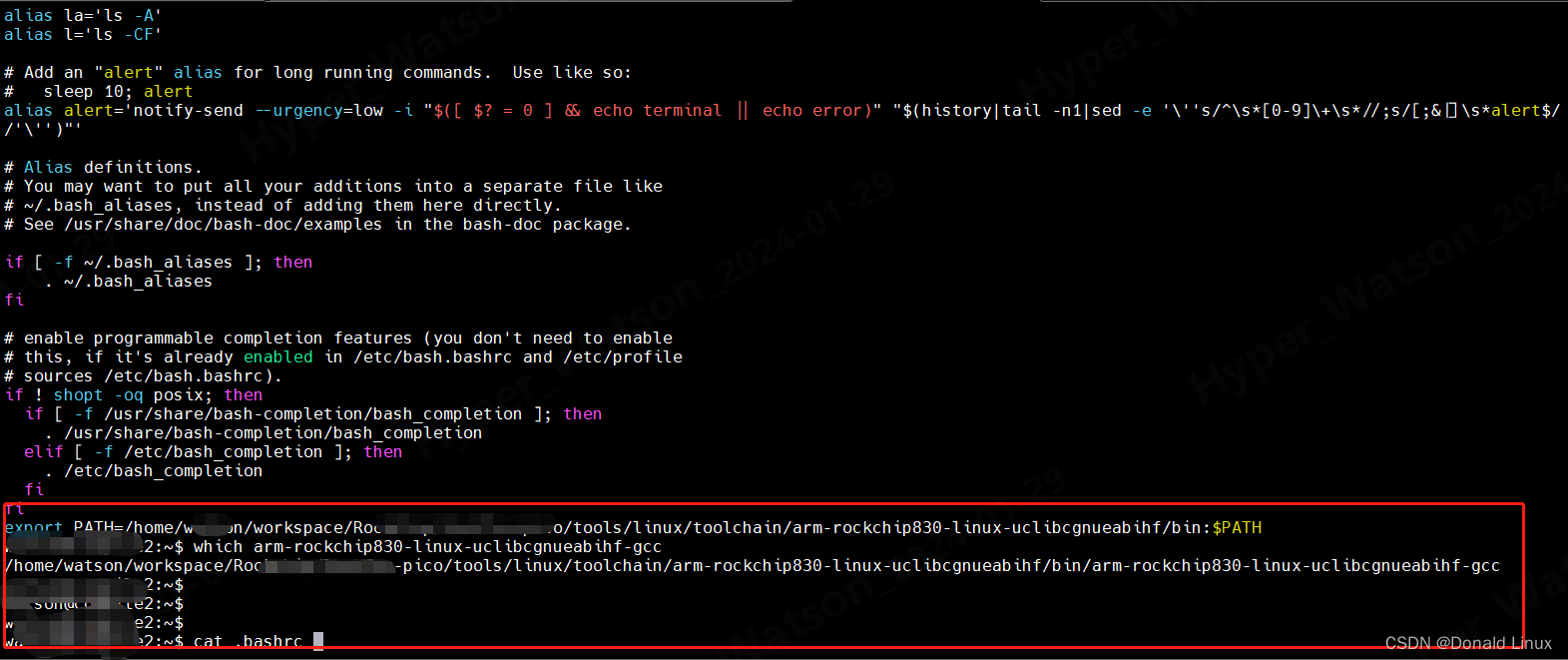
三、运行完上面的脚本之后的效果。
声明:本文内容由网友自发贡献,不代表【wpsshop博客】立场,版权归原作者所有,本站不承担相应法律责任。如您发现有侵权的内容,请联系我们。转载请注明出处:https://www.wpsshop.cn/article/detail/55252
推荐阅读
相关标签

