
热门标签
热门文章
- 1DevOps基础设施配置之jenkins对接K8S_jenkins k8s
- 2在Linux Docker中部署RStudio Server,实现高效远程访问
- 3史上最详细的小程序测试用例模板,以后再也不怕测试用例不会写了
- 4win10安装telnet服务器(开启端口,开启telnet客户端后依旧显示:无法打开到主机的连接,在端口xxxx连接失败)_只有telnet客户端没有服务器
- 510-9 查询年龄18-20之间的学生信息(MSSQL)
- 6华为FusionStorage Block、OceanStor 100D、OceanStor pacific的区别
- 7猿创征文|弃文从工,从小白到蚂蚁工程师,我的 Java 成长之路_弃文就工
- 8关于OpenHarmony系统,我们该如何高效学习_openharmony学习
- 9LibreSSL SSL_connect: SSL_ERROR_SYSCALL in connection to github.com:443
- 10Node.js和Vue的安装与配置(超详细步骤)_nodejs安装vue
当前位置: article > 正文
按照模板生成文件,Word 或者 Excel
作者:代码吟游诗人 | 2024-02-02 11:14:34
赞
踩
按照模板生成文件,Word 或者 Excel
需求流程:

模板部分如图:
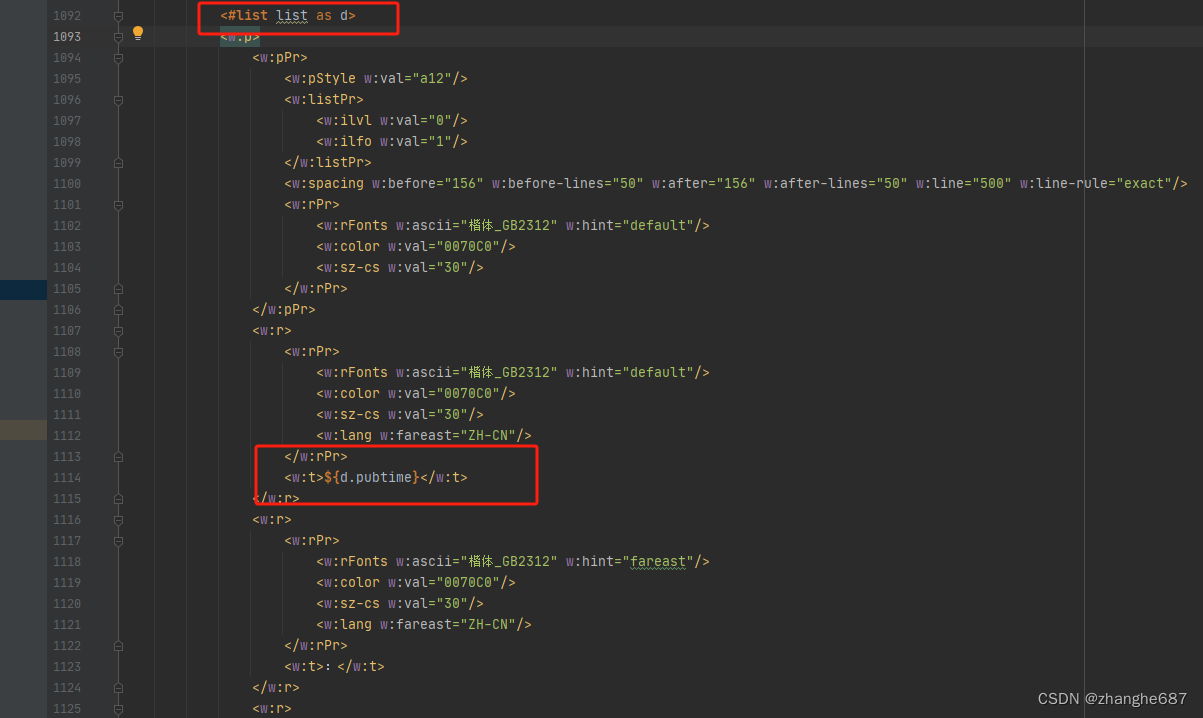
Web端技术选用Jfinal
功能实现:
下面代码是调用 --“外部接口”--传参,将前端选中的信息传给后端, 另外将后端返回的文件流下载成文件
- package ibasic.web.com.controller;
-
- import java.io.BufferedInputStream;
- import java.io.BufferedOutputStream;
- import java.io.BufferedReader;
- import java.io.ByteArrayOutputStream;
- import java.io.File;
- import java.io.FileInputStream;
- import java.io.FileOutputStream;
- import java.io.IOException;
- import java.io.InputStream;
- import java.io.InputStreamReader;
- import java.io.OutputStream;
- import java.net.URLDecoder;
- import java.text.SimpleDateFormat;
- import java.util.Date;
-
- import javax.servlet.annotation.MultipartConfig;
- import javax.servlet.annotation.WebServlet;
- import javax.servlet.http.HttpServlet;
- import javax.servlet.http.HttpServletRequest;
- import javax.servlet.http.HttpServletResponse;
-
- import org.apache.http.HttpResponse;
- import org.apache.http.HttpStatus;
- import org.apache.http.client.HttpClient;
- import org.apache.http.client.config.RequestConfig;
- import org.apache.http.client.methods.HttpPost;
- import org.apache.http.entity.StringEntity;
- import org.apache.http.impl.client.HttpClientBuilder;
- import org.apache.http.message.BasicHeader;
- import org.apache.http.protocol.HTTP;
-
- import com.jfinal.kit.PropKit;
-
- import net.sf.json.JSONObject;
-
- //excel模板
- @MultipartConfig
- @WebServlet("/templateExportServlet")
- public class TemplateExportServlet extends HttpServlet{
-
-
-
- @Override
- protected void doPost(HttpServletRequest req, HttpServletResponse resp) throws IOException {
- // String data = req.getParameter("data");
- BufferedReader header = req.getReader();
- StringBuffer sb = new StringBuffer();
- String str ="" ;
- //将数据读到StringBuffer里面
- while (null != (str = header.readLine())){
- sb.append( str );
- }
- // String params = sb.toString().replaceAll("%(?![0-9a-fA-F]{2})", "%25").replaceAll("\\+", "%2B");
-
- // String content = URLDecoder.decode(params,"UTF-8");
- JSONObject jsonData = JSONObject.fromObject(sb.toString());
- String url = PropKit.get("template_url");
-
- RequestConfig config = RequestConfig.custom().setConnectTimeout(60000).setSocketTimeout(60000).build();
- HttpClient client = HttpClientBuilder.create().setDefaultRequestConfig(config).build();
- HttpPost post = new HttpPost(url);
- post.setHeader("Content-Type", "application/json");
- String result = "";
-
- try {
-
- StringEntity s = new StringEntity(jsonData.toString(), "utf-8");
- s.setContentEncoding(new BasicHeader(HTTP.CONTENT_TYPE, "application/json"));
- post.setEntity(s);
- HttpResponse httpResponse = client.execute(post);
- InputStream inStream = httpResponse.getEntity().getContent();
-
-
-
-
- // BufferedReader reader = new BufferedReader(new InputStreamReader(inStream, "utf-8"));
- // StringBuilder strber = new StringBuilder();
- // String line = null;
- // while ((line = reader.readLine()) != null){
- // strber.append(line);
- // }
- // inStream.close();
- // result = strber.toString();
- // System.out.println(result);
- if (HttpStatus.SC_OK != httpResponse.getStatusLine().getStatusCode()) {
-
- System.out.println("请求服务端失败");
- }
-
-
- // if(!"".equals(result)){
-
- String now = new SimpleDateFormat("yyyy-MM-dd HH-mm-ss").format(new Date());
- String fileName = String.format("%s.xlsx", now);
- getFileByBytes(toByteArray(inStream), PropKit.get("excel_dir"), fileName);
- download(PropKit.get("excel_dir")+fileName, resp);
- // }
-
- } catch (Exception e) {
-
- e.printStackTrace();
- }
- }
-
- public HttpServletResponse download(String path, HttpServletResponse response) {
- try {
- // path是指欲下载的文件的路径。
- File file = new File(path);
- // 取得文件名。
- String filename = file.getName();
- // 取得文件的后缀名。
- String ext = filename.substring(filename.lastIndexOf(".") + 1).toUpperCase();
-
- // 以流的形式下载文件。
- InputStream fis = new BufferedInputStream(new FileInputStream(path));
- byte[] buffer = new byte[fis.available()];
- fis.read(buffer);
- fis.close();
- // 清空response
- // response.reset();
- // 设置response的Header
- response.addHeader("Content-Disposition", "attachment;filename=" + new String(filename.getBytes()));
- response.addHeader("Content-Length", "" + file.length());
- OutputStream toClient = new BufferedOutputStream(response.getOutputStream());
- response.setContentType("application/octet-stream");
- toClient.write(buffer);
- toClient.flush();
- toClient.close();
- } catch (IOException ex) {
- ex.printStackTrace();
- }
- return response;
- }
-
-
- /**
- * 将Byte数组转换成文件
- **/
- public static void getFileByBytes(byte[] bytes, String filePath, String fileName) {
- BufferedOutputStream bos = null;
- FileOutputStream fos = null;
- File file = null;
- try {
- File dir = new File(filePath);
- // 判断文件目录是否存在
- if (!dir.exists() && dir.isDirectory()) {
- dir.mkdirs();
- }
- file = new File(filePath + File.separator + fileName);
- fos = new FileOutputStream(file);
- bos = new BufferedOutputStream(fos);
- bos.write(bytes);
- } catch (Exception e) {
- e.printStackTrace();
- } finally {
- if (bos != null) {
- try {
- bos.close();
- } catch (IOException e) {
- e.printStackTrace();
- }
- }
- if (fos != null) {
- try {
- fos.close();
- } catch (IOException e) {
- e.printStackTrace();
- }
- }
- }
- }
-
- public static byte[] toByteArray(InputStream input) throws IOException {
- ByteArrayOutputStream output = new ByteArrayOutputStream();
- byte[] buffer = new byte[1024*4];
- int n = 0;
- while (-1 != (n = input.read(buffer))) {
- output.write(buffer, 0, n);
- }
- return output.toByteArray();
- }
- }

下面代码实现,接收参数,生成按照模板的文件, SpringBoot实现,将模板文件ftl 放在resource目录下即可。 最后 打成jar 。部署一个地方,将这个服务的ip:port/接口名 告知上面的web去调用即可
- package com.wenge.controller;
-
- import com.alibaba.fastjson.JSONArray;
- import com.alibaba.fastjson.JSONObject;
- import com.wenge.model.Vo;
- import com.wenge.util.ExcelUtils;
- import org.springframework.beans.factory.annotation.Value;
- import org.springframework.core.io.FileSystemResource;
- import org.springframework.http.HttpHeaders;
- import org.springframework.http.MediaType;
- import org.springframework.http.ResponseEntity;
- import org.springframework.web.bind.annotation.PostMapping;
- import org.springframework.web.bind.annotation.RequestBody;
- import org.springframework.web.bind.annotation.RestController;
-
- import java.io.ByteArrayOutputStream;
- import java.io.File;
- import java.io.FileInputStream;
- import java.text.SimpleDateFormat;
- import java.util.*;
-
- /**
- * @description:
- * @author: hezha
- */
- @RestController
- public class ExcelControll {
- @Value("${excel.dir}")
- private String dir_path ;
-
- @PostMapping("/downLoadExcel")
- public byte[] downLoadExcel(@RequestBody String data){
- String msg = "";
- Map<String, Object> dataMap = new HashMap<>();
-
- List<Vo> list = new ArrayList<>();
-
- try {
- JSONObject json = JSONObject.parseObject(data);
- if(json.containsKey("news")){
- JSONArray newsArr = json.getJSONArray("news");
- for (int i = 0; i < newsArr.size(); i++) {
- Vo vo = new Vo();
- JSONObject jsonObject = newsArr.getJSONObject(i);
- vo.setId(i+1);
- vo.setTitle(jsonObject.getString("title"));
- list.add(vo);
- }
-
- }
-
- dataMap.put("list", list);
- String now = new SimpleDateFormat("yyyy-MM-dd HH-mm-ss").format(new Date());
- String fileName = String.format("%s.xlsx", now);
- System.out.println("当前导出的excel文件---->"+dir_path+fileName);
- ExcelUtils.buildExcelByTemplate("templates/excel_template.xlsx", dir_path+fileName, dataMap);
- // return dir_path+fileName;
-
- return getBytesByFile(dir_path+fileName);
- } catch (Exception e) {
- msg = "error";
- e.printStackTrace();
- }
- // return msg;
- return null;
- }
-
-
-
- //将文件转换成Byte数组
- public byte[] getBytesByFile(String pathStr) {
- File file = new File(pathStr);
- System.out.println("文件大小为: " + file.length());
- try {
- FileInputStream fis = new FileInputStream(file);
- ByteArrayOutputStream bos = new ByteArrayOutputStream(1024);
- byte[] b = new byte[1024];
- int n;
- while ((n = fis.read(b)) != -1) {
- bos.write(b, 0, n);
- }
- fis.close();
- byte[] data = bos.toByteArray();
- bos.close();
- return data;
- } catch (Exception e) {
- e.printStackTrace();
- }
- return null;
- }
-
- }
- package com.wenge.controller;
-
- import com.alibaba.fastjson.JSONArray;
- import com.alibaba.fastjson.JSONObject;
- import com.spire.doc.Document;
- import com.spire.doc.FileFormat;
- import com.spire.doc.Section;
- import com.spire.doc.collections.SectionCollection;
- import com.spire.doc.documents.HorizontalAlignment;
- import com.spire.doc.documents.Paragraph;
- import com.wenge.model.Vo;
-
- import freemarker.template.Configuration;
- import freemarker.template.Template;
- import org.springframework.beans.factory.annotation.Value;
- import org.springframework.web.bind.annotation.PostMapping;
- import org.springframework.web.bind.annotation.RequestBody;
- import org.springframework.web.bind.annotation.RestController;
-
- import java.io.*;
- import java.text.SimpleDateFormat;
- import java.util.*;
-
- /**
- * @description:
- * @author: hezha
- */
- @RestController
- public class WordController {
- @Value("${word3.dir}")
- private String dir_word3;
-
- @Value("${word1.dir}")
- private String dir_word1;
-
- @PostMapping("/downLoadWord3")
- public byte[] word3(@RequestBody String data){
- String msg = "";
- Map<String, Object> dataMap = new HashMap<>();
- List<Vo> list = new ArrayList<>();
-
- try {
- JSONObject json = JSONObject.parseObject(data);
- if(json.containsKey("news")){
- JSONArray newsArr = json.getJSONArray("news");
- for (int i = 0; i < newsArr.size(); i++) {
- Vo vo = new Vo();
- JSONObject jsonObject = newsArr.getJSONObject(i);
- vo.setId(i+1);
- //(信源2,阅读数xx,评论量xx)
- String sitename = jsonObject.getString("source_name");
- String read_count = jsonObject.getString("read_count");
- String cmt_count = jsonObject.getString("cmt_count");
-
- vo.setDesc("("+sitename+",阅读量"+read_count+",评论量"+cmt_count+")");
-
- vo.setPage_no("第"+jsonObject.getString("page_no")+"页");
- vo.setContent(jsonObject.getString("content"));
- list.add(vo);
- }
-
- }
-
- dataMap.put("list", list);
-
- String now = new SimpleDateFormat("yyyy-MM-dd HH-mm-ss").format(new Date());
- String fileName = String.format("%s.docx", now);
- System.out.println("当前导出的word3文件---->"+dir_word3+fileName);
-
- String top_time = now.substring(0, 10).replaceAll("-", ".");
- dataMap.put("top_time", top_time);
- toWord(dataMap, dir_word3+fileName, "word3.ftl");
- // return dir_word3+fileName;
- return getBytesByFile(dir_word3+fileName);
- } catch (Exception e) {
- msg = "error";
- e.printStackTrace();
- }
- // return msg;
- return null;
- }
-
-
-
- @PostMapping("/downLoadWord1")
- public byte[] word1(@RequestBody String data){
- String msg = "";
- Map<String, Object> dataMap = new HashMap<>();
- List<Vo> list = new ArrayList<>();
-
- try {
- JSONObject json = JSONObject.parseObject(data);
- if(json.containsKey("news")){
- JSONArray newsArr = json.getJSONArray("news");
- for (int i = 0; i < newsArr.size(); i++) {
- Vo vo = new Vo();
- JSONObject jsonObject = newsArr.getJSONObject(i);
- vo.setId(i+1);
- String title = jsonObject.getString("title");
- vo.setBlogger("作者:"+jsonObject.getString("blogger"));
- list.add(vo);
- }
-
- }
-
- dataMap.put("list", list);
-
- String now = new SimpleDateFormat("yyyy-MM-dd HH-mm-ss").format(new Date());
- String fileName = String.format("%s.docx", now);
- System.out.println("当前导出的word1文件---->"+dir_word1+fileName);
-
- String year = now.substring(0, 4);
- String month = now.substring(5, 7);
- String day = now.substring(8, 10);
- dataMap.put("year", year);
- dataMap.put("month", month);
- dataMap.put("day", day);
- toWord(dataMap, dir_word1+fileName, "word1.ftl");
-
-
- Document doc = new Document();
- doc.loadFromFile(dir_word1+fileName);
-
-
- //在文档最前面插入一个段落,写入文本并格式化
- Paragraph parainserted = new Paragraph(doc);
- doc.getSections().get(0).getParagraphs().insert(2,parainserted);
- parainserted.getFormat().setHorizontalAlignment(HorizontalAlignment.Center);
- doc.getSections().get(0).getParagraphs().get(1).appendTOC(1,3);
-
-
-
-
- doc.updateTableOfContents();
- //保存文档
- doc.saveToFile(dir_word1+fileName, FileFormat.Docx_2010);
- // return dir_word1+fileName;
- return getBytesByFile(dir_word1+fileName);
- } catch (Exception e) {
- msg = "error";
- e.printStackTrace();
- }
- // return msg;
- return null;
- }
-
-
-
- public void toWord(Map<String, Object> dataMap, String docName, String ftlName) {
- try {
- //Configuration用于读取ftl文件
- Configuration configuration = new Configuration();
- configuration.setDefaultEncoding("utf-8");
-
- /*以下是两种指定ftl文件所在目录路径的方式, 注意这两种方式都是
- * 指定ftl文件所在目录的路径,而不是ftl文件的路径
- */
- //指定路径的第一种方式(根据某个类的相对路径指定)
- //configuration.setClassForTemplateLoading(this.getClass(),"");
- configuration.setClassForTemplateLoading(WordController.class, "/templates");
-
- //指定路径的第二种方式,我的路径是C:/a.ftl
- //configuration.setDirectoryForTemplateLoading(new File("C:\\Users\\张胜强\\Desktop"));
-
- // 输出文档路径及名称
- File outFile = new File(docName);
-
- //以utf-8的编码读取ftl文件
- Template t = configuration.getTemplate(ftlName, "utf-8");
- Writer out = new BufferedWriter(new OutputStreamWriter(new FileOutputStream(outFile), "utf-8"), 10240);
- t.process(dataMap, out);
- out.flush();
- out.close();
- } catch (Exception e) {
- e.printStackTrace();
- }
- }
-
-
- //将文件转换成Byte数组
- public byte[] getBytesByFile(String pathStr) {
- File file = new File(pathStr);
- System.out.println("文件大小为: " + file.length());
- try {
- FileInputStream fis = new FileInputStream(file);
- ByteArrayOutputStream bos = new ByteArrayOutputStream(1024);
- byte[] b = new byte[1024];
- int n;
- while ((n = fis.read(b)) != -1) {
- bos.write(b, 0, n);
- }
- fis.close();
- byte[] data = bos.toByteArray();
- bos.close();
- return data;
- } catch (Exception e) {
- e.printStackTrace();
- }
- return null;
- }
- }
- /**
- * 通过模板生成Excel文件
- * @param templateFileName 模板文件
- * @param fileName 目标文件
- * @param map 数据
- */
- public static void buildExcelByTemplate(String templateFileName, String fileName, Map map) {
- OutputStream outStream = null;
- try {
- outStream = new FileOutputStream(fileName);
- TemplateExportParams param = new TemplateExportParams(templateFileName, 0);
- Workbook workbook = ExcelExportUtil.exportExcel(param, map);
- workbook.write(outStream);
- } catch (IOException e) {
- log.error("根据模板生成Excel文件失败, 失败原因: {}", e);
- } finally {
- try {
- if (outStream != null) {
- outStream.close();
- }
- } catch (IOException e) {
- e.printStackTrace();
- }
- }
- }
声明:本文内容由网友自发贡献,不代表【wpsshop博客】立场,版权归原作者所有,本站不承担相应法律责任。如您发现有侵权的内容,请联系我们。转载请注明出处:https://www.wpsshop.cn/article/detail/55002
推荐阅读
相关标签

