
热门标签
热门文章
- 1掘根宝典之C++友元(友元函数,友元类,友元成员函数)
- 2YOLO 超详细入门(含开源代码)——网络结构、细节、目标损失函数、优点
- 3总结Object.assign()用法_object.assign()的用法
- 4python虚拟数字人直播间带货_数字人直播 代码实现
- 5CF1479B Painting the Array_b1. painting the array i
- 6Linux 设备文件_japanisexbusa
- 7python涨停分析 -股票量化_python涨停板复盘
- 8AdaBoost.M1 算法原理与python实现:弱模型到强模型——机器学习笔记之集成学习PartⅡ_adaboostm1
- 9操作系统--精髓与设计原理(第八版)第二章复习题答案
- 10SimpleAdapter的使用介绍_simpleadapter的用法
当前位置: article > 正文
Windows 11 使用DockerFile起Python服务
作者:算法创新者 | 2024-02-02 10:56:17
赞
踩
Windows 11 使用DockerFile起Python服务
#Windows 11#Dockerfile#Python
1. 创建dockerfile
1. 在项目的根目录进行
pip freeze > requirements.txt改命令将已安装的所有依赖包及其版本号导出到一个名为requirements.txt的文本文件中。你可以打开该文件查看已安装的依赖包及其版本
2. 在项目的根目录创建Dockerfile
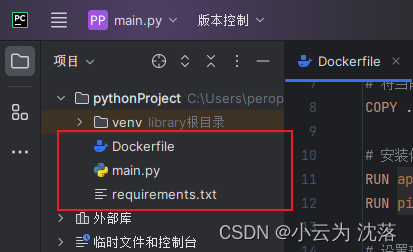
Dockerfile内容:
- # 使用Python 3.9 作为基础镜像
- FROM python:3.9
-
- # 设置工作目录
- WORKDIR /app
-
- # 将当前目录下的所有文件复制到容器的工作目录中
- COPY . /app
-
- # 安装依赖包
- RUN pip install --no-cache-dir -r requirements.txt
-
- # 设置环境变量
- ENV PYTHONUNBUFFERED=1
-
- # 定义容器启动时执行的命令
- CMD ["python", "/app/main.py"]

2. 基于dockerfile构造镜像
在根目录执行命令:
docker build -t 服务名字:版本 .3. 错误解决
在构建镜像的时候报错
- error during connect: this error may indicate that the docker daemon is not running: Get "http://%2F%2F.%2Fpipe%2Fdocker_engine/v1.24/version": open //./pipe/docker_engine: The system cannot find the file specified.
- Client:
- Cloud integration: v1.0.35-desktop+001
- Version: 24.0.5
- API version: 1.43
- Go version: go1.20.6
- Git commit: ced0996
- Built: Fri Jul 21 20:36:24 2023
- OS/Arch: windows/amd64
- Context: default

解决方法:
网上众说纷纭,我是Windows的命令行cmd 中输入:bcdedit /set hypervisorlaunchtype auto 再重開機,再在Windows上登录Docker。再构建镜像就没有问题了。
声明:本文内容由网友自发贡献,不代表【wpsshop博客】立场,版权归原作者所有,本站不承担相应法律责任。如您发现有侵权的内容,请联系我们。转载请注明出处:https://www.wpsshop.cn/article/detail/54911?site
推荐阅读

相关标签

