- 1获取屏幕触控位置_adb 点击屏幕坐标
- 2安卓数据存储-SharePreferences
- 3制作一个简单HTML电影网页设计(HTML+CSS)---电影主题网站 6页带_html电影网页制作
- 4如何自建网站(1)
- 5【科技】三元环计数
- 6C#与C++、Java之比较概览
- 72021爱分析·中国人工智能应用趋势报告——新基建助推,人工智能应用迈入新阶段_人工智能气象+ 应用统一算力系统
- 8java byte数组转String
- 9MVC、MVP、MVVM的区别_请简要说明mvc,mvp,mvvm三种模式的异同
- 10Simple Pose: Rethinking and Improving a Bottom-up Approach for Multi-Person Pose Estimation
Python基础学习笔记5_def fun()什么意思
赞
踩
一、函数的定义及调用
- 函数的定义:
1.函数是将一段实现功能的完整代码,使用函数名称进行封装,通过函数名称进行调用。以此达到一次编写,多次调用的目的
2.使用函数可以实现代码的重用性
3.Python中函数定义使用def关键字
4.语法结构:
def 函数名称(参数列表):
	函数体
	[return 返回值列表]
- 1
- 2
- 3
def get_sum(num):
    s = 0
    for i in range (1, num+1):
        s += i
    print(f'1到{num}之间的和为:{s}')

get_sum(10)
- 1
- 2
- 3
- 4
- 5
- 6
- 7
-
函数的调用:
1.无返回值的调用:函数名(参数列表) -
函数使用的总结:
1.函数定义:
关键字def
确定函数名称、参数名称、参数个数、编写函数体
2.函数的调用:
通过函数名称进行调用函数
对函数的个个参数进行实际的赋值
3.函数执行:
使用实际参数参于函数功能的实现
4.函数返回结果:
函数执行结束后,如果使用return进行返回结果,则结果被返回到函数的调用处
二、函数的参数传递
形式参数与实际参数:
-形式参数:函数定义处的参数
-实际参数:函数调用处的参数
2.1位置参数、关键字参数、默认值参数
- 参数的类型:
1.位置参数:调用时的参数个数和顺序必须与定义的参数个数和顺序相同
2.关键字参数:函数调用时,使用“形参名称=值”的方式进行传参,传递参数顺序可以与定义时的参数顺序不同
3.默认值参数:函数定义时,直接形式参数进行赋值,在调用时如果该参数不传值,将使用默认值,如果该参数传值,则使用传递的值
def happy_birthday(name,age):
    print('祝{0}生日快乐'.format(name))
    print(str(age) + '岁生日快乐')

#函数调用
# happy_birthday('fc')#TypeError: happy_birthday() missing 1 required positional argument: 'age'
# happy_birthday(21, 'fc')#程序不报错,语义不正确

#正确的传递方式
happy_birthday('fc', 21)

#关键字传参
happy_birthday(age=21, name='fc')
#happy_birthday(age1=21, name='fc')参数的名称必须与函数定义的参数的名称相同
happy_birthday(name='fc', age=21)
happy_birthday('fc', age=21)#第一个参数使用位置参数传参,第二个参数使用关键字参数传参
happy_birthday(name='fc', 21)#位置参数在关键字参数之后程序会报错

#默认值参数
def happy_birthday(name='fc', age=18):
    print('祝{0}生日快乐'.format(name))
    print(str(age) + '岁生日快乐')

happy_birthday()
happy_birthday('陈明明')#age使用了默认值
happy_birthday(age=19)#age使用关键字传参,name使用默认值
#happy_birthday(19)
#如果同时存在位置参数和默认值参数时,默认值参数放后【函数定义时】

def fun(a, b=20):
    pass

# def fun(a=20, b):
#     pass

- 1
- 2
- 3
- 4
- 5
- 6
- 7
- 8
- 9
- 10
- 11
- 12
- 13
- 14
- 15
- 16
- 17
- 18
- 19
- 20
- 21
- 22
- 23
- 24
- 25
- 26
- 27
- 28
- 29
- 30
- 31
- 32
- 33
- 34
2.2可变参数
- 参数的类型:
1.可变参数:
-个数可变的位置参数:
在参数前加一个星(*para)
函数调用时可以接收任意个数的实际参数,并放到一个元组中
#调用时参数前加一个星,会将列表进行解包
-个数可变的关键字参数:
在参数前加两个星(**para)
在函数调用时可以接收任意多个“参数=值”形式的参数,并放到一个字典中
#调用时参数前加一个星,会将字典进行解包
#可变的位置参数
def fun(*para):
    print(type(para))
    for item in para:
        print(item)

fun(10,20,30,40)
fun(10)
fun([1,2,3,4,5])
#调用时参数前加一个星,会将列表进行解包
fun(*[1,2,3,4,5])

#个数可变的关键字参数
def fun2(**kwpara):
    print(type(kwpara))
    for key,value in kwpara.items():
        print(key,'-->',value)

fun2(name='fc', age=18, height=164)
d = {'name':'fc', 'age':18, 'height':164}
#fun2(d)#TypeError: fun2() takes 0 positional arguments but 1 was given
fun(**d)
- 1
- 2
- 3
- 4
- 5
- 6
- 7
- 8
- 9
- 10
- 11
- 12
- 13
- 14
- 15
- 16
- 17
- 18
- 19
- 20
- 21
- 22
三、文件
- 文件的概述:
文件是存储在辅助存储设备的一组数据序列
不同类型的文件通过后缀名进行区分 - 文件的分类:
-文本文件:如.txt文件,文件中的内容由于编码格式的不同,所占磁盘空间的字节数不同
-二进制文件:然后.png文件,文件直接由0或1组成,没有统一编码,需要用指定的软件打开
3.1文件的基本操作
- 文件的创建(打开)和关闭
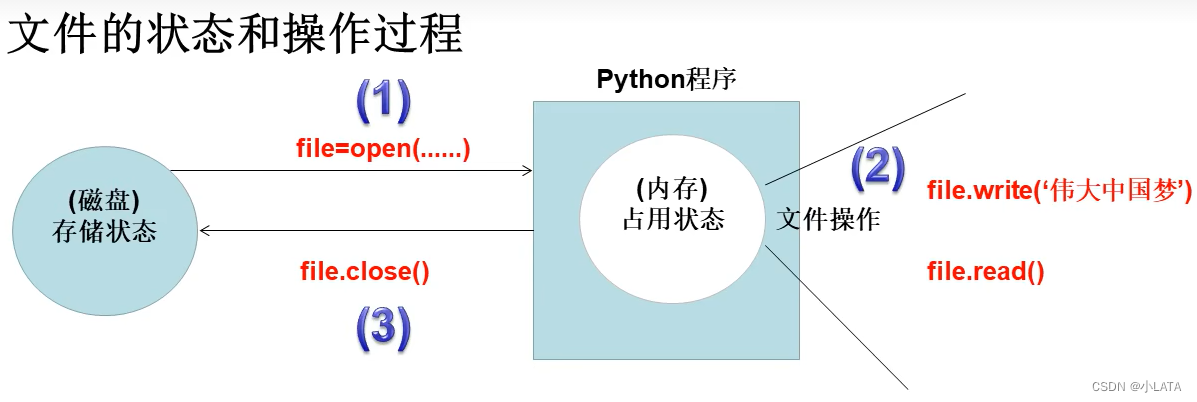
-文件的操作顺序:打开——操作——关闭
-创建文件:变量名=open(filename,mode,encoding)
-操作文件:变量名.read() 变量名.write(s)
-关闭文件:变量名.close()
def my_write():
    #1.创建文件
    file = open('a.txt', 'w', encoding='utf-8')
    #2.操作
    file.write('天天开心')
    #3.关闭
    file.close()

def my_read():
    #1.打开文件
    file = open('a.txt', 'r',encoding='utf-8')
    #2.操作文件
    s = file.read()
    print(s)
    #关闭
    file.close()

my_read()
- 1
- 2
- 3
- 4
- 5
- 6
- 7
- 8
- 9
- 10
- 11
- 12
- 13
- 14
- 15
- 16
- 17
- 18
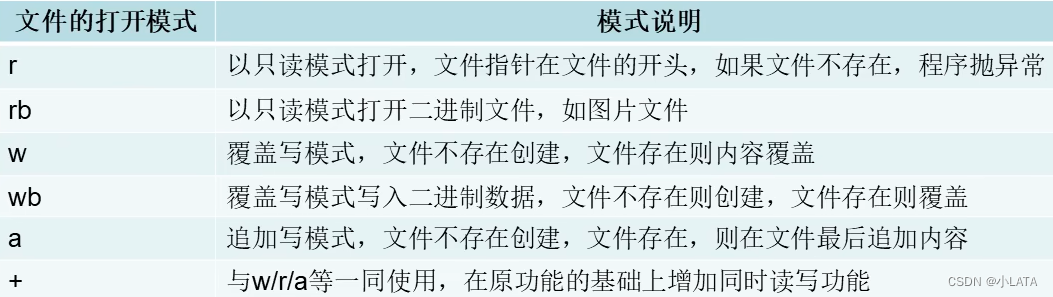
2.1.1文件的打开模式
报错的情况:列表中所有的数据类型必须是str类型,否则程序报错
def my_write_list(file, lst):
    # 1.创建文件
    file = open(file, 'a', encoding='utf-8')
    # 2.操作
    file.writelines(lst)
    # 3.关闭
    file.close()

lst = ['姓名\t', '年龄\t', '成绩\n', '张三\t', '18\t', '98\t']
my_write_list('b.txt', lst)

#报错的情况:列表中所有的数据类型必须是str类型,否则程序报错
- 1
- 2
- 3
- 4
- 5
- 6
- 7
- 8
- 9
- 10
- 11
- 12
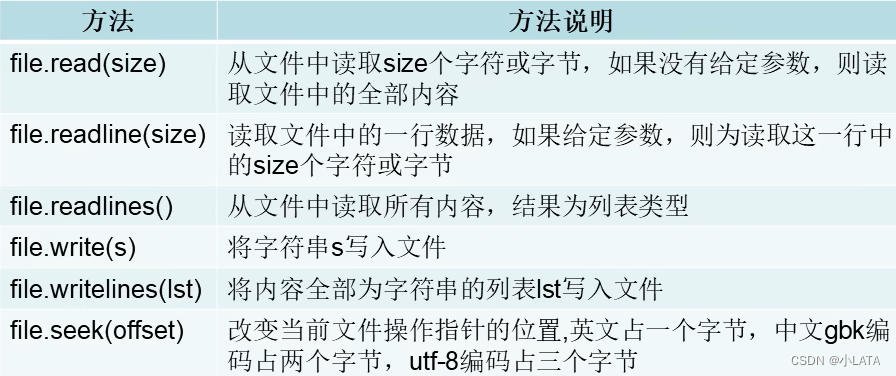
2.1.2文件的读写方法
def my_read(filename):
    #1.打开文件
    file = open(filename, 'r',encoding='utf-8')
    #2.操作文件
    # s = file.read()
    # s = file.read(2)#读取两个字符
    # s = file.readline()#读取一行数据
    # s = file.readline(2)#从一行中读取两个字符
    # s = file.readlines()
    file.seek(3)#改变当前文件指针的位置,单位是字节
    s = file.read()
    print(type(s))
    print(s)
    #关闭
    file.close()

my_read('b.txt')
- 1
- 2
- 3
- 4
- 5
- 6
- 7
- 8
- 9
- 10
- 11
- 12
- 13
- 14
- 15
- 16
- 17
2.1.3文件的复制
def copy(scr,new_path):
    #1.打开原文件
    file1 = open(scr,'r',encoding='utf-8')
    #2.打开目标文件
    file2 = open(new_path,'w',encoding='utf-8')
    #3.开始复制
    s = file1.read()#读取全部内容
    file2.write(s)#写入全部内容
    #4.关闭
    file2.close()
    file1.close()#先开的文件后关

copy('a.txt', r'G:\pyprojects\learnpython\acopy.txt')

def copy(scr,new_path):
    #1.打开原文件
    file1 = open(scr,'rb')
    #2.打开目标文件
    file2 = open(new_path,'wb')
    #3.开始复制
    s = file1.read()#读取全部内容
    file2.write(s)#写入全部内容
    #4.关闭
    file2.close()
    file1.close()#先开的文件后关

copy('./1.1new.png', '../learnpython/copy2.png')
- 1
- 2
- 3
- 4
- 5
- 6
- 7
- 8
- 9
- 10
- 11
- 12
- 13
- 14
- 15
- 16
- 17
- 18
- 19
- 20
- 21
- 22
- 23
- 24
- 25
- 26
- 27
2.1.4with语句
语法结构:
with open(...)as file:
	pass
- 1
- 2
使用with语句的优点:
-处理文件时,无论是否产生异常,都能保证with语句执行完毕后关闭已经打开的文件
def write_fun():
    with open('aa.txt', 'w', encoding='utf-8') as file:
        file.write('2022北京冬奥会欢迎你')

def read_fun():
    with open('aa.txt', 'r', encoding='utf-8') as file:
        print(file.read())

write_fun()
read_fun()

def copy(scr_file,target_file):
    with open(scr_file, 'r', encoding='utf-8') as file:
        with open(target_file, 'w', encoding='utf-8') as file2:
            file2.write(file.read())

copy('aa.txt','bb.txt')
- 1
- 2
- 3
- 4
- 5
- 6
- 7
- 8
- 9
- 10
- 11
- 12
- 13
- 14
- 15
- 16
- 17
3.2数据的组织维度及存储
-
数据的组织维度
1.一维数据:采用线性方式组织数据,可以使用列表、元组、集合进行存储
2.二维数据:也称表格数据,由行和列组成,在Python中可以使用二维列表进行存储
3.高维数据:使用key-value对方式组织数据,在Python中可以使用字典进行存储 -
数据的存储
1.一维数据和二维数据
-可采用CSV(逗号分隔值)格式进行存储
-CSV格式存储的文件扩展名为.csv
-可以使用记事本或excel打开
-每一行表示一个一维数据,多行表示二维数据
#一维数据的存储和读取
def my_write():
    #一维数据可以使用列表、元组、集合进行存储
    lst = ['张三','里斯','王五','赵丽']
    with open('student.csv','w') as file:
        file.write(','.join(lst))

my_write()

def my_read():
    with open('student.csv','r') as file:
        s = file.read()
        lst = s.split(',')#对字符串使用,分割
        print(lst)

my_read()

#二维数据的存储和读取
def my_write_table():
    lst = [
        ['商品名称','单价','采购数量'],
        ['水杯','98.5','20'],
        ['鼠标','89','100'],
    ]#使用二维列表进行存储
    with open('table.csv','w',encoding='gbk') as file:
        for item in lst:
            line = ','.join(item)
            file.write(line)
            file.write('\n')

my_write_table()

def my_raed_table():
    data = []
    with open('table.csv','r',encoding='gbk') as file:
        lst = file.readlines()#结果是一个列表类型
        for item in lst:
            newlst = item[:len(item)-1].split(',')
            data.append(newlst)
    print(data)

my_raed_table()
- 1
- 2
- 3
- 4
- 5
- 6
- 7
- 8
- 9
- 10
- 11
- 12
- 13
- 14
- 15
- 16
- 17
- 18
- 19
- 20
- 21
- 22
- 23
- 24
- 25
- 26
- 27
- 28
- 29
- 30
- 31
- 32
- 33
- 34
- 35
- 36
- 37
- 38
- 39
- 40
- 41
- 42
2.高维数据
-JSON格式可以对高维数据进行存储,JSON(JavaScript Object Notation)是一种轻量级的数据交换格式,易于阅读和理解
-JASON格式的数据使用key:value形式存储
-Python内置的json模块专门用于处理JSON格式数据
-json模块的两个过程:
–编码:将Python数据类型转成JSON格式的过程
–解码:将JSON格式解析对应到Python数据类型的过程
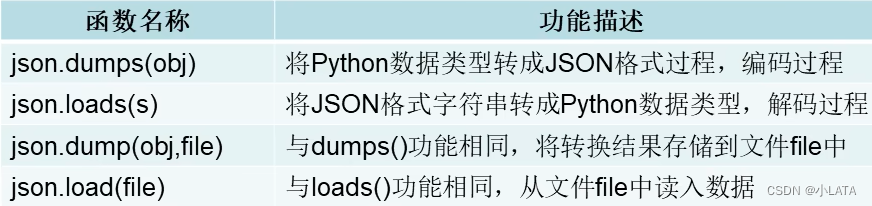
# -*- coding:utf-8 -*-
import json

lst = [
    {'name':'艺术家','age':18,'score':90},
{'name':'陈明明','age':19,'score':89},
{'name':'懒洋洋','age':20,'score':91}
]

#编码,转成JSON格式,结果为一个字符串
#ensure_ascii=False,正常显示中文
#indent 增加数据的显示缩进,使得生成的Json格式字符串更具有可读性
s = json.dumps(lst,ensure_ascii=False,indent=4)
print(type(s))
print(s)
#解码,将JSON格式字符串转成Python中的数据类型
lst2 = json.loads(s)
print(type(lst2))
print(lst2)

#编码到文件
with open('student.txt','w') as file:
    json.dump(lst,file,indent=4,ensure_ascii=False)

#解码到程序
with open('student.txt','r') as file:
    print(json.load(file))
- 1
- 2
- 3
- 4
- 5
- 6
- 7
- 8
- 9
- 10
- 11
- 12
- 13
- 14
- 15
- 16
- 17
- 18
- 19
- 20
- 21
- 22
- 23
- 24
- 25
- 26
- 27
3.3目录与文件的相关操作——os模块
os模块:Python内置的与操作系统和文件系统相关的模块,该模块语句的执行结果通常与操作系统有关
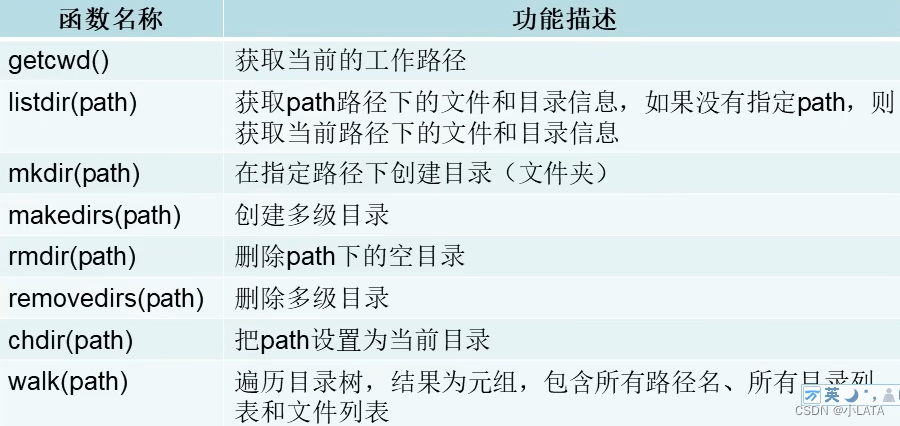
import os
print('当前的工作目录:', os.getcwd())
lst = os.listdir()
print('当前路径下所有的目录及文件:', lst)
print('指定路径下的所有目录及文件', os.listdir(r'G:\pyprojects'))#G:\\pyprojects G:/pyprojects

#创建目录
# os.mkdir('好好学习')#如果要创建的目录已存在,程序报错
# os.makedirs('g:/pyprojects/learnpython/aa/bb/cc')#创建多级目录

#删除目录
# os.rmdir('好好学习')#'./好好学习' 目录若不存在,程序报错
# os.removedirs('./aa/bb/cc')

#把path设置为当前路径,但并不会修改磁盘真正的位置
# os.chdir('g:/pyprojects')
# print('获取当前路径:',os.getcwd())

#遍历目录树,类似于递归操作,会展示指定路径下的所有目录和文件
for dirs,dirlst,filelst in os.walk('g:/pyprojects'):
    print(dirs)
    print(dirlst)
    print(filelst)
    print('---------------------------------------------------------------------------------------------')
- 1
- 2
- 3
- 4
- 5
- 6
- 7
- 8
- 9
- 10
- 11
- 12
- 13
- 14
- 15
- 16
- 17
- 18
- 19
- 20
- 21
- 22
- 23
- 24
- 25
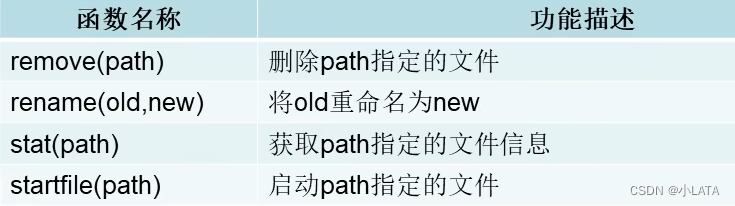
import os
# #删除文件
# os.remove('./a.txt')#若文件不存在,程序报错
#
# #重命名文件
# os.rename('./aa.txt','./newaa.txt')

#转换时间格式
import time

def data_format(longtime):
    s = time.strftime('%Y-%m-%d %H:%M:%S', time.localtime(longtime))
    return s
#获取文件的信息
info = os.stat('./bb.txt')
print(type(info))
print(info)
print('最近一次访问时间:', data_format(info.st_atime))
print('在Windows系统中显示的是文件的创建的时间:', data_format(info.st_ctime))
print('最后一次修改的时间:', data_format(info.st_mtime))
print('文件的大小(单位为字节):', info.st_size)

#启动路径下的指定文件
# os.startfile('calc.exe')
# os.startfile(r'F:\Microsoft VS Code\Code.exe')
- 1
- 2
- 3
- 4
- 5
- 6
- 7
- 8
- 9
- 10
- 11
- 12
- 13
- 14
- 15
- 16
- 17
- 18
- 19
- 20
- 21
- 22
- 23
- 24
- 25
2.4目录与文件的相关操作——os.path模块
os.path模块:是os模块的子模块,也提供了一些目录或文件的操作函数
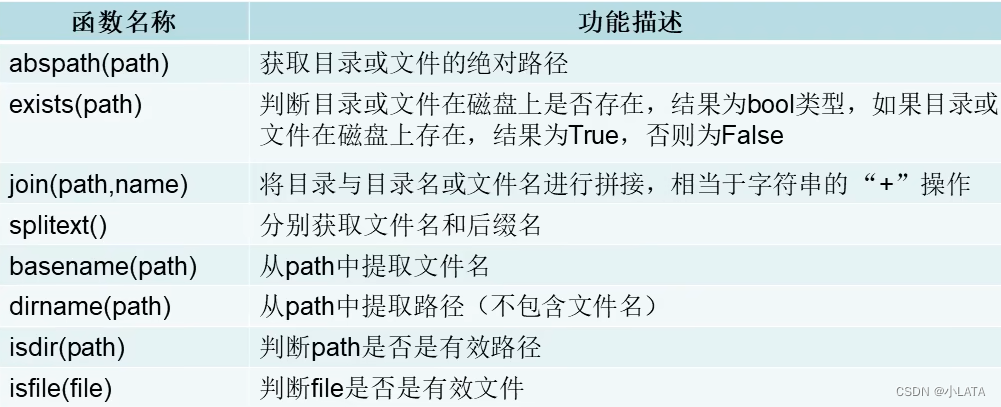
import os.path
print('获取目录或文件的绝对路径:',os.path.abspath('./b.txt'))
print('判断目录或文件在磁盘上是否存在:',os.path.exists('b.txt'))
print('拼接路径:',os.path.join('G:\pyprojects\learnpython','b.txt'))
print('分割文件名与文件的后缀名:',os.path.splitext(r'G:\pyprojects\learnpython\b.txt'))
print('提取文件名:',os.path.basename(r'G:\pyprojects\learnpython\b.txt'))
print('提取路径:',os.path.dirname(r'G:\pyprojects\learnpython\b.txt'))
print('判断一个路径是否是有效路径:',os.path.isdir(r'G:\pyprojects\learnpython'))
print('判断一个文件按是否有效:',os.path.isfile(r'G:\pyprojects\learnpython\b.txt'))
- 1
- 2
- 3
- 4
- 5
- 6
- 7
- 8
- 9
四、实战——批量创建文件
import os.path
import random


def create_filename():
    filename_lst = []
    lst = ['水果','烟酒','粮油','肉蛋','蔬菜']#物资的类别
    code = ['0','1','2','3','4','5','6','7','8','9','a','b','c','d','e','f']
    for i in range(1,3001):
        filename = ''
        #根据不同情况拼接文件名称的序号
        if i < 10:
            filename += '000' + str(i)
        elif i< 100:
            filename += '00' + str(i)
        elif i <= 1000:
            filename += '0' + str(i)
        else:
            filename += str(i)
        #拼接类别
        filename = '_' + random.choice(lst)
        #拼接识别码
        s = ''
        for j in range(9):
            s += random.choice(code)
        filename += '_' + s
        filename_lst.append(filename)
    return filename_lst

# print(create_filename())

def create_file(filename):
    with open(filename,'w') as file:
        pass

path = './data'

if not os.path.exists(path):
    os.mkdir(path)

lst = create_filename() #获取文件名的列表
for item in lst:
    create_file(os.path.join(path, item) + '.txt')
- 1
- 2
- 3
- 4
- 5
- 6
- 7
- 8
- 9
- 10
- 11
- 12
- 13
- 14
- 15
- 16
- 17
- 18
- 19
- 20
- 21
- 22
- 23
- 24
- 25
- 26
- 27
- 28
- 29
- 30
- 31
- 32
- 33
- 34
- 35
- 36
- 37
- 38
- 39
- 40
- 41
- 42
- 43
五、实战——批量创建文件夹
import os
import os.path
def mkdirs(path,num):
    for item in range(1,num+1):
        os.mkdir(path + '\\' + str(item))

path = './newdir'
if not os.path.exists(path):
    os.mkdir(path)

num = eval(input('请输入要创建的目录的个数:'))
mkdirs(path,num)
- 1
- 2
- 3
- 4
- 5
- 6
- 7
- 8
- 9
- 10
- 11
- 12
六、实战——记录用户登录日志并查看
import time


def show_info():
    print('输入提示数字,执行相应操作:0.退出 1.查看登录日志')

def write_loginfo(username):
    with open('log.txt','a') as file:
        s = '用户名:{0},登录时间:{1}\n'.format(username,time.strftime('%Y-%m-%d %H:%M:%S',time.localtime(time.time())))
        file.write(s)

def read_loginfo():
    with open('log.txt','r') as file:
        while True:
            line = file.readline()
            if line == '':
                break
            else:
                print(line)

username = input('请输入用户名:')
pwd = input('请输入密码:')
if username == 'admin' and pwd == 'admin':
    print('登录成功')
    write_loginfo(username)
    show_info()
    num = eval(input('请输入操作数字:'))
    while True:
        if num == 0:
            print('退出循环')
            break
        elif num == 1:
            print('查看登录日志')
            read_loginfo()
            show_info()
        else:
            print('您输入的数字有误:')
            show_info()
        num = eval(input('请输入操作数字:'))
else:
    print('用户名或密码不正确')
- 1
- 2
- 3
- 4
- 5
- 6
- 7
- 8
- 9
- 10
- 11
- 12
- 13
- 14
- 15
- 16
- 17
- 18
- 19
- 20
- 21
- 22
- 23
- 24
- 25
- 26
- 27
- 28
- 29
- 30
- 31
- 32
- 33
- 34
- 35
- 36
- 37
- 38
- 39
- 40
- 41
六、实战——模拟淘宝客服自动回复
def find_answer(question):
    with open('replay.txt','r',encoding='utf-8') as file:
        while True:
            line = file.readline()
            if line == '':
                break
            #字符串的分割
            keyword = line.split('|')[0] #|左侧的内容
            reply = line.split('|')[1] #|右侧的内容
            if keyword in question:
                return reply
    return False

question = input('HI,xxx你好,小蜜在此等主人很久了,有什么烦恼快和小蜜说说吧~')
while True:
    if question == 'bye':
        break
    #开始查找是否可以自动回复
    reply = find_answer(question)
    if reply == False:
        question = input('小蜜不知道您说的是什么,您可以问一些关于订单,物流,支付等问题,退出请输入bye')
    else:
        print(reply)
        question = input('您还可以问一些关于订单,物流,支付等问题,退出请输入bye')
print('主人再见')
- 1
- 2
- 3
- 4
- 5
- 6
- 7
- 8
- 9
- 10
- 11
- 12
- 13
- 14
- 15
- 16
- 17
- 18
- 19
- 20
- 21
- 22
- 23
- 24
- 25