
热门标签
热门文章
- 1盘点2023年Q3的开源模型,这些值得推荐!_exllamav2hf
- 2在Flask中实现websocket_flask websocket
- 3关于“React 和 Vue 该用哪个”我真的栓Q_react vue 选型
- 4网络安全工具——Wireshark抓包工具_抓包工具wireshark
- 5数学基础--均值、方差、标准差、协方差_均值和标准差
- 6自回归模型(Autoregressive model)(auto)
- 7SpringBoot多数据源切换,AOP实现动态数据源切换_dynamicdatasource.adddatasource()
- 8西瓜视频登录页面_69av
- 9Qt - Clion使用cmake运行QtCreator创建的qmake项目,无改动切换自如_clion 创建qmake 项目
- 10Git使用总结_git topic
当前位置: article > 正文
js 之 Math对象的常用方法、random(随机数)_使用math对象方法获取随机数的上机总结
作者:算法编织者 | 2024-02-01 18:42:38
赞
踩
使用math对象方法获取随机数的上机总结
1、Math.ceil() 向上取整
	console.log(Math.ceil(1.01)); //2
    console.log(Math.ceil(1.0)); //1
    console.log(Math.ceil(1.66)); //2
- 1
- 2
- 3
2、Math.floor() 向下取整
        console.log(Math.floor(1.91)); //1
        console.log(Math.floor(2.0)); //2
        console.log(Math.floor(1.66)); //1
- 1
- 2
- 3
3、Math.round() 四舍五入
console.log(Math.round(1.5)); //2
console.log(Math.round(1.4)); //1
console.log(Math.round(6.66)); //7
- 1
- 2
- 3
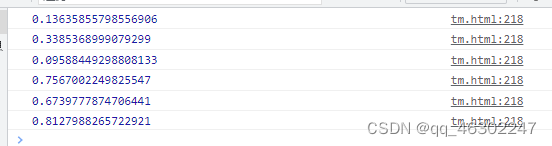
4、Math.random() 0~1之间的随机数(不包括 0和1)
for(let i=0; i<6; i++) {
    console.log(Math.random());
}
- 1
- 2
- 3
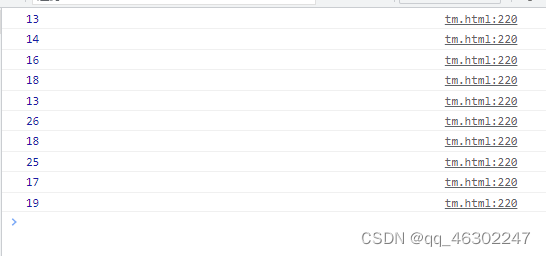
5、生成 x~y 之间的随机数(包括 x和y)
公式:Math.round( Math.random() * (y-x) + x )

// 生成 12~26 的随机数
for(let i=0; i<10; i++) {
    console.log(Math.round( Math.random() * (26-12) + 12 ));
}
- 1
- 2
- 3
- 4
- 5
- 6
6、Math.max()获取多数中的最大值、Math.min()获取多数中的最小值
            let arr = [9,6,2,5,3,88]
            console.log(Math.max(...arr)); //88
            console.log(Math.min(...arr)); //2
- 1
- 2
- 3
声明:本文内容由网友自发贡献,不代表【wpsshop博客】立场,版权归原作者所有,本站不承担相应法律责任。如您发现有侵权的内容,请联系我们。转载请注明出处:https://www.wpsshop.cn/article/detail/54541
推荐阅读
相关标签

