
热门标签
热门文章
- 1安全运维:cmd命令大全(108个)
- 2高并发系统设计_高并发设计
- 3windows docker desktop配置国内镜像仓库_docker desktop 国内镜像
- 4[VB.NET]动态生成的repeater,为什么无法显示?_repeater控件使用后什么也没有
- 5对讲机 百度百科
- 6C#的StringBuilder属性
- 7格式化硬盘时出现“由于i/o设备错误,无法运行此项请求”错误提示,如何解决?_diskpart 遇到错误: 由于 i/o 设备错误,无法运行此项请求。 有关详细信息,请参阅
- 8【kubernetes系列】Kubernetes之Taints和tolerations_kubernetes tolerations
- 9已解决CMake Error: Could not find CMAKE_ROOT !!!
- 10Flink笔记-sink写入kafka_flink sink kafka
当前位置: article > 正文
egret eui 动态添加多个按钮_菜鸟丨如何用Egret实现抽奖轮盘
作者:数据灵魂 | 2024-02-01 17:54:22
赞
踩
egret 如何画一个按钮
本篇教程适合初次接触白鹭的同学,我们通过实现抽奖效果,让大家对egret的touch事件,timer计时器以及滤镜有一个基本的了解。具体效果如下:
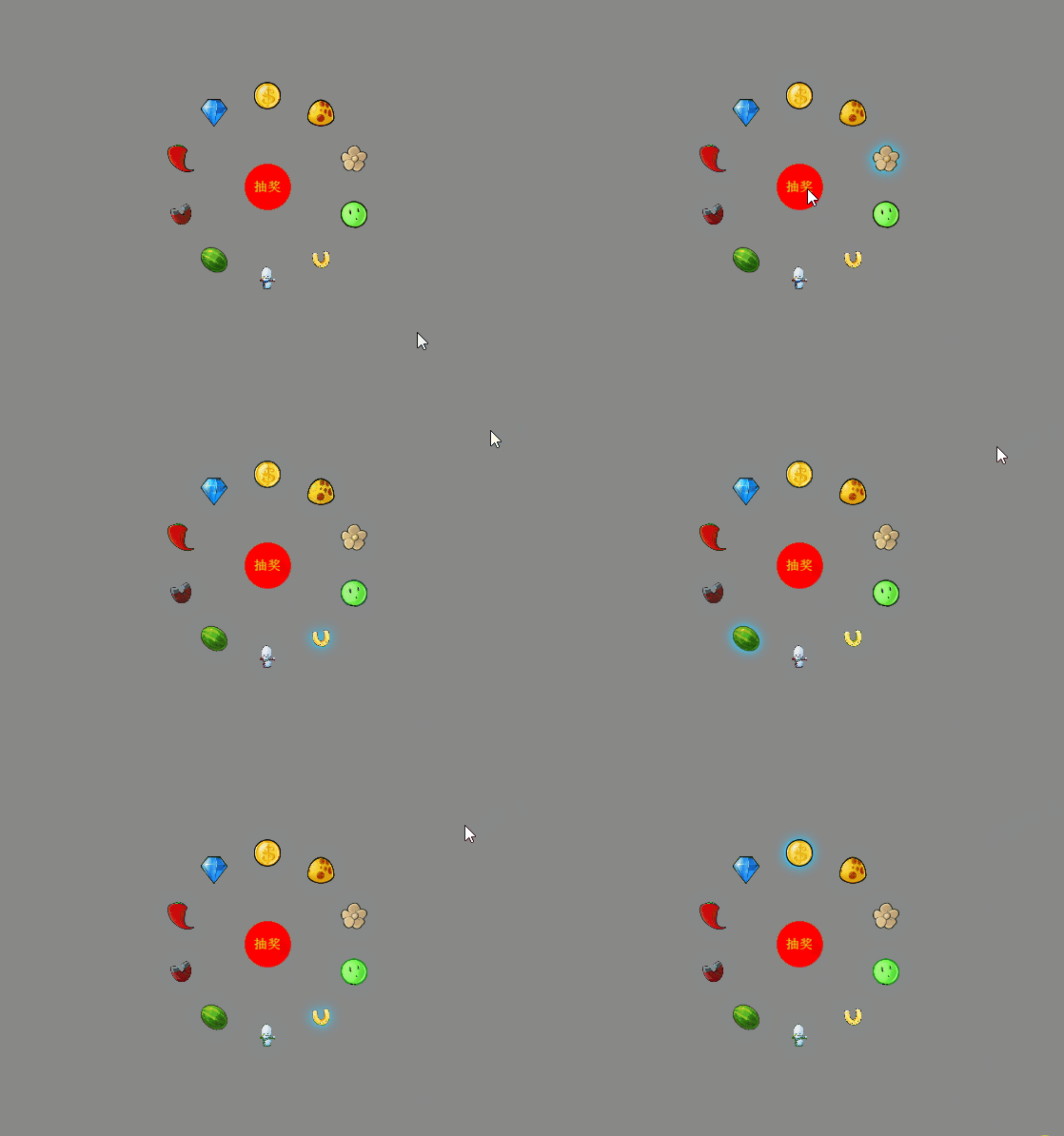
教程源码地址:https://github.com/hkjlx/Luckdraw
具体实现方法
1、创建一个Luck类编写抽奖的主逻辑
Luck类继承自egret.DisplayObjectContainer容器
- class Luck extends egret.DisplayObjectContainer {
-
- public constructor() {
- super();
- }
- }
2、数据初始化
- //存放所有奖品的数组
- private arr_img: string[] = [];
- //抽奖计时器
- private tim:egret.Timer;
- //初始化
- private init() {
- //创建中心区域的红色抽奖按钮
- this.creatbtn();
- //给存放奖品的数组赋值
- this.arr_img = ["xg_png", "ct_png", "lj_png", "zs_png", "my_png", "mg_png", "hua_png", "yy_png", "jct_png", "xr_png"];
- //绘制轮盘使奖品以圆的形式排列
- this.setcircle();
- //添加抽奖时的计时器
- this.tim = new egret.Timer(500,0);
- this.tim.addEventListener(egret.TimerEvent.TIMER,this.Luckyanimation,this);
- }

3、创建红色抽奖按钮(creatbtn)
设置抽奖按钮居中:改变按钮的锚点,默认的锚点在左上角,改为按钮的中心this.btn.anchorOffsetX = this.btn.width / 2;this.btn.anchorOffsetY = this.btn.height / 2;然后让按钮的位置在整个舞台的中心。此时在创建按钮的时候舞台上什么都没有,所以直接用this.stage.stageWidth是获取不到舞台的宽高的。在以后的项目中同学们可以创建一个date类,用来存放全局的数据,本篇教程是在main.ts中直接添加了两个静态属性STAGEWIDTH和STAGEHEIGHT具体方法如下:
- //舞台宽度
- public static STAGEWIDTH: number;
- //舞台高度
- public static STAGEHEIGHT: number;
- protected createGameScene(): void {
- Main.STAGEWIDTH = this.stage.stageWidth;
- Main.STAGEHEIGHT = this.stage.stageHeight;
- this.addChild(new Luck);
- }
- private btn: egret.Sprite;//中心的抽奖按钮
- //绘制抽奖按钮
- private creatbtn() {
- //创建抽奖按钮的精灵
- this.btn = new egret.Sprite();
- this.addChild(this.btn);
- //让按钮居中
- this.btn.x = Main.STAGEWIDTH / 2;
- this.btn.y = Main.STAGEHEIGHT / 2;
- this.btn.anchorOffsetX = this.btn.width / 2;
- this.btn.anchorOffsetY = this.btn.height / 2;
- //开启btn的可点击
- this.btn.touchEnabled = true;
- //给btn添加点击事件
- this.btn.addEventListener(egret.TouchEvent.TOUCH_TAP, this.onbtnTap, this);
-
- //绘制红色的圆并添加到btn中
- let cir:egret.Shape = new egret.Shape();
- cir.graphics.beginFill(0xff0000);
- cir.graphics.drawCircle(0,0,50);
- cir.graphics.endFill();
- this.btn.addChild(cir);
-
- //添加抽奖文字
- let cj:egret.TextField = new egret.TextField();
- cj.text = '抽奖';
- cj.anchorOffsetX = cj.width/2;
- cj.anchorOffsetY = cj.height/2;
- cj.textColor = 0xd8ee1f;
- this.btn.addChild(cj);
- }
4、使所有奖品以圆的形式排列
- private point = []; //结果
- private bitmapArr:egret.Bitmap[] = [];//
- //让奖品以圆的形式排列
- private setcircle() {
- this.getPoint(200, Main.STAGEWIDTH / 2, Main.STAGEHEIGHT / 2, this.arr_img.length);
- for (let i: number = 0; i < this.point.length; i++) {
- let img = new egret.Bitmap();
- img.texture = RES.getRes(this.arr_img[i]);
- img.width = 60;
- img.height = 60;
- img.anchorOffsetX = img.width / 2;
- img.anchorOffsetY = img.height / 2;
- //根据拿到的坐标给每一个奖品赋值
- img.x = this.point[i].x;
- img.y = this.point[i].y;
- img.name = i+'';
- this.addChild(img);
- this.bitmapArr.push(img);
- }
- }
- /**
- * 求圆周上等分点的坐标
- * @param r 圆的半径
- * @param ox 圆心坐标x
- * @param oy 圆心坐标y
- * @param count 等分个数
- */
- private getPoint(r: number, ox: number, oy: number, count: number) {
- let radians = (Math.PI / 180) * Math.round(360 / count); //弧度
- for (let i: number = 0; i < count; i++) {
- let x = ox + r * Math.sin(radians * i);
- let y = oy + r * Math.cos(radians * i);
- this.point.unshift({ x: x, y: y }); //为保持数据顺时针
- }
- }
在egret中,用/***/进行注释会在编写代码时有代码提示,当参数比较多时,可在注释行中用@param声明每个参数的作用。

5、编写点击抽奖的响应事件
在点击事件里移除对当前点击的监听,防止用户多次点击。
在计时器里可以直接用 timer.delay 改变计时器的延迟毫秒数。
-
- private rad:number;
- private isjia:boolean = true;
-
- //点击开始抽奖
- private onbtnTap() {
- //移除点击事件监听
- this.btn.removeEventListener(egret.TouchEvent.TOUCH_TAP, this.onbtnTap, this);
- //获取一个随机数
- this.Getrandom();
- //开启计时器
- this.tim.start();
- //
- this.isjia = true;
- this.jsq = 0;
- }
-
- private jsq:number=0; //控制计时器在延迟小于30的时候实现一个抽奖滚动的过程
- //抽奖动画特效
- private Luckyanimation(){
- this.num++;
- if (this.num>=this.arr_img.length) this.num =0;
- this.creatfilter(this.bitmapArr[this.num==0?this.arr_img.length-1:this.num-1],this.bitmapArr[this.num]);
- //实现由慢到快,再由快到慢的过程
- if(this.tim.delay>30 && this.isjia){
- this.tim.delay-=30;
- }else{
- this.jsq++;
- }
- if(this.jsq>=100){
- this.isjia = false;
- this.tim.delay+=20;
- }
- if(!this.isjia && this.num==this.rad && this.tim.delay>400){
- this.tim.stop();
- //当计时器停止并且已经停在了抽奖的位置时,再给抽奖按钮添加监听
- this.btn.addEventListener(egret.TouchEvent.TOUCH_TAP, this.onbtnTap, this);
- }
- }
- //获取随机出现的值
- private Getrandom(){
- this.rad = Math.floor(Math.random()*this.arr_img.length);
- }
- //设置滤镜
- private creatfilter(bitmap0:egret.Bitmap,bitmap:egret.Bitmap) {
- var color: number = 0x33CCFF; /// 光晕的颜色,十六进制,不包含透明度
- var alpha: number = 0.8; /// 光晕的颜色透明度,是对 color 参数的透明度设 定。有效值为 0.0 到 1.0。例如,0.8 设置透明度值为 80%。
- var blurX: number = 35; /// 水平模糊量。有效值为 0 到 255.0(浮点)
- var blurY: number = 35; /// 垂直模糊量。有效值为 0 到 255.0(浮点)
- var strength: number = 2; /// 压印的强度,值越大,压印的颜色越深,而且发光与背景之间的对比度也越强。有效值为 0 到 255。暂未实现
- var quality: number = egret.BitmapFilterQuality.HIGH; /// 应用滤镜的次数,建议用 BitmapFilterQuality 类的常量来体现
- var inner: boolean = false; /// 指定发光是否为内侧发光
- var knockout: boolean = false; /// 指定对象是否具有挖空效果
- var glowFilter: egret.GlowFilter = new egret.GlowFilter(color, alpha, blurX, blurY, strength, quality, inner, knockout);
- bitmap0.filters=[];//先清除上一个的发光滤镜,再给当前图片添加
- bitmap.filters = [glowFilter];
- }
以上就是本次教程的全部内容了,不知道各位开发者小伙伴们看完之后有没有学会,如果有任何关于白鹭引擎的问题,欢迎在文章内评论,我们共同交流探讨。
声明:本文内容由网友自发贡献,不代表【wpsshop博客】立场,版权归原作者所有,本站不承担相应法律责任。如您发现有侵权的内容,请联系我们。转载请注明出处:https://www.wpsshop.cn/article/detail/54443?site
推荐阅读
相关标签

