
热门标签
热门文章
- 1「Django REST Framework 框架」Permissions权限解析及应用举例_djangoobjectpermissions
- 2python开发数字人助理版_fay数字人搭建
- 3A. Make it Increasing-Codeforces Round #783 (Div. 1)_make it increasing codeforces
- 4Unity3d发布WebGL(网页)以及IIS部署_unity3d如何将localhost改为ip
- 5Spring Boot3整合Redis
- 62021年总结:回顾这不平凡的一年_回顾即将过去的2021年,对于我个人来说,意义非凡极不平常
- 7【命令行】CMD/BAT文件执行时中文乱码的解决方法_bat文件中文无法执行
- 8[PyTorch][chapter 54][Variational Auto-Encoder 实战]
- 9Python | 关于日期的那些事儿_python timedetla
- 10Kafka 生产调优
当前位置: article > 正文
Python XPath解析html出现â解决方法 html出现{;解决方法
作者:AI数据结构灵魂 | 2024-02-01 17:20:02
赞
踩
Python XPath解析html出现â解决方法 html出现{;解决方法
前言
爬网页又遇到一个坑,老是出现â乱码,查看html出现的是&#数字;这样的。
网上相关的“Python字符中出现&#的解决办法”又没有很好的解决,自己继续冲浪,费了一番功夫解决了。
这算是又加深了一下我对这些iso、Unicode编码的理解。故分享。
问题
用Python的lxml解析html时,调用text()输出出来的结果带有â这样的乱码:
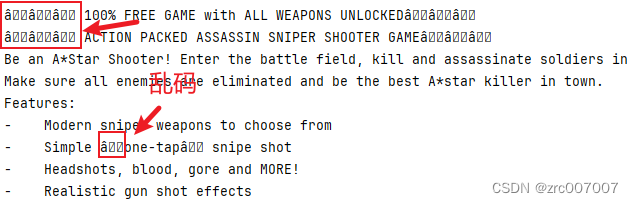
网页原页面展示:

爬取代码:
- url = "xxx"
-
- response = requests.request("GET", url)
-
- html = etree.HTML(response.text)
-
- # 直接调用text函数
- description = html.xpath('//div[@class="xxx"]/div/div//text()')
- # 直接打印
- for desc in description:
- print(desc)
原因
不用说自然是编码的问题。下面教大家排查和解决。
排查与解决
首先查看返回的响应是如何编码的:
- response = requests.request("GET", url, proxies=proxy)
- # 得到响应之后,先检查一下它的编码方式
- print(response.encoding)
结果如下:

然后根据这个编码的方式再来解码:
- html = etree.HTML(response.text)
-
- description = html.xpath('//div[@class="xxx"]/div/div//text()')
-
- for desc in description:
- # print(desc)
- # 根据上面的结果,用iso88591来编码,再解码为utf-8
- print(desc.encode("ISO-8859-1").decode("utf-8"))
结果如下:
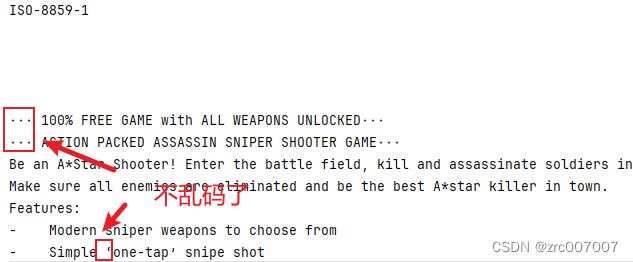
完整代码:
- url = "xxx"
-
- response = requests.request("GET", url)
- print(response.encoding)
-
- html = etree.HTML(response.text)
-
- description = html.xpath('//div[@class="xxx"]/div/div//text()')
-
- for desc in description:
- print(desc.encode("ISO-8859-1").decode("utf-8"))
- # print(desc)
总结
网上有用python2流传下来的HTMLParser的,还有用python3的html包的,效果都不好。
不过也有改response的编码方式的,就是这样:
- url = "xxx"
-
- response = requests.request("GET", url)
-
- # html = etree.HTML(response.text)
- html = etree.HTML(response.content) # 改用二进制编码
-
- # 直接调用text函数
- description = html.xpath('//div[@class="xxx"]/div/div//text()')
- # 直接打印
- for desc in description:
- print(desc)
也能成功解析。
参考文章:
声明:本文内容由网友自发贡献,不代表【wpsshop博客】立场,版权归原作者所有,本站不承担相应法律责任。如您发现有侵权的内容,请联系我们。转载请注明出处:https://www.wpsshop.cn/article/detail/54369?site
推荐阅读

相关标签

