
热门标签
热门文章
- 1前端程序员辞掉朝九晚五工作成为独立开发者一年开发出6款软件的故事_程序员卖自己开发软件
- 2postman使用教程_postman设置utf 8编码
- 314:00面试,14:06就出来了,问的问题有点变态。。。
- 4常用的测试组织架构模型_企业测试结构
- 5AI - AI绘画的精准控图(ControlNet)
- 6ConvLSTM时空预测实战代码详解
- 7解决numpy.linalg.LinAlgError: singular matrix
- 8Flink 输出至 Elasticsearch
- 9HTML小游戏13 —— 仿《神庙逃亡》3D风格跑酷游戏《墓地逃亡》(附完整源码)_html神庙逃亡制作代码
- 10将网页数据读入数据库+将数据库数据读出到网页——基于python flask实现网页与数据库的交互连接【全网最全】_flask查询数据库并在网页显示
当前位置: article > 正文
vs code中配置git(source control工具)及git提交代码_vs中的source control
作者:数据灵魂 | 2024-02-01 16:28:23
赞
踩
vs中的source control
file->preferences->settings
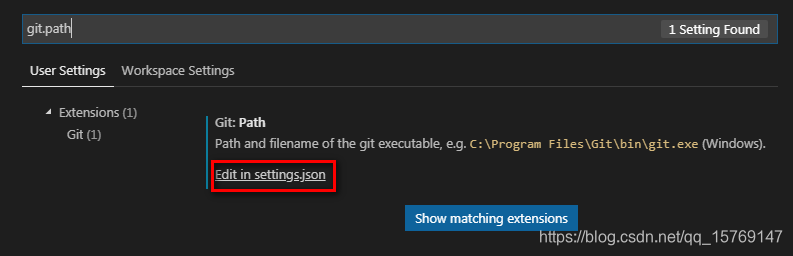
增加如下git.path的配置,如下:
{
“editor.fontSize”: 16,
“files.autoSave”: “off”,
“editor.wordWrap”: “on”,
“git.ignoreMissingGitWarning”: true,
“git.path”: “D:/git/Git/bin/git.exe”
}
git提交代码:
git status
git add .
git commit -m “first day”
git push
声明:本文内容由网友自发贡献,不代表【wpsshop博客】立场,版权归原作者所有,本站不承担相应法律责任。如您发现有侵权的内容,请联系我们。转载请注明出处:https://www.wpsshop.cn/article/detail/54248?site
推荐阅读
相关标签

