
热门标签
热门文章
- 1.NET异步和多线程系列(一)_.net线程是不是异步的一种
- 2微信小程序自定义tabBar(超详细简单以及tabBar选中效果不改变解决办法)_微信小程序底部选项,选中之后图片不变
- 3华为配置车地通信快速切换实验
- 4社交网络和社会计算入门路径_《网络动力学》 社会计算
- 5【LeetCode】Excel Sheet Column Number(Excel表列序号)
- 6LaTeX 插入图片_latex 图片导入格式
- 7小程序中强制页面刷新_小程序强制刷新页面
- 8人工智能数学基础_人工智能数学基础学习
- 9Qt窗体全屏与复原,子窗体全屏与复原_qwidget全屏
- 10图像分类学习笔记(二)——AlexNet_alexnet分类结果预测概率
当前位置: article > 正文
如何取消vscode git之前commit all changes when there are no staged changes选中的always
作者:itdef | 2024-02-01 16:25:00
赞
踩
there are no staged changes
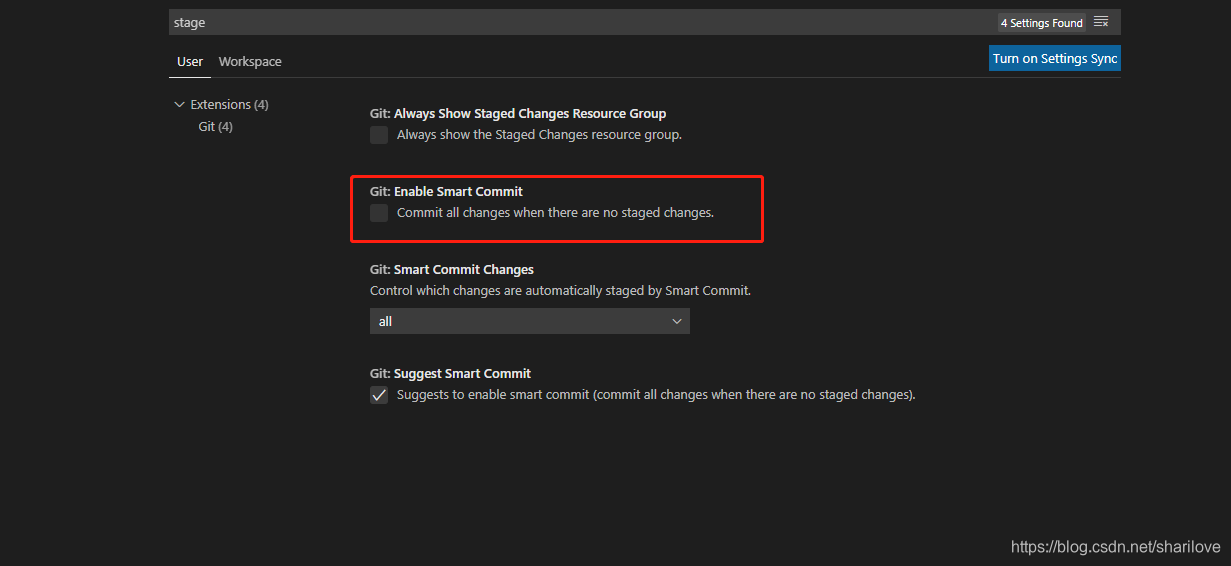
vscode的git插件中,当暂存更改没有文件时,会跳出弹窗,提示commit all changes when there are no staged changes。在之前选择时,本人选择了always,后来有些文件要进行区分,不方便,怎么办呢?
方法:
打开settings,输入stage,把红框内的勾去掉就好了
声明:本文内容由网友自发贡献,不代表【wpsshop博客】立场,版权归原作者所有,本站不承担相应法律责任。如您发现有侵权的内容,请联系我们。转载请注明出处:https://www.wpsshop.cn/article/detail/54240
推荐阅读
相关标签

