
热门标签
热门文章
- 1开源C语言库Melon:数据恢复算法
- 2nginx负载均衡(轮询、权重、负载均衡)_nginx 轮询
- 32021-02-22_waylandsink
- 4QT 串口通信中 QIODevice::write (QSerialPort): device not open
- 5mysql relaylog_MySQL relay log 详细参数解释
- 6华为OD机试真题-执行时长-2023年OD统一考试(C卷)
- 7Win10实现非标端口访问公网SMB服务_smb端口映射公网
- 8Bito(GPT-4) 的下载、安装与使用_bito插件下载
- 9大数据与云计算——部署Hadoop集群并运行MapReduce集群案例(超级详细!)_部署hadoop集群(容器)及基于mapreduce的倒排索引构建
- 10Flutter学习笔记_flutter反编译
当前位置: article > 正文
python在多卡服务器中指定某块显卡允许程序 -- 本机为mac,服务器为Linux, nvidia_python 指定显卡
作者:算法研究专家 | 2024-02-01 12:35:28
赞
踩
python 指定显卡
1 在pychram环境变量中设置
在pycharm端操作,操作步骤如下:
(1)操作右上角:Edit Configurations...
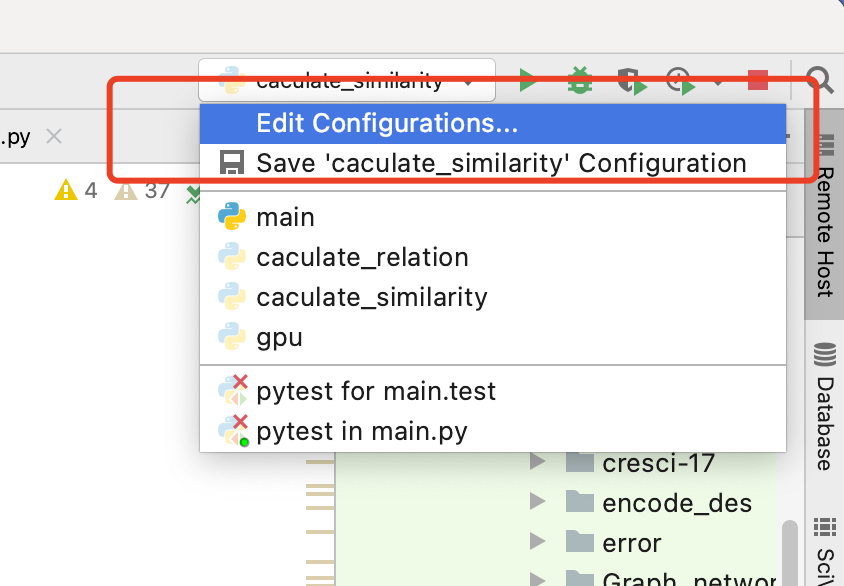
(2)在 Edit Configurations界面可以选择设置哪个程序的cuda,如图:
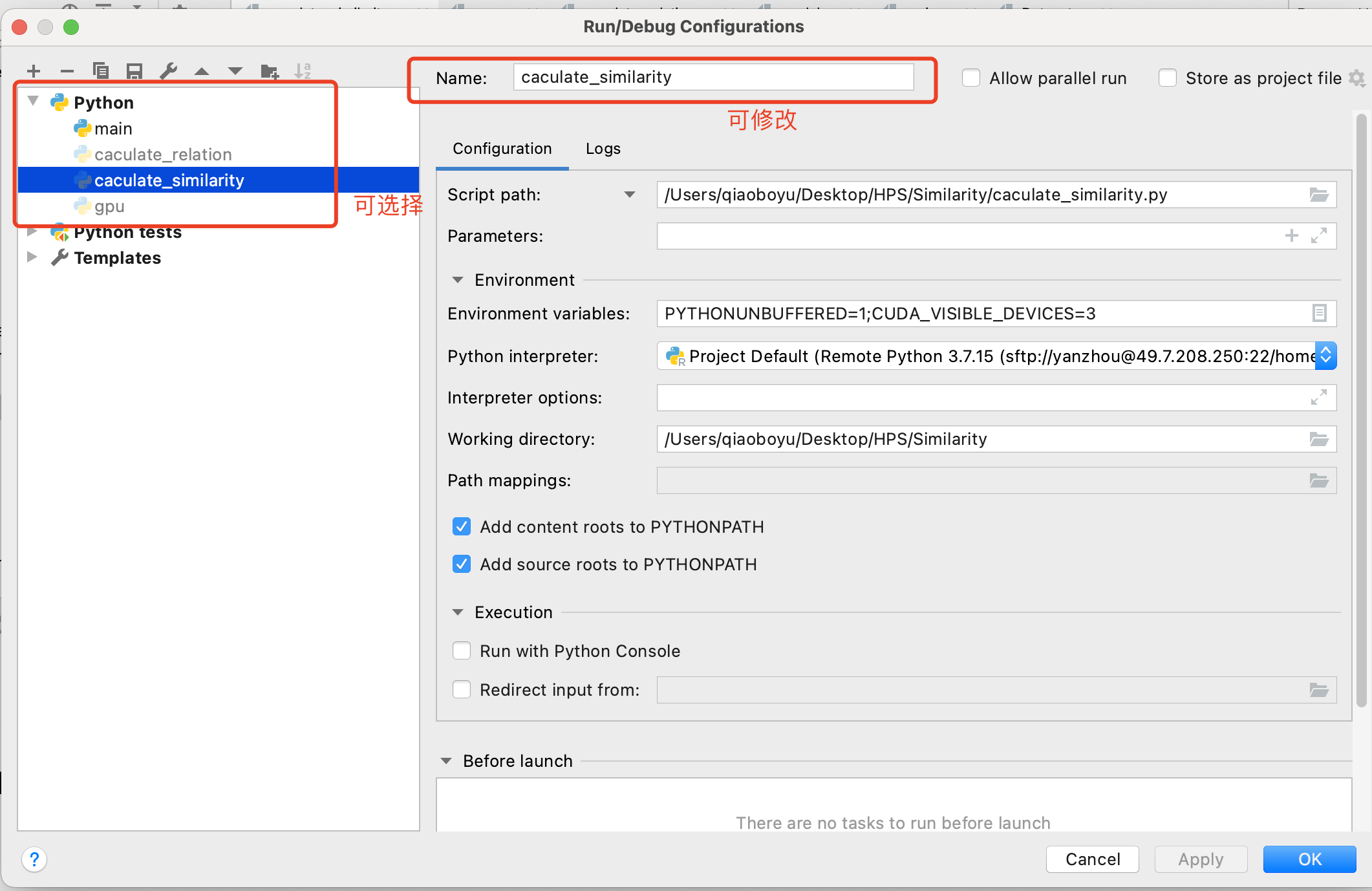
(3)还是(2)的界面,添加CUDA_VISIBLE_DEVICES=3,3可以改成任何可使用的显卡序号,
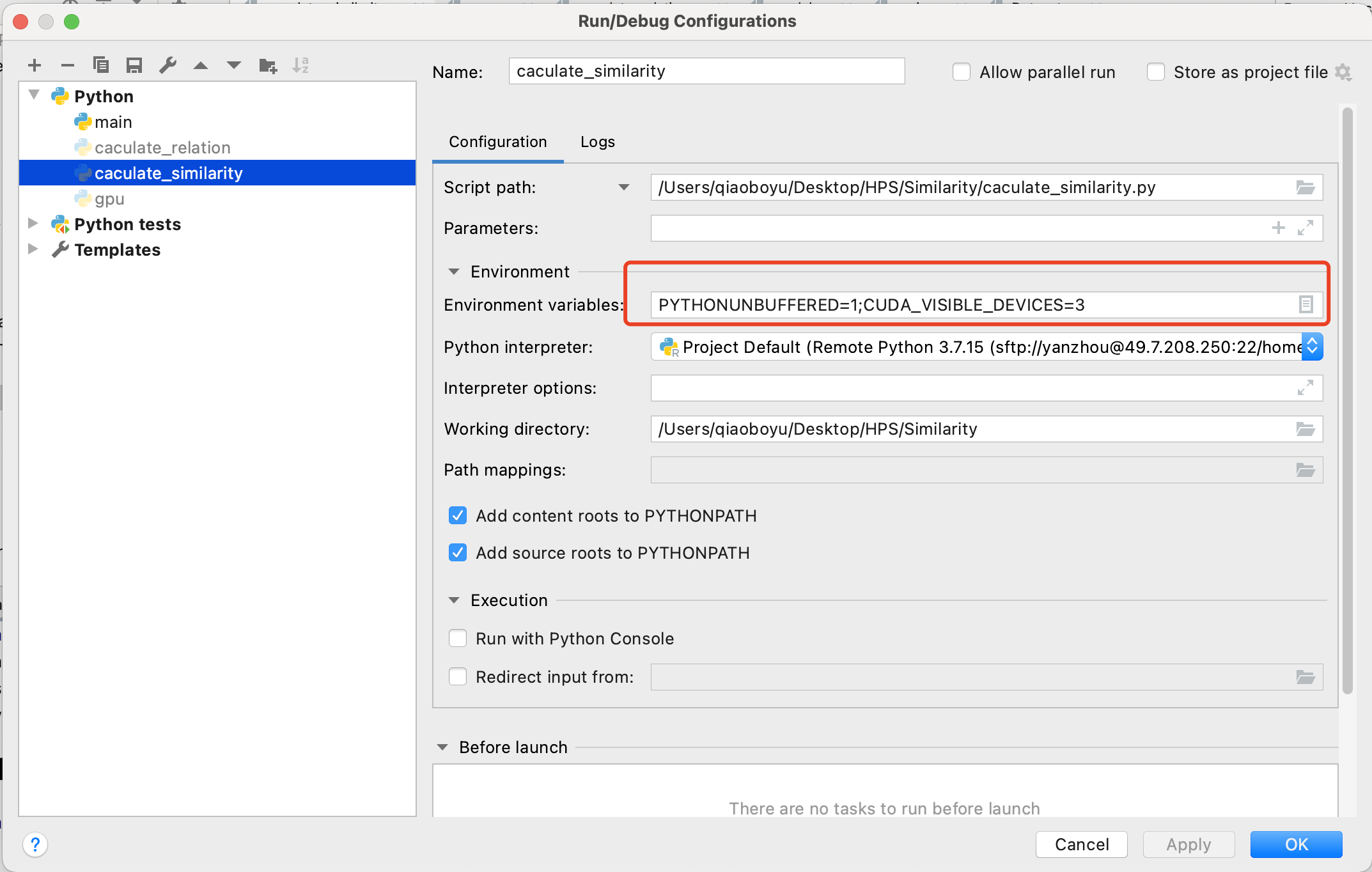
(4)最后Apply就好;
(5)需要注意的是在代码端默认,设置的第三块卡的编号为0,为起始显卡,第四块编号为1;
代码书写 直接:
model = model.cuda()2 利用CUDA_VISIBLE_DEVICES设置可用显卡
(1)在代码中直接指定显卡: -- 该操作和上述 环境变量操作等价;
- import os
-
- os.environ['CUDA_VISIBLE_DEVICES'] = '3'
注意该代码需要放在 import torch 之前,否则会失效;
举例:
- import os
- os.environ['CUDA_VISIBLE_DEVICES'] = '1,2,3'
-
- import torch
-
- print("torch版本号:", end="")
- print(torch.__version__)
- print("判断torch是否可用:", end="")
- print(torch.cuda.is_available())
-
- print("gpu数量:", end="")
- print(torch.cuda.device_count())
-
- print("gpu名字,设备索引默认从0开始:", end="")
- print(torch.cuda.get_device_name(0))
- print("现在正在使用的GPU编号:", end="")
- print(torch.cuda.current_device())
-
- # 输出
- torch版本号:1.12.1+cu102
- 判断torch是否可用:True
- gpu数量:3
- gpu名字,设备索引默认从0开始:Tesla V100-PCIE-32GB
- 现在正在使用的GPU编号:0

(2)在命令行中指定GPU运行
CUDA_VISIBLE_DEVICES='3' python3 train.py(3)在命令行执行脚本文件中指定
CUDA_VISIBLE_DEVICES='3' sh run.sh3 cuda()方法和torch.cuda.set_device()
(1)cuda()
- model.cuda('3') # gpu_id为int类型变量,只能指定一张显卡
-
- model.cuda('cuda:3') #输入参数为str类型,可指定多张显卡
-
- model.cuda('cuda:1,2') #指定多张显卡的一个示例
(2)torch.cuda.set_device()
- torch.cuda.set_device('3') #单卡
-
- torch.cuda.set_device('cuda:2,3') #可指定多卡
但是这种写法的优先级低,如果model.cuda()中指定了参数,那么torch.cuda.set_device()会失效;
而且pytorch的官方文档中明确说明,不建议用户使用该方法。
声明:本文内容由网友自发贡献,不代表【wpsshop博客】立场,版权归原作者所有,本站不承担相应法律责任。如您发现有侵权的内容,请联系我们。转载请注明出处:https://www.wpsshop.cn/article/detail/53792
推荐阅读

相关标签

