- 1python解释器安装手把手指南_python翻译器安装教程
- 2使用批处理批量复制文件并重命名_1个文件复制100分并命名
- 3JMeter学习(三十五)使用jmeter来发送json/gzip格式数据_jmeter 发送 json.stringify
- 4windows 批处理命令大全
- 5如何实现ubuntu每天定时关机
- 6残差网络的搭建_torch.nn.sequential torch.nn.conv2d torch.nn.cross
- 7SpringMVC源码解读 --- 处理器适配器 - 3 源码解读前置知识WebDataBinder的父子结构及源码分析_checkfieldmarkers()
- 87-22 龟兔赛跑_乌龟与兔子进行赛跑,跑场是一个矩型跑道,跑道边可以随地进行休息。乌龟每分钟可以
- 9云计算基础(云计算概述)
- 10FFMPEG数据结构_ffopgtg
JDK 8新特性 ——接口与函数式接口_static method may be invoked on containing interfa
赞
踩
一、接口
1.1 接口组成更新概述
常量
public static final 可以省略
抽象方法
public abstract 可以省略
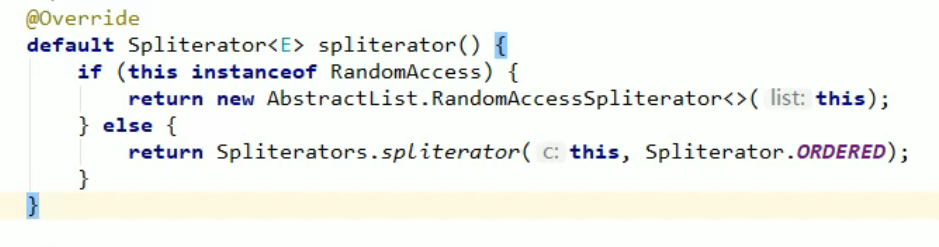
默认方法(since java8)
如下图所示
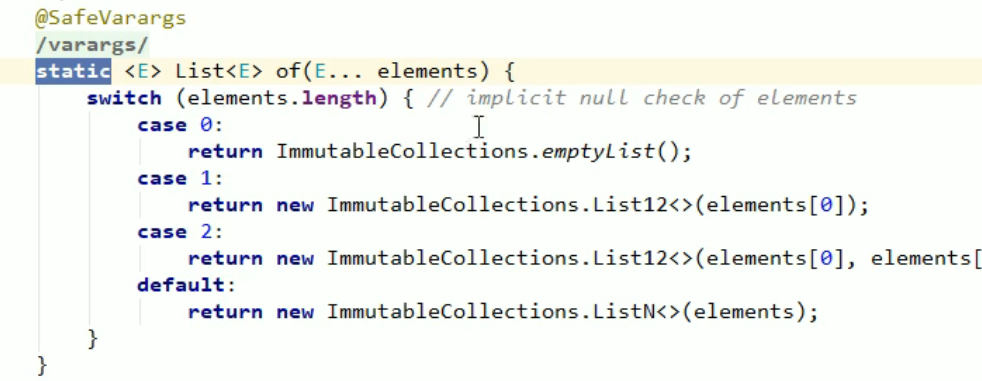
静态方法(since java8)
如下图所示
私有方法(since java9)
1.2 默认方法
1.2.1 使用场景
假设我们已经存在一个劲接口MyInterface,但是随着业务的进行我们还需要在MyInterface接口中增加一个方法,但是如果我们增加的话,他的每个实现类都需要将这个方法进行实现。
此时有一个坏处,并不是每个类都能使用到这个接口,那我们就重新创建一个接口MyInterfaceSon去继承MyInterface接口,并且写上想增加的方法,如果有类想要使用这个方法,直接可以实现MyInterfaceSon这个类。 但是这样用的话,以后还是会出现想用的问题
- public interface MyInterfaceSon extends MyInterface{
- }
那我们就可以在接口中使用默认方法,如下所示,当我们添加一个默认方法后,实现MyInterface的类可以选择实现方法show3,也可以选择不实现,很人性化
- public interface MyInterface {
- void show1();
- void show2();
-
- public default void show3(){
- }
- }
总结来说:方法的升级不会破坏现有的代码
1.2.2 默认方法的使用
public default 返回值类型 方法名(参数列表){ }
其中 public是可以省略的
- public interface MyInterface {
- void show1();
- void show2();
-
- public default void show3(){
- // 方法体
- }
- }
当我们给MyInterface接口多加了一个default方法后,下面的实现类并没有报错
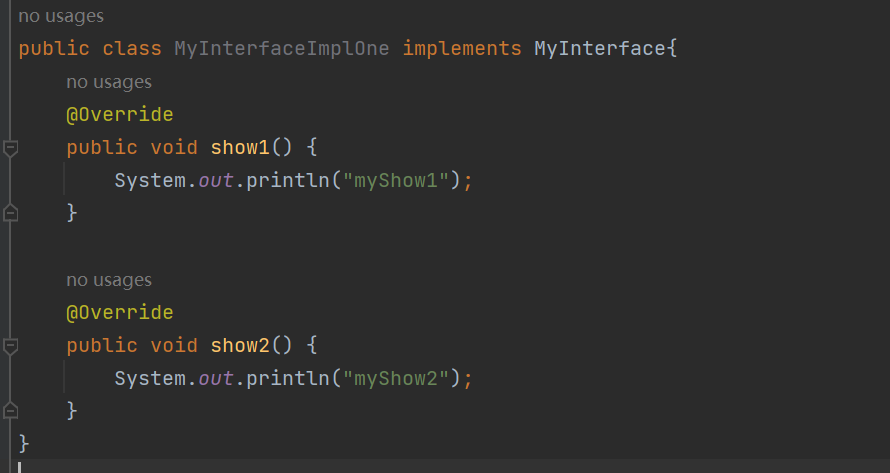
当我们子类实现show3方法的时候,发现没有default这个关键字了,一定要注意
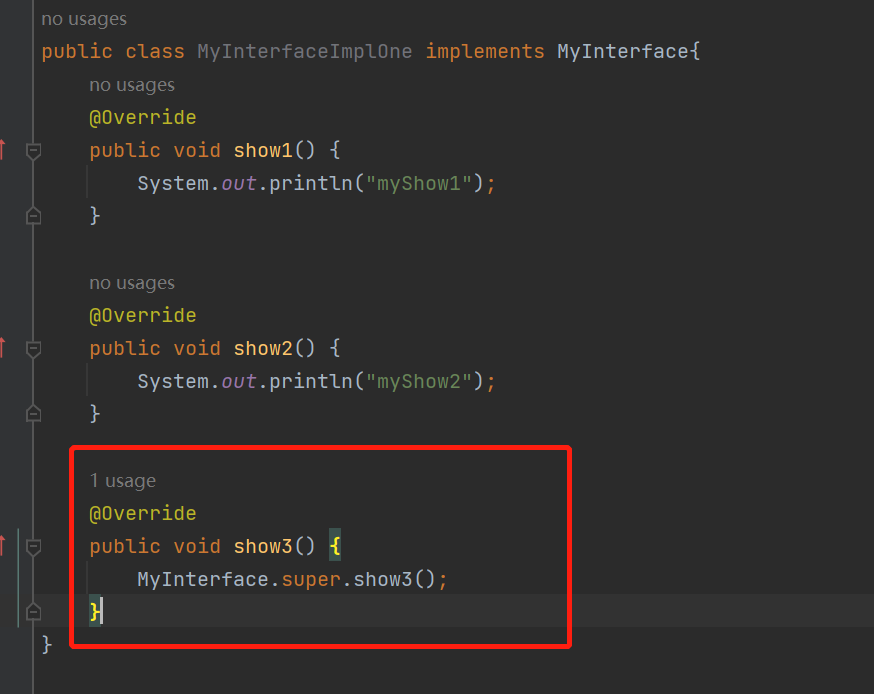
1.3 静态方法
静态方法只能通过接口名调用,不能通过实现类名或者对象名调用
public static 返回值类型 方法名(参数列表){}
public可以省略
- public static void show(){
- }
1.3.1 静态方法的使用
- public interface Inter {
- void show();
- default void method(){
- System.out.println("Inter中的默认方法执行了");
- }
- public static void test(){
- System.out.println("Inter中的静态方法执行了");
- }
- }
- public class InterImpl implements Inter{
- @Override
- public void show() {
- System.out.println("show方法执行了");
- }
- }
然后我们发现我们掉用不了静态的test方法
静态方法只能在包含接口类上调用
Static method may be invoked on containing interface class only
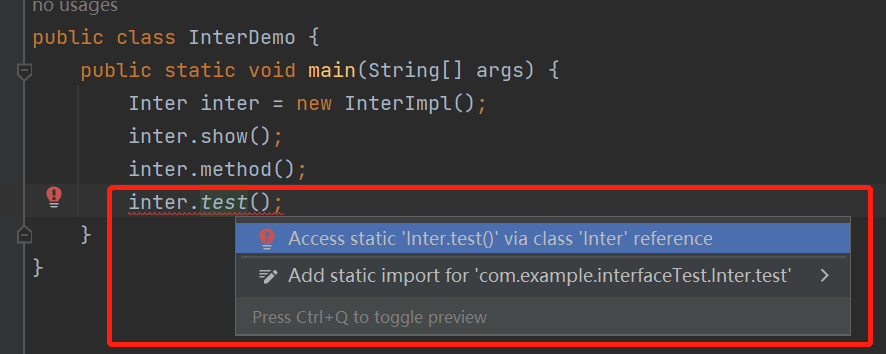
为什么只能通过类来调用呢?
假设 InterImpl这个实现类实现了好几个接口,并且每个接口中都有test静态方法,那如果此时再通过实例对象调用,编译器将不会知道调用哪个接口的test方法
1.4 私有方法(Java9)
1.4.1 接口中的私有方法
Java 9 中新增了带方法体的私有方法,这其实在Java 8中就埋下了伏笔:Java 8允许在接口中定义带方法体的默认方法和静态方法。
这样可能会引发一个问题:当两个默认方法或者静态方法中包含一段相同的代码实现时,程序必然考虑将这段代码抽取成一个共性的方法,而这个共性方法是不需要让别人使用的,因此用私有给隐藏起来,这就是Java 9增加私有方法的必然性
格式:
private 返回值类型 方法名(参数列表){}
private static 返回值类型 方法名(参数列表){}
示例:
- private void show(){}
-
- private static void method(){}
1.4.2 接口中私有方法的使用
一定要注意!!!!
默认方法可以调用私有静态方法,但是静态方法无法调用私有默认方法
自我理解出现这种情况的原因:
其实说白了和这个根本没有关系,其实和 方法是不是静态方法或者是实例方法有关。
我为什么这么说呢,我解释一下
静态方法什么时候被加载呢?
当然是在class文件被加载的时候,也就是说在方法区就被加载了
实例方法什么时候被加载?
在程序运行过程中类实例化后才会存在。
那这样说来就很清晰了,即我们不实例化我们也是可以使用静态方法的,但是不可以使用实例方法。 那如果我们在静态方法中调用了实例方法,但我没有对此类进行实例化,那肯定是不符合要求的呀,你 没有实例化怎么能在静态方法中调用实例方法呢?
- public class InterImpl implements Inter{
- }
- public interface Inter {
- default void show1() {
- System.out.println("show1开始执行");
- // 抽取下面的三行
- // System.out.println("初级工程师");
- // System.out.println("中级工程师");
- // System.out.println("高级工程师");
- show();
- System.out.println("show1结束执行");
- }
-
- default void show2() {
- System.out.println("show2开始执行");
- // 抽取下面的三行
- // System.out.println("初级工程师");
- // System.out.println("中级工程师");
- // System.out.println("高级工程师");
- show();
- System.out.println("show2结束执行");
- }
-
- private void show() {
-
- System.out.println("初级工程师");
- System.out.println("中级工程师");
- System.out.println("高级工程师");
- }
-
- static void method1() {
- System.out.println("method1开始执行");
- // System.out.println("初级工程师");
- // System.out.println("中级工程师");
- // System.out.println("高级工程师");
- method();
- System.out.println("method1结束执行");
- }
-
- static void method2() {
- System.out.println("method2开始执行");
- // System.out.println("初级工程师");
- // System.out.println("中级工程师");
- // System.out.println("高级工程师");
- method()
- System.out.println("method2结束执行");
- }
-
- private static void method() {
- System.out.println("初级工程师");
- System.out.println("中级工程师");
- System.out.println("高级工程师");
- }
- }

- public class InterDemo {
- public static void main(String[] args) {
- // 按照多态的方式创建对象并使用
- Inter i = new InterImpl();
- i.show1();
- System.out.println("----------");
- i.show2();
- System.out.println("----------");
- Inter.method1();
- System.out.println("----------");
- Inter.method2();
- }
- }
二、引用
对lambda表达式不熟悉可以看下面的文章
(45条消息) JDK 8新特性——Lambda表达式_我爱布朗熊的博客-CSDN博客
2.1 体验方法引用
在使用Lambda表达式的时候,我们实际上传递进去的代码就是一种解决方法:拿参数做操作
那么考虑一种情况:如果我们在Lambda中所指定的操作方案,已经有地方存在相同的方案,那是否还有必要再重写逻辑呢?那我们如何使用已经存在的解决方案的呢?
- @FunctionalInterface
- public interface Printable {
- void printString(String s);
- }
- public class PrintableDemo {
- public static void main(String[] args) {
- // 第一种写法: lambda表达式
- usePrintable( (s -> System.out.println(s)));
- System.out.println("****************");
-
- // 第二种写法:lambda表达式
- Printable printable = (s) -> {
- System.out.println(s);
- };
- usePrintable(printable);
- System.out.println("****************");
-
- // 第三种写法:方法引用符 ::
- // System.out是一个对象,我们要调用此对象下的println方法
- usePrintable(System.out::println);
- }
-
- private static void usePrintable(Printable p){
- p.printString("爱生活爱Java");
- }
- }
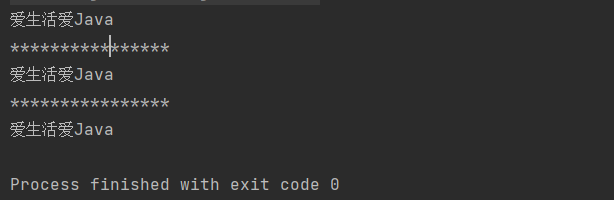
2.2 方法引用符
如果使用Lambda,那么根据"可推导就是可省略"的原则,无需指定参数类型,也无需指定的重载形式,它们都将被自动推导。如果使用方法引用,也是同样可以根据上下文进行推导
:: 双冒号,引用运算符,而它所在的表达式被称为方法引用
usePrintable(System.out::println);直接使用System.out中的println方法来取代Lambda,代码更加的简洁
对比一下lambda表达式
usePrintable( (s -> System.out.println(s)));分析: 拿到参数s之后通过Lambda表达式,传递给System.out.println方法去处理
2.3 引用类方法(静态方法)
格式: 类名::静态方法
范例: Integer::parseInt
Integer类的方法,public static int parseInt(String s) 将此String转换为int类型的数据
- @FunctionalInterface
- public interface Converter {
- int convert(String s);
- }
- public class ConverterDemo {
- public static void main(String[] args) {
- // 1.匿名内部类表达式
- useConverter(new Converter() {
- @Override
- public int convert(String s) {
- return Integer.parseInt(s);
- }
- });
-
- // 2.lambda表达式
- // Converter converter = (String s) -> {
- // return Integer.parseInt(s);
- // };
- // useConverter(converter);
- useConverter((String s) -> {
- return Integer.parseInt(s);
- });
-
- // 3.引用类方法
- // lambda表达式被类方法替代的时候,它的形式参数全部传递给静态方法作为参数
- useConverter(Integer::parseInt);
- }
-
- private static void useConverter(Converter c){
- int number = c.convert("666");
- System.out.println(number);
- }
- }
2.4 引用对象的实例方法(成员方法)
其实就是引用类中的成员方法、
格式: 对象::成员方法
范例: "HelloWord"::toUpperCase
String类中的方法:public String toUpperCase() 将此String所有字符转换成大写
- public class PrinterDemo {
- public static void main(String[] args) {
- // 1.Lambda表达式
- userPrinter((String s) ->{
- String result = s.toUpperCase();
- System.out.println(result);
- });
-
- // 2.引用成员方法
- PrintString printString = new PrintString();
- userPrinter(printString::printUpper);
- }
-
- private static void userPrinter(Printer p) {
- p.printUpperCase("HelloWord");
-
- }
- }
- public interface Printer {
- void printUpperCase(String s);
- }
- public class PrintString {
- public void printUpper(String s){
- System.out.println(s.toUpperCase());
- }
- }
2.5引用类的实例方法
其实就是引用类中的成员方法
格式: 类名::成员方法
范例: String::substring
String类中的方法:public String substring(int beginIndex, int endIndex) 从beginIndex开始到endIndex结束,截取字符串,返回一个子串,子串的长度为endIndex-beginIndex
- public interface MyString {
- String mySubString(String s,int x,int y);
- }
- public class MyStringDemo {
- public static void main(String[] args) {
- // 1.lambda表达式的形式
- useMyString((s,x,y)->{
- String substring = s.substring(x, y);
- return substring;
- });
-
- // 2.方法引用
- useMyString(String::substring);
- }
-
- public static void useMyString(MyString my){
- String s = my.mySubString("HelloWorld", 2, 5);
- System.out.println(s);
- }
- }
2.6 引用构造器
引用构造器,其实就是引用构造方法
格式: 类名:: new
范例: Student::new
三、函数式接口
3.1 概述
函数式接口: 有且仅有一个抽象方法的接口
Java中的函数式变成体现就是lambda表达式,所以函数式接口就是可以适用于Lambda使用的接口,只有确保接口中有且仅有一个抽象方法,Java中的Lambda才能顺利地进行推导
- public interface MyInterface {
- void show();
- }
- public class MyInterfaceDemo {
- public static void main(String[] args) {
-
- MyInterface my = ()->{
- System.out.println("函数式接口");
- };
-
- my.show();
- }
- }

但是对于MyInterface接口,我们知道其有一个方法,知道是函数式接口,那万一以后有人再修改接口,新增加抽象方法,那岂不是我们在Demo中的程序无法运行了?
答案: 是的!
为了避免这种情况,我们可以在接口上使用@FunctionalInterface注解,用意是标注此接口为函数式接口
- @FunctionalInterface
- public interface MyInterface {
- void show();
- }
3.2 函数式接口作为方法的参数
- public class RunnableDemo {
- public static void main(String[] args) {
- // 1.匿名内部类
- startThread(new Runnable() {
- @Override
- public void run() {
- System.out.println(Thread.currentThread().getName()+"线程启动了");
- }
- });
-
- // 2.lambda表达式
- startThread(()->{
- System.out.println(Thread.currentThread().getName()+"线程启动了");
- });
-
- // 2.1更清晰的写法
- Runnable runnable =()->{
- System.out.println(Thread.currentThread().getName()+"线程启动了");
- };
- startThread(runnable);
-
- }
-
- // Runnable 接口是函数式接口
- public static void startThread(Runnable r){
- // Thread t = new Thread(r);
- // t.start();
- new Thread(r).start();
- }
- }
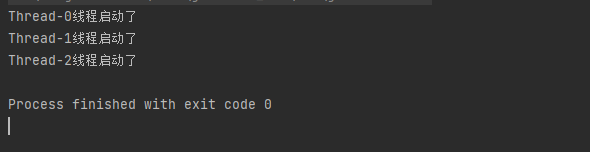
3.3 函数式接口作为方法的返回值
很明显,我们的返回值类型是一个函数式接口
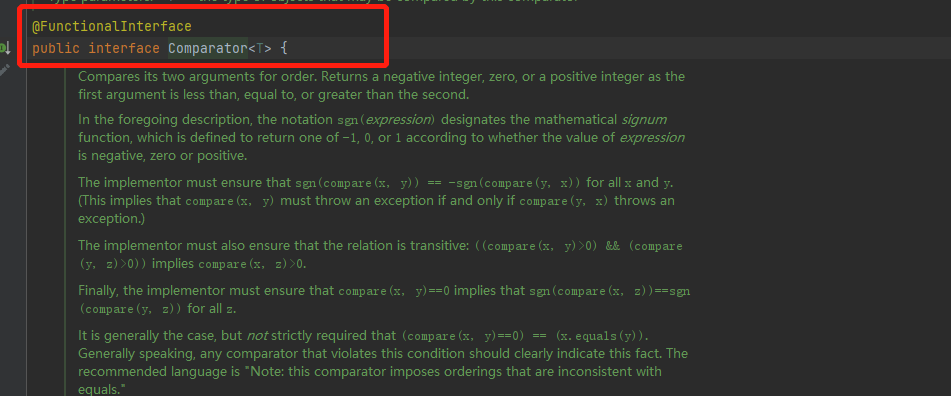
- public class ComparatorDemo {
- public static void main(String[] args) {
- ArrayList<String> arrayList = new ArrayList<>();
- arrayList.add("cccc");
- arrayList.add("aa");
- arrayList.add("b");
- arrayList.add("saff");
- System.out.println("排序前:"+arrayList);
-
- // 排序
- Collections.sort(arrayList,getComparator());
- System.out.println("排序后:"+arrayList);
- }
-
- private static Comparator<String> getComparator(){
- Comparator<String> comp = new Comparator<String>() {
- @Override
- public int compare(String o1, String o2) {
- return o1.length()-o2.length();
- }
- };
- return comp;
- // 比较的逻辑也能使用Lambda表达式的形式
- // return (s1,s2)->{
- // return s1.length()-s2.length();
- // };
- }
- }
3.4 常用的函数式接口
3.4.1 Supplier
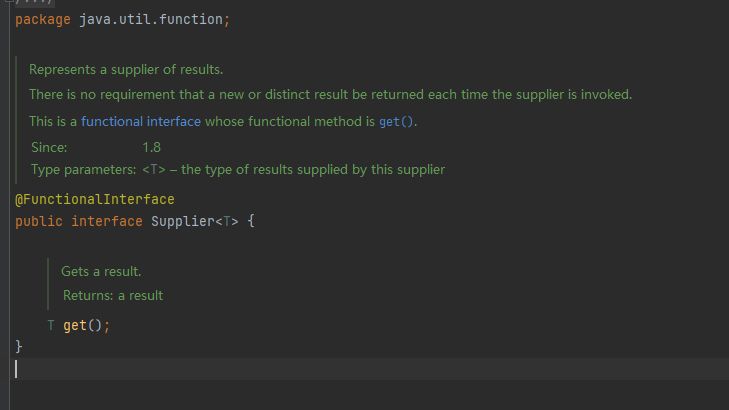
Supplier<T>:包含一个无参的方法
T get(): 获得结果
该方法不需要参数,它会按照某种实现逻辑(由Lambda表达式实现)返回一个数据
Supplier<T> 接口也被称为生产型接口,如果我们指定了接口的泛型是什么类型,那么接口中的get方法就会生产什么类型的数据供我们使用
- public class SupplierDemo {
- public static void main(String[] args) {
- // 写法1:
- String string1 = getString(() -> {
- return "林青霞";
- });
- System.out.println(string1);
-
- // 写法2:
- Supplier<String> supplier = ()->{
- return "林青霞";
- };
- String string2 = getString(supplier);
- System.out.println(string2);
-
- }
- // 定义一个方法,返回字符串数据
- private static String getString(Supplier<String> supplier){
- return supplier.get();
- }
- }
3.4.1.1 Supplier接口获取最大值
- public class SupplierTest {
- public static void main(String[] args) {
- // 定义一个int数组
- int[] arr= {19,50,28,37,46};
-
- int maxNum = getMax(() -> {
- int max = arr[0];
- for (int i = 1; i < arr.length; i++) {
- if (arr[i] > max) {
- max = arr[i];
- }
- }
- return max;
- });
- System.out.println(maxNum);
- }
-
- private static int getMax(Supplier<Integer> supplier){
- return supplier.get();
- }
- }
3.4.2 Consumer接口 消费型接口

Consumer<T> 包含两个方法
Consumer接口也称为消费型接口,它消费的数据的数据类型由泛型指定
void accept(T t): 对给定的参数执行此操作
default Consumer<T> andThen(Consumer after): 返回一个组合的Consumer,依次执行此操作,然后执行after操作
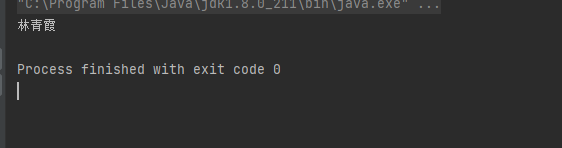
- public class ConsumerDemo {
- public static void main(String[] args) {
- operatorString("林青霞", (String s) -> {
- System.out.println(s);
- });
- }
-
- private static void operatorString(String name, Consumer<String> consumer) {
- consumer.accept(name);
- }
- }
3.4.2.1 Consumer—按要求打印信息
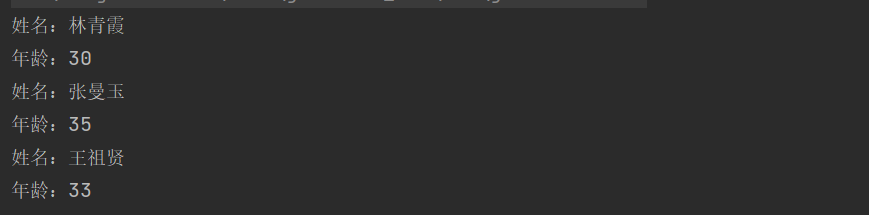
String[] strArray={"林青霞,30" , "张曼玉,35" , "王祖贤,33" };
字符串数组中有多条信息,请按照格式:"姓名:xx,年龄:xx"的格式将信息打印出来
要求:
把打印姓名的动作作为第一个Consumer接口的Lambda实例
把打印年龄的动作作为第二个Consumer接口的Lambda实例
将两个Consumer接口按照顺序组合到一起使用
- public class ConsumerTest {
- public static void main(String[] args) {
- String[] strArray={"林青霞,30" , "张曼玉,35" , "王祖贤,33" };
-
- printInfo(strArray,(String str)->{
- String name = str.split(",")[0];
- System.out.println("姓名:"+name);
- },(String str)->{
- int age = Integer.parseInt(str.split(",")[1]);
- System.out.println("年龄:"+age);
- });
-
- }
- private static void printInfo(String[] strArry, Consumer<String> con1,Consumer<String> con2){
- for (String str: strArry){
- con1.andThen(con2).accept(str);
- }
- }
- }
3.4.3 Predicate
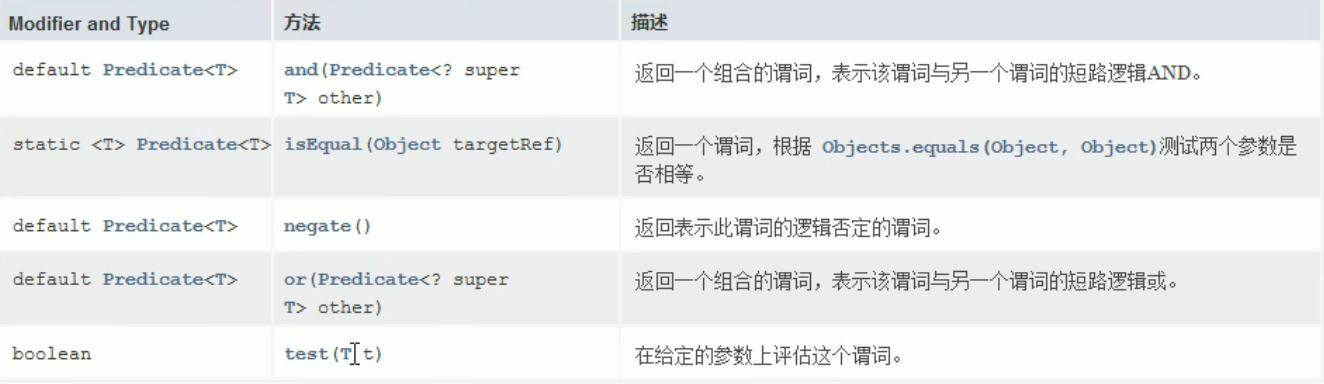
表示对一个参数进行判断的,返回一个布尔值
下图是Api文档中对Predicate接口方法的描述
Predicate<T>:常用的四个方法
boolean test(T t):对给定的参数进行判断(判断罗辑由Lambda表达式实现),返回一个布尔值
default Predicate<T>negate0:返回一个逻辑的否定,对应逻辑非default
Predicate<T>and(Predicate other): 返回一个组合判断,对应短路与
defaultPredicate<T>or(Predicate other): 返回一个组合判断,对应短路或
3.4.3.1 Predicate<T> 接口通常用于判断参数是否满足指定的条件
- public class PredicateDemo01 {
- public static void main(String[] args) {
- boolean b = checkString("hello", (String s) -> {
- return s.length() > 8;
- });
- System.out.println(b);
- }
- private static boolean checkString(String s, Predicate<String> pre){
- return pre.test(s);
- }
- }

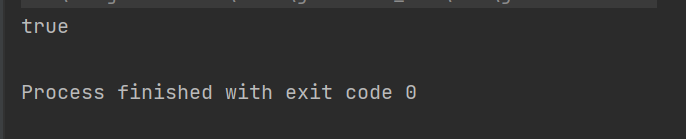
3.4.3.2 negate逻辑非的运算
- private static boolean checkString(String s, Predicate<String> pre){
- // return !pre.test(s); 这种情况是我们之前的饿用法
- return pre.negate().test(s);
- }
3.4.3.3 组合判断,对应短路与
- public class PredicateDemo01 {
- public static void main(String[] args) {
-
- boolean b = checkString("hello",
- (String s) -> {
- return s.length() > 8;
- },
- (String s) -> {
- return s.length() <15;
- });
- System.out.println(b);
- }
-
- // 同一个字符串给出两个不同的判断条件,最后把这两个判断的结果做逻辑与运算的结果作为最终的结果
- private static boolean checkString(String s, Predicate<String> pre1, Predicate<String> pre2) {
- //
- // boolean b1 = pre1.test(s);
- // boolean b2 = pre2.test(s);
- // boolean b = b1 && b2;
- // return b;
- return pre1.and(pre2).test(s);
- }
- }
3.4.3.4 组合判断,对应短路或
- private static boolean checkString(String s, Predicate<String> pre1, Predicate<String> pre2) {
-
- return pre1.or(pre2).test(s);
- }
3.4.3.5 筛选满足条件的数据
String[] strArray={"林青霞,30","柳岩,34","张曼玉,35","貂蝉,31","王祖贤,33"};
字符串数组中有多条信息,请通过Predicate接口的拼装将符合要求的字符审筛选到集合ArraList中,并遍历ArrayList
集合同时满足如下要求:姓名长度大于2;年龄大于33
- public class PredicateDemo02 {
- public static void main(String[] args) {
- String[] strArray = {"林青霞,30", "柳岩,34", "张曼玉,35", "貂蝉,31", "王祖贤,33"};
- ArrayList<String> arrayList = myFilter(strArray,
- (String s) -> {
- return s.split(",")[0].length() > 2;
- }, (String s) -> {
- return Integer.parseInt( s.split(",")[1])>33;
- });
- System.out.println(arrayList);
- }
-
- private static ArrayList<String> myFilter(String[] strArray, Predicate<String> pre1, Predicate<String> pre2) {
- ArrayList<String> arrayList = new ArrayList<>();
- // 便利数组
- for (String str : strArray) {
- if (pre1.and(pre2).test(str)) {
- arrayList.add(str);
- }
-
- }
- return arrayList;
- }
- }
3.4.4 Function
Function<T,R>接口通常用于对参数进行处理,转换(处理逻辑由Lambda表达式实现),然后返回一个新的值
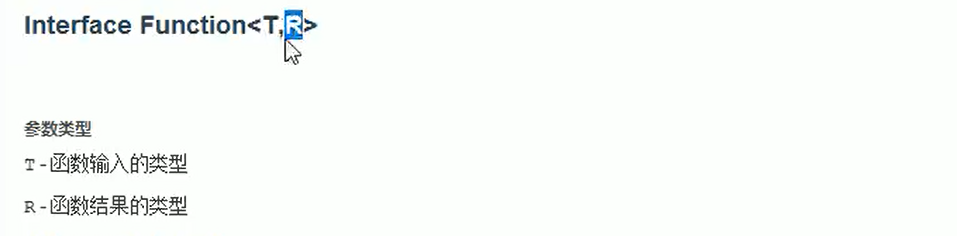
R apply(T t): 将此函数应用于给定的参数
default<V> Function andThen(Function after): 返回一个组合函数,首先将该函数应用于输入,然后将after函数应用于结果
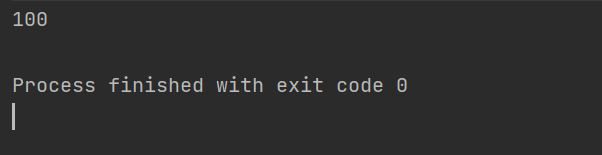
- public class FunctionDemo {
- public static void main(String[] args) {
- convert("100",(String s)->{
- return Integer.parseInt(s);
- });
- }
- // 将String转化为integer
- private static void convert(String s, Function<String, Integer> function){
- Integer apply = function.apply(s);
- System.out.println(apply);
- }
- }
3.4.4.1 按照指定要求操作数据
String s="林青霞,30"
请按照我指定的要求进行操作:
1:将字符串截取得到数字年龄部分
2:将上一步的年龄字特串转换成为int类型的数据
3:将上一步的int数据加70,得到一个int结果,在控制台输出请通过Function接口来实现函数拼接
- public class FunctionDemo {
- public static void main(String[] args) {
-
- convert("林青霞,30",
- (String s) -> {
- // 提取出30
- return s.split(",")[1];
- },
- // 将字符串转换成Integer
- s1 -> {
- return Integer.parseInt(s1);
- },
- // 将这个数加70
- s2 -> {
- return s2+70;
- }
- );
- }
-
- // 将String转化为integer
- private static void convert(String s, Function<String, String> function1, Function<String, Integer> function2, Function<Integer, Integer> function3) {
- // Integer apply = function1.apply(s);
- // System.out.println(apply);
- Integer integer = function1.andThen(function2).andThen(function3).apply(s);
- System.out.println(integer);
- }
- }