
- 1torch.cuda.OutOfMemoryError_torch.cuda.outofmemoryerror: cuda out of memory.
- 22023年全国职业院校技能大赛(高职组)“云计算应用”赛项赛卷8_任务二、私有云服务运维任务
- 3docker registry详解
- 4Avalonia基础学习_avalonia groupbox
- 5【Linux | 网络编程】TCP的服务端(守护进程) + 客户端_linux tcp服务器
- 6神经网络初认识——BP神经网络(7月18,再次认识)_最速下降法和最速下降bp法区别
- 7【第十届“泰迪杯”数据挖掘挑战赛】B题:电力系统负荷预测分析 Baseline_数据分析电力系统负荷高短期负荷预测管理水平客户样本数据
- 8python离线录音转文字_python3实现语音转文字(语音识别)和文字转语音(语音合成)...
- 9python+flask+django农产品供销展销电子商务系统lkw43
- 10CARLA和LGSVL坐标系差异_lgsvl和carla
用PaddleDetection做上班摸鱼神器(完整教程)_paddledetection github
赞
踩
来源:转载 作者:livingbody
编辑:学姐
还记得小时候爸妈不偷看电视的你吗?
还记得高中时代看小说防着老师的你吗?
还记得上班打游戏防着领导的你吗?
有了这个你将能安心摸鱼
介绍
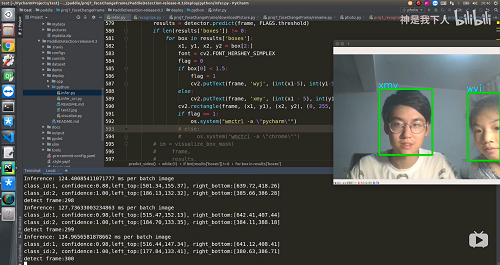
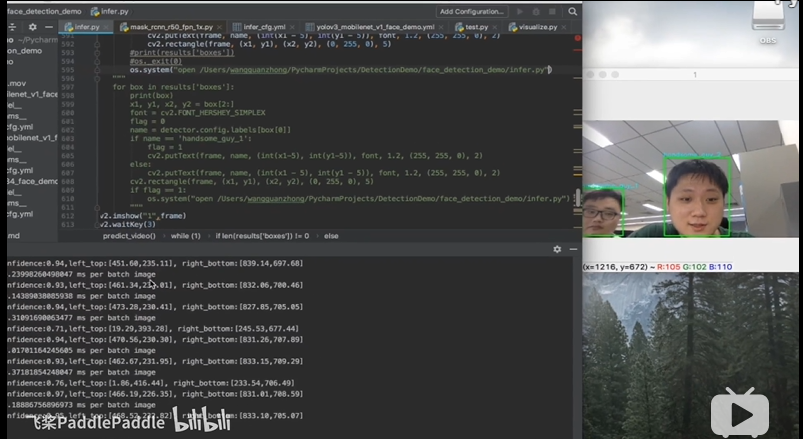
本文使用PaddleDetection自制数据集,做人脸分类,调用本地电脑的前置摄像头识别出现在屏幕前的人脸,根据不同的人脸切换本地电脑的窗口,实现偷懒神器~
效果
演示项目效果地址:
https://www.bilibili.com/video/BV1ni4y1V7TT
百度推广视频演示地址:
https://www.bilibili.com/video/BV1kC4y1t7s1
实现的效果截图:
百度推广视频效果图:
PaddleDetection介绍
目标检测是机器视觉领域的核心问题之一。7月3日百度AI开发者大会,飞桨核心框架Paddle Fluid v1.5宣布开源了PaddleDetection物体检测统一框架,用户可以非常方便、快速的搭建出各种检测框架,构建强大的各类应用。
PaddleDetection物体检测统一框架,覆盖主流的检测算法,即具备高精度模型、也具备高速推理模型,并提供丰富的预训练模型,具有工业化、模块化、高性能的优势。
- 工业化:结合飞桨核心框架的高速推理引擎,训练到部署无缝衔接
- 模块化:提供模块化设计,模型网络结构和数据处理均可定制
- 高性能:基于高效的核心框架,训练速度和显存占用上有一定的优势,例如,YOLO v3训练速度相比同类框架快1.6倍。
现有的模型

用PaddleDetection实现本项目
PaddleDetection下载地址:
https://github.com/PaddlePaddle/PaddleDetection
或者
https://gitee.com/paddlepaddle/PaddleDetection
- # git下载最新版本
- !git clone https://gitee.com/paddlepaddle/PaddleDetection.git --depth=1
- Cloning into 'PaddleDetection'...
- remote: Enumerating objects: 1870, done.[K
- remote: Counting objects: 100% (1870/1870), done.[K
- remote: Compressing objects: 100% (1438/1438), done.[K
- remote: Total 1870 (delta 617), reused 1061 (delta 368), pack-reused 0[K
- Receiving objects: 100% (1870/1870), 175.31 MiB | 15.71 MiB/s, done.
- Resolving deltas: 100% (617/617), done.
- Checking connectivity... done.
01本地制作数据集
实现本项目,最好用打算实验的相机拍摄数据集,就比如我想在自己的笔记本电脑上实现,那么可以直接调用本地电脑的前置相机来采集人脸照片,调用本地电脑拍照储存代码如会自动调用摄像头,按 S 按键,保存捕获的图像, ESC 退出。
- ####### 本地运行!!!!!!!!!
- import cv2
- import os
-
-
- path = "./pictures/" # 图片保存路径
- if not os.path.exists(path):
- os.makedirs(path)
- cap = cv2.VideoCapture(0)
- i = 0
- while (1):
- ret, frame = cap.read()
- k = cv2.waitKey(1)
- if k == 27:
- break
- elif k == ord('s'):
- cv2.imwrite(path + str(i) + '.jpg', frame)
- print("save" + str(i) + ".jpg")
- i += 1
- cv2.imshow("capture", frame)
- cap.release()
- cv2.destroyAllWindows()

02数据标注
上述代码执行完后会在本地这段代码所在路径创建pictures文件夹存放图片,接下来下载labelImg工具进行数据标注参考教程:
[labelImg在Python3 linux环境下安装]
(https://blog.csdn.net/weixin_40745291/article/details/85775708)
~ 安装完成后在本地执行以下命令打开labelImg:
- ##### 本地执行,不可在aistudio执行!!!!
- cd 你的path/labelImg
- python labelImg.py
-
打开图片路径:
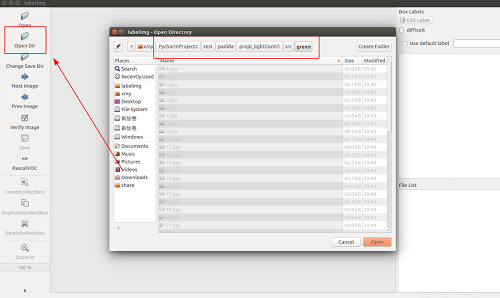
选择框选,并给人脸标注名字(这里我用红绿灯的图为例保护隐私):

标注完成:

03训练模型
- # 解压照片,aistudio上执行
- %mkdir -p PaddleDetection/dataset/faces
- %mv pictures.zip PaddleDetection/dataset/faces
- %cd PaddleDetection/dataset/faces
- !unzip pictures.zip
- /home/aistudio/PaddleDetection-release-0.3/dataset
-
现在的路径应该是这样的:

pictures下放着我们的图片和xml文件。
3.1 生成图片和xmls关系的描述文件
- #### 在aistudio上执行
- %cd PaddleDetection/dataset/faces
- %mkdir xmls
- %cd ./pictures/
- %mv *.xml ../xmls
- # 记录train图片
- import os
- import random
-
- path = "PaddleDetection/dataset/faces/"
- total_red = os.listdir(path + "pictures/")
-
- num = len(total_red)
- list=range(num)
-
- ftrain = open('PaddleDetection/dataset/faces/train.txt', 'w')
- fval = open('PaddleDetection/dataset/faces/val.txt', 'w')
-
- for i in list:
- if i % 9 != 0:
- name=total_red[i].split(".")[0]
- writeName = "pictures/" + total_red[i] + " xmls/" + name + ".xml\n"
- ftrain.write(writeName)
- else:
- name=total_red[i].split(".")[0]
- writeName = "pictures/" + total_red[i] + " xmls/" + name + ".xml\n"
- fval.write(writeName)
-
-
- ftrain.close()
- fval.close()
-
- # 记录了label,记得修改label的列表!!!!!
- import os
- flabel = open('PaddleDetection/dataset/faces/label_list.txt', 'w')
- label = ['张三','李四']
- for _label in label:
- flabel.write(_label + "\n")
-
- flabel.close()
-
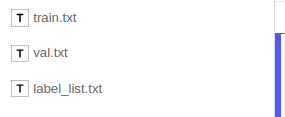
上面两段代码执行完后会生成三个文件:
3.2修改配置文件
修改这个文件:PaddleDetection/configs/ssd/ssd_mobilenet_v1_voc.yml
主要修改就是改动了dataset_dir和anno_path和use_default_label,本项目的ssd_mobilenet_v1_voc.yml文件已经修改了。
内容如下:
- #### 只是用来看的,不要运行!!!!!
- architecture: SSD
- pretrain_weights: https://paddlemodels.bj.bcebos.com/object_detection/ssd_mobilenet_v1_coco_pretrained.tar
- use_gpu: true
- max_iters: 28000
- snapshot_iter: 2000
- log_smooth_window: 1
- metric: VOC
- map_type: 11point
- save_dir: output
- weights: output/ssd_mobilenet_v1_voc/model_final
- # 20(label_class) + 1(background)
- num_classes: 21
-
- SSD:
- backbone: MobileNet
- multi_box_head: MultiBoxHead
- output_decoder:
- background_label: 0
- keep_top_k: 200
- nms_eta: 1.0
- nms_threshold: 0.45
- nms_top_k: 400
- score_threshold: 0.01
-
- MobileNet:
- norm_decay: 0.
- conv_group_scale: 1
- conv_learning_rate: 0.1
- extra_block_filters: [[256, 512], [128, 256], [128, 256], [64, 128]]
- with_extra_blocks: true
-
- MultiBoxHead:
- aspect_ratios: [[2.], [2., 3.], [2., 3.], [2., 3.], [2., 3.], [2., 3.]]
- base_size: 300
- flip: true
- max_ratio: 90
- max_sizes: [[], 150.0, 195.0, 240.0, 285.0, 300.0]
- min_ratio: 20
- min_sizes: [60.0, 105.0, 150.0, 195.0, 240.0, 285.0]
- offset: 0.5
-
- LearningRate:
- schedulers:
- - !PiecewiseDecay
- milestones: [10000, 15000, 20000, 25000]
- values: [0.001, 0.0005, 0.00025, 0.0001, 0.00001]
-
- OptimizerBuilder:
- optimizer:
- momentum: 0.0
- type: RMSPropOptimizer
- regularizer:
- factor: 0.00005
- type: L2
-
- TrainReader:
- inputs_def:
- image_shape: [3, 300, 300]
- fields: ['image', 'gt_bbox', 'gt_class']
- dataset:
- !VOCDataSet
- anno_path: train.txt
- dataset_dir: dataset/faces
- use_default_label: false
- sample_transforms:
- - !DecodeImage
- to_rgb: true
- - !RandomDistort
- brightness_lower: 0.875
- brightness_upper: 1.125
- is_order: true
- - !RandomExpand
- fill_value: [127.5, 127.5, 127.5]
- - !RandomCrop
- allow_no_crop: false
- - !NormalizeBox {}
- - !ResizeImage
- interp: 1
- target_size: 300
- use_cv2: false
- - !RandomFlipImage
- is_normalized: true
- - !Permute {}
- - !NormalizeImage
- is_scale: false
- mean: [127.5, 127.5, 127.5]
- std: [127.502231, 127.502231, 127.502231]
- batch_size: 32
- shuffle: true
- drop_last: true
- worker_num: 8
- bufsize: 16
- use_process: true
-
- EvalReader:
- inputs_def:
- image_shape: [3, 300, 300]
- fields: ['image', 'gt_bbox', 'gt_class', 'im_shape', 'im_id', 'is_difficult']
- dataset:
- !VOCDataSet
- anno_path: val.txt
- dataset_dir: dataset/faces
- use_default_label: false
- sample_transforms:
- - !DecodeImage
- to_rgb: true
- - !NormalizeBox {}
- - !ResizeImage
- interp: 1
- target_size: 300
- use_cv2: false
- - !Permute {}
- - !NormalizeImage
- is_scale: false
- mean: [127.5, 127.5, 127.5]
- std: [127.502231, 127.502231, 127.502231]
- batch_size: 32
- worker_num: 8
- bufsize: 16
- use_process: false
-
- TestReader:
- inputs_def:
- image_shape: [3,300,300]
- fields: ['image', 'im_id', 'im_shape']
- dataset:
- !ImageFolder
- dataset_dir: dataset/faces
- anno_path: label_list.txt
- use_default_label: false
- sample_transforms:
- - !DecodeImage
- to_rgb: true
- - !ResizeImage
- interp: 1
- max_size: 0
- target_size: 300
- use_cv2: false
- - !Permute {}
- - !NormalizeImage
- is_scale: false
- mean: [127.5, 127.5, 127.5]
- std: [127.502231, 127.502231, 127.502231]
- batch_size: 1
开始训练
- %cd ~/PaddleDetection/
- !pip install -r requirements.txt
- #测试项目环境
- %cd ~/PaddleDetection/
- !export PYTHONPATH=`pwd`:$PYTHONPATH
- !python ppdet/modeling/tests/test_architectures.py
-
- #训练模型
- %cd ~/PaddleDetection/
- # ssd训练
- !python -u tools/train.py -c configs/ssd/ssd_mobilenet_v1_voc.yml -o --eval
- #转换模型
- %cd ~/PaddleDetection/
- !python -u tools/export_model.py -c configs/ssd/ssd_mobilenet_v1_voc.yml --output_dir=./inference_model
本地部署
转换模型后,这个路径下:
~/PaddleDetection-release/inference_model/ssd_mobilenet_v1_voc会有__params__ model infer_cfg.yml
三个文件,下载到本地。
本地在python环境下下载PaddleDetection的包,将模型的三个文件放到PaddleDetection目录下的output目录下:
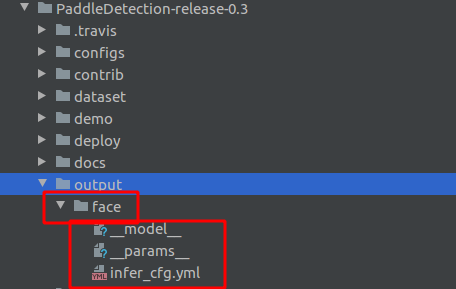
安装工具wmctrl 在linux的终端下执行:
sudo apt-get install wmctrl
修改本地PaddleDetection包中的这个文件:
/PaddleDetection-release-0.3/deploy/python/infer.py
内容如下:
- # Copyright (c) 2020 PaddlePaddle Authors. All Rights Reserved.
- #
- # Licensed under the Apache License, Version 2.0 (the "License");
- # you may not use this file except in compliance with the License.
- # You may obtain a copy of the License at
- #
- # http://www.apache.org/licenses/LICENSE-2.0
- #
- # Unless required by applicable law or agreed to in writing, software
- # distributed under the License is distributed on an "AS IS" BASIS,
- # WITHOUT WARRANTIES OR CONDITIONS OF ANY KIND, either express or implied.
- # See the License for the specific language governing permissions and
- # limitations under the License.
- # python -u deploy/python/infer.py --model_dir output/light/mobilnet_best_model
- import os
- import argparse
- import threading
- import time
- import yaml
- import ast
- from functools import reduce
-
- from PIL import Image
- import cv2
- import numpy as np
- import paddle.fluid as fluid
- from visualize import visualize_box_mask
-
-
-
- def decode_image(im_file, im_info):
- """read rgb image
- Args:
- im_file (str/np.ndarray): path of image/ np.ndarray read by cv2
- im_info (dict): info of image
- Returns:
- im (np.ndarray): processed image (np.ndarray)
- im_info (dict): info of processed image
- """
- if isinstance(im_file, str):
- with open(im_file, 'rb') as f:
- im_read = f.read()
- data = np.frombuffer(im_read, dtype='uint8')
- im = cv2.imdecode(data, 1) # BGR mode, but need RGB mode
- im = cv2.cvtColor(im, cv2.COLOR_BGR2RGB)
- im_info['origin_shape'] = im.shape[:2]
- im_info['resize_shape'] = im.shape[:2]
- else:
- im = im_file
- im_info['origin_shape'] = im.shape[:2]
- im_info['resize_shape'] = im.shape[:2]
- return im, im_info
-
-
- class Resize(object):
- """resize image by target_size and max_size
- Args:
- arch (str): model type
- target_size (int): the target size of image
- max_size (int): the max size of image
- use_cv2 (bool): whether us cv2
- image_shape (list): input shape of model
- interp (int): method of resize
- """
-
- def __init__(self,
- arch,
- target_size,
- max_size,
- use_cv2=True,
- image_shape=None,
- interp=cv2.INTER_LINEAR):
- self.target_size = target_size
- self.max_size = max_size
- self.image_shape = image_shape,
- self.arch = arch
- self.use_cv2 = use_cv2
- self.interp = interp
- self.scale_set = {'RCNN', 'RetinaNet'}
-
- def __call__(self, im, im_info):
- """
- Args:
- im (np.ndarray): image (np.ndarray)
- im_info (dict): info of image
- Returns:
- im (np.ndarray): processed image (np.ndarray)
- im_info (dict): info of processed image
- """
- im_channel = im.shape[2]
- im_scale_x, im_scale_y = self.generate_scale(im)
- if self.use_cv2:
- im = cv2.resize(
- im,
- None,
- None,
- fx=im_scale_x,
- fy=im_scale_y,
- interpolation=self.interp)
- else:
- resize_w = int(im_scale_x * float(im.shape[1]))
- resize_h = int(im_scale_y * float(im.shape[0]))
- if self.max_size != 0:
- raise TypeError(
- 'If you set max_size to cap the maximum size of image,'
- 'please set use_cv2 to True to resize the image.')
- im = im.astype('uint8')
- im = Image.fromarray(im)
- im = im.resize((int(resize_w), int(resize_h)), self.interp)
- im = np.array(im)
-
- # padding im when image_shape fixed by infer_cfg.yml
- if self.max_size != 0 and self.image_shape is not None:
- padding_im = np.zeros(
- (self.max_size, self.max_size, im_channel), dtype=np.float32)
- im_h, im_w = im.shape[:2]
- padding_im[:im_h, :im_w, :] = im
- im = padding_im
-
- if self.arch in self.scale_set:
- im_info['scale'] = im_scale_x
- im_info['resize_shape'] = im.shape[:2]
- return im, im_info
-
- def generate_scale(self, im):
- """
- Args:
- im (np.ndarray): image (np.ndarray)
- Returns:
- im_scale_x: the resize ratio of X
- im_scale_y: the resize ratio of Y
- """
- origin_shape = im.shape[:2]
- im_c = im.shape[2]
- if self.max_size != 0 and self.arch in self.scale_set:
- im_size_min = np.min(origin_shape[0:2])
- im_size_max = np.max(origin_shape[0:2])
- im_scale = float(self.target_size) / float(im_size_min)
- if np.round(im_scale * im_size_max) > self.max_size:
- im_scale = float(self.max_size) / float(im_size_max)
- im_scale_x = im_scale
- im_scale_y = im_scale
- else:
- im_scale_x = float(self.target_size) / float(origin_shape[1])
- im_scale_y = float(self.target_size) / float(origin_shape[0])
- return im_scale_x, im_scale_y
-
-
- class Normalize(object):
- """normalize image
- Args:
- mean (list): im - mean
- std (list): im / std
- is_scale (bool): whether need im / 255
- is_channel_first (bool): if True: image shape is CHW, else: HWC
- """
-
- def __init__(self, mean, std, is_scale=True, is_channel_first=False):
- self.mean = mean
- self.std = std
- self.is_scale = is_scale
- self.is_channel_first = is_channel_first
-
- def __call__(self, im, im_info):
- """
- Args:
- im (np.ndarray): image (np.ndarray)
- im_info (dict): info of image
- Returns:
- im (np.ndarray): processed image (np.ndarray)
- im_info (dict): info of processed image
- """
- im = im.astype(np.float32, copy=False)
- if self.is_channel_first:
- mean = np.array(self.mean)[:, np.newaxis, np.newaxis]
- std = np.array(self.std)[:, np.newaxis, np.newaxis]
- else:
- mean = np.array(self.mean)[np.newaxis, np.newaxis, :]
- std = np.array(self.std)[np.newaxis, np.newaxis, :]
- if self.is_scale:
- im = im / 255.0
- im -= mean
- im /= std
- return im, im_info
-
-
- class Permute(object):
- """permute image
- Args:
- to_bgr (bool): whether convert RGB to BGR
- channel_first (bool): whether convert HWC to CHW
- """
-
- def __init__(self, to_bgr=False, channel_first=True):
- self.to_bgr = to_bgr
- self.channel_first = channel_first
-
- def __call__(self, im, im_info):
- """
- Args:
- im (np.ndarray): image (np.ndarray)
- im_info (dict): info of image
- Returns:
- im (np.ndarray): processed image (np.ndarray)
- im_info (dict): info of processed image
- """
- if self.channel_first:
- im = im.transpose((2, 0, 1)).copy()
- if self.to_bgr:
- im = im[[2, 1, 0], :, :]
- return im, im_info
-
-
- class PadStride(object):
- """ padding image for model with FPN
- Args:
- stride (bool): model with FPN need image shape % stride == 0
- """
-
- def __init__(self, stride=0):
- self.coarsest_stride = stride
-
- def __call__(self, im, im_info):
- """
- Args:
- im (np.ndarray): image (np.ndarray)
- im_info (dict): info of image
- Returns:
- im (np.ndarray): processed image (np.ndarray)
- im_info (dict): info of processed image
- """
- coarsest_stride = self.coarsest_stride
- if coarsest_stride == 0:
- return im
- im_c, im_h, im_w = im.shape
- pad_h = int(np.ceil(float(im_h) / coarsest_stride) * coarsest_stride)
- pad_w = int(np.ceil(float(im_w) / coarsest_stride) * coarsest_stride)
- padding_im = np.zeros((im_c, pad_h, pad_w), dtype=np.float32)
- padding_im[:, :im_h, :im_w] = im
- im_info['resize_shape'] = padding_im.shape[1:]
- return padding_im, im_info
-
-
- def create_inputs(im, im_info, model_arch='YOLO'):
- """generate input for different model type
- Args:
- im (np.ndarray): image (np.ndarray)
- im_info (dict): info of image
- model_arch (str): model type
- Returns:
- inputs (dict): input of model
- """
- inputs = {}
- inputs['image'] = im
- origin_shape = list(im_info['origin_shape'])
- resize_shape = list(im_info['resize_shape'])
- scale = im_info['scale']
- if 'YOLO' in model_arch:
- im_size = np.array([origin_shape]).astype('int32')
- inputs['im_size'] = im_size
- elif 'RetinaNet' in model_arch:
- im_info = np.array([resize_shape + [scale]]).astype('float32')
- inputs['im_info'] = im_info
- elif 'RCNN' in model_arch:
- im_info = np.array([resize_shape + [scale]]).astype('float32')
- im_shape = np.array([origin_shape + [1.]]).astype('float32')
- inputs['im_info'] = im_info
- inputs['im_shape'] = im_shape
- return inputs
-
-
- class Config():
- """set config of preprocess, postprocess and visualize
- Args:
- model_dir (str): root path of model.yml
- """
- support_models = ['YOLO', 'SSD', 'RetinaNet', 'RCNN', 'Face']
-
- def __init__(self, model_dir):
- # parsing Yaml config for Preprocess
- deploy_file = os.path.join(model_dir, 'infer_cfg.yml')
- with open(deploy_file) as f:
- yml_conf = yaml.safe_load(f)
- self.check_model(yml_conf)
- self.arch = yml_conf['arch']
- self.preprocess_infos = yml_conf['Preprocess']
- self.use_python_inference = yml_conf['use_python_inference']
- self.min_subgraph_size = yml_conf['min_subgraph_size']
- self.labels = yml_conf['label_list']
- self.mask_resolution = None
- if 'mask_resolution' in yml_conf:
- self.mask_resolution = yml_conf['mask_resolution']
- self.print_config()
-
- def check_model(self, yml_conf):
- """
- Raises:
- ValueError: loaded model not in supported model type
- """
- for support_model in self.support_models:
- if support_model in yml_conf['arch']:
- return True
- raise ValueError(
- "Unsupported arch: {}, expect SSD, YOLO, RetinaNet, RCNN and Face".
- format(yml_conf['arch']))
-
- def print_config(self):
- print('----------- Model Configuration -----------')
- print('%s: %s' % ('Model Arch', self.arch))
- print('%s: %s' % ('Use Padddle Executor', self.use_python_inference))
- print('%s: ' % ('Transform Order'))
- for op_info in self.preprocess_infos:
- print('--%s: %s' % ('transform op', op_info['type']))
- print('--------------------------------------------')
-
-
- def load_predictor(model_dir,
- run_mode='fluid',
- batch_size=1,
- use_gpu=False,
- min_subgraph_size=3):
- """set AnalysisConfig, generate AnalysisPredictor
- Args:
- model_dir (str): root path of __model__ and __params__
- use_gpu (bool): whether use gpu
- Returns:
- predictor (PaddlePredictor): AnalysisPredictor
- Raises:
- ValueError: predict by TensorRT need use_gpu == True.
- """
- if not use_gpu and not run_mode == 'fluid':
- raise ValueError(
- "Predict by TensorRT mode: {}, expect use_gpu==True, but use_gpu == {}"
- .format(run_mode, use_gpu))
- if run_mode == 'trt_int8':
- raise ValueError("TensorRT int8 mode is not supported now, "
- "please use trt_fp32 or trt_fp16 instead.")
- precision_map = {
- 'trt_int8': fluid.core.AnalysisConfig.Precision.Int8,
- 'trt_fp32': fluid.core.AnalysisConfig.Precision.Float32,
- 'trt_fp16': fluid.core.AnalysisConfig.Precision.Half
- }
- config = fluid.core.AnalysisConfig(
- os.path.join(model_dir, '__model__'),
- os.path.join(model_dir, '__params__'))
- if use_gpu:
- # initial GPU memory(M), device ID
- config.enable_use_gpu(100, 0)
- # optimize graph and fuse op
- config.switch_ir_optim(True)
- else:
- config.disable_gpu()
-
- if run_mode in precision_map.keys():
- config.enable_tensorrt_engine(
- workspace_size=1 << 10,
- max_batch_size=batch_size,
- min_subgraph_size=min_subgraph_size,
- precision_mode=precision_map[run_mode],
- use_static=False,
- use_calib_mode=False)
-
- # disable print log when predict
- config.disable_glog_info()
- # enable shared memory
- config.enable_memory_optim()
- # disable feed, fetch OP, needed by zero_copy_run
- config.switch_use_feed_fetch_ops(False)
- predictor = fluid.core.create_paddle_predictor(config)
- return predictor
-
-
- def load_executor(model_dir, use_gpu=False):
- if use_gpu:
- place = fluid.CUDAPlace(0)
- else:
- place = fluid.CPUPlace()
- exe = fluid.Executor(place)
- program, feed_names, fetch_targets = fluid.io.load_inference_model(
- dirname=model_dir,
- executor=exe,
- model_filename='__model__',
- params_filename='__params__')
- return exe, program, fetch_targets
-
-
- def visualize(image_file,
- results,
- labels,
- mask_resolution=14,
- output_dir='output/'):
- # visualize the predict result
- im = visualize_box_mask(
- image_file, results, labels, mask_resolution=mask_resolution)
- img_name = os.path.split(image_file)[-1]
- if not os.path.exists(output_dir):
- os.makedirs(output_dir)
- out_path = os.path.join(output_dir, img_name)
- im.save(out_path, quality=95)
- print("save result to: " + out_path)
-
-
- class Detector():
- """
- Args:
- model_dir (str): root path of __model__, __params__ and infer_cfg.yml
- use_gpu (bool): whether use gpu
- """
-
- def __init__(self,
- model_dir,
- use_gpu=False,
- run_mode='fluid',
- threshold=0.5):
- self.config = Config(model_dir)
- if self.config.use_python_inference:
- self.executor, self.program, self.fecth_targets = load_executor(
- model_dir, use_gpu=use_gpu)
- else:
- self.predictor = load_predictor(
- model_dir,
- run_mode=run_mode,
- min_subgraph_size=self.config.min_subgraph_size,
- use_gpu=use_gpu)
- self.preprocess_ops = []
- for op_info in self.config.preprocess_infos:
- op_type = op_info.pop('type')
- if op_type == 'Resize':
- op_info['arch'] = self.config.arch
- self.preprocess_ops.append(eval(op_type)(**op_info))
-
- def preprocess(self, im):
- # process image by preprocess_ops
- im_info = {
- 'scale': 1.,
- 'origin_shape': None,
- 'resize_shape': None,
- }
- im, im_info = decode_image(im, im_info)
- for operator in self.preprocess_ops:
- im, im_info = operator(im, im_info)
- im = np.array((im, )).astype('float32')
- inputs = create_inputs(im, im_info, self.config.arch)
- return inputs, im_info
-
- def postprocess(self, np_boxes, np_masks, im_info, threshold=0.5):
- # postprocess output of predictor
- results = {}
- if self.config.arch in ['SSD', 'Face']:
- w, h = im_info['origin_shape']
- np_boxes[:, 2] *= h
- np_boxes[:, 3] *= w
- np_boxes[:, 4] *= h
- np_boxes[:, 5] *= w
- expect_boxes = np_boxes[:, 1] > threshold
- np_boxes = np_boxes[expect_boxes, :]
- for box in np_boxes:
- print('class_id:{:d}, confidence:{:.2f},'
- 'left_top:[{:.2f},{:.2f}],'
- ' right_bottom:[{:.2f},{:.2f}]'.format(
- int(box[0]), box[1], box[2], box[3], box[4], box[5]))
- results['boxes'] = np_boxes
- if np_masks is not None:
- np_masks = np_masks[expect_boxes, :, :, :]
- results['masks'] = np_masks
- return results
-
- def predict(self, image, threshold=0.5, warmup=0, repeats=1):
- '''
- Args:
- image (str/np.ndarray): path of image/ np.ndarray read by cv2
- threshold (float): threshold of predicted box' score
- Returns:
- results (dict): include 'boxes': np.ndarray: shape:[N,6], N: number of box,
- matix element:[class, score, x_min, y_min, x_max, y_max]
- MaskRCNN's results include 'masks': np.ndarray:
- shape:[N, class_num, mask_resolution, mask_resolution]
- '''
- inputs, im_info = self.preprocess(image)
- np_boxes, np_masks = None, None
- if self.config.use_python_inference:
- for i in range(warmup):
- outs = self.executor.run(self.program,
- feed=inputs,
- fetch_list=self.fecth_targets,
- return_numpy=False)
- t1 = time.time()
- for i in range(repeats):
- outs = self.executor.run(self.program,
- feed=inputs,
- fetch_list=self.fecth_targets,
- return_numpy=False)
- t2 = time.time()
- ms = (t2 - t1) * 1000.0 / repeats
- print("Inference: {} ms per batch image".format(ms))
-
- np_boxes = np.array(outs[0])
- if self.config.mask_resolution is not None:
- np_masks = np.array(outs[1])
- else:
- input_names = self.predictor.get_input_names()
- for i in range(len(inputs)):
- input_tensor = self.predictor.get_input_tensor(input_names[i])
- input_tensor.copy_from_cpu(inputs[input_names[i]])
-
- for i in range(warmup):
- self.predictor.zero_copy_run()
- output_names = self.predictor.get_output_names()
- boxes_tensor = self.predictor.get_output_tensor(output_names[0])
- np_boxes = boxes_tensor.copy_to_cpu()
- if self.config.mask_resolution is not None:
- masks_tensor = self.predictor.get_output_tensor(
- output_names[1])
- np_masks = masks_tensor.copy_to_cpu()
-
- t1 = time.time()
- for i in range(repeats):
- self.predictor.zero_copy_run()
- output_names = self.predictor.get_output_names()
- boxes_tensor = self.predictor.get_output_tensor(output_names[0])
- np_boxes = boxes_tensor.copy_to_cpu()
- if self.config.mask_resolution is not None:
- masks_tensor = self.predictor.get_output_tensor(
- output_names[1])
- np_masks = masks_tensor.copy_to_cpu()
- t2 = time.time()
- ms = (t2 - t1) * 1000.0 / repeats
- print("Inference: {} ms per batch image".format(ms))
-
- if reduce(lambda x, y: x * y, np_boxes.shape) < 6:
- print('[WARNNING] No object detected.')
- results = {'boxes': np.array([])}
- else:
- results = self.postprocess(
- np_boxes, np_masks, im_info, threshold=threshold)
-
- return results
-
-
- def predict_image():
- detector = Detector(
- FLAGS.model_dir, use_gpu=FLAGS.use_gpu, run_mode=FLAGS.run_mode)
- if FLAGS.run_benchmark:
- detector.predict(
- FLAGS.image_file, FLAGS.threshold, warmup=100, repeats=100)
- else:
- results = detector.predict(FLAGS.image_file, FLAGS.threshold)
- visualize(
- FLAGS.image_file,
- results,
- detector.config.labels,
- mask_resolution=detector.config.mask_resolution,
- output_dir=FLAGS.output_dir)
-
-
-
-
-
- def predict_video():
- detector = Detector(
- FLAGS.model_dir, use_gpu=FLAGS.use_gpu, run_mode=FLAGS.run_mode)
- capture = cv2.VideoCapture(0)
- fps = 30
- width = int(capture.get(cv2.CAP_PROP_FRAME_WIDTH))
- height = int(capture.get(cv2.CAP_PROP_FRAME_HEIGHT))
- fourcc = cv2.VideoWriter_fourcc(*'mp4v')
- video_name = os.path.split(FLAGS.video_file)[-1]
- if not os.path.exists(FLAGS.output_dir):
- os.makedirs(FLAGS.output_dir)
- out_path = os.path.join(FLAGS.output_dir, video_name)
- writer = cv2.VideoWriter(out_path, fourcc, fps, (width, height))
- index = 1
- while (1):
- ret, frame = capture.read()
- if not ret:
- break
- print('detect frame:%d' % (index))
- index += 1
- results = detector.predict(frame, FLAGS.threshold)
- if len(results['boxes']) != 0:
- for box in results['boxes']:
- x1, y1, x2, y2 = box[2:]
- font = cv2.FONT_HERSHEY_SIMPLEX
- flag = 0
- # 这里两个人脸的话box[0]的值就是1.0和2.0,如果是三个人就是1.0和2.0和3.0,所以我这里两个人脸我就写了小于1.5来判断是谁
- if box[0] < 1.5:
- flag = 1
- cv2.putText(frame, 'wyj', (int(x1-5), int(y1-5)), font, 1.2, (255, 255, 0), 2)
- else:
- cv2.putText(frame, 'xmy', (int(x1 - 5), int(y1 - 5)), font, 1.2, (255, 255, 0), 2)
- cv2.rectangle(frame, (x1, y1), (x2, y2), (0, 255, 0), 5)
- if flag == 1:
- os.system("wmctrl -a \"pycharm\"") #检测到妹妹的脸 命令行打开pycharm
- cv2.imshow("1",frame)
- cv2.waitKey(3)
- writer.release()
- cv2.destroyAllWindows()
-
-
- def print_arguments(args):
- print('----------- Running Arguments -----------')
- for arg, value in sorted(vars(args).items()):
- print('%s: %s' % (arg, value))
- print('------------------------------------------')
-
-
- flag = 0
-
- def showImg():
- global flag
- cap = cv2.VideoCapture(0)
- while 1:
- ret,frame = cap.read()
- #cv2.imshow("cap",frame)
-
- if flag is 0:
- cv2.imwrite("temp.jpg",frame)
- flag = 1
-
- if cv2.waitKey(100) & 0xff == ord('q'):
- break
- cap.release()
- cv2.destroyAllWindows()
-
-
- if __name__ == '__main__':
-
-
- parser = argparse.ArgumentParser(description=__doc__)
- parser.add_argument(
- "--model_dir",
- type=str,
- default="",
- help=("Directory include:'__model__', '__params__', "
- "'infer_cfg.yml', created by tools/export_model.py."),
- required=True)
- parser.add_argument(
- "--image_file", type=str, default='', help="Path of image file.")
- parser.add_argument(
- "--video_file", type=str, default='', help="Path of video file.")
- parser.add_argument(
- "--run_mode",
- type=str,
- default='fluid',
- help="mode of running(fluid/trt_fp32/trt_fp16)")
- parser.add_argument(
- "--use_gpu",
- type=ast.literal_eval,
- default=False,
- help="Whether to predict with GPU.")
- parser.add_argument(
- "--run_benchmark",
- type=ast.literal_eval,
- default=False,
- help="Whether to predict a image_file repeatedly for benchmark")
- parser.add_argument(
- "--threshold", type=float, default=0.5, help="Threshold of score.")
- parser.add_argument(
- "--output_dir",
- type=str,
- default="output",
- help="Directory of output visualization files.")
-
- FLAGS = parser.parse_args()
- print_arguments(FLAGS)
-
- if FLAGS.image_file != '' and FLAGS.video_file != '':
- assert "Cannot predict image and video at the same time"
- if FLAGS.image_file != '':
- predict_image()
- predict_video()
上面代码的核心代码,根据个人使用一点修改,核心代码在585行,其他不用改动,内容如下:

- # 启动识别,本地运行不可以在aistudio运行!!!!!
- 在pychram中可打开终端,输入:
- python -u deploy/python/infer.py --model_dir output/face
总结
PaddleDetection可以帮助我们很好的实现各种目标检测任务,不需要用户写大量的代码,只需要简单的配置
使用PaddleDetection也可以很轻松的实现本地的部署
如果项目有任何问题,欢迎在评论区留言指出
关注下方《学姐带你玩AI》




Copyright © 2003-2013 www.wpsshop.cn 版权所有,并保留所有权利。

