
热门标签
热门文章
- 1网络安全--防御保护02
- 2【深度学习】深度学习模型训练的tricks总结_cosine learning rate decay
- 3Java B组蓝桥杯第十届国赛:平方拆分_蓝桥杯国赛题 平方拆分 动态规划
- 4使用PowerShell命令行,批量修改文件编码
- 5【JaveWeb教程】(15) SpringBootWeb之 响应 详细代码示例讲解
- 6umask函数_umask 系统函数
- 7【vue】Vue-Router报错:Uncaught (in promise)Error: Navigation cancelled from “/“ to “/1“ with a new navig_vue-router.esm.js:2046 uncaught (in promise) error
- 8volatile 关键字理解一(保证可见性)_volatile保证可见性
- 9计算机网络 应用层
- 10重看Mysql联想到数据库连接池DruidDataSource_druid datasource keeplive
当前位置: article > 正文
python实现读取pdf格式文档_python读取pdf
作者:算法设计者 | 2024-01-31 19:23:02
赞
踩
python读取pdf
python实现读取pdf格式文档
一、 准备工作
安装对应的库
	pip install pdfminer3k
	pip install pdfminer.six
- 1
- 2
- 3
二、部分变量的含义
PDFDocument(pdf文档对象)
PDFPageInterpreter(解释器)
PDFParser(pdf文档分析器)
PDFResourceManager(资源管理器)
PDFPageAggregator(聚合器)
LAParams(参数分析器)
- 1
- 2
- 3
- 4
- 5
- 6
三、PDFMiner类之间的关系
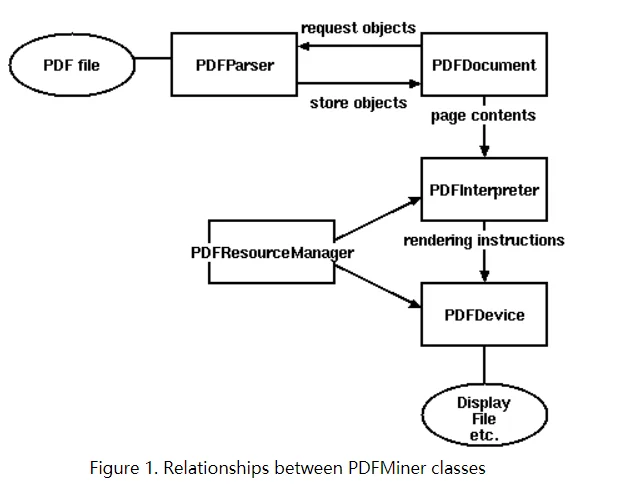
四、代码实现
#!/usr/bin/env python
# -*- coding:utf-8 -*-
# datetime:2021/3/17 12:12
# software: PyCharm
# version: python 3.9.2

def changePdfToText(filePath):
    """
     解析pdf 文本,保存到同名txt文件中

    param:
        filePath: 需要读取的pdf文档的目录
    introduced module:
        from pdfminer.pdfpage import PDFPage
        from pdfminer.pdfparser import PDFParser
        from pdfminer.pdfinterp import PDFResourceManager, PDFPageInterpreter
        from pdfminer.converter import PDFPageAggregator
        from pdfminer.layout import LAParams
        from pdfminer.pdfdocument import PDFDocument, PDFTextExtractionNotAllowed
        import os.path
    """
    file = open(filePath, 'rb')  # 以二进制读模式打开
    # 用文件对象来创建一个pdf文档分析器
    praser = PDFParser(file)
    # 创建一个PDF文档
    doc = PDFDocument(praser, '')  # praser :上面创建的pdf文档分析器 ,第二个参数是密码,设置为空就好了
    # 连接分析器 与文档对象
    praser.set_document(doc)
    # 检测文档是否提供txt转换,不提供就忽略
    if not doc.is_extractable:
        raise PDFTextExtractionNotAllowed
    # 创建PDf 资源管理器 来管理共享资源
    rsrcmgr = PDFResourceManager()
    # 创建一个PDF设备对象
    laparams = LAParams()
    device = PDFPageAggregator(rsrcmgr, laparams=laparams)
    # 创建一个PDF解释器对象
    interpreter = PDFPageInterpreter(rsrcmgr, device)
    result = []  # 内容列表
    # 循环遍历列表,每次处理一个page的内容
    for page in PDFPage.create_pages(doc):
        interpreter.process_page(page)
        # 接受该页面的LTPage对象
        layout = device.get_result()
        for x in layout:
            if hasattr(x, "get_text"):
                result.append(x.get_text())
                fileNames = os.path.splitext(filePath)  # 分割
                # 以追加的方式打开文件
                with open(fileNames[0] + '.txt', 'a', encoding="utf-8") as f:
                    results = x.get_text()
                    # print(results)   这个句可以取消注释就可以在控制台将所有内容输出了
                    f.write(results)  # 写入文件

# 调用示例 :

# path = u'E:\\1.pdf'
# changePdfToText(path)

- 1
- 2
- 3
- 4
- 5
- 6
- 7
- 8
- 9
- 10
- 11
- 12
- 13
- 14
- 15
- 16
- 17
- 18
- 19
- 20
- 21
- 22
- 23
- 24
- 25
- 26
- 27
- 28
- 29
- 30
- 31
- 32
- 33
- 34
- 35
- 36
- 37
- 38
- 39
- 40
- 41
- 42
- 43
- 44
- 45
- 46
- 47
- 48
- 49
- 50
- 51
- 52
- 53
- 54
- 55
- 56
- 57
- 58
声明:本文内容由网友自发贡献,不代表【wpsshop博客】立场,版权归原作者所有,本站不承担相应法律责任。如您发现有侵权的内容,请联系我们。转载请注明出处:https://www.wpsshop.cn/article/detail/51646
推荐阅读

相关标签

