
热门标签
热门文章
- 1品达通用权限系统(Day 5~Day 6)_pinda.itheima.net
- 2Win7 77条tip个人精简6条版(可惜不是7。。)
- 3Flink实时数仓同步:流水表实战详解
- 4跟姥爷深度学习1 浅用tensorflow做个天气预测_tensorflow天气预测
- 5RuntimeError: invalid multinomial distribution (encountering probability entry < 0)_runtimeerror: invalid multinomial distribution (su
- 6python程序开机自启动_python打包exe开机自动启动的实例(windows)
- 7STM32单片机的 Hard-Fault 硬件错误问题追踪与分析_stm32hardfault定位
- 8Fonts字体简介_font中ttf都代表的是什么字体
- 9mysql is not null 优化_MySQL优化系列2.1-MySQL中 IS NULL、IS NOT NULL、!= 能用上索引吗?...
- 10Quartz详解和使用CommandLineRunner在项目启动时初始化定时任务_quartz的commandlinerunner
当前位置: article > 正文
python使用pdfminer解析页面内容,得到内容的详细坐标_python的importerror 导入pdfminer.page
作者:opred | 2024-01-31 19:13:54
赞
踩
python的importerror 导入pdfminer.page
官方文档地址:https://pdfminersix.readthedocs.io/en/latest/reference/index.html
github地址:https://github.com/pdfminer/pdfminer.six
pdfminer与pdf基本概念:https://euske.github.io/pdfminer/programming.html
使用pdfminer需要首先安装:
pip install pdfminer.six
- 1
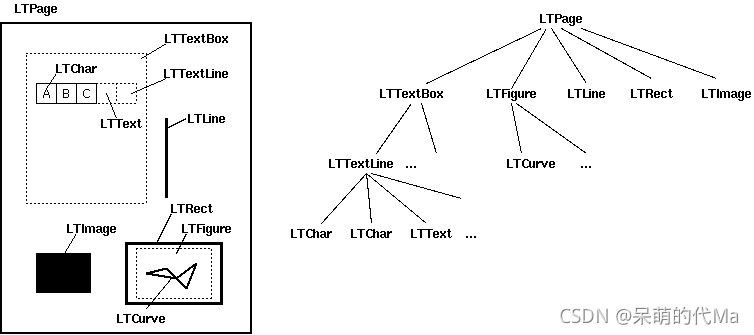
示例
import requests
import io
from pdfminer.pdfdocument import PDFDocument
from pdfminer.pdfpage import PDFPage
from pdfminer.pdfparser import PDFParser
from pdfminer.pdfinterp import PDFResourceManager, PDFPageInterpreter
from pdfminer.converter import PDFPageAggregator
from pdfminer.layout import LAParams, LTTextBox, LTText, LTChar, LTAnno, LTTextLine


def parse_line_layout(layout):
    """解析页面内容,一行一行的解析"""
    # bbox:
    # x0:从页面左侧到框左边缘的距离。
    # y0:从页面底部到框的下边缘的距离。
    # x1:从页面左侧到方框右边缘的距离。
    # y1:从页面底部到框的上边缘的距离
    for textbox in layout:
        if isinstance(textbox, LTTextBox) or isinstance(textbox, LTTextLine):
            for char in textbox:
                print("坐标 x:", char.bbox[0], "y:", char.bbox[3], " ||| ", char.get_text().strip(), )


def parse_words_layout(layout):
    """解析页面内容,一个单词一个单词的解析"""
    x, y, text = -1, -1, ''
    for textbox in layout:
        if isinstance(textbox, LTText):
            for line in textbox:
                for char in line:
                    # If the char is a line-break or an empty space, the word is complete
                    if isinstance(char, LTAnno) or char.get_text() == ' ':
                        if x != -1:
                            print("坐标 x:", x, "y:", y, " ||| ", text)
                        x, y, text = -1, -1, ''
                    elif isinstance(char, LTChar):
                        text += char.get_text()
                        if x == -1:
                            x, y, = char.bbox[0], char.bbox[3]
    if x != -1:
        print('At %r is text: %s' % ((x, y), text))


def parse_char_layout(layout):
    """解析页面内容,一个字母一个字母的解析"""
    for textbox in layout:
        if isinstance(textbox, LTText):
            for line in textbox:
                for char in line:
                    # If the char is a line-break or an empty space, the word is complete
                    if isinstance(char, LTAnno) or char.get_text() == ' ':
                        pass
                    elif isinstance(char, LTChar):
                        print("坐标 x:", char.bbox[0], "y:", char.bbox[3], " ||| ", char.get_text())


if __name__ == '__main__':
    req = requests.get("http://www.africau.edu/images/default/sample.pdf")
    fp = io.BytesIO(req.content)
    # fp = open('../../ocr_pdf/0a0c3b458b66d5e525551ec5b40df1c6.pdf', 'rb')
    parser = PDFParser(fp)  # 用文件对象来创建一个pdf文档分析器
    doc: PDFDocument = PDFDocument(parser)  # 创建pdf文档

    rsrcmgr = PDFResourceManager()  # 创建PDF,资源管理器,来共享资源
    # 创建一个PDF设备对象
    laparams = LAParams()
    device = PDFPageAggregator(rsrcmgr, laparams=laparams)
    # 创建一个PDF解释其对象
    interpreter = PDFPageInterpreter(rsrcmgr, device)
    # 循环遍历列表,每次处理一个page内容
    # doc.get_pages() 获取page列表
    interpreter = PDFPageInterpreter(rsrcmgr, device)
    # 处理文档对象中每一页的内容
    # doc.get_pages() 获取page列表
    # 循环遍历列表,每次处理一个page的内容
    # 这里layout是一个LTPage对象 里面存放着 这个page解析出的各种对象 一般包括LTTextBox, LTFigure, LTImage, LTTextBoxHorizontal 等等 想要获取文本就获得对象的text属性,
    for page in PDFPage.create_pages(doc):
        print('================ 新页面 ================')
        interpreter.process_page(page)
        layout = device.get_result()
        parse_line_layout(layout)  # 解析句子
        parse_words_layout(layout)  # 解析单词
        parse_char_layout(layout)  # 解析字母

- 1
- 2
- 3
- 4
- 5
- 6
- 7
- 8
- 9
- 10
- 11
- 12
- 13
- 14
- 15
- 16
- 17
- 18
- 19
- 20
- 21
- 22
- 23
- 24
- 25
- 26
- 27
- 28
- 29
- 30
- 31
- 32
- 33
- 34
- 35
- 36
- 37
- 38
- 39
- 40
- 41
- 42
- 43
- 44
- 45
- 46
- 47
- 48
- 49
- 50
- 51
- 52
- 53
- 54
- 55
- 56
- 57
- 58
- 59
- 60
- 61
- 62
- 63
- 64
- 65
- 66
- 67
- 68
- 69
- 70
- 71
- 72
- 73
- 74
- 75
- 76
- 77
- 78
- 79
- 80
- 81
- 82
- 83
运行parse_line_layout的结果:
坐标 x: 57.375 y: 743.691  |||  A Simple PDF File
坐标 x: 69.25 y: 696.5379999999999  |||  This is a small demonstration .pdf file -
坐标 x: 69.25 y: 672.6339999999999  |||  just for use in the Virtual Mechanics tutorials. More text. And more
坐标 x: 69.25 y: 660.6819999999999  |||  text. And more text. And more text. And more text.
坐标 x: 69.25 y: 636.7779999999999  |||  And more text. And more text. And more text. And more text. And more
坐标 x: 69.25 y: 624.8259999999999  |||  text. And more text. Boring, zzzzz. And more text. And more text. And
坐标 x: 69.25 y: 612.8739999999999  |||  more text. And more text. And more text. And more text. And more text.
- 1
- 2
- 3
- 4
- 5
- 6
- 7
运行parse_words_layout的结果:
坐标 x: 64.881 y: 743.691  |||  A
坐标 x: 90.396 y: 743.691  |||  Simple
坐标 x: 180.414 y: 743.691  |||  PDF
坐标 x: 241.92 y: 743.691  |||  File
坐标 x: 72.03 y: 696.5379999999999  |||  This
坐标 x: 93.7 y: 696.5379999999999  |||  is
坐标 x: 103.7 y: 696.5379999999999  |||  a
坐标 x: 112.04 y: 696.5379999999999  |||  small
坐标 x: 138.15 y: 696.5379999999999  |||  demonstration
- 1
- 2
- 3
- 4
- 5
- 6
- 7
- 8
- 9
运行parse_char_layout的结果:
坐标 x: 64.881 y: 743.691  |||  A
坐标 x: 90.396 y: 743.691  |||  S
坐标 x: 108.405 y: 743.691  |||  i
坐标 x: 114.399 y: 743.691  |||  m
坐标 x: 136.89 y: 743.691  |||  p
坐标 x: 151.902 y: 743.691  |||  l
坐标 x: 157.89600000000002 y: 743.691  |||  e
- 1
- 2
- 3
- 4
- 5
- 6
- 7
声明:本文内容由网友自发贡献,转载请注明出处:【wpsshop博客】
推荐阅读


相关标签

