
- 1SpringBoot进行自然语言处理,利用Hanlp进行文本情感分析
- 2Python代码雨
- 3yolov7改进系列_改进yolo
- 4鸿蒙OS2.0添加加密门禁卡进入卡包_鸿蒙系统新建空白门禁卡
- 52023 亚马逊云科技 re:lnvent 大会探秘: Amazon Connect 全渠道云联络中心
- 6Windows server——部署web服务_windows一键部署web环境
- 7大数据与云计算——部署Hadoop集群并运行MapReduce集群案例(超级详细!)_在hadoop上运行mapreduce
- 8【软考-中级】系统集成项目管理工程师-计算题_系统集成项目管理工程师计算题
- 9VOC/YOLO/COCO数据集格式转换及LabelImg/Labelme/精灵标注助手Colabeler标注工具介绍_coco数据集标注工具
- 10Ubuntu如何使用宝塔面板部署开源论坛HadSky并结合内网穿透远程访问?
Python 实现个人博客系统(附零基础python学习资料)_python个人简易博客系统
赞
踩
前言
项目描述
开发环境:PyCharm、python3.7、MySQL5.5
使用技术:服务端是使用Flask开发的,前端是使用的Layui和Markdown编辑器所实现的。
项目包含功能如下:(文末送读者福利)
注册:注册账号
登录:通过账号密码进行登录
写博客:写博客采用的Markdown编辑器完成的。可以发布自己的博客
我的博客:查看自己发布的博客并对其管理
我的评论:查看自己的所有评论并对其管理
修改密码
查看博客列表:查看所有已发布的博客
博客详情页:查看博客内容及评论信息,可以对当前博客进行评论
关于
项目目录
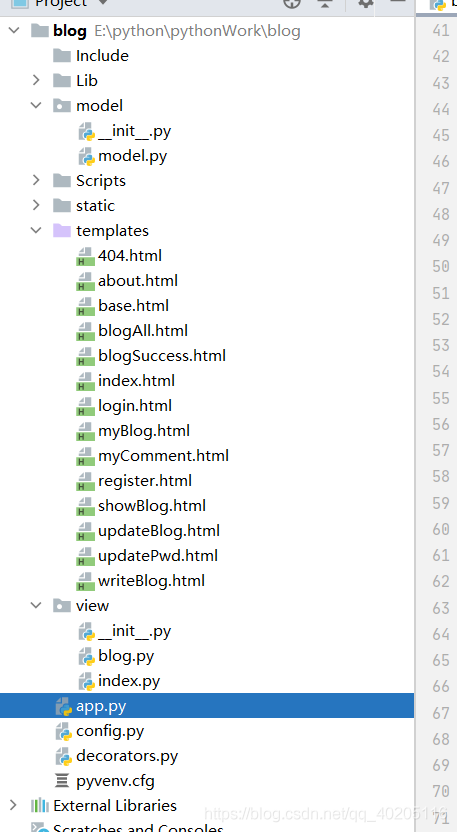
数据库设计
数据库一共设计了三张表:用户表、博客表、评论表。(文末送读者福利)
表之间的映射关系如下:
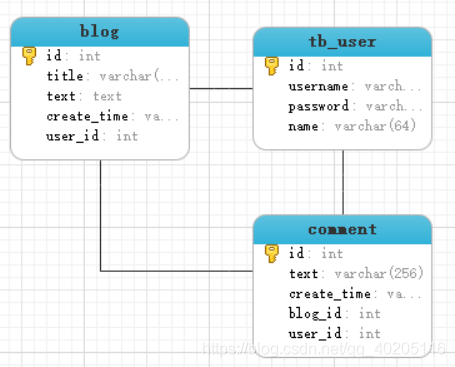
用户表和博客表一对多关系;用户和评论表一对多关系;博客表和评论表一对多关系。
其表的模型类代码如下:
class User(db.Model):
    # 设置表名
    __tablename__ = 'tb_user';
    # id,主键并自动递增
    id = db.Column(db.Integer, primary_key=True, autoincrement=True)
    username = db.Column(db.String(64), unique=True)
    password = db.Column(db.String(256), nullable=True)
    name = db.Column(db.String(64))

    # 设置只可写入,对密码进行加密
    def password_hash(self, password):
        self.password = generate_password_hash(password);

class Blog(db.Model):
    __tablename__ = 'blog'
    id = db.Column(db.Integer, primary_key=True, autoincrement=True)
    title = db.Column(db.String(128))
    text = db.Column(db.TEXT)
    create_time = db.Column(db.String(64))
    #关联用户id
    user_id = db.Column(db.Integer, db.ForeignKey('tb_user.id'))
    user = db.relationship('User', backref='user')

class Comment(db.Model):
    __tablename__ = 'comment'
    id = db.Column(db.Integer, primary_key=True, autoincrement=True)
    text = db.Column(db.String(256))    # 评论内容
    create_time = db.Column(db.String(64))
    # 关联博客id
    blog_id = db.Column(db.Integer, db.ForeignKey("blog.id"))
    # 关联用户id
    user_id = db.Column(db.Integer, db.ForeignKey("tb_user.id"))
    blog = db.relationship("Blog", backref="blog")
    user = db.relationship("User", backref="use")

- 1
- 2
- 3
- 4
- 5
- 6
- 7
- 8
- 9
- 10
- 11
- 12
- 13
- 14
- 15
- 16
- 17
- 18
- 19
- 20
- 21
- 22
- 23
- 24
- 25
- 26
- 27
- 28
- 29
- 30
- 31
- 32
- 33
- 34
功能实现
页面基本模板实现
页面使用的是Jinja2模板,Jinja2支持页面继承,所以导航栏重复性的页面代码,我们都可以写在一个文件中。这里我们先创建一个base.html文件,编写页面大致的框架。其他模块直接继承使用即可。
"en">

    "UTF-8">

    "stylesheet" href="/static/layui/css/layui.css">
    "stylesheet" href="/static/css/base.css">
    "/static/js/jquery.js">
    "/static/layui/layui.js">
    {% block css %}
    {% endblock %}


"bg">
- 1
- 2
- 3
- 4
- 5
- 6
- 7
- 8
- 9
- 10
- 11
- 12
- 13
"layui-nav" lay-filter="">
    "layui-nav-item">"/">在线博客平台
    {% if username %}
        "layui-nav-item{% block updatepwd_class %}{% endblock %}">"/updatePwd">修改密码
    {% endif %}
    "layui-nav-item{% block blog_class %}{% endblock %}">"/blog/blogAll">博客
    "layui-nav-item{% block about_class %}{% endblock %}">"/about">关于
    {% if username %}
        "layui-nav-item" style="float: right; margin-right: 30px;">
            "javascript:;">{{ name }}
            "layui-nav-child">

"/blog/myBlog">我的博客


"/blog/myComment">我的评论


"/logout">注销


        "layui-nav-item{% block write_class %}{% endblock %}" style="float: right">"/blog/writeBlog">写博客
    {% else %}
        "layui-nav-item{% block register_class %}{% endblock %}" style="float: right">"/register">注册
        "layui-nav-item{% block login_class %}{% endblock %}" style="float: right">"/login">登录
    {% endif %}


"content">
    {% block content %}
        {# 其他页面内容 #}
    {% endblock %}
- 1
- 2
- 3
- 4
- 5
- 6
- 7
- 8
- 9
- 10
- 11
- 12
- 13
- 14
- 15
- 16
- 17
- 18
- 19
- 20
- 21
- 22
- 23
- 24
- 25
- 26
- 27
- 28
- 29
- 30
- 31
- 32
- 33
这里页面使用了Layui定义了一个导航栏,展示了对应的功能模块。其中{% if username %},username为后台存放在session中的一个键值对,用于判断用户是否登录了,有些功能登录后才显示。
base.html模板文件完成后,我们在定义一个index.html来做项目的首页,直接继承base.html。这样首页index.html就节省了很多代码。如下:
{% extends 'base.html' %}

{% block title %}
    在线博客平台
{% endblock %}

{% block content %}
    "margin: 35vh;">在线博客平台
{% endblock %}
- 1
- 2
- 3
- 4
- 5
- 6
- 7
- 8
- 9
首页效果如下:
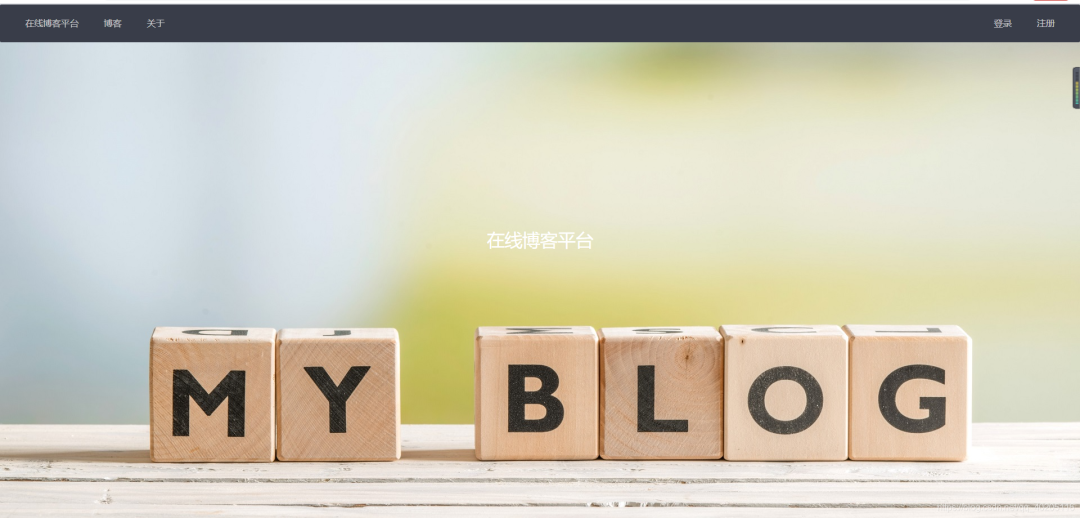
登录与注册功能
登录
先定义一个登录的视图函数,可以接收GET、POST请求,GET请求为跳转到登录页面,POST请求为处理登录提交的请求,验证是否登录成功,登录成功后把当前登录对象的用户名存入session会话中。
# 登录请求
@index.route('/login', methods=['POST', 'GET'])
def login():
    if request.method == 'GET':
        return render_template('login.html')
    if request.method == 'POST':
        username = request.form.get('username')
        password = request.form.get('password')
        user = User.query.filter(User.username == username).first();
        # check_password_hash比较两个密码是否相同
        if (user is not None) and (check_password_hash(user.password, password)):
            session['username'] = user.username
            session.permanent = True
            return redirect(url_for('index.hello'))
        else:
            flash("账号或密码错误")
            return render_template('login.html');
- 1
- 2
- 3
- 4
- 5
- 6
- 7
- 8
- 9
- 10
- 11
- 12
- 13
- 14
- 15
- 16
- 17
登录页面是用Layui写的一组form表单,也是基础的base.html,代码如下:
{% extends 'base.html' %}

{% block title %}
    在线博客平台.登录
{% endblock %}

{% block css %}
"stylesheet" href="/static/css/register.css">
{% endblock %}

{% block content %}
    "register">

登录

        "tip">
            {% for item in get_flashed_messages() %}
            {{ item }}
            {% endfor %}


        "layui-form" action="login" method="post">
            "layui-form-item">
                "layui-form-label">用户名
                "layui-input-block">
                    type="text" name="username" required  lay-verify="required" placeholder="请输入用户名" class="layui-input">


            "layui-form-item">
                "layui-form-label">密  码
                "layui-input-block">
                    type="password" name="password" required lay-verify="required" placeholder="请输入密码" class="layui-input">


            "layui-form-item">
                "layui-input-block">
                    "layui-btn" lay-submit lay-filter="formDemo">立即提交
                    type="reset" class="layui-btn layui-btn-primary">重置


{% endblock %}

{% block login_class %}
    layui-this
{% endblock %}
- 1
- 2
- 3
- 4
- 5
- 6
- 7
- 8
- 9
- 10
- 11
- 12
- 13
- 14
- 15
- 16
- 17
- 18
- 19
- 20
- 21
- 22
- 23
- 24
- 25
- 26
- 27
- 28
- 29
- 30
- 31
- 32
- 33
- 34
- 35
- 36
- 37
- 38
- 39
- 40
- 41
- 42
- 43
- 44
- 45
- 46
- 47
- 48
效果如下(账号和密码错误后,会有相应的提示信息):
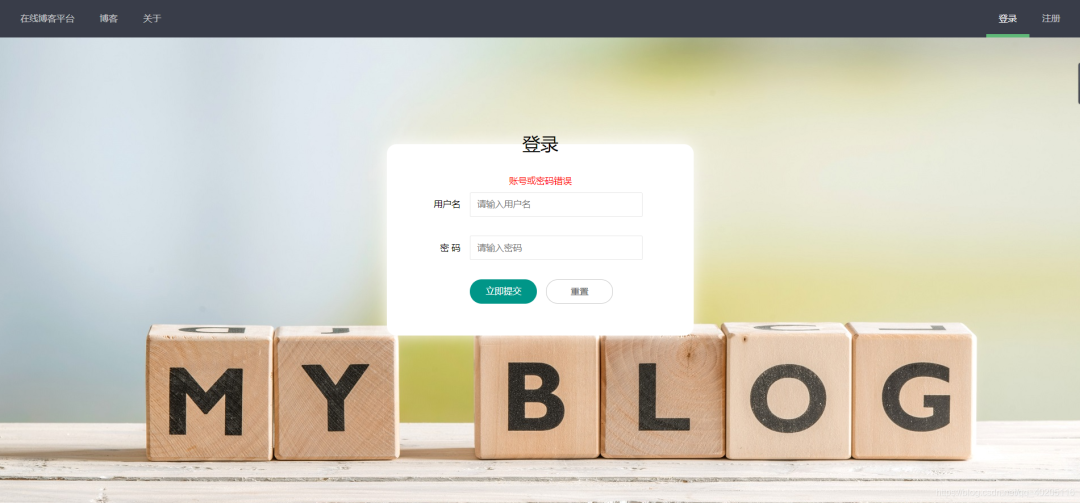
注册和登录差不多,页面都是使用的同一个css样式文件,所以这里就贴代码出来了,需要的可以自行下载完整项目代码:GitHub地址。
修改密码
修改密码模块,因为数据库存放明文密码很不安全,所以这里使用了Werkzeug对密码进行了加密存储。对于WerkZeug密码加密想进一步了解的,可以访问Flask 使用Werkzeug实现密码加密。
因为数据库中存储的是加密后的密码,所以这里判断原密码是否正确需要使用check_password_hash函数进行判断。
定义一个修改密码的视图函数。
# 修改密码
@index.route("/updatePwd", methods=['POST', 'GET'])
@login_limit
def update():
    if request.method == "GET":
        return render_template("updatePwd.html")
    if request.method == 'POST':
        lodPwd = request.form.get("lodPwd")
        newPwd1 = request.form.get("newPwd1")
        newPwd2 = request.form.get("newPwd2")
        username = session.get("username");
        user = User.query.filter(User.username == username).first();
        if check_password_hash(user.password, lodPwd):
            if newPwd1 != newPwd2:
                flash("两次新密码不一致!")
                return render_template("updatePwd.html")
            else:
                user.password_hash(newPwd2)
                db.session.commit();
                flash("修改成功!")
                return render_template("updatePwd.html")
        else:
            flash("原密码错误!")
            return render_template("updatePwd.html")
- 1
- 2
- 3
- 4
- 5
- 6
- 7
- 8
- 9
- 10
- 11
- 12
- 13
- 14
- 15
- 16
- 17
- 18
- 19
- 20
- 21
- 22
- 23
- 24
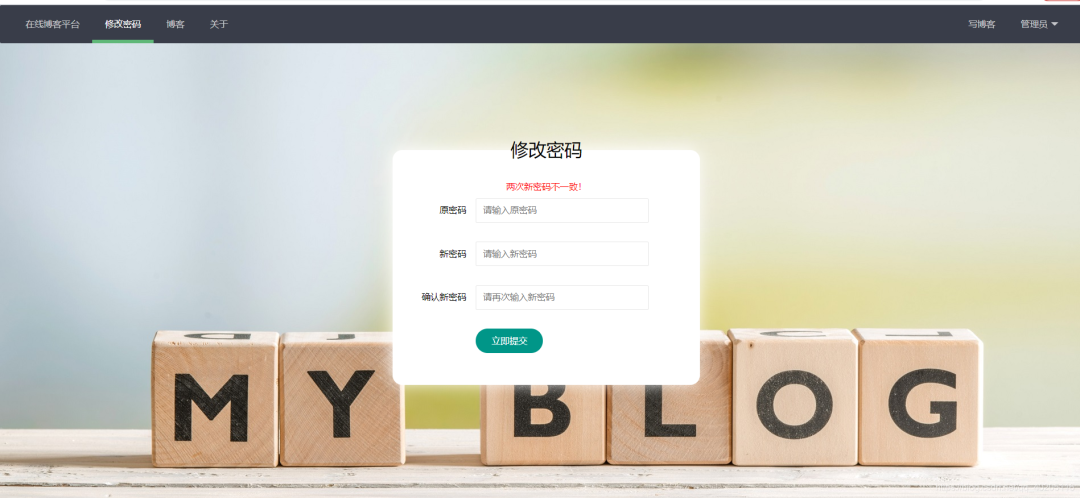
页面样式文件和登录注册引入的样式文件一致(原密码不正确或两次新密码不同,会给出相应的提示信息),代码如下:
{% extends 'base.html' %}

{% block title %}
    在线博客平台.修改密码
{% endblock %}

{% block css %}
"stylesheet" href="/static/css/register.css">
{% endblock %}

{% block content %}
    "register">

修改密码

        "tip">
            {% for item in get_flashed_messages() %}
            {{ item }}
            {% endfor %}


        "layui-form" action="updatePwd" method="post">
            "layui-form-item">
                "layui-form-label">原密码
                "layui-input-block">
                    type="password" name="lodPwd" required  lay-verify="required" placeholder="请输入原密码" class="layui-input">


            "layui-form-item">
                "layui-form-label">新密码
                "layui-input-block">
                    type="password" name="newPwd1" required lay-verify="required" placeholder="请输入新密码" class="layui-input">


            "layui-form-item">
                "layui-form-label">确认新密码
                "layui-input-block">
                    type="password" name="newPwd2" required lay-verify="required" placeholder="请再次输入新密码" class="layui-input">


            "layui-form-item">
                "layui-input-block">
                    "layui-btn" lay-submit lay-filter="formDemo">立即提交


{% endblock %}

{% block updatepwd_class %}
    layui-this
{% endblock %}
- 1
- 2
- 3
- 4
- 5
- 6
- 7
- 8
- 9
- 10
- 11
- 12
- 13
- 14
- 15
- 16
- 17
- 18
- 19
- 20
- 21
- 22
- 23
- 24
- 25
- 26
- 27
- 28
- 29
- 30
- 31
- 32
- 33
- 34
- 35
- 36
- 37
- 38
- 39
- 40
- 41
- 42
- 43
- 44
- 45
- 46
- 47
- 48
- 49
- 50
- 51
- 52
- 53
效果如下:
写博客
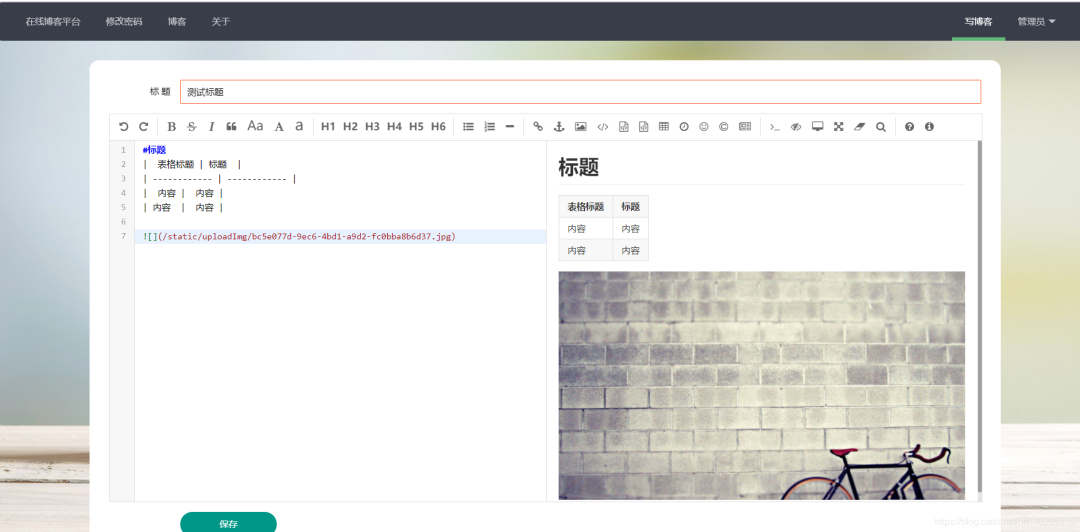
写博客,博客表中会保存标题、博客内容、当前时间等字段。如下是写博客的视图函数。
# 写博客页面
@blog.route('/writeBlog', methods=['POST', 'GET'])
@login_limit
def writeblog():
    if request.method == 'GET':
        return render_template('writeBlog.html')
    if request.method == 'POST':
        title = request.form.get("title")
        text = request.form.get("text")
        username = session.get('username')
        # 获取当前系统时间
        create_time = time.strftime("%Y-%m-%d %H:%M:%S")
        user = User.query.filter(User.username == username).first()
        blog = Blog(title=title, text=text, create_time=create_time, user_id=user.id)
        db.session.add(blog)
        db.session.commit();
        blog = Blog.query.filter(Blog.create_time == create_time).first();
        return render_template('blogSuccess.html', title=title, id=blog.id)
- 1
- 2
- 3
- 4
- 5
- 6
- 7
- 8
- 9
- 10
- 11
- 12
- 13
- 14
- 15
- 16
- 17
- 18
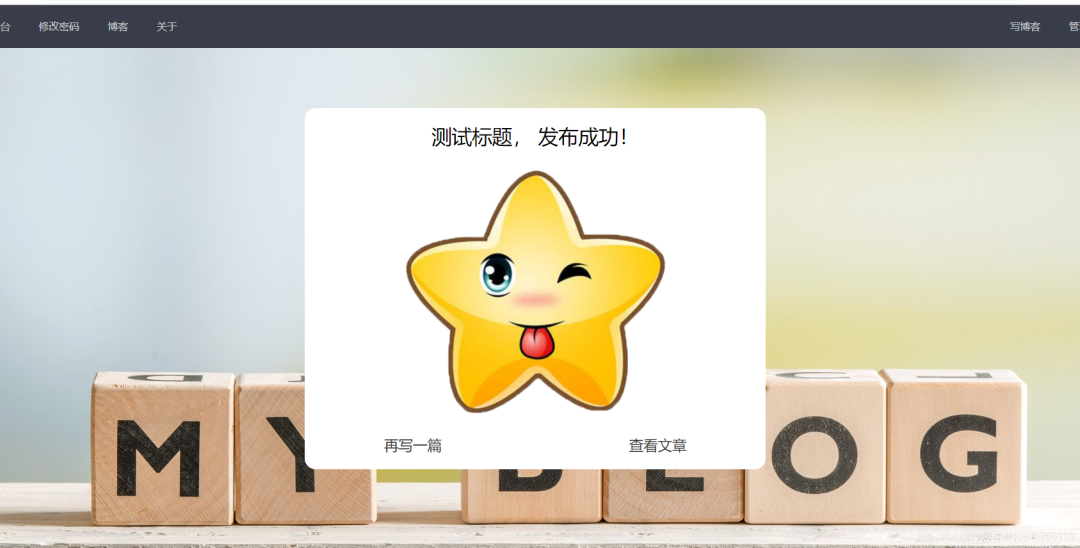
保存博客时会获取到当前系统时间,当做博客的发布时间。博客保存成功后,会返回保存成功页面,下面会有讲解。
写博客对应的html文件,代码如下。
{% extends 'base.html' %}

{% block title %}
    在线博客平台.写博客
{% endblock %}

{% block css %}
"stylesheet" type="text/css" href="/static/editor/css/editormd.css"/>
"/static/editor/editormd.js" type="text/javascript">
{% endblock %}

{% block content %}
    "main">
        "/blog/writeBlog" class="layui-form" method="post">
            "layui-form-item">
                "layui-form-label">标   题
                "layui-input-block">
                    type="text" name="title"  lay-verify="required" placeholder="请输入标题" class="layui-input">


            "editormd">
                "text" lay-verify="required" style="display:none;" >

            "layui-form-item">
                "layui-input-block">
                    "layui-btn" style="width: 150px" lay-submit lay-filter="formDemo">保存


    type="text/javascript">
        layui.use('form', function(){
            var form = layui.form;
            form.on('submit(formDemo)', function(data){
            });
        });

        $(function() {
            editormd("editormd", {
                width: "100%",
                height: 600,
                syncScrolling: "single",
                path: "/static/editor/lib/", //依赖lib文件夹路径
                emoji: true,
                taskList: true,
                tocm: true,
                imageUpload: true, //开启本地图片上传
                imageFormats: ["jpg", "jpeg", "gif", "png"], //设置上传图片的格式
                imageUploadURL: "/blog/imgUpload"  //上传图片请求路径
            });
        });

{% endblock %}

{% block write_class %}
    layui-this
{% endblock %}
- 1
- 2
- 3
- 4
- 5
- 6
- 7
- 8
- 9
- 10
- 11
- 12
- 13
- 14
- 15
- 16
- 17
- 18
- 19
- 20
- 21
- 22
- 23
- 24
- 25
- 26
- 27
- 28
- 29
- 30
- 31
- 32
- 33
- 34
- 35
- 36
- 37
- 38
- 39
- 40
- 41
- 42
- 43
- 44
- 45
- 46
- 47
- 48
- 49
- 50
- 51
- 52
- 53
- 54
- 55
- 56
- 57
- 58
写博客这里采用的是Markdown编辑器,对于Markdown编辑器之前写过一篇Markdown的使用方法,只不过后端用的是Java语言,感兴趣的小伙伴可以看看,Markdown的基本使用。Flask与之不同的是,后端接收Markdown上传图片时的语句不同,Flask接收Markdown上传图片的语句:
file = request.files.get('editormd-image-file');
- 1
其他的基本相同,毕竟Markdown是属于前端的知识,后端只要求根据规定个格式返回数据即可。
因为Markdown支持图片上传,那就必须的有文件上传的方法了。如下定义一个文件上传的视图函数(这里需要注意的是Markdown上传图片是使用的POST方法)。
# 上传图片
@blog.route('/imgUpload', methods=['POST'])
@login_limit
def imgUpload():
    try:
        file = request.files.get('editormd-image-file');
        fname = secure_filename(file.filename);
        ext = fname.rsplit('.')[-1];
        # 生成一个uuid作为文件名
        fileName = str(uuid.uuid4()) + "." + ext;
        filePath = os.path.join("static/uploadImg/", fileName);
        file.save(filePath)
        return {
            'success': 1,
            'message': '上传成功!',
            'url': "/" + filePath
        }
    except Exception:
        return {
            'success': 0,
            'message': '上传失败'
        }
- 1
- 2
- 3
- 4
- 5
- 6
- 7
- 8
- 9
- 10
- 11
- 12
- 13
- 14
- 15
- 16
- 17
- 18
- 19
- 20
- 21
- 22
如果对上述的文件上传代码比较陌生,可以访问Flask 文件上传与下载,对Flask文件上传与下载进一步了解。
效果如下:
保存成功后,会返回保存成功页面,可以在写一篇,或者查看当前发布的文章。
查看博客列表
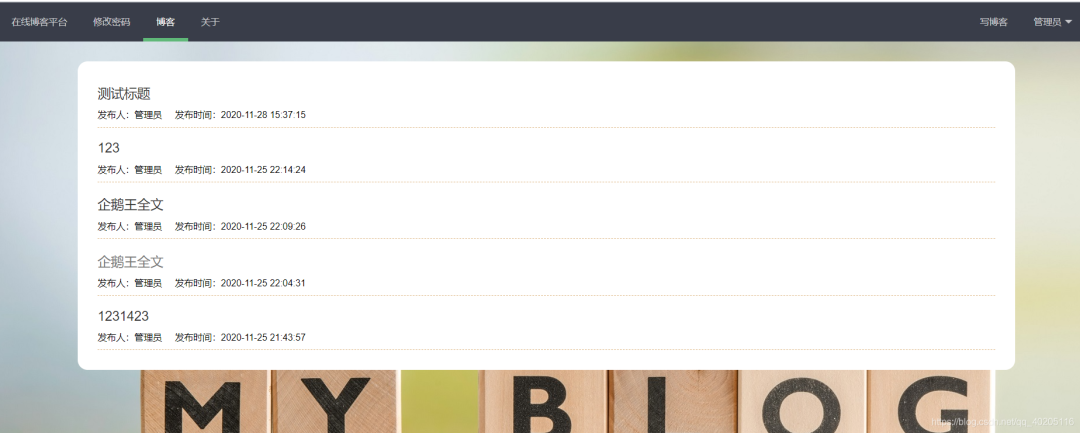
查看博客列表就是遍历所有已发布的博客。先定义一个视图函数,查询所有已发布的博客,传递到前端进行遍历显示。视图函数代码如下:
# 展示全部博客
@blog.route("/blogAll")
def blogAll():
    # order_by按照时间倒序
    blogList = Blog.query.order_by(Blog.create_time.desc()).all();
    return render_template('blogAll.html', blogList=blogList)
- 1
- 2
- 3
- 4
- 5
- 6
因为最新发布的博客在数据库的最后一条,所以这里根据发布时间倒序查询。
页面代码如下:
{% extends 'base.html' %}

{% block title %}
    在线博客平台.博客
{% endblock %}

{% block css %}
"stylesheet" href="/static/css/blogAll.css">
{% endblock %}

{% block content %}
    "main">


            {% for blog in blogList %}


                    "title" href="/blog/showBlog/{{ blog.id }}">{{ blog.title }}


                        发布人:{{ blog.user.name }}     发布时间:{{ blog.create_time }}


            {% endfor %}


{% endblock %}

{% block blog_class %}
    layui-this
{% endblock %}
- 1
- 2
- 3
- 4
- 5
- 6
- 7
- 8
- 9
- 10
- 11
- 12
- 13
- 14
- 15
- 16
- 17
- 18
- 19
- 20
- 21
- 22
- 23
- 24
- 25
- 26
- 27
- 28
- 29
- 30
- 31
- 32
- 33
- 34
- 35
效果如下:
博客详情页面
在博客列表中点击博客的标题可以进入博客的详情页面,详情页面展示了博客的详细内容以及评论内容。
因为数据库中保存博客内容的是Markdown格式的,所以在这里需要解析成HTML格式,解析代码如下。
"/static/editor/lib/marked.min.js">
"/static/editor/lib/prettify.min.js">
"/static/editor/lib/raphael.min.js">
"/static/editor/lib/underscore.min.js">
"/static/editor/lib/sequence-diagram.min.js">
"/static/editor/lib/flowchart.min.js">
"/static/editor/lib/jquery.flowchart.min.js">
"/static/editor/editormd.js">
editormd.markdownToHTML("test", {
    htmlDecode: "style,script,iframe",
    emoji: true,
    taskList: true,
    tex: true,  // 默认不解析
    flowChart: true,  // 默认不解析
    sequenceDiagram: true  // 默认不解析
});
- 1
- 2
- 3
- 4
- 5
- 6
- 7
- 8
- 9
- 10
- 11
- 12
- 13
- 14
- 15
- 16
评论
在博客详情页面可以进行评论,评论使用的是Layui的编辑器,比较简约也可以达到想要的效果。
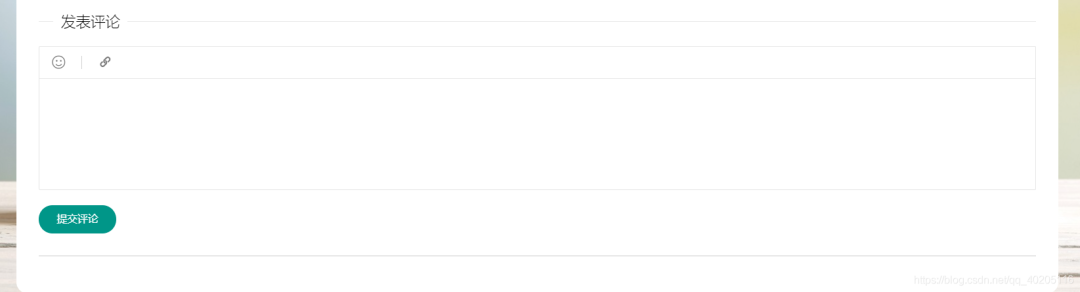
看上去是不是还可以,和页面也很搭。评论需要先登录才可以评论,如果没有登录则会提示登录。
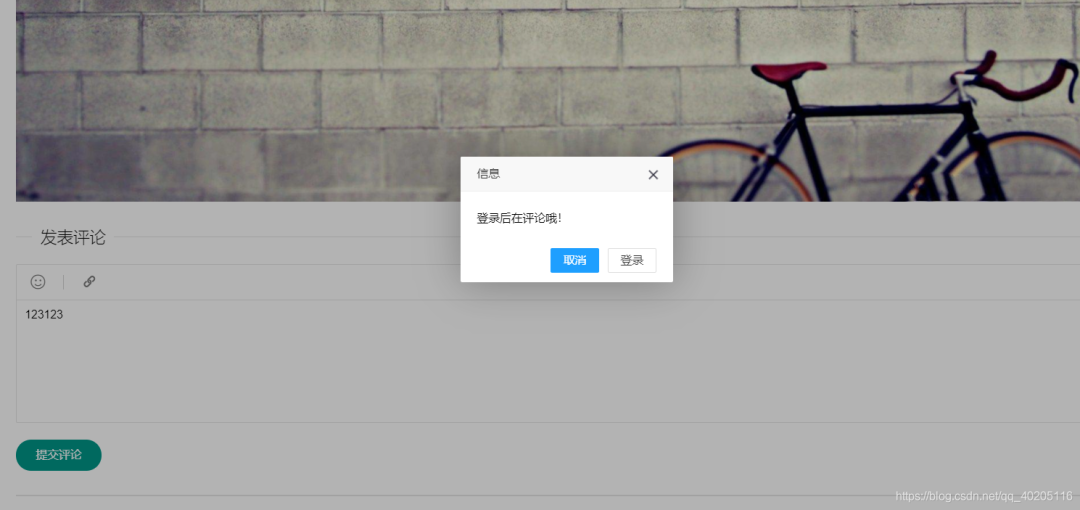
如果登录评论后,会发送保存评论请求,携带当前博客的id和评论内容进行保存。
保存评论的视图函数。
# 评论
@blog.route("/comment", methods=['POST'])
@login_limit
def comment():
    text = request.values.get('text')
    blogId = request.values.get('blogId')
    username = session.get('username')
    # 获取当前系统时间
    create_time = time.strftime("%Y-%m-%d %H:%M:%S")
    user = User.query.filter(User.username == username).first()
    comment = Comment(text=text, create_time=create_time, blog_id=blogId, user_id=user.id)
    db.session.add(comment)
    db.session.commit();
    return {
        'success': True,
        'message': '评论成功!',
    }
- 1
- 2
- 3
- 4
- 5
- 6
- 7
- 8
- 9
- 10
- 11
- 12
- 13
- 14
- 15
- 16
- 17
上述的博客内容解析与评论都在一个页面中,完整代码如下。
{% extends 'base.html' %}

{% block title %}
    在线博客平台.博客
{% endblock %}

{% block css %}
"stylesheet" type="text/css" href="/static/editor/css/editormd.css"/>
"stylesheet" href="/static/css/showBlog.css">
"/static/editor/lib/marked.min.js">
"/static/editor/lib/prettify.min.js">
"/static/editor/lib/raphael.min.js">
"/static/editor/lib/underscore.min.js">
"/static/editor/lib/sequence-diagram.min.js">
"/static/editor/lib/flowchart.min.js">
"/static/editor/lib/jquery.flowchart.min.js">
"/static/editor/editormd.js">
{% endblock %}

{% block content %}
    "main">

{{ blog.title }}


发布人:{{ blog.user.name }}     发布时间:{{ blog.create_time }}


        "test">

{{ blog.text }}


        "layui-elem-field layui-field-title">
            发表评论

            type="hidden" id="blog_id" name="blogId" value="{{ blog.id }}">
            "lay_edit" lay-verify="content" name="text">
            type="button" class="layui-btn comSub">提交评论

        "margin-top: 30px; margin-bottom: 20px;">
        "comment">
            {% for com in comment %}


                    "myText">{{ com.text }}


评论人:{{ com.user.name }}     发布时间:{{ com.create_time }}


            {% endfor %}


    type="text/javascript">
        $(function (){
            $(".myText").each(function () {
                $(this).html($(this).text());
            });
        })

        editormd.markdownToHTML("test", {
            htmlDecode: "style,script,iframe",
            emoji: true,
            taskList: true,
            tex: true,  // 默认不解析
            flowChart: true,  // 默认不解析
            sequenceDiagram: true  // 默认不解析
        });

        layui.use(['layedit', 'form'], function () {
            var form = layui.form;
            var layedit = layui.layedit;
            //创建一个编辑器
            var index = layedit.build('lay_edit', {
                height: 150,
                tool: [
                    'face', //表情
                    '|', //分割线
                    'link' //超链接
                ]
            });
            $(".comSub").click(function (){
                layui.use('layer', function(){
                    var layer = layui.layer;
                    {% if username %}
                        //获取评论内容
                        var text = layedit.getContent(index);
                        var blogId = $("#blog_id").val();
                        if(text == "" || text == undefined){
                            layer.msg("评论不能为空哦!", {icon: 0});
                        }else {
                            $.post("/blog/comment", {text: text, blogId: blogId}, function (result) {
                                if (result.success) {
                                    window.location.href = '/blog/showBlog/' + blogId;
                                }
                            })
                        }
                    {% else %}
                        layer.confirm('登录后在评论哦!', {
                            btn: ['取消','登录']
                        }, function(index){
                            layer.close(index);
                        }, function(){
                            window.location.href = '/login';
                        });
                    {% endif %}
                });
            })
        });

{% endblock %}
- 1
- 2
- 3
- 4
- 5
- 6
- 7
- 8
- 9
- 10
- 11
- 12
- 13
- 14
- 15
- 16
- 17
- 18
- 19
- 20
- 21
- 22
- 23
- 24
- 25
- 26
- 27
- 28
- 29
- 30
- 31
- 32
- 33
- 34
- 35
- 36
- 37
- 38
- 39
- 40
- 41
- 42
- 43
- 44
- 45
- 46
- 47
- 48
- 49
- 50
- 51
- 52
- 53
- 54
- 55
- 56
- 57
- 58
- 59
- 60
- 61
- 62
- 63
- 64
- 65
- 66
- 67
- 68
- 69
- 70
- 71
- 72
- 73
- 74
- 75
- 76
- 77
- 78
- 79
- 80
- 81
- 82
- 83
- 84
- 85
- 86
- 87
- 88
- 89
- 90
- 91
- 92
- 93
- 94
- 95
- 96
- 97
- 98
- 99
- 100
- 101
- 102
- 103
- 104
- 105
- 106
- 107
- 108
- 109
- 110
- 111
- 112
- 113
- 114
- 115
- 116
- 117
我的博客
登录之后在右上角导航栏可以查看我的博客,查看个人已经发布过的博客并进行管理。
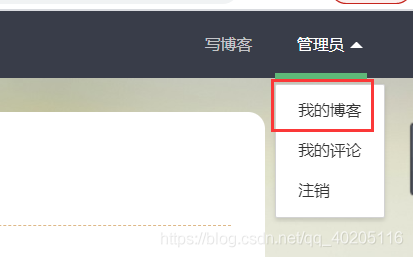
定义一个视图函数,查询当前登录的用户发布的所有博客。
# 查看个人博客
@blog.route("/myBlog")
@login_limit
def myBlog():
    username = session.get('username')
    user = User.query.filter(User.username == username).first()
    # order_by按照时间倒序
    blogList = Blog.query.filter(Blog.user_id == user.id).order_by(Blog.create_time.desc()).all()
    return render_template("myBlog.html", blogList=blogList)
- 1
- 2
- 3
- 4
- 5
- 6
- 7
- 8
- 9
页面与博客列表基本相似,但可以对其博客进行修改与删除。
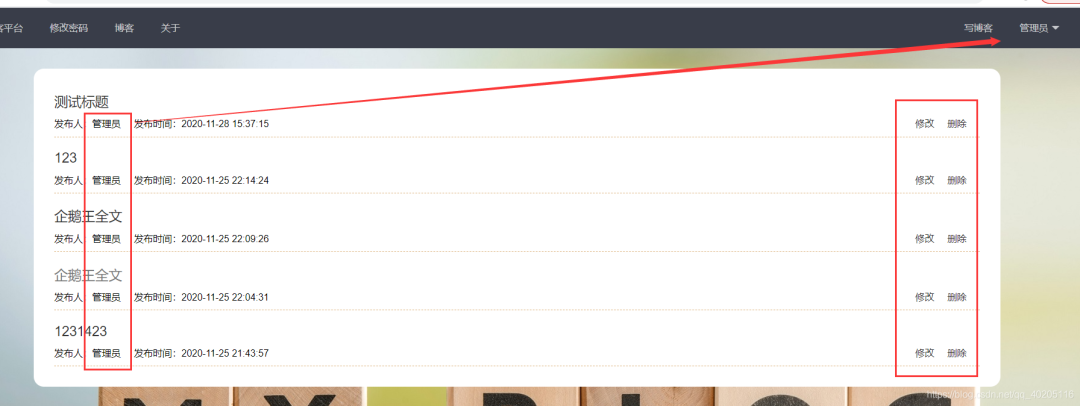
修改博客
在我的博客中,有修改博客的链接,把当前的博客id当做参数传递到后台,查询当前这条博客的数据,进行修改。
# 博客修改
@blog.route("/update/", methods=['POST', 'GET'])
@login_limit
def update(id):
    if request.method == 'GET':
        blog = Blog.query.filter(Blog.id == id).first();
        return render_template('updateBlog.html', blog=blog)
    if request.method == 'POST':
        id = request.form.get("id")
        title = request.form.get("title")
        text = request.form.get("text")
        blog = Blog.query.filter(Blog.id == id).first();
        blog.title = title;
        blog.text = text;
        db.session.commit();
        return render_template('blogSuccess.html', title=title, id=id)
- 1
- 2
- 3
- 4
- 5
- 6
- 7
- 8
- 9
- 10
- 11
- 12
- 13
- 14
- 15
- 16
修改页面和写博客的页面基本一样,在textarea标签中设置markdown编辑器的默认值。
"text" lay-verify="required" style="display:none;" >{{ blog.text }}
- 1
删除博客
删除博客和修改一样,把博客的id传到后端,根据id删除数据库中对应的数据。
# 删除博客
@blog.route("/delete/")
@login_limit
def delete(id):
    blog = Blog.query.filter(Blog.id == id).first();
    db.session.delete(blog);
    db.session.commit();
    return {
        'state': True,
        'msg': "删除成功!"
    }
- 1
- 2
- 3
- 4
- 5
- 6
- 7
- 8
- 9
- 10
- 11
删除成功后,使用JS删除页面上对应的DOM元素。
 function del(url, that){
    layui.use('layer', function(){
        var layer = layui.layer;
        layer.confirm('您确定要删除吗?', {
            btn: ['取消','确定']
        }, function(index){
            layer.close(index);
        }, function(){
            $.get(url, function (data){
                if(data.state){
                    $(that).parent().parent().parent().remove();
                    layer.msg(data.msg, {icon: 1});
                }
            })
        });
    });
}
- 1
- 2
- 3
- 4
- 5
- 6
- 7
- 8
- 9
- 10
- 11
- 12
- 13
- 14
- 15
- 16
- 17
我的评论
在页面的右上角不仅可以查看个人已发布的博客,也可以看到自己的所有评论信息。
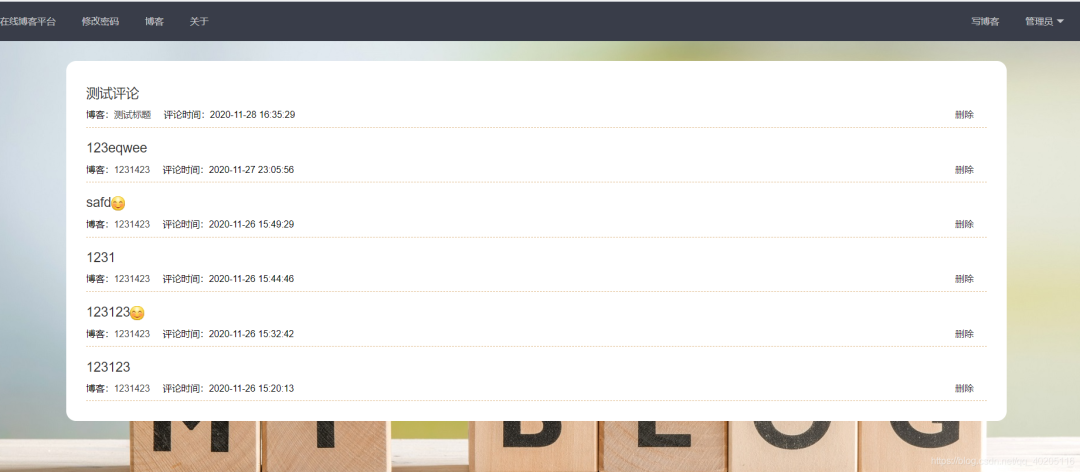
根据评论列表,可以点击评论或博客,可以进入评论的博客详情页中;也可以对评论的内容进行删除操作。
定义一个视图函数,查询所有的评论内容,返回给前台遍历展示(同样根据时间倒序查询)。
# 用户所有的评论
@blog.route('/myComment')
@login_limit
def myComment():
    username = session.get('username')
    user = User.query.filter(User.username == username).first()
    # order_by按照时间倒序
    commentList = Comment.query.filter(Comment.user_id == user.id).order_by(Comment.create_time.desc()).all();
    return render_template("myComment.html", commentList=commentList)
- 1
- 2
- 3
- 4
- 5
- 6
- 7
- 8
- 9
前端页面展示代码。
{% extends 'base.html' %}

{% block title %}
    在线博客平台.我的评论
{% endblock %}

{% block css %}
"stylesheet" href="/static/css/blogAll.css">
{% endblock %}

{% block content %}
    "main">


            {% for comment in commentList %}


                    "title" href="/blog/showBlog/{{ comment.blog_id }}">{{ comment.text }}


                        博客:"/blog/showBlog/{{ comment.blog_id }}">{{ comment.blog.title }}     评论时间:{{ comment.create_time }}
                        "operation">
                            "javascript:;" onclick="del('/blog/deleteCom/{{ comment.id }}', this)">删除


            {% endfor %}


    type="text/javascript">
         $(function (){
            $(".title").each(function () {
                $(this).html($(this).text());
            });
        })

        function del(url, that){
            layui.use('layer', function(){
                var layer = layui.layer;
                layer.confirm('您确定要删除吗?', {
                    btn: ['取消','确定']
                }, function(index){
                    layer.close(index);
                }, function(){
                    $.get(url, function (data){
                        if(data.state){
                            $(that).parent().parent().parent().remove();
                            layer.msg(data.msg, {icon: 1});
                        }
                    })
                });
            });
        }

{% endblock %}
- 1
- 2
- 3
- 4
- 5
- 6
- 7
- 8
- 9
- 10
- 11
- 12
- 13
- 14
- 15
- 16
- 17
- 18
- 19
- 20
- 21
- 22
- 23
- 24
- 25
- 26
- 27
- 28
- 29
- 30
- 31
- 32
- 33
- 34
- 35
- 36
- 37
- 38
- 39
- 40
- 41
- 42
- 43
- 44
- 45
- 46
- 47
- 48
- 49
- 50
- 51
- 52
- 53
- 54
- 55
- 56
- 57
- 58
- 59
- 60
页面样式和博客列表样式一致。
删除评论
在评论列表中有删除评论的链接,根据评论的id删除当前条评论,删除后,对应博客中的评论也随之删除。
# 删除评论
@blog.route('/deleteCom/')
def deleteCom(id):
    com = Comment.query.filter(Comment.id == id).first()
    db.session.delete(com);
    db.session.commit();
    return {
        'state': True,
        'msg': "删除成功!"
    }
- 1
- 2
- 3
- 4
- 5
- 6
- 7
- 8
- 9
- 10
关于页面
关于页面可以简单的描述一下网站的设计及作用等,这里就没有写过多的内容了,可以自行设计。

注销
注销只需要清除session中的数据,返回首页即可。
# 退出
@index.route('/logout')
def logout():
    session.clear()
    return redirect(url_for('index.hello'))
- 1
- 2
- 3
- 4
- 5
定义错误页面
系统在平时使用中难免会遇到一些错误,但又不能直接让用户看到这些错误,所以我们可以定义一个错误页面,使其报错后都跳转到此页面。Flask中有两个视图函数处理404和500错误的,这里直接使用即可,这里两个视图函数都是跳转到了同一个页面(也可以跳转不同的页面)。
# 404页面
@app.errorhandler(404)
def page_not_found(e):
    return render_template('404.html'), 404;

# 500页面
@app.errorhandler(500)
def internal_server_error(e):
    return render_template('404.html'), 500;
- 1
- 2
- 3
- 4
- 5
- 6
- 7
- 8
- 9
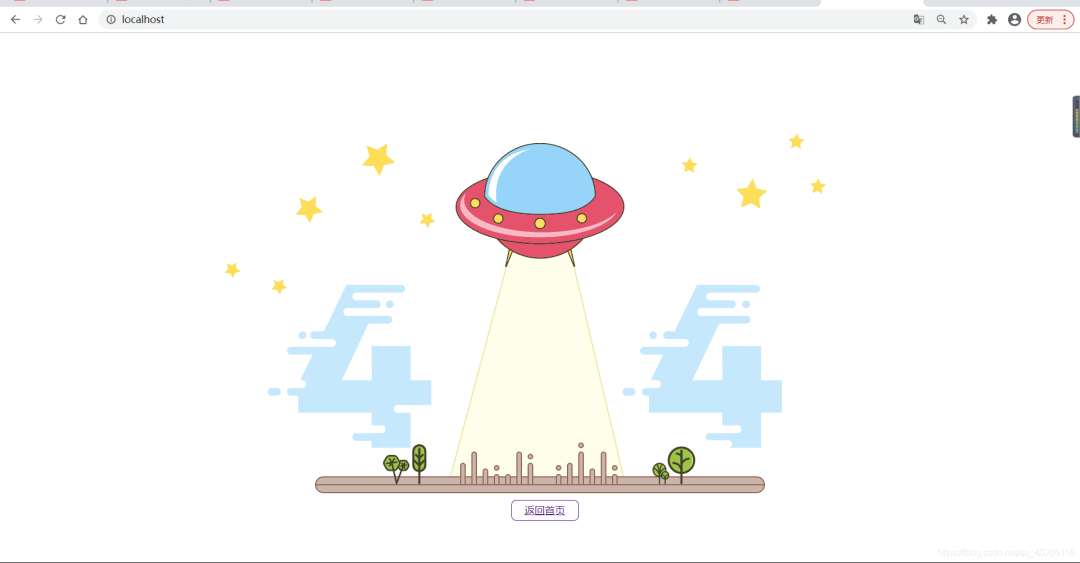
错误页面这里就简单的插入了一张图片,添加了一个返回首页的链接。
"en">

    "UTF-8">


type="text/css">
body{
    position: fixed;
    width: 100%;
    height: 100vh;
    background: url('/static/img/404.gif') no-repeat;
    background-size: cover;
    z-index: -1;
}
a{
    width: 65px;
    display: inherit;
    margin: 0 auto;
    margin-top: 87vh;
    padding: 5px 20px;
    border: 1px solid;
    border-radius: 8px;
}


"/">返回首页
- 1
- 2
- 3
- 4
- 5
- 6
- 7
- 8
- 9
- 10
- 11
- 12
- 13
- 14
- 15
- 16
- 17
- 18
- 19
- 20
- 21
- 22
- 23
- 24
- 25
- 26
效果如下:
读者福利:知道你对Python感兴趣,便准备了这套python学习资料,
对于0基础小白入门:
如果你是零基础小白,想快速入门Python是可以考虑的。
一方面是学习时间相对较短,学习内容更全面更集中。
二方面是可以找到适合自己的学习方案
零基础Python学习资源介绍
声明:本文内容由网友自发贡献,不代表【wpsshop博客】立场,版权归原作者所有,本站不承担相应法律责任。如您发现有侵权的内容,请联系我们。转载请注明出处:https://www.wpsshop.cn/article/detail/51505

Copyright © 2003-2013 www.wpsshop.cn 版权所有,并保留所有权利。

