
热门标签
热门文章
- 17个银行的软件测试项目实战,别再说简历项目不知道怎么写了_软件测试银行项目
- 2嵌入式硬件基础知识——1
- 3在探索创意中进一步了解生成式人工智能:PartyRock —— re:Invent 2023 产品测评
- 4Python项目打包, docker build构建docker镜像, Docker Compose (Docker编配)_docker打包python项目
- 5代码实现对selenium的驱动器WebDrive的配置
- 6IM通信技术快速入门:短轮询、长轮询、SSE、WebSocket
- 7在 Mac 中卸载 Node.js_mac node卸载
- 8【小吉带你学Git】Git分支
- 9Web3.0的五大趋势,你是否已经了解?
- 10利用OGG实现PostgreSQL实时同步
当前位置: article > 正文
移植树莓派上的功能包到rk3288上_could not find tf2_sensor_msgs (missing: tf2_senso
作者:思考机器5 | 2024-01-31 16:39:23
赞
踩
could not find tf2_sensor_msgs (missing: tf2_sensor_msgs_dir)
一、编译和解决报错
打包功能包,放到ros工作空间中,ydlidar_ws单独创建一个工作空间(对于复杂和干扰性强的功能包要单独创建功能包);
GongNengBao里面的功能包放在主工作空间;
turtlebot_teleop功能包直接放在外边。
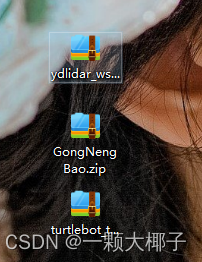
然后在ros主工作空间编译功能包,编译命令为
catkin_make
- 1
1 第一次编译
-- +++ processing catkin package: 'astra_launch'
-- ==> add_subdirectory(astra/ros_astra_launch)
-- +++ processing catkin package: 'hibot_follower'
-- ==> add_subdirectory(hibot_follower)
-- Using these message generators: gencpp;geneus;genlisp;gennodejs;genpy
-- Could NOT find serial (missing: serial_DIR)
-- Could not find the required component 'serial'. The following CMake error indicates that you either need to install the package with the same name or change your environment so that it can be found.
CMake Error at /opt/ros/melodic/share/catkin/cmake/catkinConfig.cmake:83 (find_package):
  Could not find a package configuration file provided by "serial" with any
  of the following names:

    serialConfig.cmake
    serial-config.cmake

  Add the installation prefix of "serial" to CMAKE_PREFIX_PATH or set
  "serial_DIR" to a directory containing one of the above files.  If "serial"
  provides a separate development package or SDK, be sure it has been
  installed.
Call Stack (most recent call first):
  hibot_follower/CMakeLists.txt:8 (find_package)


-- Configuring incomplete, errors occurred!
See also "/home/firefly/catkin_ws/build/CMakeFiles/CMakeOutput.log".
See also "/home/firefly/catkin_ws/build/CMakeFiles/CMakeError.log".
Invoking "cmake" failed

- 1
- 2
- 3
- 4
- 5
- 6
- 7
- 8
- 9
- 10
- 11
- 12
- 13
- 14
- 15
- 16
- 17
- 18
- 19
- 20
- 21
- 22
- 23
- 24
- 25
- 26
编译错误
-- Could NOT find serial (missing: serial_DIR)
- 1
错误原因
没有串口文件——serial
- 1
解决:下载相关组件
sudo apt-get install ros-melodic-serial
- 1
2 第二次编译
编译过程
-- Using these message generators: gencpp;geneus;genlisp;gennodejs;genpy
-- Found Bullet: /usr/lib/arm-linux-gnueabihf/libBulletDynamics.so
CMake Error at /usr/share/cmake-3.10/Modules/FindPackageHandleStandardArgs.cmake:137 (message):
  Could NOT find SDL (missing: SDL_LIBRARY SDL_INCLUDE_DIR)
Call Stack (most recent call first):
  /usr/share/cmake-3.10/Modules/FindPackageHandleStandardArgs.cmake:378 (_FPHSA_FAILURE_MESSAGE)
  /usr/share/cmake-3.10/Modules/FindSDL.cmake:190 (FIND_PACKAGE_HANDLE_STANDARD_ARGS)
  navigation-melodic-huanyu/map_server/CMakeLists.txt:12 (find_package)


-- Configuring incomplete, errors occurred!
See also "/home/firefly/catkin_ws/build/CMakeFiles/CMakeOutput.log".
See also "/home/firefly/catkin_ws/build/CMakeFiles/CMakeError.log".
Makefile:614: recipe for target 'cmake_check_build_system' failed
make: *** [cmake_check_build_system] Error 1
Invoking "make cmake_check_build_system" failed
- 1
- 2
- 3
- 4
- 5
- 6
- 7
- 8
- 9
- 10
- 11
- 12
- 13
- 14
- 15
- 16
编译错误
Could NOT find SDL (missing: SDL_LIBRARY SDL_INCLUDE_DIR)
- 1
解决:下载相关组件
sudo apt-get install libsdl-dev
- 1
或
sudo apt-get install libsdl1.2-dev
- 1
3 第三次编译
编译过程
-- +++ processing catkin metapackage: 'navigation'
-- ==> add_subdirectory(navigation-melodic-huanyu/navigation)
-- +++ processing catkin package: 'map_server'
-- ==> add_subdirectory(navigation-melodic-huanyu/map_server)
-- Using these message generators: gencpp;geneus;genlisp;gennodejs;genpy
CMake Error at /usr/share/cmake-3.10/Modules/FindPackageHandleStandardArgs.cmake:137 (message):
  Could NOT find SDL_image (missing: SDL_IMAGE_LIBRARIES
  SDL_IMAGE_INCLUDE_DIRS)
Call Stack (most recent call first):
  /usr/share/cmake-3.10/Modules/FindPackageHandleStandardArgs.cmake:378 (_FPHSA_FAILURE_MESSAGE)
  /usr/share/cmake-3.10/Modules/FindSDL_image.cmake:91 (FIND_PACKAGE_HANDLE_STANDARD_ARGS)
  navigation-melodic-huanyu/map_server/CMakeLists.txt:13 (find_package)


-- Configuring incomplete, errors occurred!
See also "/home/firefly/catkin_ws/build/CMakeFiles/CMakeOutput.log".
See also "/home/firefly/catkin_ws/build/CMakeFiles/CMakeError.log".
Makefile:614: recipe for target 'cmake_check_build_system' failed
make: *** [cmake_check_build_system] Error 1
Invoking "make cmake_check_build_system" failed
- 1
- 2
- 3
- 4
- 5
- 6
- 7
- 8
- 9
- 10
- 11
- 12
- 13
- 14
- 15
- 16
- 17
- 18
- 19
- 20
未解决此问题,直接删了astra功能包,错误好像是这个功能包引起的,这个功能包是关于摄像头的,没有用到
4 第四次编译
编译过程
-- +++ processing catkin package: 'robot_pose_ekf'
-- ==> add_subdirectory(robot_pose_ekf)
-- Checking for module 'orocos-bfl'
--   No package 'orocos-bfl' found
CMake Error at /usr/share/cmake-3.10/Modules/FindPkgConfig.cmake:415 (message):
  A required package was not found
Call Stack (most recent call first):
  /usr/share/cmake-3.10/Modules/FindPkgConfig.cmake:593 (_pkg_check_modules_internal)
  robot_pose_ekf/CMakeLists.txt:6 (pkg_check_modules)


-- Configuring incomplete, errors occurred!
See also "/home/firefly/catkin_ws/build/CMakeFiles/CMakeOutput.log".
See also "/home/firefly/catkin_ws/build/CMakeFiles/CMakeError.log".
Invoking "cmake" failed
- 1
- 2
- 3
- 4
- 5
- 6
- 7
- 8
- 9
- 10
- 11
- 12
- 13
- 14
- 15
解决:下载相关组件
sudo apt-get install ros-melodic-bfl
- 1
5 第五次编译
编译过程
-- Could NOT find tf2_sensor_msgs (missing: tf2_sensor_msgs_DIR)
-- Could not find the required component 'tf2_sensor_msgs'. The following CMake error indicates that you either need to install the package with the same name or change your environment so that it can be found.
CMake Error at /opt/ros/melodic/share/catkin/cmake/catkinConfig.cmake:83 (find_package):
  Could not find a package configuration file provided by "tf2_sensor_msgs"
  with any of the following names:

    tf2_sensor_msgsConfig.cmake
    tf2_sensor_msgs-config.cmake

  Add the installation prefix of "tf2_sensor_msgs" to CMAKE_PREFIX_PATH or
  set "tf2_sensor_msgs_DIR" to a directory containing one of the above files.
  If "tf2_sensor_msgs" provides a separate development package or SDK, be
  sure it has been installed.
Call Stack (most recent call first):
  navigation-melodic-huanyu/costmap_2d/CMakeLists.txt:4 (find_package)


-- Configuring incomplete, errors occurred!
See also "/home/firefly/catkin_ws/build/CMakeFiles/CMakeOutput.log".
See also "/home/firefly/catkin_ws/build/CMakeFiles/CMakeError.log".
Makefile:614: recipe for target 'cmake_check_build_system' failed
make: *** [cmake_check_build_system] Error 1
Invoking "make cmake_check_build_system" failed
- 1
- 2
- 3
- 4
- 5
- 6
- 7
- 8
- 9
- 10
- 11
- 12
- 13
- 14
- 15
- 16
- 17
- 18
- 19
- 20
- 21
- 22
- 23
- 24
解决:下载相关组件
sudo apt-get install ros-melodic-tf2-sensor-msgs
- 1
5 第五次编译
编译过程
-- Using these message generators: gencpp;geneus;genlisp;gennodejs;genpy
-- Could NOT find move_base_msgs (missing: move_base_msgs_DIR)
-- Could not find the required component 'move_base_msgs'. The following CMake error indicates that you either need to install the package with the same name or change your environment so that it can be found.
CMake Error at /opt/ros/melodic/share/catkin/cmake/catkinConfig.cmake:83 (find_package):
  Could not find a package configuration file provided by "move_base_msgs"
  with any of the following names:

    move_base_msgsConfig.cmake
    move_base_msgs-config.cmake

  Add the installation prefix of "move_base_msgs" to CMAKE_PREFIX_PATH or set
  "move_base_msgs_DIR" to a directory containing one of the above files.  If
  "move_base_msgs" provides a separate development package or SDK, be sure it
  has been installed.
Call Stack (most recent call first):
  navigation-melodic-huanyu/move_base/CMakeLists.txt:4 (find_package)


-- Configuring incomplete, errors occurred!
See also "/home/firefly/catkin_ws/build/CMakeFiles/CMakeOutput.log".
See also "/home/firefly/catkin_ws/build/CMakeFiles/CMakeError.log".
Makefile:614: recipe for target 'cmake_check_build_system' failed
make: *** [cmake_check_build_system] Error 1
Invoking "make cmake_check_build_system" failed
- 1
- 2
- 3
- 4
- 5
- 6
- 7
- 8
- 9
- 10
- 11
- 12
- 13
- 14
- 15
- 16
- 17
- 18
- 19
- 20
- 21
- 22
- 23
- 24
解决:下载相关组件
sudo apt-get install ros-melodic-move-base-msgs
- 1
二、启动机器人
启动机器人
提示没有找到yocs_velocity_smoother功能包
解决:安装 yocs_velocity_smoother 功能包
sudo apt-get install ros-kinetic-yocs-velocity-smoother
- 1
注:
1.未经许可不能转载
声明:本文内容由网友自发贡献,不代表【wpsshop博客】立场,版权归原作者所有,本站不承担相应法律责任。如您发现有侵权的内容,请联系我们。转载请注明出处:https://www.wpsshop.cn/article/detail/51102
推荐阅读
相关标签

