
热门标签
热门文章
- 1Linux设备调试-GDB调试器
- 2单元测试和集成测试有什么区别_单元测试和集成测试区别
- 3fiddler抓包手机和部分app无法连接网络问题_使用fiddler无法连接网络
- 4多边形顶点的顺逆时针判断_格林公式顺时针和逆时针的区别
- 5JavaScript高级:构造函数
- 6docker镜像与容器基本的基本操作_docker ps和docker images
- 7Android 图片添加文字水印方案_安卓开发 bitmap 添加倾斜文字水印
- 8为什么我们放弃了Vue?Vue和React深度比较_前端不用vue
- 9【OpenCV】告别人工目检:深度学习技术引领工业品缺陷检测新时代
- 10程序员如何逆袭,达到财富自由?_学技术只能挣口饭,如何实现财富自由
当前位置: article > 正文
使用Python和systemctl管理Linux系统服务的简便工具_python 加入 systemctl
作者:思考机器 | 2024-01-31 15:49:32
赞
踩
python 加入 systemctl
前言
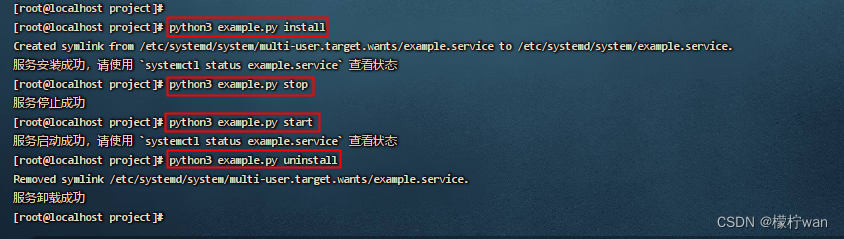
本文介绍了一个实用工具,用于在Linux系统上管理systemctl服务。该工具提供了创建、安装、卸载、启动和停止服务的功能,帮助用户轻松地管理和控制正在运行的服务。
通过使用该代码,你可以轻松地执行以下操作:
- 创建服务文件:根据指定的内容创建一个systemctl服务文件。
- 安装服务:创建一个服务文件,将其复制到系统的服务目录中,并添加为系统服务。
- 卸载服务:从系统中移除已安装的服务。
- 启动服务:使用systemctl命令启动已安装的服务。
- 停止服务:使用systemctl命令停止已安装的服务。
这个工具使得服务管理更加简单和高效,无需手动执行复杂的命令。你可以在开发环境和生产环境中使用它来管理和控制服务,提高工作效率和减少错误。
总之,这段代码提供了一种简单而可靠的方式来管理systemctl服务,方便你对服务进行管理和控制。
一、方法
import os
import sys
import subprocess

# 服务名称:*.service
SERVICE_NAME = "example.service"
SERVICE_FILE_PATH = f"/etc/systemd/system/{SERVICE_NAME}"


def create_service_file():
    """服务文件内容
    WorkingDirectory: 指需要执行命令的路径所在位置,也就是命令执行的当前工作目录
    ExecStart:指服务启动命令,可以是已打包执行程序的完整路径,或者是python解释器的路径加上脚本的路径

    """
    service_content = """
[Unit]
Description=Demo Services
After=network.target network-online.target systemd-networkd-wait-online.service

[Service]
WorkingDirectory=/home/project
ExecStart=/usr/local/python3/bin/python3 example.py
Restart=on-failure
RestartSec=10s
KillMode=mixed

[Install]
WantedBy=multi-user.target
"""
    # 去除第一行空格
    service_content = service_content.lstrip()
    with open(SERVICE_FILE_PATH, 'w') as f:
        f.write(service_content)


def install_service():
    """创建systemctl服务"""
    # 检查文件是否存在,如存在则先停止,再覆盖安装
    if os.path.exists(SERVICE_FILE_PATH):
        subprocess.run(f"systemctl stop {SERVICE_NAME}", shell=True)
    try:
        create_service_file()
        subprocess.run("systemctl daemon-reload", shell=True)
        subprocess.run(f"systemctl enable {SERVICE_NAME}", shell=True)
        subprocess.run(f"systemctl start {SERVICE_NAME}", shell=True)
        print(f"服务安装成功,请使用 `systemctl status {SERVICE_NAME}` 查看状态")
    except Exception as e:
        print("服务安装失败:", e)


def uninstall_service():
    """卸载systemctl服务"""
    if os.path.exists(SERVICE_FILE_PATH):
        try:
            subprocess.run(f"systemctl stop {SERVICE_NAME}", shell=True)
            subprocess.run(f"systemctl disable {SERVICE_NAME}", shell=True)
            subprocess.run(f"rm {SERVICE_FILE_PATH}", shell=True)
            print("服务卸载成功")
        except Exception as e:
            print("服务卸载失败:", e)
    else:
        print(f"{SERVICE_NAME} 服务不存在")


def start_service():
    """启动systemctl服务"""
    if os.path.exists(SERVICE_FILE_PATH):
        try:
            subprocess.run(f"systemctl start {SERVICE_NAME}", shell=True)
            print(f"服务启动成功,请使用 `systemctl status {SERVICE_NAME}` 查看状态")
        except Exception as e:
            print("服务启动失败:", e)
    else:
        print(f"{SERVICE_NAME} 服务不存在")


def stop_service():
    """停止systemctl服务"""
    if os.path.exists(SERVICE_FILE_PATH):
        try:
            subprocess.run(f"systemctl stop {SERVICE_NAME}", shell=True)
            print("服务停止成功")
        except Exception as e:
            print("服务停止失败:", e)
    else:
        print(f"{SERVICE_NAME} 服务不存在")


if __name__ == "__main__":
    if len(sys.argv) > 1:

        if sys.argv[1] == 'install':
            install_service()
        elif sys.argv[1] == 'uninstall':
            uninstall_service()
        elif sys.argv[1] == 'start':
            start_service()
        elif sys.argv[1] == 'stop':
            stop_service()
        else:
            print("无效参数, 只支持:install、uninstall、start、stop")

    else:
        # 不传入参数时,运行功能代码
        while True:
            print("程序运行中...")

- 1
- 2
- 3
- 4
- 5
- 6
- 7
- 8
- 9
- 10
- 11
- 12
- 13
- 14
- 15
- 16
- 17
- 18
- 19
- 20
- 21
- 22
- 23
- 24
- 25
- 26
- 27
- 28
- 29
- 30
- 31
- 32
- 33
- 34
- 35
- 36
- 37
- 38
- 39
- 40
- 41
- 42
- 43
- 44
- 45
- 46
- 47
- 48
- 49
- 50
- 51
- 52
- 53
- 54
- 55
- 56
- 57
- 58
- 59
- 60
- 61
- 62
- 63
- 64
- 65
- 66
- 67
- 68
- 69
- 70
- 71
- 72
- 73
- 74
- 75
- 76
- 77
- 78
- 79
- 80
- 81
- 82
- 83
- 84
- 85
- 86
- 87
- 88
- 89
- 90
- 91
- 92
- 93
- 94
- 95
- 96
- 97
- 98
- 99
- 100
- 101
- 102
- 103
- 104
- 105
- 106
- 107
声明:本文内容由网友自发贡献,不代表【wpsshop博客】立场,版权归原作者所有,本站不承担相应法律责任。如您发现有侵权的内容,请联系我们。转载请注明出处:https://www.wpsshop.cn/article/detail/50996
推荐阅读


相关标签

