
热门标签
热门文章
- 1Python web实战之Django的文件上传和处理详解_django上传
- 2Django银角大王武沛齐配套视频笔记,python全栈开发、pythonWeb_python 武沛奇
- 3Linux编辑器---vim的使用
- 4手把手教你如何把vue项目打包后部署到服务器(小白教程)_vue项目打包部署到服务器
- 5基于Java+Servlet+Mysql的人才招聘网站的设计与实现(附源码 调试 文档)
- 6【2023】Windows11安装Linux子系统(Ubuntu22.04LTS)+安装ROS_wsl安装ros
- 703. Python中的语句
- 8【Linux】命令expect使用详解_expect 参数
- 9人工智能时代AIGC绘画实战
- 10详解Java的static关键字
当前位置: article > 正文
python脚本自启动_.sh文件开机自启动运行py
作者:编程革命者 | 2024-01-31 15:43:51
赞
踩
.sh文件开机自启动运行py
参考:
https://blog.csdn.net/chenhao0424/article/details/126556116
第一步
准备要执行的python脚本11.py,auto_start.sh脚本,如下:
#!/bin/bash
cd /home/xxxx/shell
/usr/bin/python3 11.py
#其中python路径都需要为绝对路径
- 1
- 2
- 3
- 4
我的python路径是/usr/bin/python3
第二步
修改 脚本权限,如下:
sudo chmod +x /home/xxx/shell/11.py
- 1
第三步
向系统注册服务,在目录/etc/systemd/system/下添加python.service文件,内容如下:
[Unit]
Description=svc-test
After=network.target
StartLimitIntervalSec=0
[Service]
Type=simple
Restart=always  //no退出后不会重启,always表示退出后会一直重启
RestartSec=1
User=root
ExecStart=/bin/bash /home/xxxx/shell/11.sh  // 必须为绝对路径,最好先在命令行输入/bin/bash /home/xxxx/shell/11.sh 看有没有什么问题

[Install]
WantedBy=multi-user.target
- 1
- 2
- 3
- 4
- 5
- 6
- 7
- 8
- 9
- 10
- 11
- 12
- 13
我的bash路径和参考链接不一样,是/bin/bash,注意注释要删掉
第四步
添加执行权限
sudo chmod +x /home/xxxx/shell/11.sh
- 1
第五步
重载系统服务
sudo systemctl daemon-reload
- 1
第六步
将服务注册为开机启动
sudo systemctl enable python.service
- 1
第七步
重启机器验证
sudo reboot
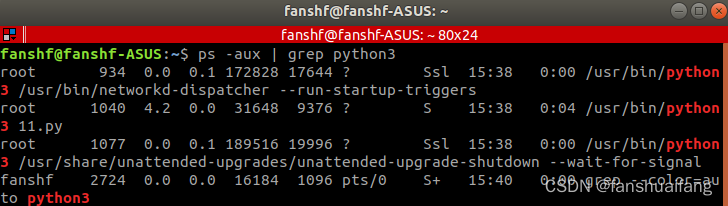
ps  -aux  |  grep  python #查看正在运行的python代码
- 1
- 2
结果
第八步
如果更换了脚本内容,需要重启服务
sudo systemctl start 1 #启动服务
sudo systemctl stop 1 #停止服务
sudo systemctl restart 1 #重启服务
sudo systemctl status 1 #查看服务状态
- 1
- 2
- 3
- 4
声明:本文内容由网友自发贡献,不代表【wpsshop博客】立场,版权归原作者所有,本站不承担相应法律责任。如您发现有侵权的内容,请联系我们。转载请注明出处:https://www.wpsshop.cn/article/detail/50982
推荐阅读

相关标签

