
热门标签
热门文章
- 1基于python flask茶叶网站数据大屏设计与实现,可以做期末课程设计或者毕业设计
- 2MySQL 5.7 服务端 错误码 (机翻)_er_error_on_close
- 3云计算-运维笔记_type="ethernet
- 4Unity Shader零基础入门1:纯色物体_unity3d物体没有白色
- 5从 Amazon Connect 全球云呼叫中心服务 SSO 构建流程
- 6CSAPP Bomb lab(内含答案)_bomblab所有答案总结
- 7Java高并发解决方案_java高并发解决方案技术
- 8Windows主机中构建适用于K8S Operator开发环境_k8s windows搭建
- 9【笔记】LeetCode字符串匹配_leetcode 字符串匹配
- 10一个心塞的手忙脚乱的项目结束后的总结_项目结束各奔天涯
当前位置: article > 正文
ubuntu16.04 python代码自启动和可执行文件自启动
作者:思考机器3 | 2024-01-31 15:42:53
赞
踩
ubuntu16.04 python代码自启动和可执行文件自启动
1 python代码自启动
参考 https://blog.csdn.net/qq_38288618/article/details/104096606
准备好python文件 test.py
import time
c=1
while 1:
    time.sleep(1)
    c=c+1
    print(c)
- 1
- 2
- 3
- 4
- 5
- 6
运行
sudo chmod 777 test.py
python3 test.py
- 1
- 2
准备run.sh 文件
#!/bin/bash
gnome-terminal -x bash -c "sleep 25;cd /home/me/robot/;python3 test.py"
- 1
- 2
注意:脚本需要实现开放执行权限 sudo chmod 777 run.sh
在搜索栏上角搜索框查找Startup Applications 点击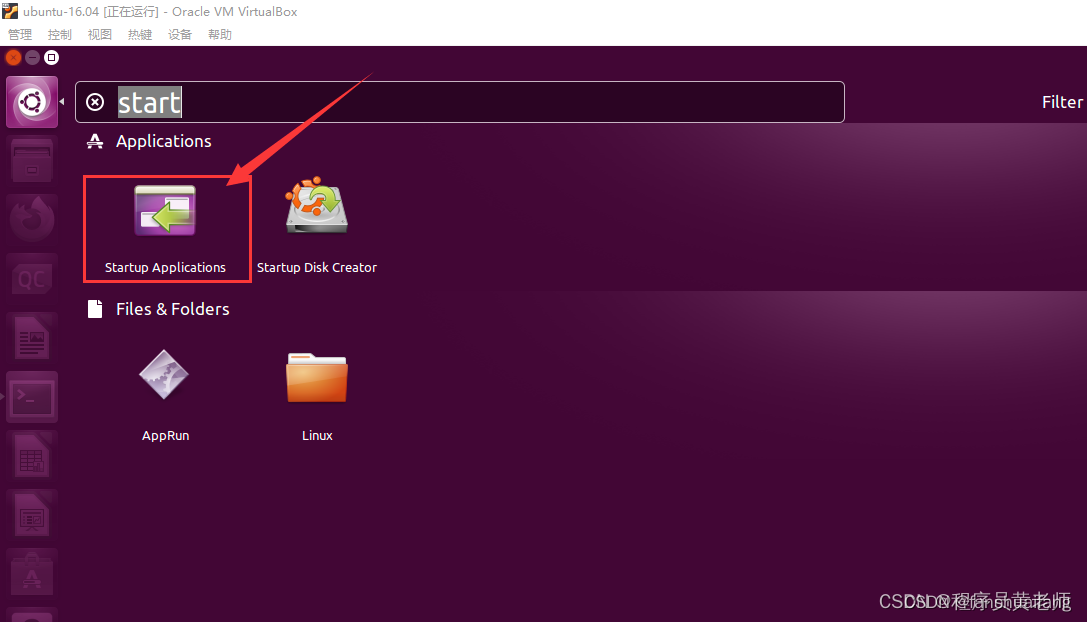
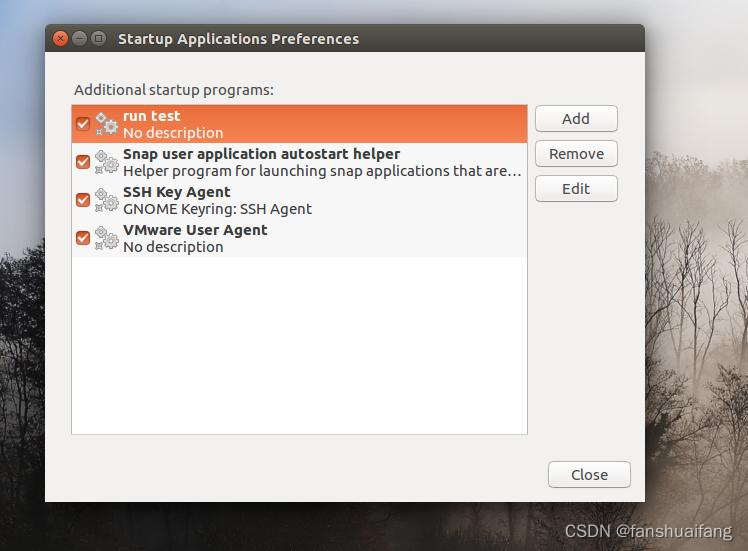
点击add
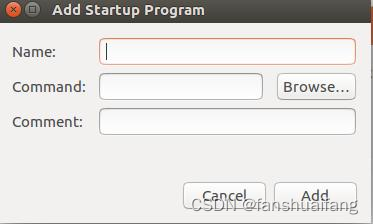
Name:定义名字,test
Command:gnome-terminal -x sh /home/robot/run.sh
#其中gnome-terminal为开机打开终端。
sh /home/robot/run.sh 运行脚本。
Comment:说明,随意填写,可不填。
点击保存。
reboot测试。
可执行文件自启动
编程成的可执行文件为test
与python相似,只是自启动脚本里面启动方式为./test
#!/bin/bash
gnome-terminal -x bash -c "sleep 25;cd /home/me/robot/;./test"
- 1
- 2
遇到的坑
1 python3代码开机自启动遇到rospy错误
参考 https://blog.csdn.net/zkk9527/article/details/111353428
报错为:
 Module compiled against API version 0xa but this version of numpy is 0x9
Module compiled against API version 0xa but this version of numpy is 0x9
Traceback (most recent call last):
  File "<stdin>", line 4, in <module>
ImportError: No module named rospy
- 1
- 2
- 3
- 4
- 5
启动包含rospy的python代码前,添加source /opt/ros/kinetic/setup.bash
#!/bin/bash
gnome-terminal -x bash -c "sleep 30;source /opt/ros/kinetic/setup.bash;cd /home/robot/;python3 test.py"
- 1
- 2
声明:本文内容由网友自发贡献,不代表【wpsshop博客】立场,版权归原作者所有,本站不承担相应法律责任。如您发现有侵权的内容,请联系我们。转载请注明出处:https://www.wpsshop.cn/article/detail/50979
推荐阅读

相关标签

