
热门标签
热门文章
- 1回归预测 | MATLAB实现基于LSSVM-Adaboost最小二乘支持向量机结合AdaBoost多输入单输出回归预测_最小二乘支持向量机预测matlab
- 2Nexus 批量发布npm包_download-tgz
- 3vue java实现登录_Vue实现登录
- 4AnimationClip切分_unity animationclip 怎么分段
- 5Spring Boot:使用EntityListeners监听JPA实体持久化_springboot 监听数据库表插入 jpa @postpersist
- 6python批量计算cosine distance_cosine python
- 7由MySQL死锁问题思考和部分解决方案_mysql 中断innodb_trx 的事务
- 8js 正则 限制 input 只能输入数字,不能输入特殊符号,保留两位小数等效果_js input 正则保留2位小数
- 9Java Windows cpu 使用率_Java获取Linux和Window系统CPU、内存和磁盘总使用率的情况
- 10Ubuntu18.04安装Matlab流程笔记
当前位置: article > 正文
Linux 模拟触摸滑动以及按下_触摸屏滑动代码
作者:ex123 | 2024-01-31 09:52:32
赞
踩
触摸屏滑动代码
首先,通过查看手动按下和滑动触摸屏时的内核日志输出:
- 1
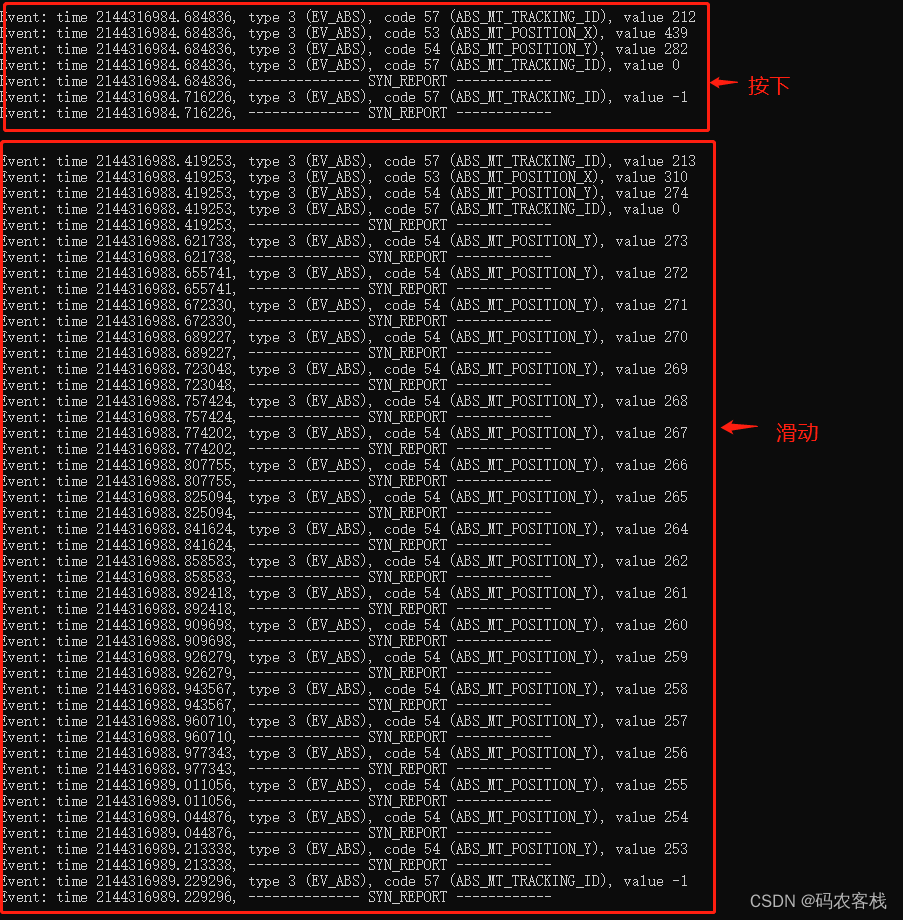
然后,我们可以根据上面的日志,在/dev/input/event3(不同平台可能不一样)文件中写入数据以模拟手动按下和滑动触摸屏的效果,代码如下:
- 1
#include <stdio.h>
#include <string.h>
#include <sys/types.h>
#include <sys/stat.h>
#include <fcntl.h>
#include <unistd.h>
#include <stdlib.h>
#include <linux/input.h>
#include <errno.h>

#define SILDING_DELAY 10000
#define SILDING_STEP 10

int id = 100;
int TOUCH_FD;

int reportkey(int fd, int type, int code, int32_t value)
{
    struct input_event event;
    event.type = type;
    event.code = code;
    event.value = value;
    gettimeofday(&event.time, 0);
    if (write(fd, &event, sizeof(struct input_event)) < 0)
    {
        perror("report key error!\n");
        return -1;
    }
    return 0;
}

//构造点击事件
void LCD_Touch_Pressed(int posx,int posy,int sec)
{
    reportkey(TOUCH_FD,EV_ABS,ABS_MT_SLOT,0);
    reportkey(TOUCH_FD,EV_ABS,ABS_MT_TRACKING_ID,id);
    reportkey(TOUCH_FD,EV_ABS,ABS_MT_POSITION_X,posx);
    reportkey(TOUCH_FD,EV_ABS,ABS_MT_POSITION_Y,posy);
    reportkey(TOUCH_FD,EV_ABS,ABS_MT_TRACKING_ID,0);
    reportkey(TOUCH_FD,EV_SYN,EV_SYN,EV_SYN);

    reportkey(TOUCH_FD,EV_ABS,ABS_PRESSURE,200);
    reportkey(TOUCH_FD,EV_ABS,ABS_MT_TRACKING_ID,-1);
    reportkey(TOUCH_FD,EV_SYN,EV_SYN,EV_SYN);
}

//构造滑动事件
void LCD_Press_Silding(int sx,int sy,int ex,int ey ,int sec)
{
    int nextPosX,nextPosY;
    if(ex == sx && ey==sy) // the same two points
    {
        LCD_Touch_Pressed(sx,sy,sec);
        return ;
    }

    reportkey(TOUCH_FD,EV_ABS,ABS_MT_SLOT,0);
    reportkey(TOUCH_FD,EV_ABS,ABS_MT_TRACKING_ID,id);
    reportkey(TOUCH_FD,EV_ABS,ABS_MT_POSITION_X,sx);
    reportkey(TOUCH_FD,EV_ABS,ABS_MT_POSITION_Y,sy);
    reportkey(TOUCH_FD,EV_ABS,ABS_MT_TRACKING_ID,0);

    reportkey(TOUCH_FD,EV_ABS,ABS_PRESSURE,200);
    reportkey(TOUCH_FD,EV_SYN,EV_SYN,EV_SYN);
    usleep(SILDING_DELAY);
    /**Report pressed-down event END----*/
    nextPosX = sx;
    nextPosY = sy;
    if(ex == sx) // vertical Line
    {
        nextPosY = ey > sy ? (nextPosY + SILDING_STEP) : (nextPosY - SILDING_STEP);
        while (abs(nextPosY-sy)< abs(ey-sy))
        {
            reportkey(TOUCH_FD,EV_ABS,ABS_MT_POSITION_X,ex);
            reportkey(TOUCH_FD,EV_ABS,ABS_MT_POSITION_Y,nextPosY);
            reportkey(TOUCH_FD,EV_SYN,EV_SYN,EV_SYN);
            usleep(SILDING_DELAY);
            nextPosY = ey > sy ? (nextPosY + SILDING_STEP) : (nextPosY - SILDING_STEP);
        }
    }
    else if(ey == sy) // horizontal Line
    {
        nextPosX = ex > sx ? (nextPosX + SILDING_STEP) : (nextPosX - SILDING_STEP);
        while (abs(nextPosX-sx)< abs(ex-sx))
        {
            reportkey(TOUCH_FD,EV_ABS,ABS_MT_POSITION_X,nextPosX);
            reportkey(TOUCH_FD,EV_ABS,ABS_MT_POSITION_Y,ey);
            reportkey(TOUCH_FD,EV_SYN,EV_SYN,EV_SYN);
            usleep(SILDING_DELAY);
            nextPosX = ex > sx ? (nextPosX + SILDING_STEP) : (nextPosX - SILDING_STEP);
        }
    }
    reportkey(TOUCH_FD,EV_ABS,ABS_MT_TRACKING_ID,-1);
    reportkey(TOUCH_FD,EV_SYN,EV_SYN,EV_SYN);
}

int main()
{

    TOUCH_FD = open("/dev/input/event3",O_RDWR);
    if(TOUCH_FD<=0)
    {
        printf("%s\n", strerror(errno));
        return 0;
    }

    while (1)
    {
        id++;

        sleep(3);
        LCD_Press_Silding(600,300,500,300 ,100);

        id++;
        sleep(3);
        LCD_Touch_Pressed(155,261,500);

    }

    close(TOUCH_FD);
    return 0;
}

- 1
- 2
- 3
- 4
- 5
- 6
- 7
- 8
- 9
- 10
- 11
- 12
- 13
- 14
- 15
- 16
- 17
- 18
- 19
- 20
- 21
- 22
- 23
- 24
- 25
- 26
- 27
- 28
- 29
- 30
- 31
- 32
- 33
- 34
- 35
- 36
- 37
- 38
- 39
- 40
- 41
- 42
- 43
- 44
- 45
- 46
- 47
- 48
- 49
- 50
- 51
- 52
- 53
- 54
- 55
- 56
- 57
- 58
- 59
- 60
- 61
- 62
- 63
- 64
- 65
- 66
- 67
- 68
- 69
- 70
- 71
- 72
- 73
- 74
- 75
- 76
- 77
- 78
- 79
- 80
- 81
- 82
- 83
- 84
- 85
- 86
- 87
- 88
- 89
- 90
- 91
- 92
- 93
- 94
- 95
- 96
- 97
- 98
- 99
- 100
- 101
- 102
- 103
- 104
- 105
- 106
- 107
- 108
- 109
- 110
- 111
- 112
- 113
- 114
- 115
- 116
- 117
- 118
- 119
- 120
- 121
- 122
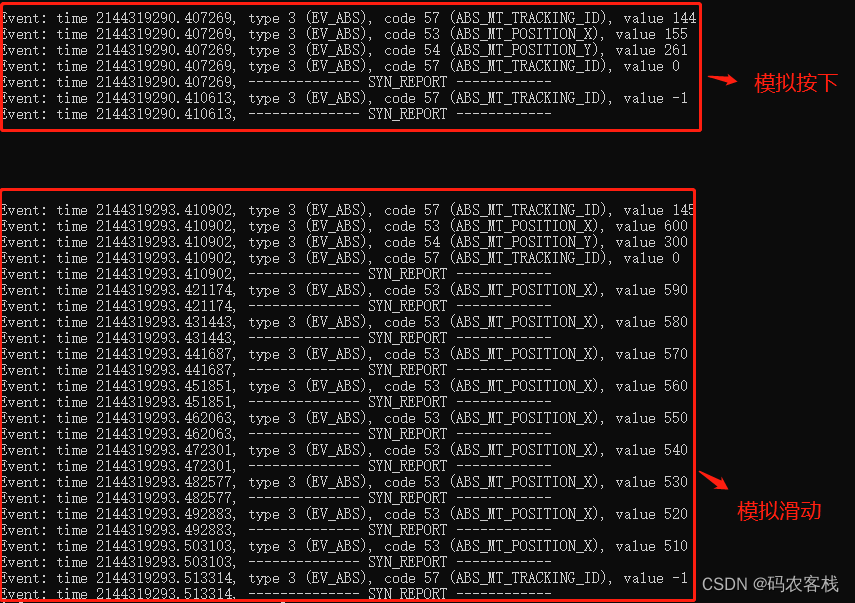
最后,大家可以查看自己设备的界面是不是有变化呢?
参考:https://blog.csdn.net/weixin_36437103/article/details/116876467
需要源代码的可自行下载:点击跳转
声明:本文内容由网友自发贡献,转载请注明出处:【wpsshop】
推荐阅读

相关标签

