
热门标签
热门文章
- 1软件测试VS软件开发 IT行业两大高薪岗位全方位对比 看完就知道选谁了_软件测试和程序员哪个更吃香
- 2参数传递过程中:函数形参 int a 与 int& a 的区别_int &a
- 3python --阿里短信服务_python阿里云定时短信
- 4django 用户认证_django 认证
- 5C++面试题汇总 数据库_c++软件开发工程师面试关于数据库部分的
- 6java的byte[]数组转成字符串并且再转回byte[]数组_java实现将byte[]转换为字符串进行存储传输,然后在利用该字符串还原为byte[],不能
- 7CVPR2020论文列表(中英对照)_perception consistency ultrasound image super-reso
- 8CUDA out of memory怎么解决
- 9Spark安装部署_export spark_worker_opts
- 10SpringBoot整合Zookeeper客户端Curator_springboot整合curator
当前位置: article > 正文
飞腾FT2000 UEFI BIOS介绍①_飞腾cpu ft2000 可以做windows系统
作者:IT领航者 | 2024-01-31 09:40:21
赞
踩
飞腾cpu ft2000 可以做windows系统
飞腾FT2000 UEFI BIOS介绍①
飞腾FT2000 UEFI BIOS介绍
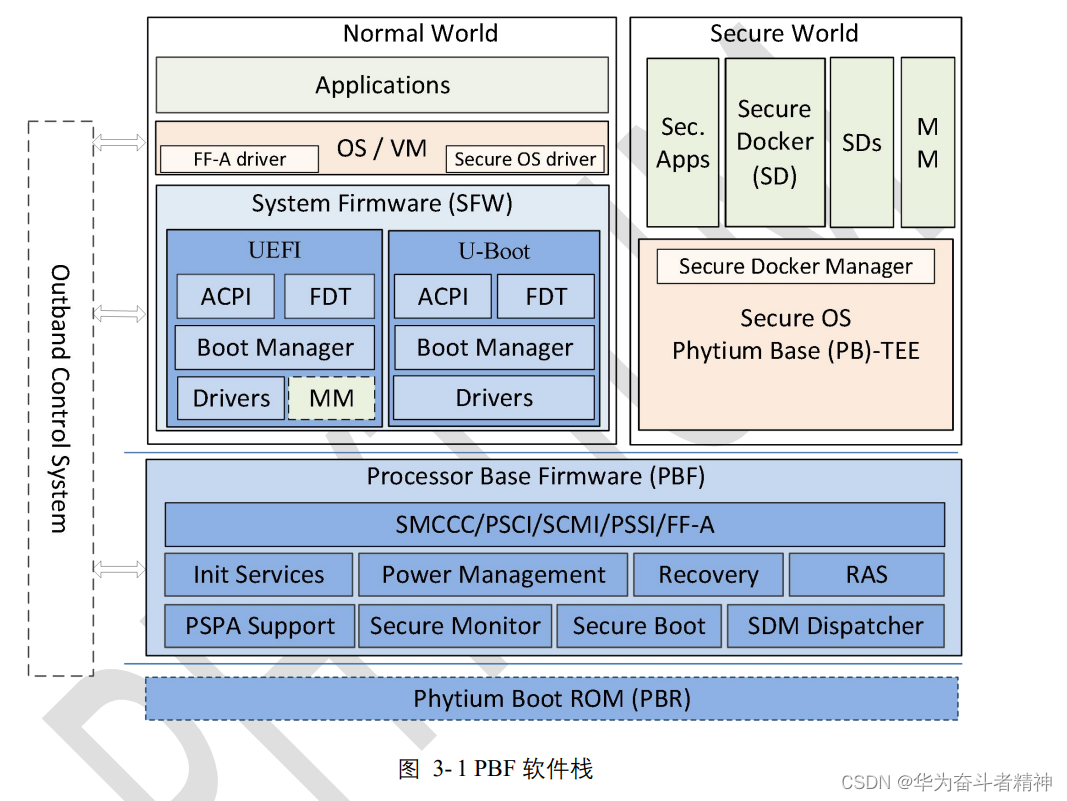
一. 编译环境
1. 安装VMware
2. 在VMware下安装Ubuntu(64 bit的需要把BIOS SETUP中的CPU的VT打开)
3. 交叉编译环境设置
- Get the requirements A Universally Unique Id (UUID) header. Needed to build the EDK2 BaseTools.
On Ubuntu:
sudo apt-get install uuid-dev
- 1
- Get the toolchain: Add Support for ARMGCC
   a. Get the arm-none-eabi Toolchain from Code Sourcery:
      cd $(WORKROOT)
      wget http://www.codesourcery.com/sgpp/lite/arm/portal/package7813/public/arm-none-eabi/arm-2010.09-51-arm-none-eabi-i686-pc-linux-gnu.tar.bz2
      tar xjf arm-2010.09-51-arm-none-eabi-i686-pc-linux-gnu.tar.bz2
   b. Add the arm-none-eabi toolchain to your path
      Add Support for ARMLINUXGCC
      On a Ubuntu based-distribution, add the Linaro toolchain:
        sudo add-apt-repository ppa:linaro-maintainers/toolchain
        sudo apt-get update
        sudo apt-get install gcc-arm-linux-gnueabi
   c. 环境变量设置:
      切换到用户名下
      gedit /home/username/.bashrc
      添加
      export PATH=$PATH:/my_new_path
      执行
      source /home/username/.bashrc
  d. 输入aarch64-linux-gnu-gcc  -v  看看有没有版本信息,如果Command not found说明没有成功,或者你的虚拟机是64位的,需要在虚拟机能连接网络情况下,输入命令
 sudo apt-get install lib32z1 lib32stdc++6
- 1
- 2
- 3
- 4
- 5
- 6
- 7
- 8
- 9
- 10
- 11
- 12
- 13
- 14
- 15
- 16
- 17
- 18
- 19
4. 安装acpica编译ACPI table工具,
工具下载地址如下:
Why ACPICA?
With advanced power management (APM), power management is controlled by the BIOS independently of the operating system. When BIOS settings are exceeded, the BIOS turns off the screen or shuts down the hard drive. This creates an imperfect power management policy because it requires reimplementing the policy for each platform. Plug and play BIOS (PNPBIOS) specification is also unreliable.
With ACPI, power management moves from the BIOS to the operating system.
- An application can tell the operating system that the display is in use, and change its power policy accordingly.
- The operating system does not have the size limitation of the BIOS.
- The ACPI system firmware describes the system’s characteristics by placing data, organized into tables, into the main memory.
ACPICA code is fairly mature and implements the following:
- An AML (ACPI machine language) interpreter
- A table manager
- A namespace manager
- A resource manager
- Fixed and general purpose event support
- ACPI hardware support
- Support for the ACPI 5.0 specification
How It Works
- ACPICA defines and implements a group of software components for both 32-bit and 64-bit platforms.
- The architecture isolates all operating system dependencies to a relatively small translation or conversion layer (called the OS Services Layer)
- This isolation enables the bulk of the ACPICA code to be independent of any individual operating system.
- Requires no source code changes within the ACPICA code itself for new operating systems.
二. 编译BIOS
1. 代码根目录下面的批处理文件:build.sh
- 编译前要先修改批处理文件的属性
chmod +x build.sh
- 1
- 第一次编译BIOS前要先编译basetool
./build.sh init
- 1
- 编译BIOS
	./build.sh r 编译release版BIOS
	./build.sh d 编译debug版BIOS
- 1
- 2
2. 整合BIOS image
-
编译出来的PHYTIUM.fd是不可以直接烧录到主板上启动的,需要把科大提供的PBF头整合到BIOS前面。在上电时会先跑PBP,然后PBP再把BIOS复制到内存里面执行。
PBP里面会初始化CPU、内存、PCI设备枚举和资源的分配以及AMD显卡的快速初始化。 -
整合BIOS&PBF
export PBF_DIR=PhytiumPkg/pbf
./${PBF_DIR}/fiptool update --nt-fw PHYTIUM.fd ${PBF_DIR}/fip.bin --align 0x10000 --out fipnew.bin

fw=ft2000plus.fd
cp  ${PBF_DIR}/bl1.bin  $fw
dd  if=${PBF_DIR}/phyinit201707.bin of=$fw bs=1M  seek=1
dd  if=fipnew.bin  of=$fw  bs=1M  seek=2
- 1
- 2
- 3
- 4
- 5
- 6
- 7
执行完上面几个步骤之后生成的ft2000plus.fd就是最终烧录到主板的BIOS镜像
- 1
备注:
使用麒麟系统编译时需要把下面一行添加到build.sh里面:
export LANGUAGE=en_US.UTF-8
- 1
三. BIOS 功能介绍
维护人:
声明:本文内容由网友自发贡献,不代表【wpsshop博客】立场,版权归原作者所有,本站不承担相应法律责任。如您发现有侵权的内容,请联系我们。转载请注明出处:https://www.wpsshop.cn/article/detail/50159
推荐阅读


相关标签

