- 1linux加速访问github的方法(2023.12.2)_linux的github加速
- 2从零学习Linux操作系统 第二十二部分 企业域名解析服务的部署及安全优化
- 3初学:selenium自动化登录qq邮箱,switch_to_selenium qq邮箱
- 4抄代码对提升编程能力有用吗?
- 5阿里一P7员工为证明自己年入百万,晒出工资,却被网友..._阿里p7薪资
- 6区块链运行原理_区块链运行机制
- 7FastDFS+Nginx - 本地搭建文件服务器同时实现在外远程访问「内网穿透」
- 8HCIA——11计算机网络分层结构——OSI/ISO、TCP/IP
- 9Unity面试题
- 10前端(二十一)——WebSocket:实现实时双向数据传输的Web通信协议_websocket前端
aarch64环境下编译kvmtool,基于kvmtool启动最小linux(busybox)_aarch64使用kvm
赞
踩
1. 目标
核心目标是为了验证aarch64架构下虚拟化支持问题。由于qemu是一个比较庞大的项目,提供了复杂的功能,编译起来非常费时费力,而我们仅仅是需要创建虚拟机,验证硬件虚拟化技术,故选择轻量级的kvmtool。
虚拟机系统也直接基于busybox制作。
环境基于aarch64架构的kylin server v10,详情如下:
[root@cp1 ~]# uname -a
Linux cp1 4.19.90-23.8.v2101.ky10.aarch64 #1 SMP Mon May 17 17:07:38 CST 2021 aarch64 aarch64 aarch64 GNU/Linux
[root@cp1 ~]# cat /etc/lsb-release
DISTRIB_ID=Kylin
DISTRIB_RELEASE=V10
DISTRIB_CODENAME=juniper
DISTRIB_DESCRIPTION="Kylin V10"
DISTRIB_KYLIN_RELEASE=V10
DISTRIB_VERSION_TYPE=enterprise
DISTRIB_VERSION_MODE=normal
[root@cp1 ~]# lscpu
架构:                           aarch64
CPU 运行模式:                   64-bit
字节序:                         Little Endian
CPU:                             64
在线 CPU 列表:                  0-63
每个核的线程数:                 1
每个座的核数:                   64
座:                             1
NUMA 节点:                      8
厂商 ID:                        Phytium
型号:                           2
型号名称:                       FT-2000+/64
步进:                           0x1
BogoMIPS:                       100.00
L1d 缓存:                       2 MiB
L1i 缓存:                       2 MiB
L2 缓存:                        256 MiB
NUMA 节点0 CPU:                 0-7
NUMA 节点1 CPU:                 8-15
NUMA 节点2 CPU:                 16-23
NUMA 节点3 CPU:                 24-31
NUMA 节点4 CPU:                 32-39
NUMA 节点5 CPU:                 40-47
NUMA 节点6 CPU:                 48-55
NUMA 节点7 CPU:                 56-63

- 1
- 2
- 3
- 4
- 5
- 6
- 7
- 8
- 9
- 10
- 11
- 12
- 13
- 14
- 15
- 16
- 17
- 18
- 19
- 20
- 21
- 22
- 23
- 24
- 25
- 26
- 27
- 28
- 29
- 30
- 31
- 32
- 33
- 34
- 35
- 36
2. kvmtool
2.1 下载kvmtools
通过git log查看,发现git.kernel.org的更新一些,不过最后编译出来执行lkvm version输出的版本是一样的
git clone git://git.kernel.org/pub/scm/linux/kernel/git/will/kvmtool.git
git clone --depth 1 https://github.com/kvmtool/kvmtool.git
- 1
- 2
2.2 依赖包安装
yum install ncurses-devel
- 1
2.3 编译安装
cd kvmtool
make
sudo cp lkvm /usr/local/bin
- 1
- 2
- 3
3. 系统制作
3.1 内核制作
3.1.1 下载内核
下载地址如下:
https://mirrors.tuna.tsinghua.edu.cn/kernel/
https://cdn.kernel.org/pub/linux/kernel/
https://mirrors.edge.kernel.org/pub/linux/kernel/
- 1
- 2
- 3
根据需要选择版本,我这与host os保持一致,选择了4.19.90内核版本
wget https://mirrors.tuna.tsinghua.edu.cn/kernel/v4.x/linux-4.19.90.tar.gz
- 1
3.1.2 解压
tar -xvf linux-4.19.90.tar.gz
cd linux-4.19.90/
- 1
- 2
3.1.3 设置CPU架构
export ARCH=arm64
- 1
3.1.4 设置选项
make menuconfig
- 1
在 menuconfig 中需要将一些模块编译进内核,如下所示:
- For the default console output:
CONFIG_SERIAL_8250=y
CONFIG_SERIAL_8250_CONSOLE=y
-> Device Drivers
  -> Character devices
    -> Serial drivers
     -> 8250/16550 and compatible serial support (SERIAL_8250 [=y])
- 1
- 2
- 3
- 4
- For running 32bit images on 64bit hosts:
CONFIG_IA32_EMULATION=y - Proper FS options according to image FS (e.g. CONFIG_EXT3_FS, CONFIG_EXT4_FS).
- For all virtio devices listed below:
CONFIG_VIRTIO=y
CONFIG_VIRTIO_PCI=y
-> Device Drivers
  -> Virtio drivers (VIRTIO_MENU [=y])
- 1
- 2
- For virtio-blk devices (–disk, -d):
CONFIG_VIRTIO_BLK=y
-> Device Drivers
  -> Block devices (BLK_DEV [=y])
- 1
- 2
- For virtio-net devices ([–network, -n] virtio):
CONFIG_VIRTIO_NET=y
-> Device Drivers
  -> Network device support (NETDEVICES [=y])
    -> Network core driver support (NET_CORE [=y])
    -> Virtio network driver
- 1
- 2
- 3
- 4
- For virtio-9p devices (–virtio-9p), 9p virtio, 支持 host 和 guest 中共享目录:
CONFIG_NET_9P=y
CONFIG_NET_9P_VIRTIO=y
CONFIG_9P_FS=y
-> Networking support (NET [=y])
  -> Plan 9 Resource Sharing Support (9P2000) (NET_9P [=y])
     -> File systems
         -> Network File Systems (NETWORK_FILESYSTEMS [=y])
- 1
- 2
- 3
- 4
- For virtio-balloon device (–balloon):
CONFIG_VIRTIO_BALLOON=y
-> Device Drivers
  -> Virtio drivers (VIRTIO_MENU [=y])
- 1
- 2
- For virtio-console device (–console virtio):
CONFIG_VIRTIO_CONSOLE=y
-> Device Drivers
  -> Character devices
- 1
- 2
- For virtio-rng device (–rng):
CONFIG_HW_RANDOM_VIRTIO=y
-> Device Drivers
  -> Character devices
    -> Hardware Random Number Generator Core support (HW_RANDOM [=y])
- 1
- 2
- 3
- For vesa device (–sdl or --vnc):
CONFIG_FB_VESA=y
-> Device Drivers
  -> Graphics support
    -> Frame buffer Devices
      -> Support for frame buffer devices (FB [=y])
- 1
- 2
- 3
- 4
- Support for uevent helper
UEVENT_HELPER
-> Device Drivers
  -> Generic Driver Options
    -> Support for uevent helper (UEVENT_HELPER [=y])
- 1
- 2
- 3
3.1.5 编译
根据CPU核数对编译参数进行配置
[root@cp1 linux-4.19.90]# make -j64
scripts/kconfig/conf  --syncconfig Kconfig
  CALL    scripts/checksyscalls.sh
  CHK     include/generated/compile.h
  CC      drivers/net/virtio_net.o
  CC      drivers/net/net_failover.o
  CC      net/core/failover.o
  GZIP    kernel/config_data.gz
  UPD     kernel/config_data.h
  CC      kernel/configs.o
  AR      kernel/built-in.a
  AR      net/core/built-in.a
  AR      net/built-in.a
  AR      drivers/net/built-in.a
  AR      drivers/built-in.a
  GEN     .version
  CHK     include/generated/compile.h
  UPD     include/generated/compile.h
  CC      init/version.o
  AR      init/built-in.a
  AR      built-in.a
  LD      vmlinux.o
  MODPOST vmlinux.o
  KSYM    .tmp_kallsyms1.o


  KSYM    .tmp_kallsyms2.o
  LD      vmlinux
  SORTEX  vmlinux
  SYSMAP  System.map
  OBJCOPY arch/arm64/boot/Image
  Building modules, stage 2.
  GZIP    arch/arm64/boot/Image.gz
  MODPOST 1585 modules
- 1
- 2
- 3
- 4
- 5
- 6
- 7
- 8
- 9
- 10
- 11
- 12
- 13
- 14
- 15
- 16
- 17
- 18
- 19
- 20
- 21
- 22
- 23
- 24
- 25
- 26
- 27
- 28
- 29
- 30
- 31
- 32
- 33
- 34
最后编译完成的内核位于arch/arm64/boot/Image,kernel编译完成,该Image一会启动时将用到。
3.2 根文件系统制作
3.2.1 下载buysbox源码
选择1.35的版本
wget https://busybox.net/downloads/busybox-1.35.0.tar.bz2
- 1
3.2.2 配置buysbox源码
tar -xvf busybox-1.35.0.tar.bz2
cd busybox-1.35.0/
make menuconfig
- 1
- 2
- 3
把busybox配置为静态编译,这样busybox在运行的时候就不需要额外的动态链接库
-> Settings
  -> Build Options
    -> Build BusyBox as a static binary (no shared libs)
- 1
- 2
- 3
3.2.3 编译安装buysbox
make -j64 && make install
- 1
3.2.4 rootfs
3.2.4.1 创建根目录所需的目录
cd _install
mkdir -p dev etc home lib mnt proc root sys tmp var
- 1
- 2
根文件系统目录说明
/bin: 系统管理员和用户均可使用的命令
/sbin: 系统管理员使用的系统命令
/dev: 存储特殊文件或设备文件;设备两种类型:字符设备、块设备
/etc: 系统配置文件
/home: 普通用户目录
/root:root用户目录
/lib: 为系统启动或根文件上的应用程序(/bin,/sbin等)提供共享库,以及为内核提供内核模块
/mnt:临时挂载点
/tmp: 临时文件存储目录
/usr:usr hierarchy,全局共享的只读数据路径
/var:存储常发生变化的数据目录:cache、log等
/proc: 基于内存的虚拟文件系统,用于为内核及进程存储其相关信息
/sys:sysfs虚拟文件系统提供了一种比proc更为理想的访问内核数据的途径:其主要作用在于为管理linux设备提供一种统一模型的接口;
3.2.4.2 创建根目录所需的必要文件
- fstab
cat> etc/fstab << EOF
proc  /proc proc  defaults 0 0
tmpfs  /tmp  tmpfs  defaults 0 0
none  /tmp  ramfs defaults 0 0
sysfs /sys  sysfs defaults 0 0
mdev  /dev  ramfs defaults 0 0
EOF
- 1
- 2
- 3
- 4
- 5
- 6
- 7
- profile
cat > etc/profile << EOF
PATH=/bin:/sbin:/usr/bin:/usr/sbin
export LD_LIBRARY_PATH=/lib:/usr/lib
/bin/hostname minilinux
USER="`id -un`"
LOGNAME=$USER
HOSTNAME='/bin/hostname'
PS1='[\u@\h \W]# '
EOF
- 1
- 2
- 3
- 4
- 5
- 6
- 7
- 8
- 9
- rcS
mkdir -p etc/init.d/
cat > etc/init.d/rcS << EOF
/bin/mount -a
mkdir -p /dev/pts
mount -t devpts devpts /dev/pts
echo /sbin/mdev > /proc/sys/kernel/hotplug
mdev -s
echo "************Welcome to mini Linux************"
EOF
chmod 755 etc/init.d/rcS
- 1
- 2
- 3
- 4
- 5
- 6
- 7
- 8
- 9
- 10
- initab
cat > etc/inittab << EOF
::sysinit:/etc/init.d/rcS
::respawn:-/bin/sh
::askfirst:-/bin/sh
::ctrlaltdel:/bin/umount -a -r
EOF
chmod 755 etc/inittab
- 1
- 2
- 3
- 4
- 5
- 6
- 7
- 添加设备文件
cd dev
mknod console c 5 1
mknod null c 1 3
mknod tty1 c 4 1
cd -
- 1
- 2
- 3
- 4
- 5
3.2.4.3 制作根文件系统镜像文件rootfs.cpio.gz
find . | cpio -o -H newc > ../rootfs.cpio
cd ..
gzip -c rootfs.cpio > rootfs.cpio.gz
- 1
- 2
- 3
3.2.4.4 制作根文件系统镜像文件rootfs.ext4
dd if=/dev/zero of=rootfs.ext4 bs=1M count=32
mkfs.ext4 rootfs.ext4
mkdir -p rootfs
mount -o loop rootfs.ext4 rootfs
cp -rf _install/* rootfs
umount rootfs
- 1
- 2
- 3
- 4
- 5
- 6
4 启动mini linux
4.1 基于initrd 启动方式
lkvm run --kernel linux-4.19.90/arch/arm64/boot/Image --initrd busybox-1.35.0/rootfs.cpio.gz --param "root=/dev/ram rdinit=/linuxrc" --console serial --name vm1
- 1
4.2 基于disk启动方式
lkvm run --kernel linux-4.19.90/arch/arm64/boot/Image --disk busybox-1.35.0/rootfs.ext4 --console serial --name vm1
- 1
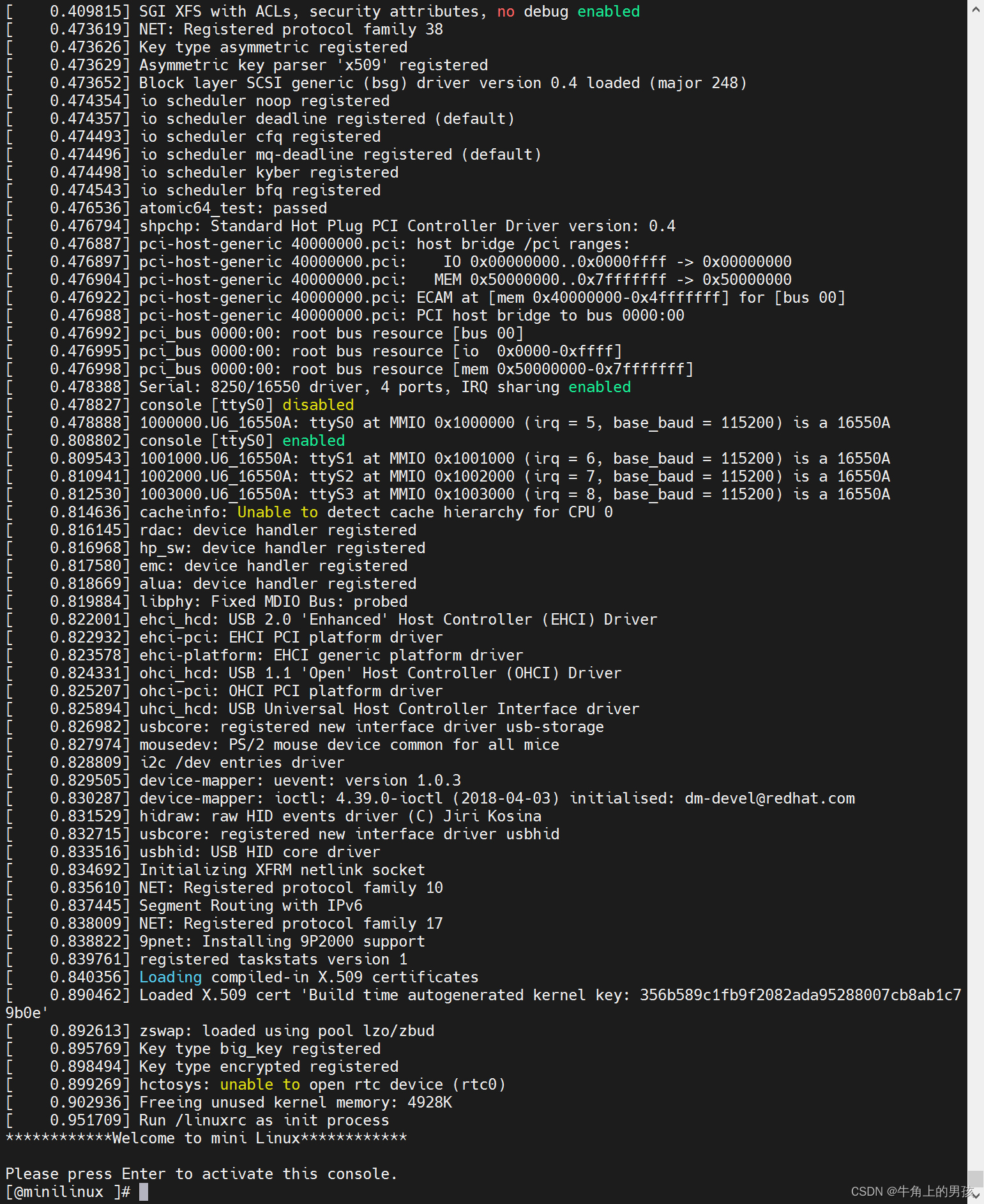
4.3 启动效果
启动效果如下:
5. 问题记录
- 编译lkvm报“hw/i8042.c:153:19: error: ‘value’ may be used uninitialized in this function [-Werror=maybe-uninitialized]”错误,具体如下:
hw/i8042.c: In function 'kbd_io':
hw/i8042.c:153:19: error: 'value' may be used uninitialized in this function [-Werror=maybe-uninitialized]
   state.write_cmd = val;
   ~~~~~~~~~~~~~~~~^~~~~
hw/i8042.c:298:5: note: 'value' was declared here
  u8 value;
     ^~~~~
cc1: all warnings being treated as errors
make: *** [Makefile:483: hw/i8042.o] Error 1
- 1
- 2
- 3
- 4
- 5
- 6
- 7
- 8
- 9
这是因为在Makefile中CFLAGS加了-Werror参数,将所有警告当做error处理。将Makefile中的-Werror参数注释掉,如下:
#ifneq ($(WERROR),0)
#       CFLAGS += -Werror
#endif
#
- 1
- 2
- 3
- 4
- aarch64架构下报Makefile:347: *** No libfdt found. Please install libfdt-dev package,缺包问题
wget https://vault.centos.org/centos/8/PowerTools/aarch64/os/Packages/libfdt-devel-1.6.0-1.el8.aarch64.rpm
wget https://vault.centos.org/centos/8/AppStream/aarch64/os/Packages/libfdt-1.6.0-1.el8.aarch64.rpm

rpm -ivh libfdt-1.6.0-1.el8.aarch64.rpm
rpm -ivh libfdt-devel-1.6.0-1.el8.aarch64.rpm
- 1
- 2
- 3
- 4
- 5
- 编译lkvm时报No rule to make target ‘/usr/include/gnu/stubs-64.h’, needed by ‘builtin-balloon.o’. Stop.错误,具体如下
Makefile:361: Skipping optional libraries: bfd aio
make: *** No rule to make target '/usr/include/gnu/stubs-64.h', needed by 'builtin-balloon.o'.  Stop.
- 1
- 2
问题为当时基于x86环境进行了编译为清理,拷贝至aarch64架构未进行清理,故需要执行make clean,再make,问题解决
- 启动虚拟机时,报virtio-net device was not detected.错误,具体如下:
  # KVM compatibility warning.
        virtio-net device was not detected.
        While you have requested a virtio-net device, the guest kernel did not initialize it.
        Please make sure that the guest kernel was compiled with CONFIG_VIRTIO_NET=y enabled in .config.
- 1
- 2
- 3
- 4
问题为menuconfig 编译内核是把CONFIG_VIRTIO_NET设置为m,即模块,需要将CONFIG_VIRTIO_NET=y,直接编译进内核
- 启动虚拟机时,报/etc/init.d/rcS: line 4: can’t create /proc/sys/kernel/hotplug: nonexistent directory
内核需要将UEVENT_HELPER 设置y,直接编译进内核
6. 参考文献:
https://github.com/kvmtool/kvmtool
https://jerling.github.io/post/%E4%BD%BF%E7%94%A8kvmtool%E5%90%AF%E5%8A%A8linux/
https://blog.csdn.net/caojinhuajy/article/details/119277087
https://www.bilibili.com/read/cv7118525
kernel:https://mirrors.tuna.tsinghua.edu.cn/kernel/
http://patchwork.ozlabs.org/project/buildroot/patch/20190523131444.36058-1-andriy.shevchenko@linux.intel.com/