
热门标签
热门文章
- 1【学习笔记】部署yolov8到安卓手机
- 2云计算虚拟机管理平台建设: 模块设计, 接口定义, 测试方案设计, 集成发布流程
- 3安全多方计算之六:秘密共享_安全多方计算 秘密共享
- 42023年最新Java八股文面试题,面试应该是够用了(吊打面试官)
- 5ElasticSearch~received plaintext http traffic on an https channel, closing connection Netty4HttpChan
- 6深度学习|BP神经网络
- 7论文初稿查重和定稿查重 神码ai
- 8这是我见过最辱人的事,“HR已读不回”作为一个测试人你会怎么想?
- 9软件测试-基础面试相关
- 10HarmonyOS应用开发者基础认证考试(95分答案)_一个应用可以包含一个或多个ability
当前位置: article > 正文
使用python库uvicorn替代Nginx发布Vue3项目_python uvicorn
作者:程序安全守护者 | 2024-01-31 08:35:16
赞
踩
python uvicorn
目录
【SpringBoot版传送门:使用SpringBoot替代Nginx发布Vue3项目_苍穹之跃的博客-CSDN博客】
一、Vue3项目打包
(博主vue版本:3.2.44)
由于是要放在FastAPI中,接口服务和Web服务用的是同一个端口,所以我们给前端一个统一的URL前缀来区分前端页面和后端接口。比如:/admin;配置方式如下:在src/router文件夹下找到路由文件,注意要用history模式,不要用哈希。

至于打包,就跟平时打包到nginx一样的去打包就行了。(不要添加base参数,画蛇添足!)
二、将打包文件放到python项目
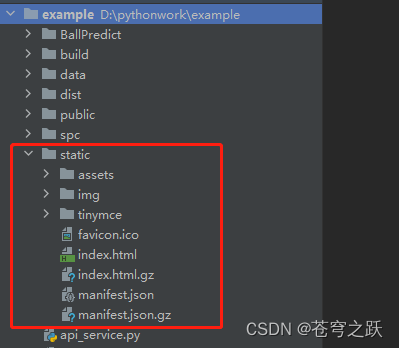
在python项目中新建文件夹static,然后将打包好的vue包复制进去。
三、配置uvicorn服务
新建api_service.py文件作为入口类
①静态文件映射

②配置VueRouter路由的反向代理

③强制让JS文件的MIME类型为application/javascript

完整代码如下↓↓↓
- import uvicorn
- from fastapi import FastAPI, Request
- from fastapi.staticfiles import StaticFiles
- from starlette.middleware.base import BaseHTTPMiddleware
- from starlette.responses import HTMLResponse
-
- app = FastAPI()
-
- app.mount("/", StaticFiles(directory="static"), name="/")
-
-
- # 静态文件代理
- class RedirectToIndexMiddleware(BaseHTTPMiddleware):
- async def dispatch(self, request: Request, call_next):
- # 排除静态文件
- if not request.url.path.endswith((".js", ".css", ".png", ".ico")):
- # 只拦截指定前缀
- if request.url.path.startswith("/admin/") or request.url.path == "/admin":
- return HTMLResponse(content=request.app.index_html, status_code=200)
- response = await call_next(request)
- return response
-
-
- # 读取index.html
- with open("static/index.html", encoding='utf-8') as f:
- app.index_html = f.read()
- # 添加中间件
- app.add_middleware(RedirectToIndexMiddleware)
-
-
- # 自定义JS文件的MIME类型为application/javascript
- @app.middleware("http")
- async def override_static_file_mimetype(request, call_next):
- response = await call_next(request)
- if request.url.path.endswith((".js")):
- response.headers["content-type"] = "application/javascript"
- return response
-
-
- # 添加中间件
- app.add_middleware(RedirectToIndexMiddleware)
-
- if __name__ == "__main__":
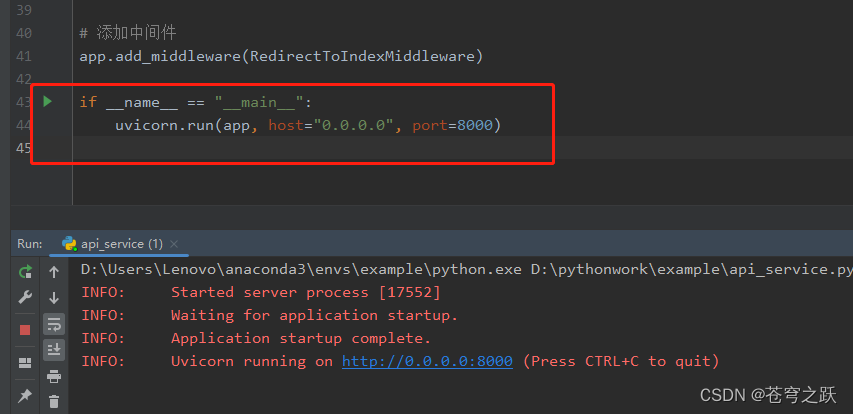
- uvicorn.run(app, host="0.0.0.0", port=8000)

四、启动服务
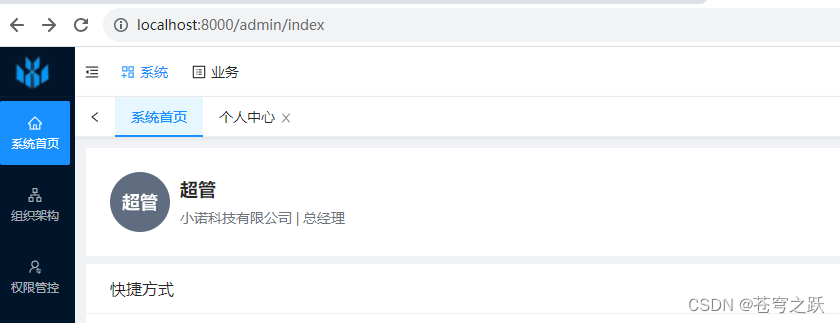
浏览器访问:http://localhost:8000/admin

声明:本文内容由网友自发贡献,不代表【wpsshop博客】立场,版权归原作者所有,本站不承担相应法律责任。如您发现有侵权的内容,请联系我们。转载请注明出处:https://www.wpsshop.cn/article/detail/50022
推荐阅读

相关标签

