
热门标签
热门文章
- 1Flask框架开发博客网站_flask开发的网站有哪些
- 2Kubernetes Ingress诡异的502、503、504等奇葩问题(二)
- 32023十大编程语言及未来展望_编程语言排行榜2010-2023
- 4Kong工作原理 - 健康检查和断路器 - 定义健康和不健康
- 5关于ROS在一个回调函数中处理两个订阅话题消息(多话题回调、多参数回调问题)_ros 服务 回调函数多参数
- 6【送书福利-第二十五期】《机器学习高级实践》
- 7如何区分一个项目是react还react native_怎样查看项目是vue的还是react
- 8MySQL 实现多张无关联表查询数据并分页_mysql将三个表的数据一起查出来分页
- 9python云南昆明旅游景点数据可视化大屏全屏系统设计与实现(django框架)_利用django铺盖整个屏幕
- 10支持上亿物联网终端设备接入的MQTT集群
当前位置: article > 正文
免费分享一套PyQt6学生信息管理系统 Python管理系统 Python源码,挺漂亮的_python qt6 制作信息管理系统
作者:代码维护者 | 2024-01-31 08:21:28
赞
踩
python qt6 制作信息管理系统
大家好,我是java1234_小锋老师,看到一个不错的PyQt6学生信息管理系统 Python管理系统 Python源码,分享下哈。
项目视频演示
 https://www.bilibili.com/video/BV1Ep4y1R7WD/
项目介绍
期末作业要求用Qt做一个学生管理系统,笔者这段时间在自学Python,本项目主要实现了PyQt5的增删改查。因为学习PyQt5的时间短,写代码时遇到了很多困难,笔者在CSDN与Github上我查阅了大量的资料,最终做了一个半成品出来。但笔者认为,以这个小项目作为一个入门练手项目十分合适,现将其分享,希望能够帮助到新手入门的人。 本项目主要用到了PyQt5、pymysql、xlwt模块、Mysql数据库、QtDesigner和pyuic。PyQt5用于构建GUI界面,pymysql用于与MySQL数据库连接,xlwt用于操作excel。 MySQL数据库笔者采用了navicat数据库管理工具。MySQL具体使用方法此文不作详细解释。
系统展示


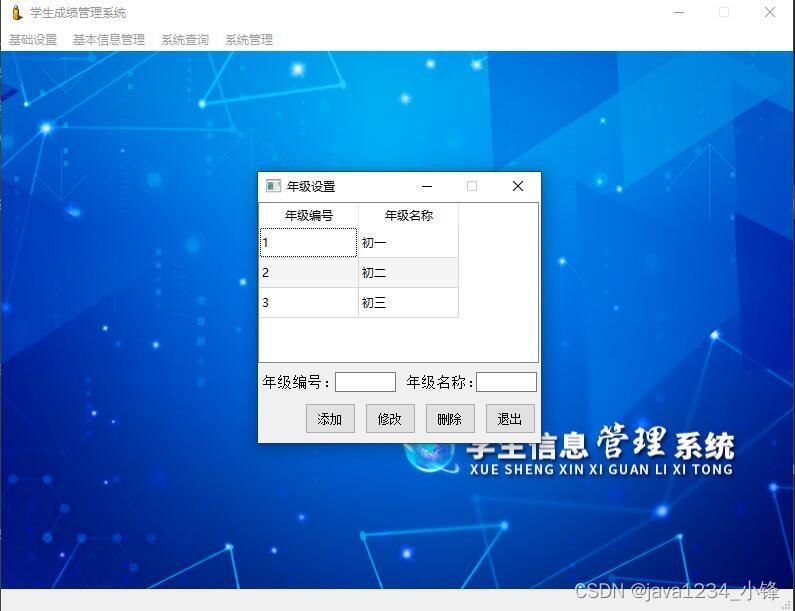


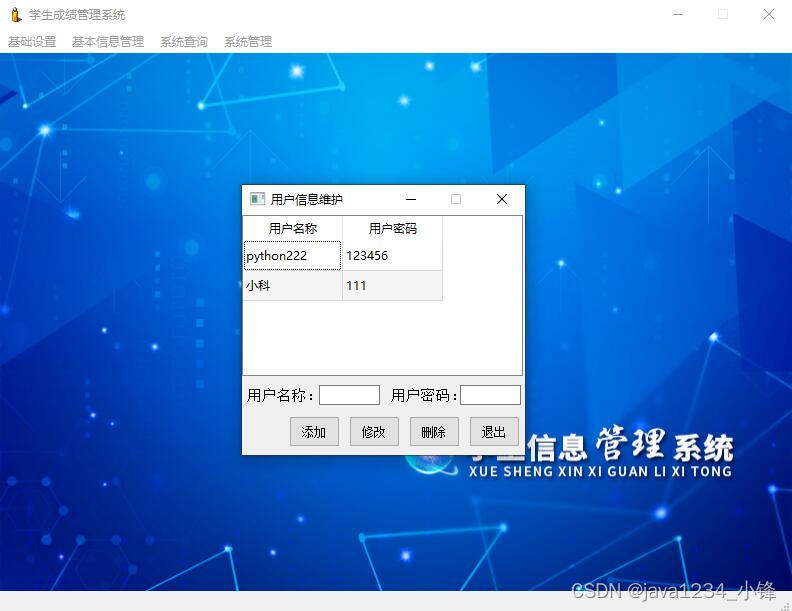
部分代码
- # -*- coding: utf-8 -*-
-
- # Form implementation generated from reading ui file 'login.ui'
- #
- # Created by: PyQt5 UI code generator 5.13.2
- #
- # WARNING! All changes made in this file will be lost!
-
-
- from PyQt5 import QtCore, QtGui, QtWidgets
- from PyQt5.QtCore import qInstallMessageHandler, QtCriticalMsg
- from PyQt5.QtWidgets import QMessageBox
- import sys # 导入sys模块
- import main
- from service import service
-
- class Ui_MainWindow(object):
- def setupUi(self, MainWindow):
- MainWindow.setObjectName("MainWindow")
- MainWindow.setWindowFlags(QtCore.Qt.MSWindowsFixedSizeDialogHint) # 只显示最小化和关闭按钮
- MainWindow.resize(360, 196)
- self.centralwidget = QtWidgets.QWidget(MainWindow)
- self.centralwidget.setObjectName("centralwidget")
- self.label = QtWidgets.QLabel(self.centralwidget)
- self.label.setGeometry(QtCore.QRect(0, 0, 360, 80))
- self.label.setStyleSheet("border-image: url('./images/login.jpg');")
- self.label.setText("")
- self.label.setObjectName("label")
- self.label_2 = QtWidgets.QLabel(self.centralwidget)
- self.label_2.setGeometry(QtCore.QRect(120, 100, 61, 21))
- font = QtGui.QFont()
- font.setPointSize(11)
- self.label_2.setFont(font)
- self.label_2.setObjectName("label_2")
- self.editName = QtWidgets.QLineEdit(self.centralwidget)
- self.editName.setGeometry(QtCore.QRect(193, 100, 141, 20))
- self.editName.setObjectName("editName")
- self.editPwd = QtWidgets.QLineEdit(self.centralwidget)
- self.editPwd.setGeometry(QtCore.QRect(192, 130, 141, 20))
- self.editPwd.setEchoMode(QtWidgets.QLineEdit.Password)
- self.editPwd.setObjectName("editPwd")
- self.label_3 = QtWidgets.QLabel(self.centralwidget)
- self.label_3.setGeometry(QtCore.QRect(119, 130, 61, 21))
- font = QtGui.QFont()
- font.setPointSize(11)
- self.label_3.setFont(font)
- self.label_3.setObjectName("label_3")
- self.btnLogin = QtWidgets.QPushButton(self.centralwidget)
- self.btnLogin.setGeometry(QtCore.QRect(200, 160, 61, 23))
- self.btnLogin.setObjectName("btnLogin")
- self.btnExit = QtWidgets.QPushButton(self.centralwidget)
- self.btnExit.setGeometry(QtCore.QRect(270, 160, 61, 23))
- self.btnExit.setObjectName("btnExit")
- MainWindow.setCentralWidget(self.centralwidget)
-
- self.retranslateUi(MainWindow)
- self.btnExit.clicked.connect(MainWindow.close) # 关闭登录窗体
- QtCore.QMetaObject.connectSlotsByName(MainWindow)
- # 输入密码后按回车键执行登录操作
- self.editPwd.editingFinished.connect(self.openMain)
- # 单击“登录”按钮执行登录操作
- self.btnLogin.clicked.connect(self.openMain)
-
- # 打开主窗体
- def openMain(self):
- service.userName=self.editName.text() # 全局变量,记录用户名
- self.userPwd=self.editPwd.text() # 记录用户密码
- if service.userName != "" and self.userPwd != "": # 判断用户名和密码不为空
- # 根据用户名和密码查询数据
- result=service.query("select * from tb_user where userName = %s and userPwd = %s",service.userName,self.userPwd)
- if len(result)>0: # 如果查询结果大于0,说明存在该用户,可以登录
- self.m = main.Ui_MainWindow() # 创建主窗体对象
- self.m.show() # 显示主窗体
- MainWindow.hide() # 隐藏当前的登录窗体
- else:
- self.editName.setText("") # 清空用户名文本
- self.editPwd.setText("") # 清空密码文本框
- QMessageBox.warning(None, '警告', '请输入正确的用户名和密码!', QMessageBox.Ok)
- else:
- QMessageBox.warning(None, '警告', '请输入用户名和密码!', QMessageBox.Ok)
-
- def retranslateUi(self, MainWindow):
- _translate = QtCore.QCoreApplication.translate
- MainWindow.setWindowTitle(_translate("MainWindow", "系统登录"))
- self.label_2.setText(_translate("MainWindow", "用户名:"))
- self.label_3.setText(_translate("MainWindow", "密 码:"))
- self.btnLogin.setText(_translate("MainWindow", "登录"))
- self.btnExit.setText(_translate("MainWindow", "退出"))
-
-
-
-
- # 主方法
- if __name__ == '__main__':
- app = QtWidgets.QApplication(sys.argv)
- MainWindow = QtWidgets.QMainWindow() # 创建窗体对象
- ui = Ui_MainWindow() # 创建PyQt5设计的窗体对象
- ui.setupUi(MainWindow) # 调用PyQt5窗体的方法对窗体对象进行初始化设置
-
- MainWindow.show() # 显示窗体
- sys.exit(app.exec_()) # 程序关闭时退出进程

- # -*- coding: utf-8 -*-
-
- # Form implementation generated from reading ui file 'main.ui'
- #
- # Created by: PyQt5 UI code generator 5.13.2
- #
- # WARNING! All changes made in this file will be lost!
-
-
- from PyQt5 import QtCore, QtGui, QtWidgets
- from PyQt5.QtWidgets import *
- from service import service
- from baseinfo import student
- from query import studentinfo
- from settings import classes,grade
- from system import user
-
- class Ui_MainWindow(QMainWindow):
- # 构造方法
- def __init__(self):
- super(Ui_MainWindow, self).__init__()
- self.setWindowFlags(QtCore.Qt.MSWindowsFixedSizeDialogHint) # 只显示最小化和关闭按钮
- self.setupUi(self) # 初始化窗体设置
-
- def setupUi(self, MainWindow):
- MainWindow.setObjectName("MainWindow")
- MainWindow.resize(792, 583)
- icon = QtGui.QIcon()
- icon.addPixmap(QtGui.QPixmap("./images/appstu.ICO"), QtGui.QIcon.Normal, QtGui.QIcon.Off)
- MainWindow.setWindowIcon(icon)
- MainWindow.setIconSize(QtCore.QSize(32, 32))
- self.centralwidget = QtWidgets.QWidget(MainWindow)
- self.centralwidget.setStyleSheet("border-image: url('./images/main.jpg');")
- self.centralwidget.setObjectName("centralwidget")
- MainWindow.setCentralWidget(self.centralwidget)
- self.menubar = QtWidgets.QMenuBar(MainWindow)
- self.menubar.setGeometry(QtCore.QRect(0, 0, 792, 23))
- self.menubar.setObjectName("menubar")
- self.menu = QtWidgets.QMenu(self.menubar)
- self.menu.setObjectName("menu")
- self.menu_2 = QtWidgets.QMenu(self.menubar)
- self.menu_2.setObjectName("menu_2")
- self.menu_3 = QtWidgets.QMenu(self.menubar)
- self.menu_3.setObjectName("menu_3")
- self.menu_4 = QtWidgets.QMenu(self.menubar)
- self.menu_4.setObjectName("menu_4")
- MainWindow.setMenuBar(self.menubar)
- self.statusbar = QtWidgets.QStatusBar(MainWindow)
- self.statusbar.setObjectName("statusbar")
- MainWindow.setStatusBar(self.statusbar)
- self.actiongrade = QtWidgets.QAction(MainWindow)
- self.actiongrade.setObjectName("actiongrade")
- self.actionclass = QtWidgets.QAction(MainWindow)
- self.actionclass.setObjectName("actionclass")
- self.actionstudent = QtWidgets.QAction(MainWindow)
- self.actionstudent.setObjectName("actionstudent")
- self.actionstudentinfo = QtWidgets.QAction(MainWindow)
- self.actionstudentinfo.setObjectName("actionstudentinfo")
- self.actionuserinfo = QtWidgets.QAction(MainWindow)
- self.actionuserinfo.setObjectName("actionuserinfo")
- self.actionexit = QtWidgets.QAction(MainWindow)
- self.actionexit.setObjectName("actionexit")
- self.menu.addAction(self.actiongrade)
- self.menu.addAction(self.actionclass)
- self.menu_2.addAction(self.actionstudent)
- self.menu_3.addAction(self.actionstudentinfo)
- self.menu_4.addAction(self.actionuserinfo)
- self.menu_4.addAction(self.actionexit)
- self.menubar.addAction(self.menu.menuAction())
- self.menubar.addAction(self.menu_2.menuAction())
- self.menubar.addAction(self.menu_3.menuAction())
- self.menubar.addAction(self.menu_4.menuAction())
-
- self.retranslateUi(MainWindow)
- self.actionexit.triggered.connect(MainWindow.close)
- QtCore.QMetaObject.connectSlotsByName(MainWindow)
- datetime = QtCore.QDateTime.currentDateTime() # 获取当前日期时间
- time = datetime.toString("yyyy-MM-dd HH:mm:ss") # 对日期时间进行格式化
- # 状态栏中显示登录用户、登录时间,以及版权信息
- self.statusbar.showMessage("当前登录用户:" + service.userName + " | 登录时间:" + time + " | www.python222.com 收藏整理",0)
- # 为基础设置菜单中的QAction绑定triggered信号
- self.menu.triggered[QtWidgets.QAction].connect(self.openSet)
- # 为基本信息管理菜单中的QAction绑定triggered信号
- self.menu_2.triggered[QtWidgets.QAction].connect(self.openBase)
- # 为系统查询菜单中的QAction绑定triggered信号
- self.menu_3.triggered[QtWidgets.QAction].connect(self.openQuery)
- # 为系统管理菜单中的QAction绑定triggered信号
- self.menu_4.triggered[QtWidgets.QAction].connect(self.openSys)
-
- # 基础设置菜单对应槽函数
- def openSet(self,m):
- if m.text()=="年级设置":
- self.m = grade.Ui_MainWindow() # 创建年级设置窗体对象
- self.m.show() # 显示窗体
- elif m.text()=="班级设置":
- self.m = classes.Ui_MainWindow() # 创建班级设置窗体对象
- self.m.show() # 显示窗体
-
- # 基本信息管理菜单对应槽函数
- def openBase(self,m):
- if m.text()=="学生管理":
- self.m = student.Ui_MainWindow() # 创建学生管理窗体对象
- self.m.show() # 显示窗体
-
- # 系统查询菜单对应槽函数
- def openQuery(self,m):
- if m.text()=="学生信息查询":
- self.m = studentinfo.Ui_MainWindow() # 创建学生信息查询窗体对象
- self.m.show() # 显示窗体
-
- # 系统管理菜单对应槽函数
- def openSys(self,m):
- if m.text()=="用户维护":
- self.m = user.Ui_MainWindow() # 创建用户维护窗体对象
- self.m.show() # 显示窗体
-
- def retranslateUi(self, MainWindow):
- _translate = QtCore.QCoreApplication.translate
- MainWindow.setWindowTitle(_translate("MainWindow", "学生成绩管理系统"))
- self.menu.setTitle(_translate("MainWindow", "基础设置"))
- self.menu_2.setTitle(_translate("MainWindow", "基本信息管理"))
- self.menu_3.setTitle(_translate("MainWindow", "系统查询"))
- self.menu_4.setTitle(_translate("MainWindow", "系统管理"))
- self.actiongrade.setText(_translate("MainWindow", "年级设置"))
- self.actionclass.setText(_translate("MainWindow", "班级设置"))
- self.actionstudent.setText(_translate("MainWindow", "学生管理"))
- self.actionstudentinfo.setText(_translate("MainWindow", "学生信息查询"))
- self.actionuserinfo.setText(_translate("MainWindow", "用户维护"))
- self.actionexit.setText(_translate("MainWindow", "退出"))
源码下载
CSDN 1积分下载:https://download.csdn.net/download/caofeng891102/88680194
或者免费领取加小锋老师wx:java9266
热门推荐
免费分享一套Springboot+Vue前后端分离的停车场管理系统,挺漂亮的-CSDN博客
免费分享一套Springboot+Vue前后端分离的个人博客系统,挺漂亮的-CSDN博客
免费分享一套Springboot+Vue前后端分离的学生网上请假系统,挺漂亮的-CSDN博客
免费分享一套基于springboot的进销存(仓库)管理系统,挺漂亮的-CSDN博客
免费分享一套 SpringBoot + Vue + ElementUI 的人力资源管理系统,挺漂亮的_element+springboot员工工资管理-CSDN博客
声明:本文内容由网友自发贡献,不代表【wpsshop博客】立场,版权归原作者所有,本站不承担相应法律责任。如您发现有侵权的内容,请联系我们。转载请注明出处:https://www.wpsshop.cn/article/detail/49975
推荐阅读


相关标签

