- 1Nodejs基础6之HTTP模块的获取请求行和请求头、获取请求体、获取请求路径和查询字符串、http请求练习、设置HTTP响应报文、http响应练习
- 2【机器学习】基于集成学习的 Amazon 用户评论质量预测
- 3无向图求三元环的个数
- 4Docker的体系架构、Dockerfile讲解、分层原理_docker 分层原理与内部结构
- 5有限自动机DFA 、 无限自动机NFA_有限自动机和无限自动机区别
- 6java面向对象编程-抽象类与接口_(2)编写一个java程序,用面向对象知识(抽象类或接口)解决:电在线路上传输时都会有
- 7python怎么安装whl文件
- 8Linux查看CPU信息、使用率、核数、操作系统、内存使用率、磁盘空间_查看cpu 内核使用率
- 9ubantu20.04和3070ti显卡安装pytorch环境_3070ti支持cuda版本
- 10wsl + vscode 离线配置 ERROR: Faild to download https://update.code.visualstudio.com
SQL Server 2016跟踪标志修改
赞
踩
SQL Server Trace Flags are special switches that are used to customize and control specific behaviors of the SQL Server Engine. Trace Flags can be defined in two forms; Session Trace Flags that are activated and visible at the current connection level only, and Global Trace Flags that are enabled and visible at the SQL Server Instance level and applied to all connecting sessions in that SQL Server. Global Trace Flags should be enabled globally in order to take effect, where some Trace Flags that can be either Global or Session Trace Flags can be enabled in the appropriate scope, and its effect will appear on the defined level.
SQL Server跟踪标志是特殊的开关,用于自定义和控制SQL Server Engine的特定行为。 跟踪标志可以两种形式定义: 仅在当前连接级别上激活并可见的会话跟踪标志 ,以及在SQL Server实例级别上启用并可见并应用于该SQL Server中所有连接会话的全局跟踪标志 。 为了全局生效,应该全局启用全局跟踪标志,在适当的范围内可以启用某些可以是全局或会话跟踪标志的跟踪标志,并且其作用将显示在定义的级别上。
Trace Flags are usually used for performance diagnostic and debugging purposes. Enabling the Trace Flags is not preferred by all database administrators unless these is a hard need to enable that Trace Flag, as enabling the Trace Flags takes effect on all databases that the user connect to in the Session Trace Flags and all databases for all connecting users in the Global Trace Flags.
跟踪标志通常用于性能诊断和调试目的。 并非所有数据库管理员都希望启用跟踪标志,除非迫切需要启用该跟踪标志,因为启用跟踪标志会在会话跟踪标志中用户连接的所有数据库以及所有连接用户的所有数据库上生效在全局跟踪标志中。
A five recommended Trace Flags can be considered as a part of the SQL Server database administrator’s best practices checklist; such as the 4199 Trace Flag that is used to enable the query optimizer hotfixes that are made in the previous releases of the current SQL Server version. Trace Flag 8048 is used to enable the SOFT NUMA option for the large systems. Trace Flag 2371 will override the 20% SQL statistics auto update threshold and will use a dynamic threshold value depending on the number of rows in your table. Also, it is a best practice to enable the Trace Flag 1117 to allow auto growth on all database filegroup files together and Trace Flag 1118 to reduce the Shared Global Allocation Map (SGAM) contention. In this article we will concentrate on the last two trace flags in SQL Server 2016.
可以将五个推荐的跟踪标志视为SQL Server数据库管理员最佳实践清单的一部分; 例如4199跟踪标记,用于启用当前SQL Server版本的先前版本中进行的查询优化程序修补程序。 跟踪标志8048用于为大型系统启用SOFT NUMA选项。 跟踪标志2371将覆盖20%SQL统计信息自动更新阈值,并将使用动态阈值,具体取决于表中的行数。 同样,最佳做法是使跟踪标记1117允许一起在所有数据库文件组文件上自动增长,并使跟踪标记1118减少共享全局分配图(SGAM)争用。 在本文中,我们将重点介绍SQL Server 2016中的最后两个跟踪标志。
Before going deeply with the SQL Server 2016 Trace Flags changes, let’s understand how to enable, disable and check the status of the SQL Server Trace Flags. Trace Flags can be enabled using the DBCC TRACEON SQL statement specifying the Trace Flag number only to enable it at the current session only or enable it globally by adding the -1 argument to the statement. The below statement will enable the Trace Flag 1117 on the current session only:
在深入探讨SQL Server 2016跟踪标志更改之前,让我们了解如何启用,禁用和检查SQL Server跟踪标志的状态。 可以使用DBCC TRACEON SQL语句来指定跟踪标志号,以仅在当前会话中启用跟踪标志,或者通过在语句中添加-1参数来全局启用跟踪标志。 下面的语句将仅在当前会话上启用跟踪标志1117:
-
- DBCC TRACEON (1117)
- GO
-
Where the following statement will enable the Trace Flag 1118 globally:
以下语句将在全局启用跟踪标志1118的位置:
-
- DBCC TRACEON (1118, -1)
- GO
-
When you enable a Trace Flag, it will be enabled till the current user disconnect from the SQL Server in the case of the Session Trace Flags or till the SQL Server service restarted in the case of Global Trace Flags. To make sure that the Trace Flags will be automatically enabled globally each time the SQL Server service started, you can use the –T startup option with the Trace Flag number in the Startup Parameters tab of the SQL Server Instance Properties window.
启用跟踪标记后,将启用它,直到使用会话跟踪标记使当前用户与SQL Server断开连接,或者如果使用全局跟踪标记,则将禁用SQL Server服务重新启动。 为确保每次启动SQL Server服务时都会自动全局启用跟踪标志,可以在SQL Server实例属性窗口的“启动参数”选项卡中将–T启动选项与跟踪标志号一起使用。
To enable the SQL Server Trace Flag globally from the startup parameters, right-click on the SQL Server Engine service from the SQL Server Configuration Manager tool and choose Properties as below:
若要从启动参数全局启用SQL Server跟踪标志,请在SQL Server配置管理器工具中右键单击SQL Server Engine服务 ,然后选择“ 属性” ,如下所示:
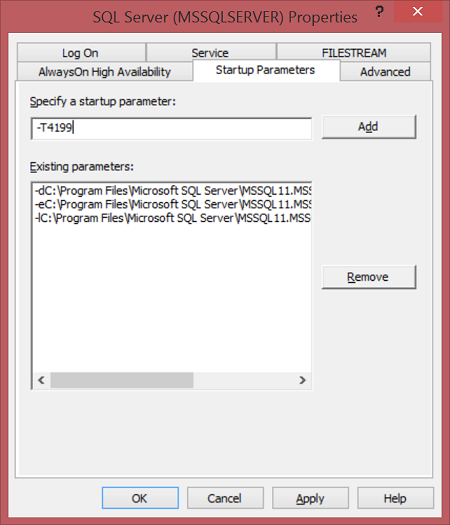
In the displayed SQL Server Instance Properties window, choose the Startup Parameters tab, and write (-T4199) value in the Specify a Startup Parameter field to enable the Trace Flag 4199, then click Add button as follows:
在显示的“ SQL Server实例属性”窗口中,选择“ 启动参数”选项卡,并在“ 指定启动参数”字段中写入( -T4199 )值以启用跟踪标志4199,然后单击“ 添加”按钮,如下所示:
The below warning message will be displayed to inform you that the new added startup parameter will take effect after restarting the SQL Server service:
将显示以下警告消息,通知您新添加的启动参数将在重新启动SQL Server服务后生效:
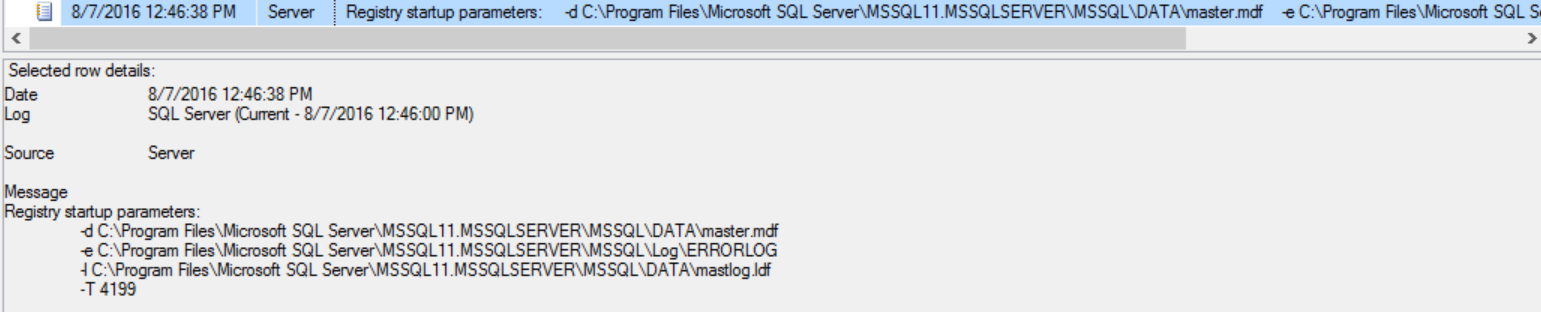
After restarting the SQL Server service, we can check the SQL Server error log as below to make sure that the Trace Flag is globally enabled:
重新启动SQL Server服务之后,我们可以如下检查SQL Server错误日志,以确保全局启用了跟踪标志:
The status of the enabled Trace Flags can be checked using the DBCC TRACESTATUS SQL statement, that shows if the Trace Flag is enabled or not and if it is enabled at the Session or Global level as follows:
可以使用DBCC TRACESTATUS SQL语句检查已启用的跟踪标志的状态,该语句显示是否启用了跟踪标志,以及是否在会话或全局级别启用了跟踪标志,如下所示:
-
- DBCC TRACESTATUS
- GO
-
The result in our case will be like:
在我们的案例中,结果将是:

There is another way that can be used to enable the Trace Flag for a specific query; the QUERYTRACEON table hint statement. A good example of using this method is enabling the 9481 Trace Flag to revert back to the legacy cardinality estimator when you are using SQL Server 2016 as in the below SELECT statement:
可以使用另一种方法为特定查询启用跟踪标志。 QUERYTRACEON表提示语句。 使用此方法的一个很好的例子是,当您使用SQL Server 2016时,如下面的SELECT语句中所示,允许9481跟踪标志还原为旧基数估计器:
-
- USE SQLShackDemo
- GO
- SELECT * from [dbo].[FactFinance] OPTION (QUERYTRACEON 9481)
-
If you manage to disable a specific Trace Flag, the DBCC TRACEOFF statement can be used to perform that. The below statement is used to disable the Trace Flag 4199 on the current sessions:
如果您设法禁用特定的跟踪标志,则可以使用DBCC TRACEOFF语句执行该操作。 以下语句用于在当前会话上禁用跟踪标志4199:
DBCC TRACEOFF (4199) GO
DBCC追击(4199)GO
And the following statement will disable the Trace Flag 4199 globally:
并且以下语句将全局禁用跟踪标志4199:
DBCC TRACEOFF (4199,-1) GO
DBCC TRACEOFF(4199,-1)开始
Now, we have a good idea about the SQL Server Trace Flags in general. As we mentioned previously, our main concerns here are Trace Flag 1117 and Trace Flag 1118, which we will discuss in details in the rest of this article.
现在,我们对一般SQL Server跟踪标志有了一个很好的了解。 正如我们前面提到的,这里主要关注的是Trace Flag 1117和Trace Flag 1118,我们将在本文的其余部分中详细讨论。
Trace Flag 1117 is used to enable the autogrowth for all database files under the same filegroup. By default, when a database file that belongs to a specific filegroup reaches the autogrowth threshold, this file only will be extended. But if the Trace Flag 1117 is enabled, all the database files that belong to the same filegroup will be extended with the same amount.
跟踪标志1117用于为同一文件组下的所有数据库文件启用自动增长。 默认情况下,当属于特定文件组的数据库文件达到自动增长阈值时,只会扩展该文件。 但是,如果启用了跟踪标志1117,则属于同一文件组的所有数据库文件都将以相同的数量扩展。
In SQL Server 2016, enabling the Trace Flag 1117 will not force all files under the same filegroup to grow together. Let’s first list our test database files with its size using the below query:
在SQL Server 2016中,启用跟踪标志1117不会强制同一文件组下的所有文件一起增长。 首先,使用以下查询列出测试数据库文件及其大小:
-
- SELECT Name , size*8/1024 AS FileSize
- FROM sys.master_files
- WHERE NAME like'%SQLShackDemo%'
-
The result will be like:
结果将如下所示:
If we try to enable the 1117 Trace Flag, apply large number of inserts and disable the Trace Flag again as the below query:
如果我们尝试启用1117跟踪标志,请进行大量插入,然后再次禁用跟踪标志,如下所示:
-
- DBCC TRACEON(1117,-1)
-
- INSERT INTO [dbo].[CountryInfo]([CountyCode]) VALUES ('AMM')
- GO 50000
-
- DBCC TRACEOFF(1117,-1)
-
Then check the database files again, the result will be like:
然后再次检查数据库文件,结果将是这样的:
As you can see from the previous result, enabling the Trace Flag 1117 didn’t force all files under the same filegroup to grow together. To do that, SQL Server 2016 introduces a new ALTER DATABASE option that enforces all files under the same filegroup to grow together, this option is called AUTOGROW_ALL_FILES. The default value is AUTOGROW_SINGLE_FILE.
从上一个结果可以看出,启用跟踪标志1117并不会强制同一文件组下的所有文件一起增长。 为此,SQL Server 2016引入了一个新的ALTER DATABASE选项,该选项强制同一文件组下的所有文件一起增长,该选项称为AUTOGROW_ALL_FILES 。 默认值为AUTOGROW_SINGLE_FILE 。
The below ALTER DATABASE command is used to will force all SQLShackDemo database files under the Primary filegroup to grow together:
下面的ALTER DATABASE命令用于强制主文件组下的所有SQLShackDemo数据库文件一起增长:
-
- ALTER DATABASE SQLShackDemo
- MODIFY FILEGROUP [PRIMARY] AUTOGROW_ALL_FILES;
-
If you repeat the insert statement again:
如果再次重复插入语句:
-
- INSERT INTO [dbo].[CountryInfo]([CountyCode]) VALUES ('AMM')
- GO 50000
-
And check the database files growth, the result will be like:
并检查数据库文件的增长,结果将是:
As you can clearly see from the previous image, all database files under the Primary filegroup extended at the same time with the same amount. This is also valid if the database files are note equally sized, where the database files will grow together too.
从上一张图像中可以清楚地看到,Primary文件组下的所有数据库文件都以相同的数量同时扩展。 如果数据库文件的大小相等,这也是有效的,数据库文件也将一起增长。
The second Trace flag that also changed in SQL Server 2016 is Trace Flag 1118. The 1118 Trace Flag is used to reduce the SGAM page contention in the SQL Server. The SGAM or the Shared Global Allocation Map is responsible for tracking page allocation within the extents. SQL Server data is stored in data pages, with each page size 8 KB, each 8 contiguous pages form a data extent with 64 KB size. In SQL Server versions prior to SQL Server 2016, when a new object is created, the first eight pages are allocated from different extents. This allocation type is called Mixed Extents Allocation. When the object requires more pages, it will be allocated from the same extent, in a technique called Uniform Extent Allocation. With a lot of mixed pages within different extents, the allocation will be more complex, with heavy scans on the SGAM page.
在SQL Server 2016中也更改的第二个跟踪标志是跟踪标志1118 。 1118跟踪标志用于减少SQL Server中的SGAM页面争用。 SGAM或“共享的全局分配图”负责在范围内跟踪页面分配。 SQL Server数据存储在数据页面中,每个页面大小为8 KB,每8个连续页面构成一个数据扩展区,大小为64 KB。 在SQL Server 2016之前SQL Server版本中,创建新对象时,前八个页面是从不同的扩展区分配的。 这种分配类型称为混合范围分配 。 当对象需要更多页面时,将使用称为统一范围分配的技术从相同范围分配对象 。 如果在不同范围内有很多混合页面,则分配将变得更加复杂,而在SGAM页面上将进行大量扫描。
Using the Trace Flag 1118, the first eight pages will be allocated from the same extent when creating a new database object, minimizing the scan operations on the SGAM page, by turning off the Mixed Extents Allocation.
使用跟踪标志1118,在创建新的数据库对象时,将通过相同的范围来分配前八个页面,从而通过关闭混合范围分配来最小化SGAM页面上的扫描操作。
In SQL Server 2016 the Trace Flag 1118 has no effect, as the Uniform Extent Allocation is the default allocation method, where the first 8 pages will be allocated from the same extent once a new database object is created, with the ability to turn the MIXED_PAGE_ALLOCATION ON and OFF using the below ALTER DATABASE statement:
在SQL Server 2016中,跟踪标记1118无效,因为统一范围分配是默认的分配方法,一旦创建了新的数据库对象,就可以从同一范围内分配前8页,并且可以打开MIXED_PAGE_ALLOCATION使用以下ALTER DATABASE语句打开和关闭 :
-
- ALTER DATABASE SQLShackDemo SET MIXED_PAGE_ALLOCATION OFF
- GO
-
If we try to add the Trace Flag 1118 to the Startup Parameters in SQL Server 2016 as described previously and check the SQL Server Error Log, a message will be displayed informing us that this Trace Flag is no longer in use and will not take effect, and that it is replaced by the ALTER DATABASE statement:
如果我们尝试如上所述将跟踪标志1118添加到SQL Server 2016中的启动参数并检查SQL Server错误日志,则会显示一条消息,通知我们该跟踪标志已不再使用并且不会生效,并将其替换为ALTER DATABASE语句:

A new column is added to the sys.databases system view that can be used to check the page allocation method used in the current SQL Server instance, with value 0 for the is_mixed_page_allocation_on column indicates that SQL Server is using Uniform allocation method as follows:
sys.databases系统视图中添加了一个新列,该列可用于检查当前SQL Server实例中使用的页面分配方法, is_mixed_page_allocation_on列的值为0表示SQL Server使用统一分配方法,如下所示:
-
- SELECT name, is_mixed_page_allocation_on
- FROM Sys.Databases
- where name='SQLShackDemo'
-
The result will be similar to:
结果将类似于:
To understand how it works let’s create a new table in our SQLShackDemo database and insert records into that table as in the below script:
为了了解它是如何工作的,让我们在SQLShackDemo数据库中创建一个新表,并将记录插入到该表中,如以下脚本所示:
-
- USE [SQLShackDemo]
- GO
- CREATE TABLE [dbo].[CountryInfoTest](
- ID INT
- ) ON [PRIMARY]
- GO
- INSERT INTO [dbo].[CountryInfoTest] (ID) VALUES (100)
- GO 5000
-
Now, run the below command that list all pages associated with the new table:
现在,运行以下命令,列出与新表关联的所有页面:
-
- SELECT extent_file_id ,extent_page_id ,is_iam_page ,is_mixed_page_allocation,page_type_desc
- FROM sys.dm_db_database_page_allocations(
- DB_ID('SQLShackDemo'),
- OBJECT_ID('dbo.CountryInfoTest'),
- NULL , NULL , 'DETAILED')
-
The output of the previous command will be similar to the below:
上一个命令的输出将类似于以下内容:
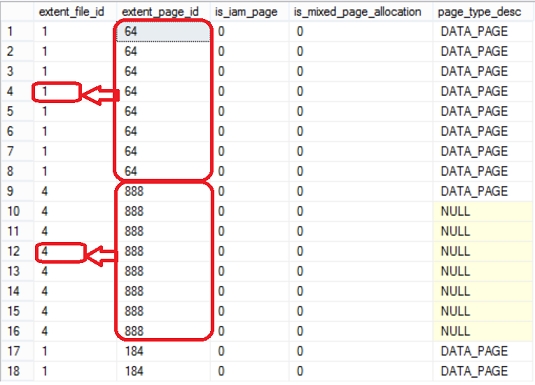
As we can see from the previous image, the pages are allocated in our table uniformly, where the first eight pages allocated from the same extent and so on.
从上一张图像可以看出,页面在表中是均匀分配的,前八个页面是从相同范围分配的,依此类推。
结论 (Conclusion)
SQL Server Trace Flags are useful switches that can help database administrators control the SQL Server Engine behaviors. Enabling some of these Trace Flags becomes a best practice in order to force the SQL Server to behave in the best way at some circumstances. In SQL Server 2016, two of these Trace Flags; 1117 and 1118 are no longer applicable and replaced by new options using the ALTER DATABASE SQL command. This change allows the database administrators to deal easily with these options and take benefits of it.
SQL Server跟踪标志是有用的开关,可以帮助数据库管理员控制SQL Server Engine行为。 启用其中的某些跟踪标记成为最佳实践,以强制SQL Server在某些情况下以最佳方式运行。 在SQL Server 2016中,其中两个跟踪标记; 1117和1118不再适用,并使用ALTER DATABASE SQL命令替换为新选项。 此更改使数据库管理员可以轻松处理这些选项并从中受益。
翻译自: https://www.sqlshack.com/sql-server-2016-trace-flags-modifications/