
- 1利用Java8新特性stream流给集合中的某个属性赋值_用stream流给数组的多个属性赋值
- 2片上网络(NoC)技术的背景、意义以及发展_片上网络与总线对比
- 3JAVA获得真正IP过滤虚拟机IP_根据网卡名称获取ip时不获取虚ip java
- 4PAT乙级_每个输入包含一个测试用例。每个测试用例先给出一个不超过 1000 的正整数 n 表示
- 5BP神经网络_bp神经网络结构
- 6计划任务ScheduledExecutorService的使用总结
- 7uview组件使用笔记_uview组件中的步骤条样式颜色怎么改
- 8【ArcGIS】批量对栅格图像按要素掩膜提取_arcmap批量掩膜提取idle
- 9Unity 使用JSON实现本地数据保存和读取_unity json get set
- 10CSDN IT冷知识(每日更新)_在 19 世纪至 20 世纪有一对同名同姓的父子,他们在唱片、办公设备、打字机到计算
谁说大厂都用 React,微信读书官网用 Vue
赞
踩
思考一下,如何识别网站用的是 Vue 框架,还是 React 框架?本文以 Vue 为例,来看看如何检测任意网站使用的框架是 Vue。
面对这个问题时,起初可能没有太多的思路,我起初的想法是看看 js 中有没有 vue 相关的 api,或者 js 中有没有单独的 vue.js,也可以看看 css 是否使用了 scoped 特征的命名。
但是,这很不靠谱,并不通用,后来想到了以前写过一篇文章 Vue 创建的 app 实例最终去哪了,按照这个思路,如果使用了 Vue,那么一定会在 HTML 中某个 DOM 节点挂载 vue 的执行上下文,会在 DOM 中创建一个__vue_app__ 的属性。可能是以前是低版本,现在发现在 DOM 下创建的 __vue__属性,那么我们试一试微信读书的官网。
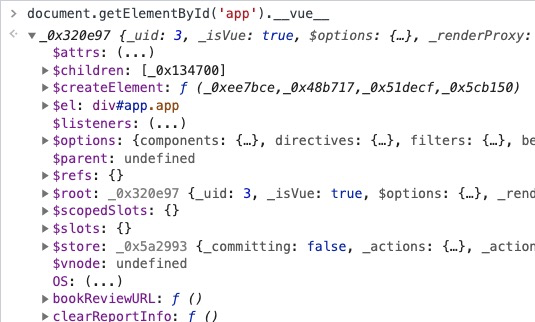
没错,确实有 __vue__属性,这里我用的选择器是 app,但是不同网站使用的不一定是 app,vue 实例会挂载到任意 DOM 上,为了更通用,我们可以遍历一下所有的节点:
- const all = document.querySelectorAll('*');
- let el
- for (let i = 0; i < all.length; i++) {
- if (all[i].__vue__) {
- el = all[i]
- break
- }
- }
- if (el) {
- console.log('use vue', el);
- var Vue = Object.getPrototypeOf(el.__vue__).constructor
- while (Vue.super) {
- Vue = Vue.super
- }
- console.log(Vue.version);
- }
- else {
- console.log('not use vue');
- }

把这段脚本放到浏览器的 Console 中执行即可以看到使用的 Vue 版本:
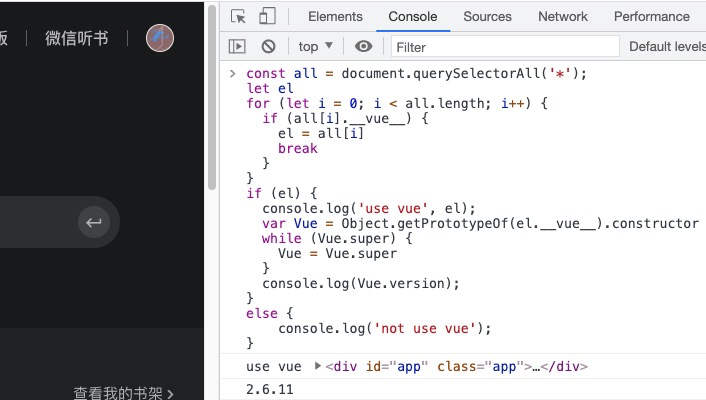
一切进行的很顺利,直到我打开 vue 浏览器插件的时候,发现原来人家插件就可以检测到网站使用的是不是 Vue,我不是多此一举吗!
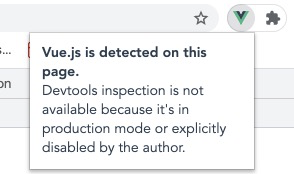
但是不能看到开发模式下类似下面的调试信息:
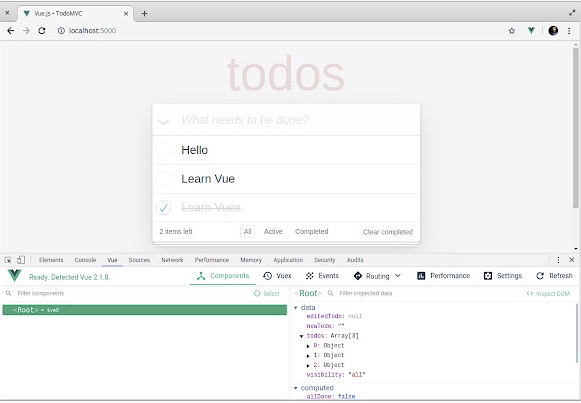
那我能不能把这个调试信息打开,可以偷窥下别人是如何使用 Vue 的,不然真的就白折腾了。
找到 vue-devtools 的源码,发现它检测是否使用 vue 代码如下(我上面那段代码其实是抄它的):
- const all = document.querySelectorAll('*')
- let el
- for (let i = 0; i < all.length; i++) {
- if (all[i].__vue__) {
- el = all[i]
- break
- }
- }
- if (el) {
- var Vue = Object.getPrototypeOf(DOM.__vue__).constructor
- while (Vue.super) {
- Vue = Vue.super
- }
- win.postMessage({
- devtoolsEnabled: Vue.config.devtools,
- vueDetected: true
- }, '*')
- }
经过一番查看后发现,通过下面这段代码控制是否显示调试 Vue 面板:
- chrome.devtools.inspectedWindow.eval(
- '!!(window.__VUE_DEVTOOLS_GLOBAL_HOOK__.Vue || window.__VUE_DEVTOOLS_GLOBAL_HOOK__.apps.length)',
- function (hasVue) {
- if (!hasVue || created) {
- return
- }
- clearInterval(checkVueInterval)
- created = true
- chrome.devtools.panels.create(
- 'Vue', 'icons/128.png', 'devtools.html',
- panel => {
- // panel loaded
- panel.onShown.addListener(onPanelShown)
- panel.onHidden.addListener(onPanelHidden)
- }
- )
- }
- )
那我其实只要在 window 下添加 __VUE_DEVTOOLS_GLOBAL_HOOK__.Vue = Vue 即可让调试面板显示出来。
对我上面的脚本进行改造:
- const all = document.querySelectorAll('*');
- let el
- for (let i = 0; i < all.length; i++) {
- if (all[i].__vue__) {
- el = all[i]
- break
- }
- }
- if (el) {
- console.log('use vue', el);
- var Vue = Object.getPrototypeOf(el.__vue__).constructor
- while (Vue.super) {
- Vue = Vue.super
- }
- Vue.config.devtools = true;
- window.__VUE_DEVTOOLS_GLOBAL_HOOK__.Vue = Vue;
- console.log(Vue.version);
- }
- else {
- console.log('not use vue');
- }
如果把这段代码放到浏览器的 Console 中执行,并不会起作用。我们需要放到浏览器插件 Tampermonkey 中执行, 它可自动在网站中注入一些脚本。脚本写法如下:
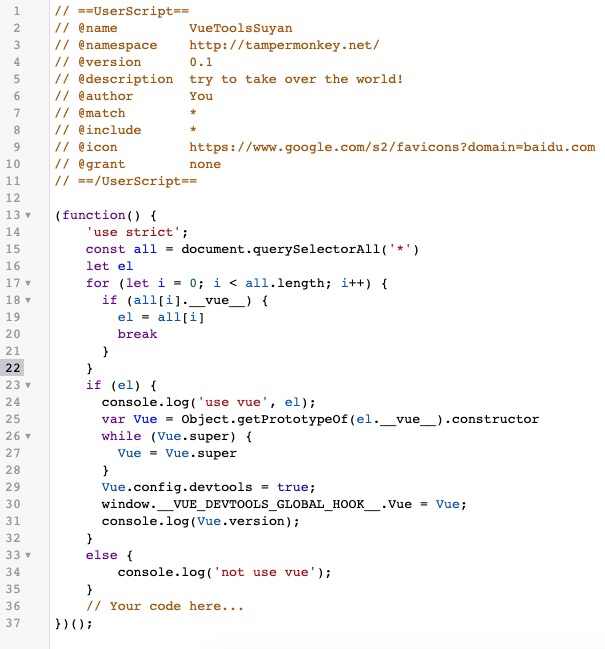
脚本准备好后,重启浏览器,效果如下:

再看看 B 站的:
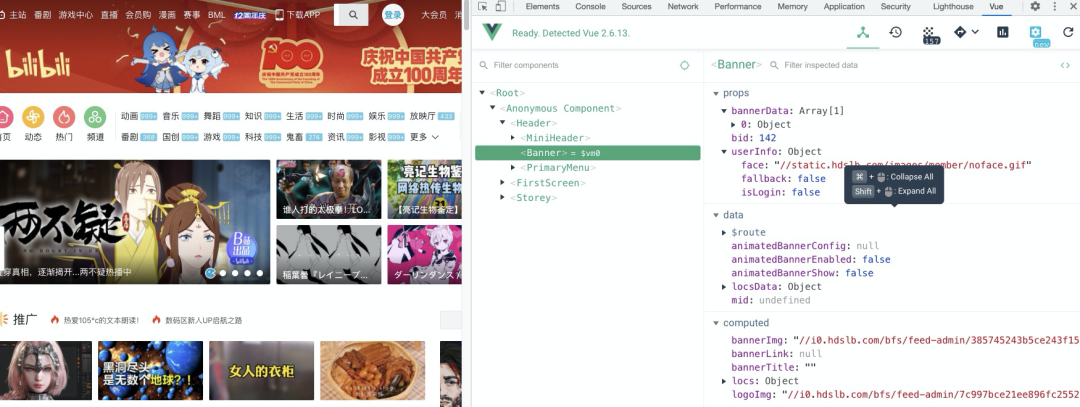
到此,可以把使用网站的 vue 调试面板显示出来了。同理,检测网站是不是使用的是 React,也很简单,大家有兴趣试试。关于 Tampermonkey ,我会在后面的文章给大家介绍,非常牛逼。
大家加油!

长按关注
素燕《前端小课》
帮助 10W 人入门并进阶前端
官网:https://lefex.gitee.io/

