
热门标签
热门文章
- 1matlab学习指南(2):安装工具箱Toolbox的方法(详细图解)_matlab toolbox
- 2【数据分析大作业 爬虫+数据清洗+可视化分析】Python抓取视频评论并生成词云、情感指数柱状图、性别比例饼图及评论信息表格_python数据分析大作业
- 3【IDEA】idea一直处于scanning files to index状态然后闪退_idea indexing 闪退
- 4Android 样式小结_在程序的res/values/styles.xml文件中创建一个名为hline的样式与一个名为vli
- 5YOLOv7教程系列:一、基于自定义数据集训练专属于自己的目标检测模型(保姆级教程,含数据集预处理),包含对train.py/test.py/detect.py/export.py详细说明_yolov7 export.py
- 6【AIGC】一款离线版的AI智能换脸工具V2.0分享(支持图片、视频、直播)
- 7mysql命令练习_mysql查询年龄大于18
- 8ENFP型人格的特征分析(mbti性格测试)_怎么测自己是enfp
- 9单元测试系列 | 如何更好地测试依赖外部接口的方法_单元测试依赖
- 10【Golang】go编程语言适合哪些项目开发?
当前位置: article > 正文
04-JAVA常用API-时间相关类_java格林时间api
作者:编程变革者 | 2024-01-30 20:23:30
赞
踩
java格林时间api
前言
全世界的时间有一个统一的计算标准.
世界标准时间:Greenwich Mean Time 格林尼治时间/格林威治时间 简称GMT
目前世界标准时间UTC已经替换为:原子钟
中国标准时间:世界标准时间+8小时
时间换算单位:一秒等于一千毫秒 一毫秒等于一千微秒 一微秒等于一千纳秒
Date时间类:
Date类是一个JDK写好的JavaBean类,用来描述时间,精确到毫秒.
利用空参构造创建的对象,默认表示系统当前时间.
利用有参构造创建的对象,表示指定的时间.
- public class demo1 {
- private long time;//当前时间的毫秒值
-
- public demo1() {//空参构造方法
- this.time = System.currentTimeMillis();
- }
-
- public demo1(long time) {//带参构造方法
- this.time = time;
- }
-
- public long getTime() {//get方法
- return time;
- }
-
- public void setTime(long time) {//set方法
- this.time = time;
- }
- }

- //1.创建对象表示一个时间
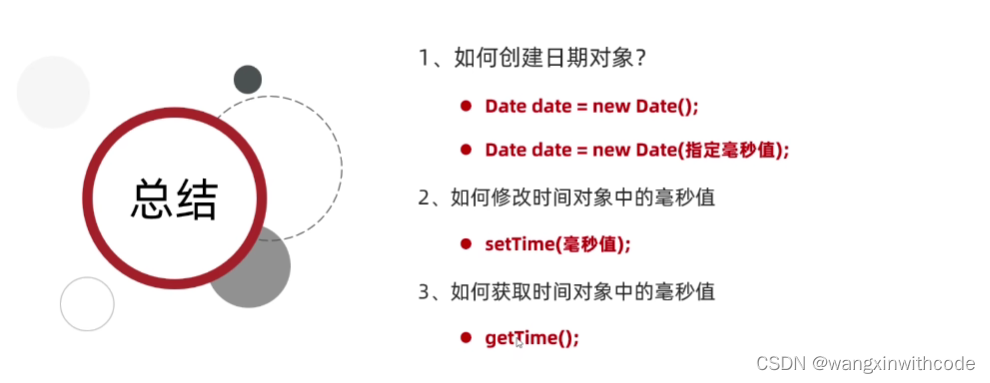
- Date d1 = new Date();
- System.out.println(d1);
- //2.创建对象表示一个指定的对象
- Date d2 = new Date(0L);
- System.out.println(d2);
- //3.settime修改时间
- d2.setTime(1000L);
- System.out.println(d2);
- //4.gettime获取当前时间的毫秒值
- long time = d2.getTime();
- System.out.println(time);
练习:
需求一:打印时间原点开始一年后的时间
- Date d1 = new Date(0L);
- //2.获取d1时间的毫秒值
- long time = d1.getTime();
- //3.在这个基础上我们加上一年的毫秒值
- time = time + 1000L * 60 * 60 * 24 * 365;
- //4.把计算之后的时间毫秒值,再设置回d1当中
- d1.setTime(time);
- System.out.println(d1);
需求二:定义任意两个Date对象,比较一下那个时间段在前,哪个时间在后
- Random r = new Random();
- Date d1 = new Date(Math.abs(r.nextInt()));
- Date d2 = new Date(Math.abs(r.nextInt()));
- System.out.println(d1);
- System.out.println(d2);
- long time1 = d1.getTime();
- long time2 = d2.getTime();
- if (time1 > time2) {
- System.out.println("time1>time2");
- } else if (time1 < time2) {
- System.out.println(time1 < time2);
- } else {
- System.out.println(time1 = time2);
- }
SimpleDateFormat类作用:
格式化:把时间变成我们喜欢的样式.
解析:把字符串表示的时间变成Date对象
| 构造方法 | 说明 |
| public SimpleDateFormat() | 构造一个SimpleDateFormat,使用默认格式 |
| public SimpleDateFormat(String pattern) | 构造一个SimpleDateFormat,使用指定的格式 |
| 常用方法 | 说明 |
| public final String format(Date date) | 格式化(时间对象->字符串) |
| public Date parse(String source) | 解析(字符串->日期对象) |
格式化的时间形式的常用的模式对应关系如下:


- //利用空参构造创建SimpleDateFormat对象,默认格式
- SimpleDateFormat sdf1 = new SimpleDateFormat();
- Date d1 = new Date();
- String str1 = sdf1.format(d1);
- System.out.println(str1);
- //利用空参构造创建SimpleDateFormat对象,指定格式
- SimpleDateFormat sdf2 = new SimpleDateFormat("yyyy年mm月dd日 HH:mm:ss");
- String str2 = sdf2.format(d1);
- System.out.println(str2);
- //定义一个字符串表示时间
- String str = "2023年00月09日 21:00:51";
- //利用空间构造创建SimpleDateFormat对象
- //细节:创建对象的格式跟字符串的格式要一致
- SimpleDateFormat sdf = new SimpleDateFormat("yyyy年mm月dd日 HH:mm:ss");
- Date date = sdf.parse(str);
- //3.打印结果
- System.out.println(date.getTime());
- String str = "2000-11-11";
- SimpleDateFormat sdf = new SimpleDateFormat("yyyy-MM-dd");
- Date date = sdf.parse(str);
- SimpleDateFormat sdf1 = new SimpleDateFormat("yyyy年MM月dd日");
- String result = sdf1.format(date);
- System.out.println(result);
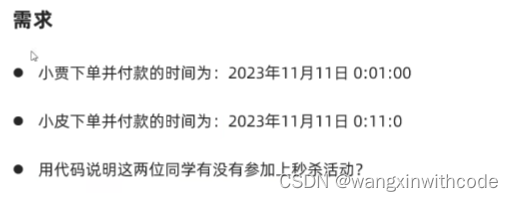
- //1.进行比较比较两个时间,比较下单时间和付款时间
- //转换成毫秒值
- String startTime = "2000-11-11 0:0:0";
- String endTime = "2000-11-12 0:0:0";
- String orderTime = "2000-11-11 0:0:0";
- SimpleDateFormat sdf = new SimpleDateFormat("yyyy-MM-DD");
- Date starttime = sdf.parse(startTime);
- Date endtime = sdf.parse(endTime);
- Date ordertime = sdf.parse(orderTime);
- long startstr = starttime.getTime();
- long endtstr = endtime.getTime();
- long orderstr = ordertime.getTime();
- if (orderstr>=startstr&&orderstr<=endtstr)
- {
- System.out.println("true");
- }else {
- System.out.println("false");
- }
Calender类的作用:
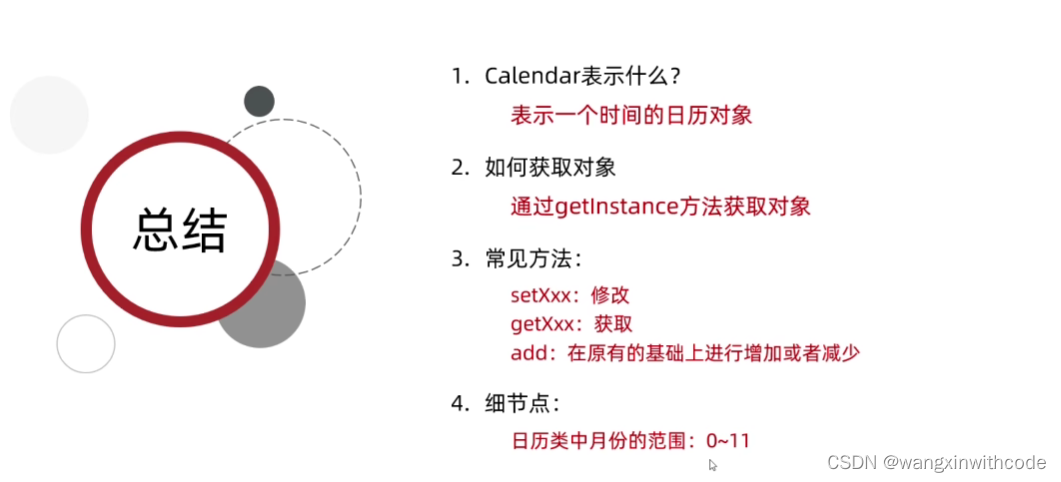
Calendar代表了系统当前的日历对象,可以单独修改,获取时间中的年月日
细节:Calendar是一个抽象类,不能直接创建对象.
获取calendar日历类对象的方法
| 方法名 | 说明 |
| public static Calendar getInstance() | 获取当前时间的日历对象 |
Calendar常用方法:
| 方法名 | 说明 |
| public final Date getTime() | 获取日期对象 |
| public final setTime(Date fate) | 给日历设置日期对象 |
| public long getTimeInMillis() | 拿到时间毫秒值 |
| public void setTimeInMillion(long million) | 给日历设置时间毫秒值 |
| public int get(int field) | 取日历中的某个字段信息 |
| public void set(int field,int value) | 修改日历的某个字段信息 |
| public void add(int field,int amount) | 为某个字段增加/减少指定的值 |
- //获取日历对象
- //calendar是一个抽象类,不能直接new,而是通过一个静态方法获取到子类对象.
- //底层原理:
- //根据系统不同时区来获取不同的日历对象,默认表示当前时间
- //会把时间中的纪元,年,月,日,时,分,秒等放到一个数组中
- //0:纪元
- //1:年
- //2.月
- //3:一年中第几周
- //4:一个月中的第几周
- //5:一个月的第几天
- //一共17个属性为0-16
- //Java为了防止我们忘记,把索引对应的数字定义成常量
- //细节2:
- //月份:范围是0_11 ,如果取出来的是1实际上是2月
- //星期:老外以星期日为第一天
- Calendar c = Calendar.getInstance();
- System.out.println(c);
- //2.修改日历代表的时间
- Date d= new Date(0L);
- c.setTime(d);
- System.out.println(c);
- //取日期中的某个字段信息
- int year = c.get(1);
- int month = c.get(Calendar.MONTH)+1;
- System.out.println(year);
- System.out.println(month);
- //修改日历的某个字段信息
-
- //为某个字段增加/减少指定的值
- }
- //查表法:表就是容器
- public static String getWeek(int dex){
- //定义一个数组,让汉字星期几 跟1-7产生对应关系
- String[] arr = {"7","1","2","3","4","5","6"};
- return arr[dex];
- }
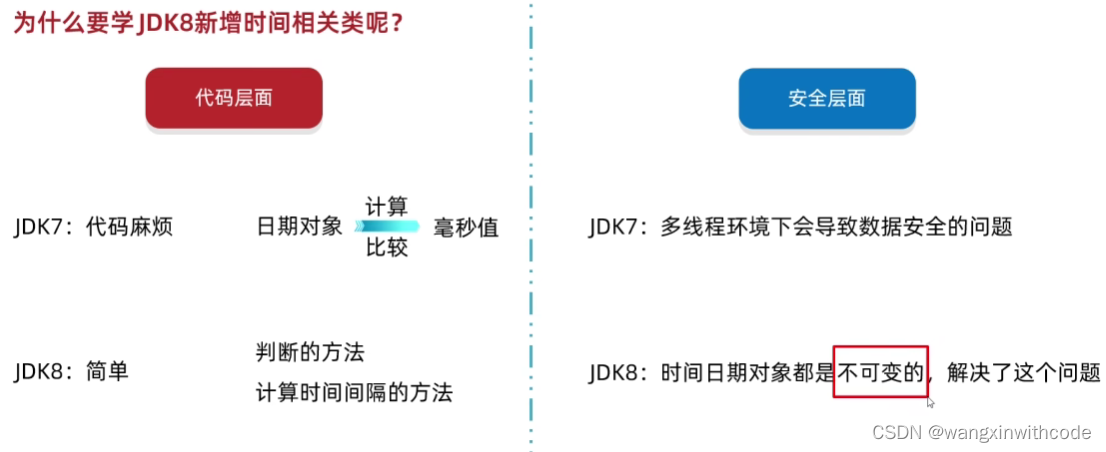
JDK8新增时间相关类

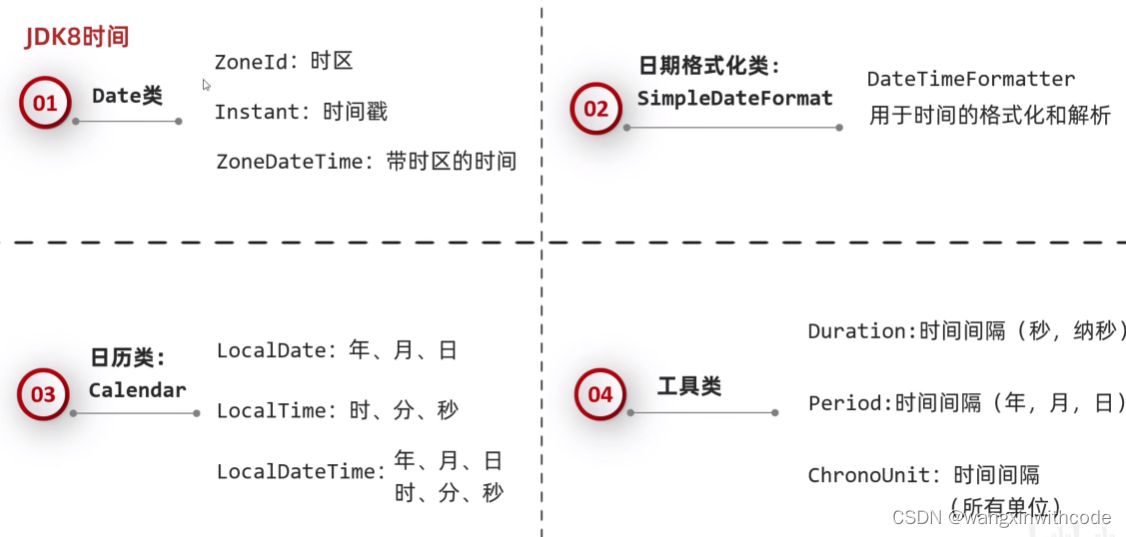
ZoneId时区:
| 方法名 | 说明 |
| static Set<string> getAvailableZoneIds() | 获取Java中支持的所有时区 |
| static ZoneId systemDefault() | 获取系统默认时区 |
| static ZoneId of(String zoneId) | 获取一个指定时区 |
- //1.获取所有时区名
- Set<String> zoneIds = ZoneId.getAvailableZoneIds();
- System.out.println(zoneIds.size());
- System.out.println(zoneIds);
- //2.获取系统默认时区
- ZoneId zoneId =ZoneId.systemDefault();
- System.out.println(zoneId);
- //3.获取一个指定时区
- ZoneId shanghai = ZoneId.of("Asia/Shanghai");
- System.out.println(shanghai);
Instant时间戳:
| 方法名 | 说明 |
| static Instant now() | 获取当前时间的instant对象(标准时间) |
| static Instant ofXxxx(long epochMilli) | 根据秒毫秒纳秒获取instant对象 |
| ZonedDateTime atZone(ZoneId zone) | 指定时区 |
| boolean isXxx(Instant otherInstant) | 判断系列的方法 |
| Instant minusXxx(long millisToSubtract) | 减少时间系列的方法 |
| Instant plusXxx(long millisToSubtract) | 增加时间系列的方法 |
- //1.获取当前时间的instant对象(标准时间)
- Instant now = Instant.now();
- System.out.println(now);
- //2.根据指定的毫秒值纳秒获取instant对象
- Instant instant1 = Instant.ofEpochMilli(0L);
- System.out.println(instant1);
- Instant instant2 = Instant.ofEpochSecond(1L);
- System.out.println(instant2);
- Instant instant3 = Instant.ofEpochSecond(1L, 1000000L);
- System.out.println(instant3);
- //3.指定时区
- ZonedDateTime time = Instant.now().atZone(ZoneId.of("Asia/Shanghai"));
- System.out.println(time);
- //4.判断系列的方法
- //ifbefore:判断调用者代表的时间是否在在参数表示时间的前面
- Instant instant4 = Instant.ofEpochMilli(0L);
- Instant instant5 = Instant.ofEpochMilli(10000L);
- boolean result = instant4.isBefore(instant5);
- //5.减少增加时间系列的方法
- Instant instant6 = Instant.ofEpochMilli(1111L);
- System.out.println(instant6);
- Instant instant7 = instant6.minusSeconds(1);
- System.out.println(instant7);
ZoneDateTime带时区的时间:
| 方法名 | 说明 |
| static ZonedDateTime now() | 获取当前时间ZonedDateTime对象 |
| static ZonedDateTime ofXxxx() | 获取指定时间的ZonedDateTime对象 |
| ZonedDateTime withXxx(time) | 修改时间系列的方法 |
| ZonedDateTime minusXxx(time) | 减少时间系列的方法 |
| ZonedDateTime plusXxx(time) | 增加时间系列的方法 |
- //1.获取当前时间的对象(带时区)
- ZonedDateTime now1 = ZonedDateTime.now();
- System.out.println(now1);
- //2.获取指定的时间对象(带时区)
- ZonedDateTime time2 = ZonedDateTime.of(2023, 10, 1, 11, 12, 12, 0, ZoneId.of("Asia/Shanghai"));
- System.out.println(time2);
- //3.通过instant+时区的方式指定获取时间对象
- Instant instant8 = Instant.ofEpochMilli(0L);
- ZoneId zoneid = ZoneId.of("Asia/Shanghai");
- ZonedDateTime time3 = ZonedDateTime.ofInstant(instant8, zoneid);
- System.out.println(time3);
-
- //3.withXxx修改时间系列的方法
- ZonedDateTime time4 = time3.withYear(2000);
- System.out.println(time3);
-
- //4.减少时间
- ZonedDateTime time5 = time3.minusYears(1);
- System.out.println(time5);
- //5.增加时间
- ZonedDateTime time6 = time5.plusYears(1);
- System.out.println(time5);
DateTimeFormatter用于时间的格式化和解析:
| 方法名 | 说明 |
| static DateTimeFormatter ofPattern(格式) | 获取格式对象 |
| String format(时间对象) | 按照指定方式格式化 |
- //获取时间对象
- ZonedDateTime time = Instant.now().atZone(ZoneId.of("Asia/Shanghai"))
- ;
- //解析/格式化器
- DateTimeFormatter dtf1 = DateTimeFormatter.ofPattern("yyyy-MM-dd HH:mm:ss EE a");
- //格式化
- System.out.println(dtf1.format(time));
LocalDate年月日:
LocalTime时分秒:
LocalDateTime年月日时分秒:
| 方法名 | 说明 |
| static XXX now() | 获取当前时间的对象 |
| static XXX of(...) | 获取指定时间的对象 |
| get开头的方法 | 获取日历中的年月日时分秒等信息 |
| isBefore,isAfter | 比较两个localdate |
| with开头的 | 修改时间系列的方法 |
| minus开头的 | 减少时间系列的方法 |
| plus开头的 | 增加时间系列的方法 |
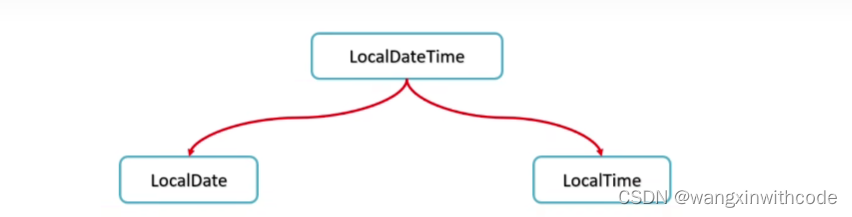
| 方法名 | 说明 |
| public LocalDate toLocalDate() | LocalDateTime转换成一个LocalDate对象 |
| public LocalTime toLocalTime() | LocalDateTime转换成一个LocalTime对象 |
- //1.获取当前时间的日历对象(包含 年月日)
- LocalDate nowDate = LocalDate.now();
- //System.out.println("今天的日期:" + nowDate);
- //2.获取指定的时间的日历对象
- LocalDate ldDate = LocalDate.of(2023, 1, 1);
- System.out.println("指定日期:" + ldDate);
-
- System.out.println("=============================");
-
- //3.get系列方法获取日历中的每一个属性值//获取年
- int year = ldDate.getYear();
- System.out.println("year: " + year);
- //获取月//方式一:
- Month m = ldDate.getMonth();
- System.out.println(m);
- System.out.println(m.getValue());
-
- //方式二:
- int month = ldDate.getMonthValue();
- System.out.println("month: " + month);
-
-
- //获取日
- int day = ldDate.getDayOfMonth();
- System.out.println("day:" + day);
-
- //获取一年的第几天
- int dayofYear = ldDate.getDayOfYear();
- System.out.println("dayOfYear:" + dayofYear);
-
- //获取星期
- DayOfWeek dayOfWeek = ldDate.getDayOfWeek();
- System.out.println(dayOfWeek);
- System.out.println(dayOfWeek.getValue());
-
- //is开头的方法表示判断
- System.out.println(ldDate.isBefore(ldDate));
- System.out.println(ldDate.isAfter(ldDate));
-
- //with开头的方法表示修改,只能修改年月日
- LocalDate withLocalDate = ldDate.withYear(2000);
- System.out.println(withLocalDate);
-
- //minus开头的方法表示减少,只能减少年月日
- LocalDate minusLocalDate = ldDate.minusYears(1);
- System.out.println(minusLocalDate);
-
-
- //plus开头的方法表示增加,只能增加年月日
- LocalDate plusLocalDate = ldDate.plusDays(1);
- System.out.println(plusLocalDate);
-
- //-------------
- // 判断今天是否是你的生日
- LocalDate birDate = LocalDate.of(2000, 1, 1);
- LocalDate nowDate1 = LocalDate.now();
-
- MonthDay birMd = MonthDay.of(birDate.getMonthValue(), birDate.getDayOfMonth());
- MonthDay nowMd = MonthDay.from(nowDate1);
-
- System.out.println("今天是你的生日吗? " + birMd.equals(nowMd));//今天是你的生日吗?
-
- // 获取本地时间的日历对象。(包含 时分秒)
- LocalTime nowTime = LocalTime.now();
- System.out.println("今天的时间:" + nowTime);
-
- int hour = nowTime.getHour();//时
- System.out.println("hour: " + hour);
-
- int minute = nowTime.getMinute();//分
- System.out.println("minute: " + minute);
-
- int second = nowTime.getSecond();//秒
- System.out.println("second:" + second);
-
- int nano = nowTime.getNano();//纳秒
- System.out.println("nano:" + nano);
- System.out.println("------------------------------------");
- System.out.println(LocalTime.of(8, 20));//时分
- System.out.println(LocalTime.of(8, 20, 30));//时分秒
- System.out.println(LocalTime.of(8, 20, 30, 150));//时分秒纳秒
- LocalTime mTime = LocalTime.of(8, 20, 30, 150);
-
- //is系列的方法
- System.out.println(nowTime.isBefore(mTime));
- System.out.println(nowTime.isAfter(mTime));
-
- //with系列的方法,只能修改时、分、秒
- System.out.println(nowTime.withHour(10));
-
- //plus系列的方法,只能修改时、分、秒
- System.out.println(nowTime.plusHours(10));
-
- // 当前时间的的日历对象(包含年月日时分秒)
- LocalDateTime nowDateTime = LocalDateTime.now();
-
- System.out.println("今天是:" + nowDateTime);//今天是:
- System.out.println(nowDateTime.getYear());//年
- System.out.println(nowDateTime.getMonthValue());//月
- System.out.println(nowDateTime.getDayOfMonth());//日
- System.out.println(nowDateTime.getHour());//时
- System.out.println(nowDateTime.getMinute());//分
- System.out.println(nowDateTime.getSecond());//秒
- System.out.println(nowDateTime.getNano());//纳秒
- // 日:当年的第几天
- System.out.println("dayofYear:" + nowDateTime.getDayOfYear());
- //星期
- System.out.println(nowDateTime.getDayOfWeek());
- System.out.println(nowDateTime.getDayOfWeek().getValue());
- //月份
- System.out.println(nowDateTime.getMonth());
- System.out.println(nowDateTime.getMonth().getValue());
-
- LocalDate ld = nowDateTime.toLocalDate();
- System.out.println(ld);
-
- LocalTime lt = nowDateTime.toLocalTime();
- System.out.println(lt.getHour());
- System.out.println(lt.getMinute());
- System.out.println(lt.getSecond());
Duration时间间隔(秒,纳秒):
用于计算两个时间间隔(秒,纳秒)
- // 本地日期时间对象。
- LocalDateTime today = LocalDateTime.now();
- System.out.println(today);
-
- // 出生的日期时间对象
- LocalDateTime birthDate = LocalDateTime.of(2000, 1, 1, 0, 0, 0);
- System.out.println(birthDate);
-
- Duration duration = Duration.between(birthDate, today);//第二个参数减第一个参数
- System.out.println("相差的时间间隔对象:" + duration);
-
- System.out.println("============================================");
- System.out.println(duration.toDays());//两个时间差的天数
- System.out.println(duration.toHours());//两个时间差的小时数
- System.out.println(duration.toMinutes());//两个时间差的分钟数
- System.out.println(duration.toMillis());//两个时间差的毫秒数
- System.out.println(duration.toNanos());//两个时间差的纳秒数
Period时间间隔(年月日):
用于计算两个日期间隔(年月日)
- // 当前本地 年月日
- LocalDate today = LocalDate.now();
- System.out.println(today);
-
- // 生日的 年月日
- LocalDate birthDate = LocalDate.of(2000, 1, 1);
- System.out.println(birthDate);
-
- Period period = Period.between(birthDate, today);//第二个参数减第一个参数
-
- System.out.println("相差的时间间隔对象:" + period);
- System.out.println(period.getYears());
- System.out.println(period.getMonths());
- System.out.println(period.getDays());
-
- System.out.println(period.toTotalMonths());
ChronoUnit时间间隔(所有单位):
用于计算两个日期间隔
- // 当前时间
- LocalDateTime today = LocalDateTime.now();
- System.out.println(today);
- // 生日时间
- LocalDateTime birthDate = LocalDateTime.of(2000, 1, 1,
- 0, 0, 0);
- System.out.println(birthDate);
-
- System.out.println("相差的年数:" + ChronoUnit.YEARS.between(birthDate, today));
- System.out.println("相差的月数:" + ChronoUnit.MONTHS.between(birthDate, today));
- System.out.println("相差的周数:" + ChronoUnit.WEEKS.between(birthDate, today));
- System.out.println("相差的天数:" + ChronoUnit.DAYS.between(birthDate, today));
- System.out.println("相差的时数:" + ChronoUnit.HOURS.between(birthDate, today));
- System.out.println("相差的分数:" + ChronoUnit.MINUTES.between(birthDate, today));
- System.out.println("相差的秒数:" + ChronoUnit.SECONDS.between(birthDate, today));
- System.out.println("相差的毫秒数:" + ChronoUnit.MILLIS.between(birthDate, today));
- System.out.println("相差的微秒数:" + ChronoUnit.MICROS.between(birthDate, today));
- System.out.println("相差的纳秒数:" + ChronoUnit.NANOS.between(birthDate, today));
- System.out.println("相差的半天数:" + ChronoUnit.HALF_DAYS.between(birthDate, today));
- System.out.println("相差的十年数:" + ChronoUnit.DECADES.between(birthDate, today));
- System.out.println("相差的世纪(百年)数:" + ChronoUnit.CENTURIES.between(birthDate, today));
- System.out.println("相差的千年数:" + ChronoUnit.MILLENNIA.between(birthDate, today));
- System.out.println("相差的纪元数:" + ChronoUnit.ERAS.between(birthDate, today));
声明:本文内容由网友自发贡献,不代表【wpsshop博客】立场,版权归原作者所有,本站不承担相应法律责任。如您发现有侵权的内容,请联系我们。转载请注明出处:https://www.wpsshop.cn/article/detail/49164
推荐阅读
![[ 云计算 | AWS 实践 ] 使用 Java 更新现有 Amazon S3 对象](https://img-blog.csdnimg.cn/direct/f6b4b45ef01445aa9a147e7c5f1a8f15.png?x-oss-process=image/resize,m_fixed,h_300,image/format,png)



相关标签

