
热门标签
热门文章
- 1docker-compose安装elk6.8.8_take_file_ownership="true
- 2科大讯飞星火认知大模型实在是太牛逼了吧,可以和人类进行自然交流,解答问题,高效完成各领域认知智能需求。
- 310种动态进度条用css3实现_css3 进度条动画
- 4Windows系统进程_windows服务中的进程本地登录
- 5Android 系统源码以及结构_手机系统的底层代码
- 6盘点网络虚拟化技术 软件定义网络时代到来
- 7【转载】Python 修改DataFrame列名的四种方法_8、将以上dataframe的列名改为:英文/中文
- 8Spring的Bean实例化_spring实例化bean的时候会实例化所有的bean吗
- 9致IDP技术博客亲爱的读者们
- 10虚拟机的vmem lck到底是个啥玩意 用虚拟机很有可能一不小心就把虚拟机搞崩了如何解决_重新安装vm虚拟机后还是会生成lck文件
当前位置: article > 正文
linux将本地库JAR批量导入到Nexus3.x_本地库的所有jar上传到nexus3
作者:代码艺术家 | 2024-01-30 19:40:40
赞
踩
本地库的所有jar上传到nexus3
linux将本地库JAR批量导入到Nexus3.x
1、问题描述
(1)由于公司的研发环境迁移到N网的不能联网,不过本地仓库已经有很多的 maven 的 jar 包了,便想将其从本地仓库导入到N网 Nexus 私服中。
(2)Nexus2.x 批量导入本地库是十分容易的,只需将库文件夹复制到对应 nexus 库下面,去网页刷新一下索引就OK了。在 Nexus3.x 中,我们可以很方便的使用 shell 脚本进行批量导入jar包。
2、搭建Nexus私服
2.1、官网下载:
地址:https://help.sonatype.com/repomanager3/product-information/download
2.2、上传并解压
tar -zxvf nexus-3.25.1-04-unix.tar.gz
- 1
2.3、修改默认端口
部署环境上一般要求五位端口号,这里把默认端口(8081)改为28081
# 进入etc文件夹
cd  /opt/nexus-3.25.1-04/etc
# 修改配置
vi nexus-default.properties
# 更改端口号 port
application-port=28081
- 1
- 2
- 3
- 4
- 5
- 6
2.4、修改内存分配:
# 进入bin目录
cd /opt/nexus-3.25.1-04/bin
# 可自行调整配置 nexus.vmoptions
vi nexus.vmoptions
- 1
- 2
- 3
- 4
2.5、启动服务
必须有JDK环境,该节点已经部署过JDK8环境,此处略过安装JDKJ的步骤;
# 启动命令 &为后台启动:
./nexus run & 也可以改为./nexus start &
- 1
- 2
2.6、访问页面
http://ip+端口,或者http://ip+端口/nexus3 进入nexus3的管理页面
首次访问页面,点击右上角 Sign In,会提示初始admin的密码文件路径
cat /opt/sonatype-work/nexus3/admin.password
- 1
3、创建本地快照仓库
创建maven仓库,用存放本地已经下好的jar包
3.1、选择创建maven仓库
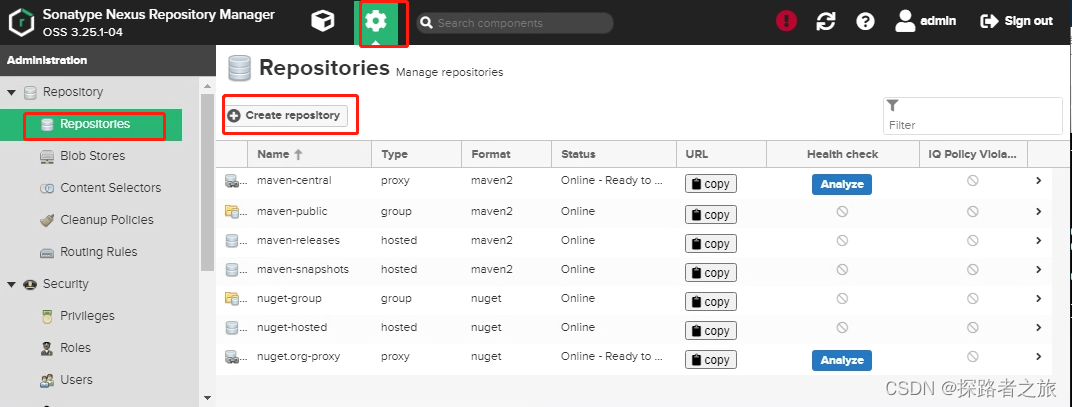
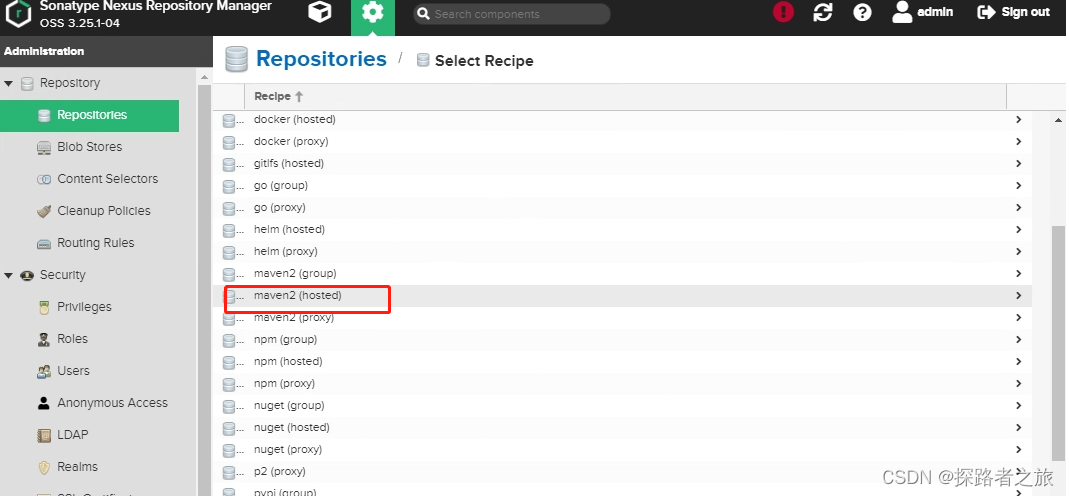
3.2、配置仓库的相关信息(仓库名随意)
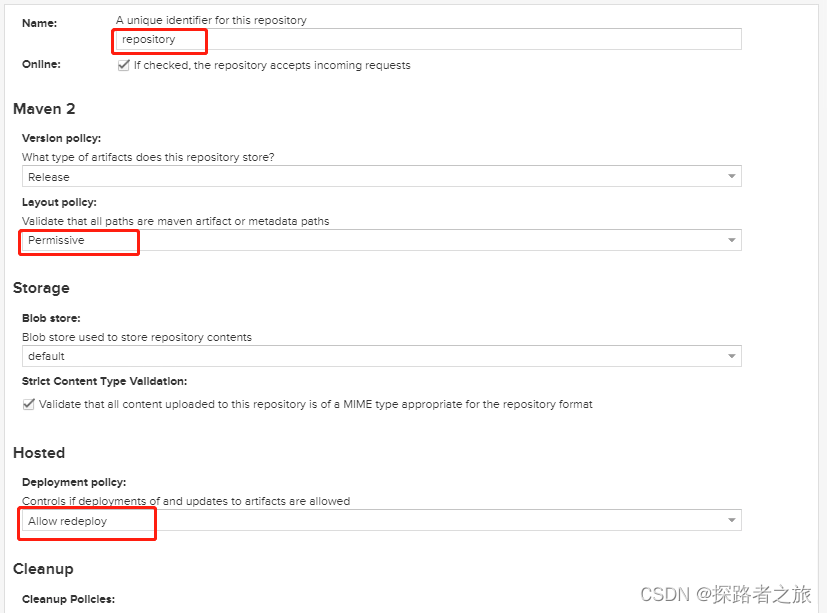
3.3、上传JAR包到服务器
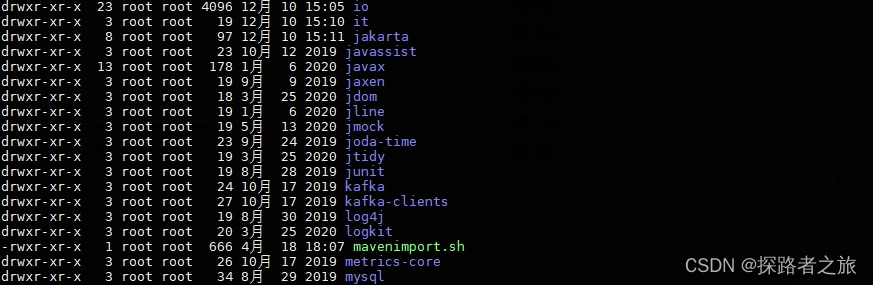
将个人PC端本地已经下载好的jar包并上传到Linux服务器上

# 将仓库打包文件上传到服务上并解压
unzip repository.zip
- 1
- 2
3.4、创建shell脚本文件
vi mavenimport.sh
- 1
#!/bin/bash
# copy and run this script to the root of the repository directory containing files
# this script attempts to exclude uploading itself explicitly so the script name is important
# Get command line params

while getopts ":r:u:p:" opt; do
 case $opt in
     r) REPO_URL="$OPTARG"
     ;;
     u) USERNAME="$OPTARG"
     ;;
     p) PASSWORD="$OPTARG"
     ;;
 esac
done

find . -type f -not -path './mavenUpload\.sh*' -not -path '*/\.*' -not -path '*/\^archetype\-catalog\.xml*' -not -path '*/\^maven\-metadata\-local*\.xml' -not -path '*/\^maven\-metadata\-deployment*\.xml' | sed "s|^\./||" | xargs -I '{}' curl -u "$USERNAME:$PASSWORD" -X PUT -v -T {} ${REPO_URL}/{} ;

- 1
- 2
- 3
- 4
- 5
- 6
- 7
- 8
- 9
- 10
- 11
- 12
- 13
- 14
- 15
- 16
- 17
3.5、推送jar到私服
# 脚本授权
chmod +x mavenimport.sh
# 执行脚本
./mavenimport.sh -u admin -p Admin123 -r http://172.16.24.163:28081/repository/repository/
- 1
- 2
- 3
- 4
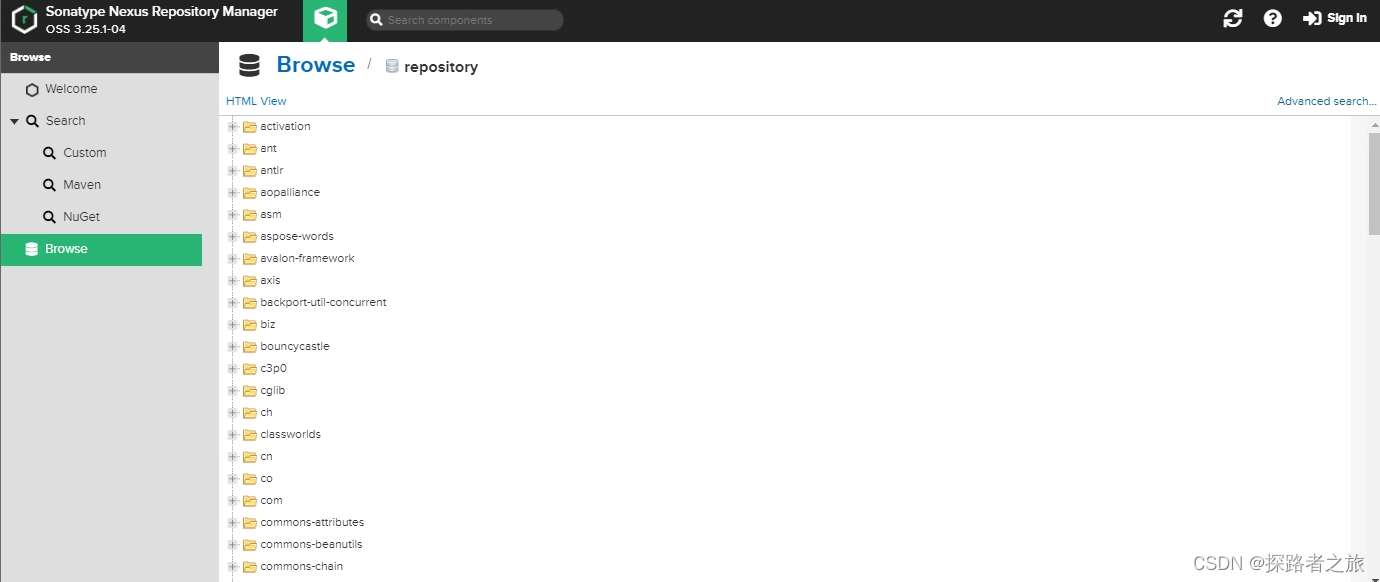
3.6、脚本执行完后刷新nexus页面
4、修改开发环境的镜像来源
修改 apache-maven-3.6.1/conf /settings.xml
<?xml version="1.0" encoding="UTF-8"?>
<settings xmlns="http://maven.apache.org/SETTINGS/1.0.0"
          xmlns:xsi="http://www.w3.org/2001/XMLSchema-instance"
          xsi:schemaLocation="http://maven.apache.org/SETTINGS/1.0.0 http://maven.apache.org/xsd/settings-1.0.0.xsd">

<localRepository>D:/Program Files/repository</localRepository>
<servers>

    <!-- server
     配置私服账号,允许匿名访问忽略了此处
    <server>
      <id>nexus3-mave</id>
      <username>admin</username>
      <password>Admin123</password>
    </server>
    -->
  </servers>
<mirrors>
    <!-- 增加maven私服地址 -->
    <mirror>
       <id>nexus3-mave</id>
       <mirrorOf>nexus3-mave</mirrorOf>
       <url>http://172.16.24.163:28081/repository/repository//</url>
    </mirror>

    <!-- 以下是公网maven仓库地址,N网无法使用,暂且保留 -->
   <mirror>
      <id>alimaven</id>
       <name>aliyun maven</name>
       <url>http://maven.aliyun.com/nexus/content/groups/public/</url>
      <mirrorOf>central</mirrorOf>
   </mirror>
   <mirror>
        <id>central</id>
        <name>Maven Repository Switchboard</name>
        <url>http://repo1.maven.org/maven2/</url>
        <mirrorOf>central</mirrorOf></mirror>
    <mirror>
        <id>repo2</id>
        <mirrorOf>central</mirrorOf>
        <name>Human Readable Name for this Mirror.</name>
        <url>http://repo2.maven.org/maven2/</url>
   </mirror>
   <mirror>
        <id>ibiblio</id>
        <mirrorOf>central</mirrorOf>
        <name>Human Readable Name for this Mirror.</name>
        <url>http://mirrors.ibiblio.org/pub/mirrors/maven2/</url>
    </mirror>
    <!-- 中央仓库在中国的镜像 -->
    <mirror>
        <id>maven.net.cn</id>
        <name>oneof the central mirrors in china</name>
        <url>http://maven.net.cn/content/groups/public/</url>
        <mirrorOf>central</mirrorOf>
    </mirror>
  </mirrors>
</settings>
- 1
- 2
- 3
- 4
- 5
- 6
- 7
- 8
- 9
- 10
- 11
- 12
- 13
- 14
- 15
- 16
- 17
- 18
- 19
- 20
- 21
- 22
- 23
- 24
- 25
- 26
- 27
- 28
- 29
- 30
- 31
- 32
- 33
- 34
- 35
- 36
- 37
- 38
- 39
- 40
- 41
- 42
- 43
- 44
- 45
- 46
- 47
- 48
- 49
- 50
- 51
- 52
- 53
- 54
- 55
- 56
- 57
- 58
5"Missing artifact......"的解决办法
在使用Maven开发时,会碰到一些问题,例如“Missing artifact xxx.xxx.jar",而通过下面的方式进行解决。
-
1、确认本地repository相应目录中是否下载好了对应的包,检查文件大小,尝试删除重新下载;
-
2、检查maven私服是否有对应的jar,不存在还需上传到私服。(N网开发就这点不方便)
声明:本文内容由网友自发贡献,不代表【wpsshop博客】立场,版权归原作者所有,本站不承担相应法律责任。如您发现有侵权的内容,请联系我们。转载请注明出处:https://www.wpsshop.cn/article/detail/48728
推荐阅读

相关标签

