
热门标签
热门文章
- 1在无GUI环境下(headless模式)配置并使用Python+selenium+chromium/firefox的流程_selenium+headless firefox 需要下载firefox吗?
- 2ONLYOFFICE:兼顾协作与安全的开源办公套件
- 3[Python从零到壹] 五十九.图像增强及运算篇之图像锐化Scharr、Canny、LOG实现边缘检测_图像使用canny使得增强后的图像
- 4微信小程序---缓慢展开和收起效果(不需要wx:if控制实现)_微信小程序点击展开效果动画
- 5*++p、++*p、(*p)++、*(p++)、*p++的区别
- 6Spring Boot 笔记 012 创建接口_添加文章分类
- 7sklearn中的聚类算法K-Means_sklearn kmeans
- 8midjourney指令笔记+踩坑日记+gpt论文润色指令_mj 提示:--stylize must be between 1250 and 5000 with
- 9EXCEL数据分析的基本知识_excel画图叫什么分析
- 10基于nodejs+vue地方特色的风景文化宣传网站vscode_前端地区宣传网页
当前位置: article > 正文
如何批量上传Maven仓库jar包到Nexus3.x私服_maven批量上传jar到私仓
作者:编程冒险家 | 2024-01-30 19:18:12
赞
踩
maven批量上传jar到私仓
一、手动mvn命令上传单个Jar
mvn deploy:deploy-file -DgroupId=com.oracle -DartifactId=ojdbc6 -Dversion=10.2.0.1.0 -Dpackaging=jar -Dfile=D:\\ojdbc6.jar -Durl=http://ip:8081/repository/maven-releases/ -DrepositoryId=nexus二、批量上传maven仓库所有jar包
1.先将本地maven/repository仓库打一个完整的zip压缩包
2.上传到linux目录,如:/opt
3.解压repository.zip
4.进入repository目录
5.创建touch mavenimport.sh脚本,写入以下内容;
- #!/bin/bash
- # copy and run this script to the root of the repository directory containing files
- # this script attempts to exclude uploading itself explicitly so the script name is important
- # Get command line params
-
- while getopts ":r:u:p:" opt; do
- case $opt in
- r) REPO_URL="$OPTARG"
- ;;
- u) USERNAME="$OPTARG"
- ;;
- p) PASSWORD="$OPTARG"
- ;;
- esac
- done
-
- find . -type f -not -path './mavenimport\.sh*' -not -path '*/\.*' -not -path '*/\^archetype\-catalog\.xml*' -not -path '*/\^maven\-metadata\-local*\.xml' -not -path '*/\^maven\-metadata\-deployment*\.xml' | sed "s|^\./||" | xargs -I '{}' curl -u "$USERNAME:$PASSWORD" -X PUT -v -T {} ${REPO_URL}/{} ;

6.输入chmod a+x mavenimport.sh进行可执行授权
7.执行导入命令
./mavenimport.sh -u admin -p admin123 -r http://ip:8081/repository/maven-releases/
8.等待全部导入完毕后,在Nexus上刷新即可看到已导入的jar
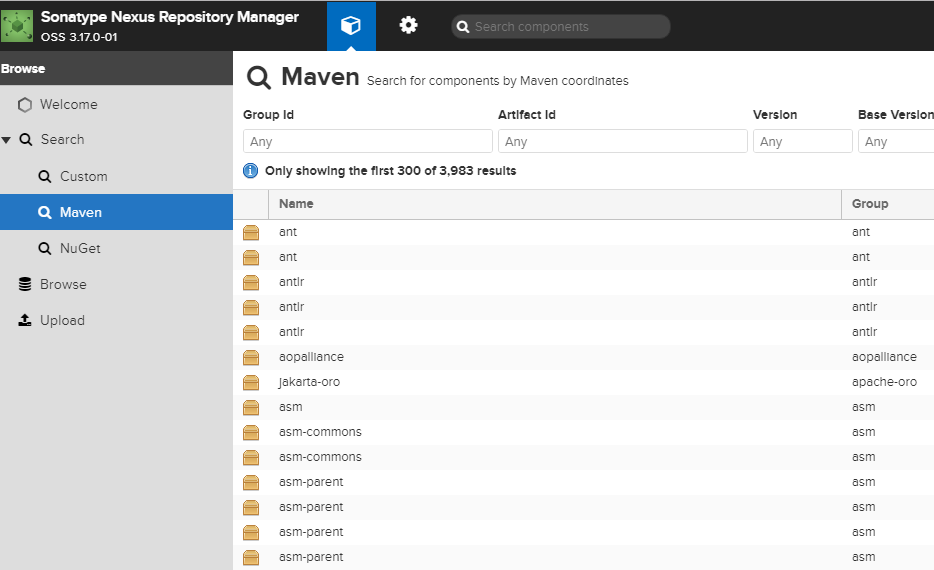
三、Nexus3界面上传jar包

声明:本文内容由网友自发贡献,不代表【wpsshop博客】立场,版权归原作者所有,本站不承担相应法律责任。如您发现有侵权的内容,请联系我们。转载请注明出处:https://www.wpsshop.cn/article/detail/48398
推荐阅读

相关标签

