
- 1SpringBoot实现登陆注册(附源码)_spring boot登录页面设计代码
- 2mitmdump的使用及踩坑记录
- 3如何保护linux服务器远程使用的安全
- 4AI对比:ChatGPT与文心一言的异同与未来
- 5XCTF:Normal_RSA[WriteUP]
- 6软件测试面试问答
- 7【Ubuntu】配置 Jetson Nano 基础环境(一)_jetson nano ubuntu pyserial配置
- 8初识C语言之——static修饰变量及函数的认知。_c语言static修饰函数
- 9nvidia driver、cuda、cudnn、nvidia-docker 安装、配置和部署(Ubuntu 18.04 LTS)_nvidia docker 版本
- 10获取微信聊天窗口的小程序入口参数_vba 微信扫码
Easyx | 游戏实例:见缝插针_python创建见缝插针小游戏的流程图
赞
踩
目录
游戏简介
见缝插针是一个经典的休闲小游戏,操作简单,图形简洁,写起来也十分容易。试试就逝世
本文介绍使用 C++ 的 Easyx图形库 来实现见缝插针。思路如下:
1. 初始化
2. 插入新的针(顺带判断游戏失败)
3. 移动针
4. 绘制屏幕
5. 主页界面
6. 扩展功能:音效、调整速度
因为这个游戏比较简单,所以步骤也比较少。
开始编写
1 预编译
- #include <stdio.h>
- #include <conio.h>
- #include <math.h>
- #include <graphics.h>
- #pragma comment(lib, "winmm.lib")
- #define HEIGHT 800
- #define WIDTH 900
- #define PI 3.1415926
- #define PIN_L 120.0
- #define RADIO 120
stdio.h 用 sprintf_s 函数进行格式化字符数组;
conio.h 用来接受用户键盘输入;
math.h 调用 sin 和 cos 函数计算针末端的坐标;
graphics.h EasyX 图形库的头文件;
pragma 这行指令用于加载播放音乐的静态库;
HEIGHT , WIDTH 分别表示窗口的高和宽;
PI 表示圆周率的常量;
PIN_L 表示针的长度(用小数是因为它要和小数运算);
RADIO 表示圆的半径。
2 初始化
全局变量
- float pin_angle[1000];
- int pin_num = 0;
- float speed = PI / 360;
pin_angle 所有针的角度;
pin_num 针的数量;
speed 旋转速度。
初始化函数
每一局游戏开始的时候调用就行了
- void Init()
- {
- pin_num = 0;
- speed = PI / 360;
- }
3 插入新的针
检测键盘
利用 _kbhit() 和 _getch() 函数检测用户是否按下了空格键 (speed != 0 是判断游戏有没有结束)
- if (_kbhit() && speed != 0)
- {
- char input = _getch();
- if (input == ' ')
- {
- // 按下空格键
- }
- }
新的针
把这根针的角度设为 PI
- // 增加一根针
- pin_num++;
- pin_angle[pin_num - 1] = PI;
判断游戏失败
简单说,就是判断新的针跟任何其他针的角度差是否小于一定的值,这里的标准是 PI / 40
- // 是否重合
- for (int i = 0; i < pin_num - 1; i++)
- {
- if (absent(pin_angle[i], pin_angle[pin_num - 1]) < (PI / 40))
- {
- speed = 0;
- return;
- }
- }
这里的 absent 函数需要自己定义,因为角度都是浮点数类型,所以不能用 abs 函数取差。
- / 取差的绝对值
- float absent(float a, float b)
- {
- if (a > b) return a - b;
- else return b - a;
- }
CreatePin 函数
- // 发射针
- void CreatePin()
- {
- if (_kbhit() && speed != 0)
- {
- char input = _getch();
- if (input == ' ')
- {
- // 增加一根针
- pin_num++;
- pin_angle[pin_num - 1] = PI;
-
- // 是否重合
- for (int i = 0; i < pin_num - 1; i++)
- {
- if (absent(pin_angle[i], pin_angle[pin_num - 1]) < (PI / 40))
- {
- speed = 0;
- return;
- }
- }
- }
- }
- }

4 移动针
很简单,每根针的角度增加速度,如果转了一圈,角度重新归零。
- // 移动针
- void MovePin()
- {
- for (int i = 0; i < pin_num; i++)
- {
- pin_angle[i] += speed;
- if (pin_angle[i] > 2 * PI)
- {
- pin_angle[i] -= 2 * PI;
- }
- }
- }
5 绘制屏幕
直接上重点——
针
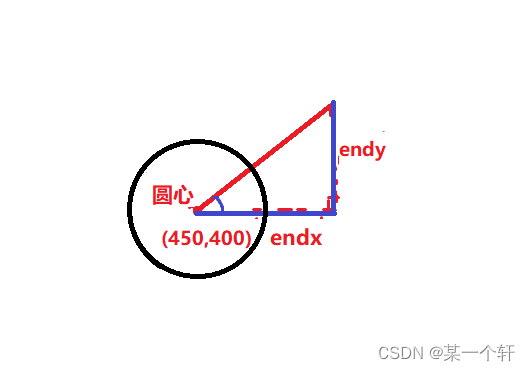
endx, endy 所表示的量如图,是直角三角形的直角边。
根据三角几何:
endy = sin(角度) (邻边除以斜边) × 斜边
endx = cos(角度) (对边除以斜边) × 斜边
然后再根据坐标绘制线
- // 针
- setlinecolor(RGB(20, 130, 255));
- line(0, HEIGHT / 2, PIN_L, HEIGHT / 2);
- for (int i = 0; i < pin_num; i++)
- {
- float endx = (PIN_L + RADIO) * cos(-pin_angle[i]) + WIDTH / 2;
- float endy = (PIN_L + RADIO) * sin(-pin_angle[i]) + HEIGHT / 2;
- setlinecolor(RGB(20, 130, 255));
- setfillcolor(RGB(20, 130, 255));
- if (i == pin_num - 1)
- {
- setlinecolor(RED);
- setfillcolor(RED);
- }
- line(WIDTH / 2, HEIGHT / 2, endx, endy);
- fillcircle(endx, endy, 10);
- }
其实真的绘制并不复杂,只需要亿点数学知识。
圆
没什么好说的……
- // 圆
- setlinecolor(RGB(20, 130, 255));
- setfillcolor(RGB(70, 180, 255));
- setlinestyle(PS_SOLID, 3);
- fillcircle(WIDTH / 2, HEIGHT / 2, RADIO);
得分
这里要用一个函数:sprintf_s
它的作用就是格式化输出一串东西,只不过是打印到字符数组里面,跟 printf 一个样。
- // 得分
- char text[20];
- sprintf_s(text, "%d", pin_num);
- setbkcolor(RGB(70, 180, 255));
- settextcolor(WHITE);
- settextstyle(50, 20, "宋体");
- outtextxy(WIDTH / 2 - 20, HEIGHT / 2 - 15, text);
按钮
我在游戏界面设置了两个按钮,分别是 返回主页 和 退出游戏 。
实现方法:
1. 画出长方形以及文字;
2. 检测鼠标按下并且坐标在按钮范围中。
在绘制屏幕的这一部分,只需要实现第一步就行了。
- // 按钮
- setlinecolor(RGB(20, 130, 255));
- roundrect(180, 10, 290, 60, 10, 10);
- settextstyle(30, 13, "楷体");
- outtextxy(185, 20, "返回主页");
- roundrect(300, 10, 410, 60, 10, 10);
- outtextxy(305, 20, "退出游戏");
Draw 函数
- void Draw()
- {
- // 针
- setlinecolor(RGB(20, 130, 255));
- line(0, HEIGHT / 2, PIN_L, HEIGHT / 2);
- for (int i = 0; i < pin_num; i++)
- {
- float endx = (PIN_L + RADIO) * cos(-pin_angle[i]) + WIDTH / 2;
- float endy = (PIN_L + RADIO) * sin(-pin_angle[i]) + HEIGHT / 2;
- setlinecolor(RGB(20, 130, 255));
- setfillcolor(RGB(20, 130, 255));
- if (i == pin_num - 1)
- {
- setlinecolor(RED);
- setfillcolor(RED);
- }
- line(WIDTH / 2, HEIGHT / 2, endx, endy);
- fillcircle(endx, endy, 10);
- }
-
- // 圆
- setlinecolor(RGB(20, 130, 255));
- setfillcolor(RGB(70, 180, 255));
- setlinestyle(PS_SOLID, 3);
- fillcircle(WIDTH / 2, HEIGHT / 2, RADIO);
-
- // 得分
- char text[20];
- sprintf_s(text, "%d", pin_num);
- setbkcolor(RGB(70, 180, 255));
- settextcolor(WHITE);
- settextstyle(50, 20, "宋体");
- outtextxy(WIDTH / 2 - 20, HEIGHT / 2 - 15, text);
-
- // 标题
- settextcolor(RGB(20, 130, 255));
- setbkcolor(RGB(150, 230, 255));
- settextstyle(45, 20, "隶书");
- outtextxy(10, 10, "见缝插针");
-
- // 按钮
- setlinecolor(RGB(20, 130, 255));
- roundrect(180, 10, 290, 60, 10, 10);
- settextstyle(30, 13, "楷体");
- outtextxy(185, 20, "返回主页");
- roundrect(300, 10, 410, 60, 10, 10);
- outtextxy(305, 20, "退出游戏");
- }
主页界面
显示一行字 “见缝插针” ,再放两个按钮。
- // 主页
- void Home()
- {
- BeginBatchDraw();
- while (true)
- {
- setbkcolor(RGB(150, 230, 255));
- cleardevice();
-
- settextcolor(RGB(20, 130, 255));
- settextstyle(130, 55, "隶书");
- outtextxy(230, 150, "见缝插针");
-
- setlinecolor(RGB(20, 130, 255));
- setlinestyle(PS_SOLID, 3);
- roundrect(350, 350, 550, 420, 10, 10);
- settextstyle(45, 20, "楷体");
- outtextxy(370, 360, "开始游戏");
- roundrect(350, 460, 550, 530, 10, 10);
- outtextxy(370, 470, "退出游戏");
-
- MOUSEMSG msg = GetMouseMsg();
- if (msg.uMsg == WM_LBUTTONDOWN)
- {
- if (msg.x >= 350 && msg.x <= 550)
- {
- if (msg.y >= 350 && msg.y <= 420)
- {
- break;
- }
- if (msg.y >= 460 && msg.y <= 530)
- {
- closegraph();
- exit(0);
- }
- }
- }
- FlushBatchDraw();
- }
- EndBatchDraw();
- }
Main 函数
- int main()
- {
- initgraph(WIDTH, HEIGHT);
- while (true)
- {
- Home();
- Init();
- BeginBatchDraw();
- while (true)
- {
- setbkcolor(RGB(150, 230, 255));
- cleardevice();
- CreatePin();
- MovePin();
- Draw();
- if (MouseHit())
- {
- MOUSEMSG msg = GetMouseMsg();
- if (msg.uMsg == WM_LBUTTONDOWN)
- {
- if (msg.y >= 10 && msg.y <= 60)
- {
- if (msg.x >= 180 && msg.x <= 290)
- {
- break;
- }
- if (msg.x >= 300 && msg.x <= 410)
- {
- closegraph();
- exit(0);
- }
- }
- }
- }
- FlushBatchDraw();
- Sleep(10);
- if (speed == 0)
- {
- break;
- }
- }
- EndBatchDraw();
- }
- return 0;
- }
扩展功能
音效
上一篇文章我讲过,这里我懒得讲了
ready go音效_站长素材ready go音效_站长素材 https://sc.chinaz.com/yinxiao/150112584240.htmgame over游戏声_站长素材game over游戏声_站长素材https://sc.chinaz.com/yinxiao/130130363410.htm在 speed == 0 判断处加入:
- PlaySound(".\\Game Over.wav", NULL, SND_ASYNC | SND_FILENAME);
- Sleep(1000);
在 Init 函数调用的后面,即游戏开始前,加入:
- cleardevice();
- Draw();
- PlaySound(".\\Ready Go.wav", NULL, SND_ASYNC | SND_FILENAME);
- Sleep(1000);
调整速度
根据得分,速度不断增加
- // 调整速度
- void ChangeSpeed()
- {
- if (speed == 0) return;
- if (pin_num <= 10) speed = PI / 360;
- else if (pin_num <= 30) speed = PI / 240;
- else if (pin_num <= 50) speed = PI / 180;
- else if (pin_num <= 70) speed = PI / 120;
- else if (pin_num <= 100) speed = PI / 60;
- else speed = PI / 50;
- }
文章最后有完整代码!
效果截图
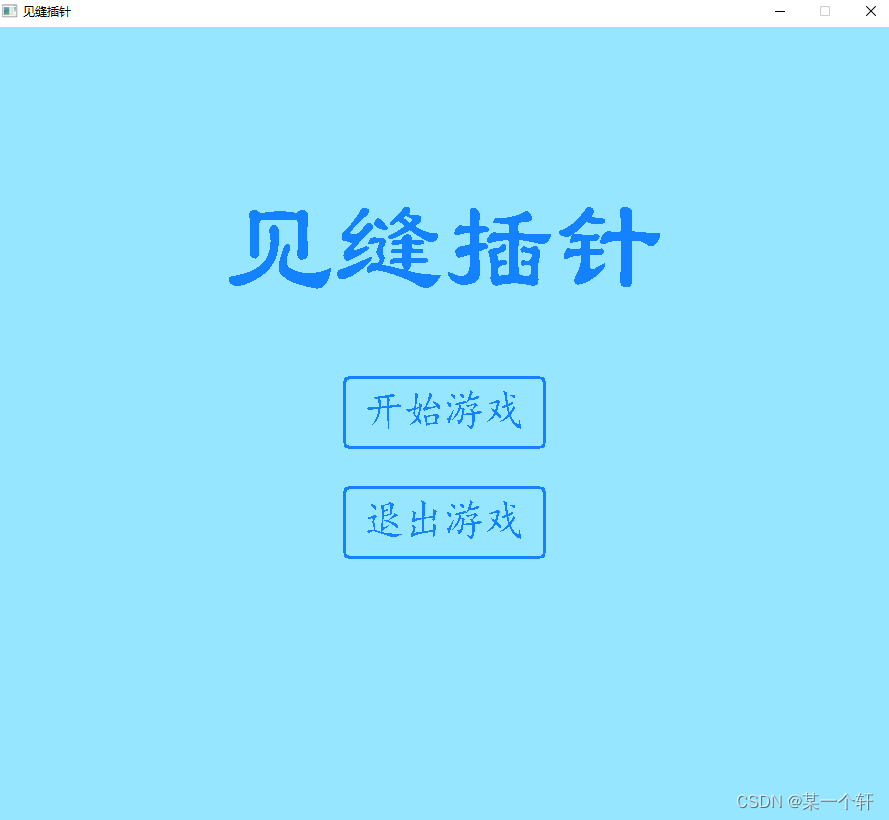
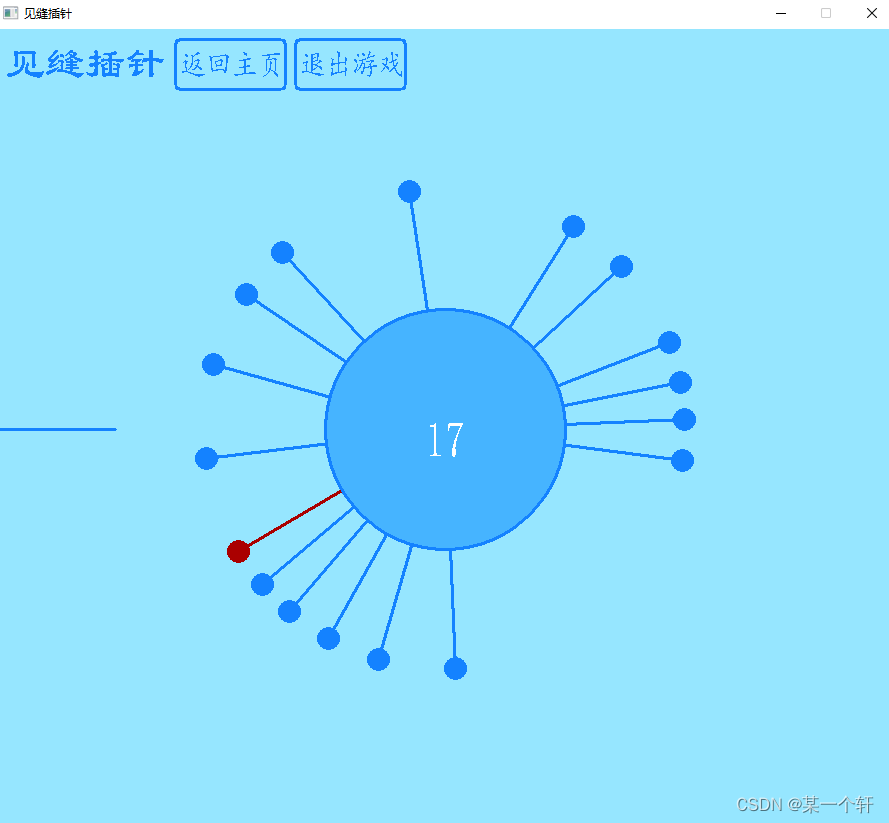
完整代码
- /*
- * 项目名称:见缝插针
- * 开发环境:vs2022 + Easyx
- * 作者:轩
- * 代码长度:232 行
- * 完成时间:2023.1.8
- * 用时:2 小时
- */
-
- #include <stdio.h>
- #include <conio.h>
- #include <math.h>
- #include <graphics.h>
- #pragma comment(lib, "winmm.lib")
- #define HEIGHT 800
- #define WIDTH 900
- #define PI 3.1415926
- #define PIN_L 120.0
- #define RADIO 120
-
- float pin_angle[1000];
- int pin_num = 0;
- float speed = PI / 360;
-
-
- // 取差的绝对值
- float absent(float a, float b)
- {
- if (a > b) return a - b;
- else return b - a;
- }
-
- // 主页
- void Home()
- {
- BeginBatchDraw();
- while (true)
- {
- setbkcolor(RGB(150, 230, 255));
- cleardevice();
-
- settextcolor(RGB(20, 130, 255));
- settextstyle(130, 55, "隶书");
- outtextxy(230, 150, "见缝插针");
-
- setlinecolor(RGB(20, 130, 255));
- setlinestyle(PS_SOLID, 3);
- roundrect(350, 350, 550, 420, 10, 10);
- settextstyle(45, 20, "楷体");
- outtextxy(370, 360, "开始游戏");
- roundrect(350, 460, 550, 530, 10, 10);
- outtextxy(370, 470, "退出游戏");
-
- MOUSEMSG msg = GetMouseMsg();
- if (msg.uMsg == WM_LBUTTONDOWN)
- {
- if (msg.x >= 350 && msg.x <= 550)
- {
- if (msg.y >= 350 && msg.y <= 420)
- {
- break;
- }
- if (msg.y >= 460 && msg.y <= 530)
- {
- closegraph();
- exit(0);
- }
- }
- }
- FlushBatchDraw();
- }
- EndBatchDraw();
- }
-
- void Init()
- {
- pin_num = 0;
- speed = PI / 360;
- }
-
- // 调整速度
- void ChangeSpeed()
- {
- if (speed == 0) return;
- if (pin_num <= 10) speed = PI / 360;
- else if (pin_num <= 30) speed = PI / 240;
- else if (pin_num <= 50) speed = PI / 180;
- else if (pin_num <= 70) speed = PI / 120;
- else if (pin_num <= 100) speed = PI / 60;
- else speed = PI / 50;
- }
-
- // 移动针
- void MovePin()
- {
- for (int i = 0; i < pin_num; i++)
- {
- pin_angle[i] += speed;
- if (pin_angle[i] > 2 * PI)
- {
- pin_angle[i] -= 2 * PI;
- }
- }
- }
-
- // 绘制
- void Draw()
- {
- // 针
- setlinecolor(RGB(20, 130, 255));
- line(0, HEIGHT / 2, PIN_L, HEIGHT / 2);
- for (int i = 0; i < pin_num; i++)
- {
- float endx = (PIN_L + RADIO) * cos(-pin_angle[i]) + WIDTH / 2;
- float endy = (PIN_L + RADIO) * sin(-pin_angle[i]) + HEIGHT / 2;
- setlinecolor(RGB(20, 130, 255));
- setfillcolor(RGB(20, 130, 255));
- if (i == pin_num - 1)
- {
- setlinecolor(RED);
- setfillcolor(RED);
- }
- line(WIDTH / 2, HEIGHT / 2, endx, endy);
- fillcircle(endx, endy, 10);
- }
-
- // 圆
- setlinecolor(RGB(20, 130, 255));
- setfillcolor(RGB(70, 180, 255));
- setlinestyle(PS_SOLID, 3);
- fillcircle(WIDTH / 2, HEIGHT / 2, RADIO);
-
- // 得分
- char text[20];
- sprintf_s(text, "%d", pin_num);
- setbkcolor(RGB(70, 180, 255));
- settextcolor(WHITE);
- settextstyle(50, 20, "宋体");
- outtextxy(WIDTH / 2 - 20, HEIGHT / 2 - 15, text);
-
- // 标题
- settextcolor(RGB(20, 130, 255));
- setbkcolor(RGB(150, 230, 255));
- settextstyle(45, 20, "隶书");
- outtextxy(10, 10, "见缝插针");
-
- // 按钮
- setlinecolor(RGB(20, 130, 255));
- roundrect(180, 10, 290, 60, 10, 10);
- settextstyle(30, 13, "楷体");
- outtextxy(185, 20, "返回主页");
- roundrect(300, 10, 410, 60, 10, 10);
- outtextxy(305, 20, "退出游戏");
- }
-
- // 发射针
- void CreatePin()
- {
- if (_kbhit() && speed != 0)
- {
- char input = _getch();
- if (input == ' ')
- {
- // 增加一根针
- pin_num++;
- pin_angle[pin_num - 1] = PI;
-
- // 是否重合
- for (int i = 0; i < pin_num - 1; i++)
- {
- if (absent(pin_angle[i], pin_angle[pin_num - 1]) < (PI / 40))
- {
- speed = 0;
- return;
- }
- }
- }
- }
- }
-
- int main()
- {
- initgraph(WIDTH, HEIGHT);
- while (true)
- {
- Home();
- Init();
- cleardevice();
- Draw();
- PlaySound(".\\Ready Go.wav", NULL, SND_ASYNC | SND_FILENAME);
- Sleep(1000);
- BeginBatchDraw();
- while (true)
- {
- setbkcolor(RGB(150, 230, 255));
- cleardevice();
- CreatePin();
- MovePin();
- ChangeSpeed();
- Draw();
- if (MouseHit())
- {
- MOUSEMSG msg = GetMouseMsg();
- if (msg.uMsg == WM_LBUTTONDOWN)
- {
- if (msg.y >= 10 && msg.y <= 60)
- {
- if (msg.x >= 180 && msg.x <= 290)
- {
- break;
- }
- if (msg.x >= 300 && msg.x <= 410)
- {
- closegraph();
- exit(0);
- }
- }
- }
- }
- FlushBatchDraw();
- Sleep(10);
- if (speed == 0)
- {
- PlaySound(".\\Game Over.wav", NULL, SND_ASYNC | SND_FILENAME);
- Sleep(1000);
- break;
- }
- }
- EndBatchDraw();
- }
- return 0;
- }



