
- 1Flask框架开发博客网站_flask开发的网站有哪些
- 2Kubernetes Ingress诡异的502、503、504等奇葩问题(二)
- 32023十大编程语言及未来展望_编程语言排行榜2010-2023
- 4Kong工作原理 - 健康检查和断路器 - 定义健康和不健康
- 5关于ROS在一个回调函数中处理两个订阅话题消息(多话题回调、多参数回调问题)_ros 服务 回调函数多参数
- 6【送书福利-第二十五期】《机器学习高级实践》
- 7如何区分一个项目是react还react native_怎样查看项目是vue的还是react
- 8MySQL 实现多张无关联表查询数据并分页_mysql将三个表的数据一起查出来分页
- 9python云南昆明旅游景点数据可视化大屏全屏系统设计与实现(django框架)_利用django铺盖整个屏幕
- 10支持上亿物联网终端设备接入的MQTT集群
Telerik Kendo UI 那点事【2】中文化(汉化)_kando ui 汉化
赞
踩
CSDN上有一个引路蜂软件的博客,里面有kendo ui的一般用法。它那里讲过的我这里就不再继续重复。
由于框架设计的需要,后台使用spring,前台使用kendo ui构建页面。为了加快快发速度以及底层兼容性,义不容辞的,继续选择了hibernate作为数据库沟通的桥梁。spring方面的例子全网就更多了,主要采用spring注解方式的MVC配置,使用json数据映射器。
经过初步的使用,发现kendo ui的设计极为强大,其MVVM的特性与spring的MVC特性结合,配合hibernate开发系统时,如列表呈现之类的,几乎都不需要写什么查询代码。
另外其中文化已经有人托管了文件在GitHub,直接配置后即可使用。对于日期的格式化的问题,经过本人多次尝试,也在汉化文件中通过简单设置,解决全局日期设置问题。
下面就来详细介绍一下,如何达到上述效果:
一、中文化
本人的习惯,拿到不管是哪里的控件,第一是看demo炫不炫,代码量如何;第二就是看国际化支持,能不能支持中文语言字典文件之类的汉化,如果不能全局直接设置汉化,而是要逢用必改的话,那就一切免谈。kendo ui是过了我这两关。下面说下具体做法。
去下面这个网址,下载kendo.messages.zh-CN.js文件,就是kendo ui的中文国际化文件。
https://github.com/telerik/kendo-ui-core/tree/master/src/messages
内容如下:
- /* FlatColorPicker messages */
-
- if (kendo.ui.FlatColorPicker) {
- kendo.ui.FlatColorPicker.prototype.options.messages =
- $.extend(true, kendo.ui.FlatColorPicker.prototype.options.messages,{
- "apply": "确定",
- "cancel": "取消"
- });
- }
-
- /* ColorPicker messages */
-
- if (kendo.ui.ColorPicker) {
- kendo.ui.ColorPicker.prototype.options.messages =
- $.extend(true, kendo.ui.ColorPicker.prototype.options.messages,{
- "apply": "确定",
- "cancel": "取消"
- });
- }
-
- /* ColumnMenu messages */
-
- if (kendo.ui.ColumnMenu) {
- kendo.ui.ColumnMenu.prototype.options.messages =
- $.extend(true, kendo.ui.ColumnMenu.prototype.options.messages,{
- "sortAscending": "升序",
- "sortDescending": "降序",
- "filter": "过滤",
- "columns": "列",
- "done": "完成",
- "settings": "列设置",
- "lock": "锁定",
- "unlock": "解除锁定"
- });
- }
-
- /* Editor messages */
-
- if (kendo.ui.Editor) {
- kendo.ui.Editor.prototype.options.messages =
- $.extend(true, kendo.ui.Editor.prototype.options.messages,{
- "bold": "粗体",
- "italic": "斜体",
- "underline": "下划线",
- "strikethrough": "删除线",
- "superscript": "上标",
- "subscript": "下标",
- "justifyCenter": "居中",
- "justifyLeft": "左对齐",
- "justifyRight": "右对齐",
- "justifyFull": "两端对齐",
- "insertUnorderedList": "插入无序列表",
- "insertOrderedList": "插入有序列表",
- "indent": "增加缩进",
- "outdent": "减少缩进",
- "createLink": "插入链接",
- "unlink": "移除链接",
- "insertImage": "插入图片",
- "insertFile": "插入文件",
- "insertHtml": "插入 HTML",
- "viewHtml": "查看 HTML",
- "fontName": "选择字体",
- "fontNameInherit": "(继承的字体)",
- "fontSize": "选择字号",
- "fontSizeInherit": "(继承的字号)",
- "formatBlock": "格式化块",
- "formatting": "格式化",
- "foreColor": "颜色",
- "backColor": "背景色",
- "style": "风格",
- "emptyFolder": "文件夹为空",
- "uploadFile": "上传",
- "orderBy": "排序条件:",
- "orderBySize": "大小",
- "orderByName": "名字",
- "invalidFileType": "选中的文件 \"{0}\" 非法,支持的文件类型为 {1}。",
- "deleteFile": '您确定要删除 \"{0}\"?',
- "overwriteFile": '当前文件夹已存在文件名为 \"{0}\" 的文件,您确定要覆盖么?',
- "directoryNotFound": "此文件夹未找到",
- "imageWebAddress": "图片地址",
- "imageAltText": "替代文本",
- "imageWidth": "宽度 (px)",
- "imageHeight": "高度 (px)",
- "fileWebAddress": "文件地址",
- "fileTitle": "标题",
- "linkWebAddress": "链接地址",
- "linkText": "链接文字",
- "linkToolTip": "链接提示",
- "linkOpenInNewWindow": "在新窗口中打开",
- "dialogUpdate": "上传",
- "dialogInsert": "插入",
- "dialogButtonSeparator": "或",
- "dialogCancel": "取消",
- "createTable": "创建表格",
- "addColumnLeft": "左侧添加列",
- "addColumnRight": "右侧添加列",
- "addRowAbove": "上方添加行",
- "addRowBelow": "下方添加行",
- "deleteRow": "删除行",
- "deleteColumn": "删除列"
- });
- }
-
- /* FileBrowser messages */
-
- if (kendo.ui.FileBrowser) {
- kendo.ui.FileBrowser.prototype.options.messages =
- $.extend(true, kendo.ui.FileBrowser.prototype.options.messages,{
- "uploadFile": "上传",
- "orderBy": "排序条件",
- "orderByName": "名称",
- "orderBySize": "大小",
- "directoryNotFound": "此文件夹未找到",
- "emptyFolder": "文件夹为空",
- "deleteFile": '您确定要删除 \"{0}\"?',
- "invalidFileType": "选中的文件 \"{0}\" 非法,支持的文件类型为 {1}。",
- "overwriteFile": "当前文件夹已存在文件名为 \"{0}\" 的文件,您确定要覆盖么?",
- "dropFilesHere": "拖拽要上传的文件到此处",
- "search": "搜索"
- });
- }
-
- /* FilterMenu messages */
-
- if (kendo.ui.FilterMenu) {
- kendo.ui.FilterMenu.prototype.options.messages =
- $.extend(true, kendo.ui.FilterMenu.prototype.options.messages,{
- "info": "显示符合以下条件的行",
- "isTrue": "为真",
- "isFalse": "为假",
- "filter": "过滤",
- "clear": "清除",
- "and": "并且",
- "or": "或",
- "selectValue": "-选择-",
- "operator": "运算符",
- "value": "值",
- "cancel": "取消"
- });
- }
-
- /* Filter menu operator messages */
-
- if (kendo.ui.FilterMenu) {
- kendo.ui.FilterMenu.prototype.options.operators =
- $.extend(true, kendo.ui.FilterMenu.prototype.options.operators,{
- "string": {
- "eq": "等于",
- "neq": "不等于",
- "startswith": "开头为",
- "contains": "包含",
- "doesnotcontain": "不包含",
- "endswith": "结尾为"
- },
- "number": {
- "eq": "等于",
- "neq": "不等于",
- "gte": "大于等于",
- "gt": "大于",
- "lte": "小于等于",
- "lt": "小于"
- },
- "date": {
- "eq": "等于",
- "neq": "不等于",
- "gte": "大于等于",
- "gt": "大于",
- "lte": "小于等于",
- "lt": "小于"
- },
- "enum": {
- "eq": "等于",
- "neq": "不等于"
- }
- });
- }
-
-
- /* Gantt messages */
-
- if (kendo.ui.Gantt) {
- kendo.ui.Gantt.prototype.options.messages =
- $.extend(true, kendo.ui.Gantt.prototype.options.messages,{
- "views": {
- "day": "日",
- "week": "周",
- "month": "月"
- },
- "actions": {
- "append": "添加任务",
- "addChild": "添加子任务",
- "insertBefore": "添加到前面",
- "insertAfter": "添加到后面"
- }
- });
- }
-
- /* Grid messages */
-
- if (kendo.ui.Grid) {
- kendo.ui.Grid.prototype.options.messages =
- $.extend(true, kendo.ui.Grid.prototype.options.messages,{
- "commands": {
- "cancel": "取消",
- "canceledit": "取消",
- "create": "新增",
- "destroy": "删除",
- "edit": "编辑",
- "save": "保存",
- "select": "选择",
- "update": "更新"
- },
- "editable": {
- "cancelDelete": "取消",
- "confirmation": "确定要删除吗?",
- "confirmDelete": "删除"
- }
- });
- }
-
- /* Groupable messages */
-
- if (kendo.ui.Groupable) {
- kendo.ui.Groupable.prototype.options.messages =
- $.extend(true, kendo.ui.Groupable.prototype.options.messages,{
- "empty": "托拽列标题到此处按列组合显示"
- });
- }
-
- /* NumericTextBox messages */
-
- if (kendo.ui.NumericTextBox) {
- kendo.ui.NumericTextBox.prototype.options =
- $.extend(true, kendo.ui.NumericTextBox.prototype.options,{
- "upArrowText": "增加",
- "downArrowText": "减少"
- });
- }
-
- /* Pager messages */
-
- if (kendo.ui.Pager) {
- kendo.ui.Pager.prototype.options.messages =
- $.extend(true, kendo.ui.Pager.prototype.options.messages,{
- "display": "显示条目 {0} - {1} 共 {2}",
- "empty": "没有可显示的记录。",
- "page": "页",
- "of": "共 {0}",
- "itemsPerPage": "每页",
- "first": "首页",
- "last": "末页",
- "next": "下一页",
- "previous": "上一页",
- "refresh": "刷新",
- "morePages": "更多..."
- });
- }
-
- /* PivotGrid messages */
-
- if (kendo.ui.PivotGrid) {
- kendo.ui.PivotGrid.prototype.options.messages =
- $.extend(true, kendo.ui.PivotGrid.prototype.options.messages,{
- "measureFields": "拖放数据字段于此",
- "columnFields": "拖放列字段于此",
- "rowFields": "拖放行字段于此"
- });
- }
-
- /* RecurrenceEditor messages */
-
- if (kendo.ui.RecurrenceEditor) {
- kendo.ui.RecurrenceEditor.prototype.options.messages =
- $.extend(true, kendo.ui.RecurrenceEditor.prototype.options.messages,{
- "frequencies": {
- "never": "从不",
- "hourly": "每小时",
- "daily": "每天",
- "weekly": "每周",
- "monthly": "每月",
- "yearly": "每年"
- },
- "hourly": {
- "repeatEvery": "重复周期: ",
- "interval": " 小时"
- },
- "daily": {
- "repeatEvery": "重复周期: ",
- "interval": " 天"
- },
- "weekly": {
- "interval": " 周",
- "repeatEvery": "重复周期: ",
- "repeatOn": "重复于:"
- },
- "monthly": {
- "repeatEvery": "重复周期: ",
- "repeatOn": "重复于:",
- "interval": " 月",
- "day": "日期"
- },
- "yearly": {
- "repeatEvery": "重复周期: ",
- "repeatOn": "重复于: ",
- "interval": " 年",
- "of": " 月份: "
- },
- "end": {
- "label": "截止时间:",
- "mobileLabel": "截止时间",
- "never": "从不",
- "after": "重复 ",
- "occurrence": " 次后",
- "on": "止于 "
- },
- "offsetPositions": {
- "first": "第一",
- "second": "第二",
- "third": "第三",
- "fourth": "第四",
- "last": "最后"
- },
- "weekdays": {
- "day": "天",
- "weekday": "工作日",
- "weekend": "周末"
- }
- });
- }
-
-
- /* Scheduler messages */
-
- if (kendo.ui.Scheduler) {
- kendo.ui.Scheduler.prototype.options.messages =
- $.extend(true, kendo.ui.Scheduler.prototype.options.messages,{
- "today": "今天",
- "save": "保存",
- "cancel": "取消",
- "destroy": "删除",
- "deleteWindowTitle": "删除事件",
- "ariaSlotLabel": "选择从 {0:t} 到 {1:t}",
- "ariaEventLabel": "{0} on {1:D} at {2:t}",
- "views": {
- "day": "日",
- "week": "周",
- "workWeek": "工作日",
- "agenda": "日程",
- "month": "月"
- },
- "recurrenceMessages": {
- "deleteWindowTitle": "删除周期条目",
- "deleteWindowOccurrence": "删除当前事件",
- "deleteWindowSeries": "删除序列",
- "editWindowTitle": "修改周期条目",
- "editWindowOccurrence": "修改当前事件",
- "editWindowSeries": "修改序列"
- },
- "editor": {
- "title": "标题",
- "start": "起始",
- "end": "终止",
- "allDayEvent": "全天事件",
- "description": "描述",
- "repeat": "重复",
- "timezone": " ",
- "startTimezone": "起始时区",
- "endTimezone": "终止时区",
- "separateTimezones": "使用独立的起始和终止时区",
- "timezoneEditorTitle": "时区",
- "timezoneEditorButton": "时区",
- "timezoneTitle": "选择时区",
- "noTimezone": "无",
- "editorTitle": "事件"
- }
- });
- }
-
- /* Slider messages */
-
- if (kendo.ui.Slider) {
- kendo.ui.Slider.prototype.options =
- $.extend(true, kendo.ui.Slider.prototype.options,{
- "increaseButtonTitle": "增加",
- "decreaseButtonTitle": "减少"
- });
- }
-
- /* TreeView messages */
-
- if (kendo.ui.TreeView) {
- kendo.ui.TreeView.prototype.options.messages =
- $.extend(true, kendo.ui.TreeView.prototype.options.messages,{
- "loading": "加载中...",
- "requestFailed": "加载失败",
- "retry": "重试"
- });
- }
-
- /* Upload messages */
-
- if (kendo.ui.Upload) {
- kendo.ui.Upload.prototype.options.localization =
- $.extend(true, kendo.ui.Upload.prototype.options.localization,{
- "select": "选择...",
- "cancel": "取消",
- "retry": "重试",
- "remove": "移除",
- "uploadSelectedFiles": "上传文件",
- "dropFilesHere": "拖拽要上传的文件到此处",
- "statusUploading": "上传中",
- "statusUploaded": "已上传",
- "statusWarning": "警告",
- "statusFailed": "失败",
- "headerStatusUploading": "上传...",
- "headerStatusUploaded": "完成"
- });
- }
-
- /* Validator messages */
-
- if (kendo.ui.Validator) {
- kendo.ui.Validator.prototype.options.messages =
- $.extend(true, kendo.ui.Validator.prototype.options.messages,{
- "required": "{0} 为必填项",
- "pattern": "{0} 非法",
- "min": "{0} 应该大于或等于 {1}",
- "max": "{0} 应该小于或等于 {1}",
- "step": "{0} 非法",
- "email": "{0} 不是合法的邮件地址",
- "url": "{0} 不是合法的URL",
- "date": "{0} 不是合法的日期"
- });
- }
-
- if(Date){
- Date.prototype.toISOString = function () {
- return kendo.toString(this, "yyyy-MM-dd HH:mm:ss");
- };
- }

注意最后的这个if(Date),是本人自己加的。主要是为了解决日期控件得到的时间date对象序列化的问题,date对象在向后台通信时,由于后台是spring的MVC框架,所以参数都通过kendo.stringify(XX)方法,或者JSON.stringify(XX)方法进行序列化,会默认调用Date对象的toISOString方法来格式化Date对象。通过在中文化文件中对Date对象的toISOString进行重写,从而达到兼容Spring后台MVC的目的,传递Date对象。格式与spring后台MVC json视图映射器的Date日期格式一直。这样才能保证Date类型对象,前后台传递没有问题。从gitHub下载的原始文件中不包含此内容。
有了国际化文件,到底怎么用呢?非常简单,直接在页面头部引入即可!
- <%@ page language="java" pageEncoding="UTF-8"%>
- <%@ page contentType="text/html;charset=UTF-8"%>
- <%@taglib prefix="c" uri="http://java.sun.com/jsp/jstl/core"%>
- <!DOCTYPE html >
- <html>
- <head>
- <meta http-equiv="Content-Type" content="text/html; charset=utf-8" />
- <link href="<c:url value='/resources/styles/kendo.common.min.css'/>"
- rel="stylesheet" />
- <link href="<c:url value='/resources/styles/kendo.rtl.min.css'/>"
- rel="stylesheet" />
- <link href="<c:url value='/resources/styles/kendo.uniform.min.css'/>"
- rel="stylesheet" />
-
-
- <script src="<c:url value='/resources/js/jquery.min.js' />"></script>
- <script src="<c:url value='/resources/js/kendo.web.min.js' />"></script>
- <script
- src="<c:url value='/resources/js/messages/kendo.messages.zh-CN.js' />"></script>
- <script
- src="<c:url value='/resources/js/cultures/kendo.culture.zh-CN.min.js' />"></script>
- <script>
- kendo.culture("zh-CN");
- </script>
-
- </head>
- ………………
- ………………
- </html>
注意<head>标签的最后3个标签行,kendo.messages.zh-CN.js负责提供所有控件的中文标签信息,使得控件中文化。kendo.culture.zh-CN.min.js里主要是一些日期、货币符号、时间格式、时区等等,不同国家不同的格式配置信息,可以根据需要修改,不过kendo已经提供了中文的文件,不需要我们再做什么操作。
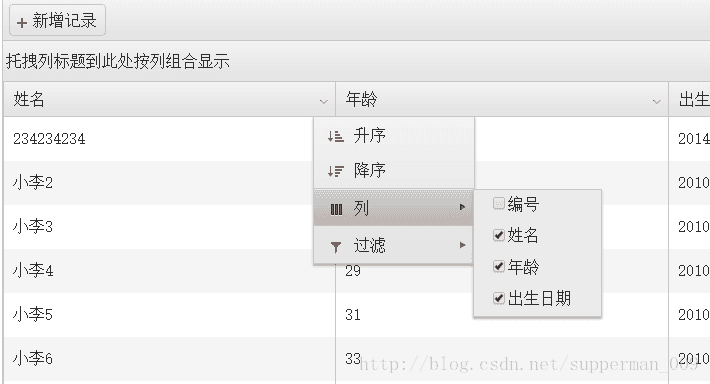
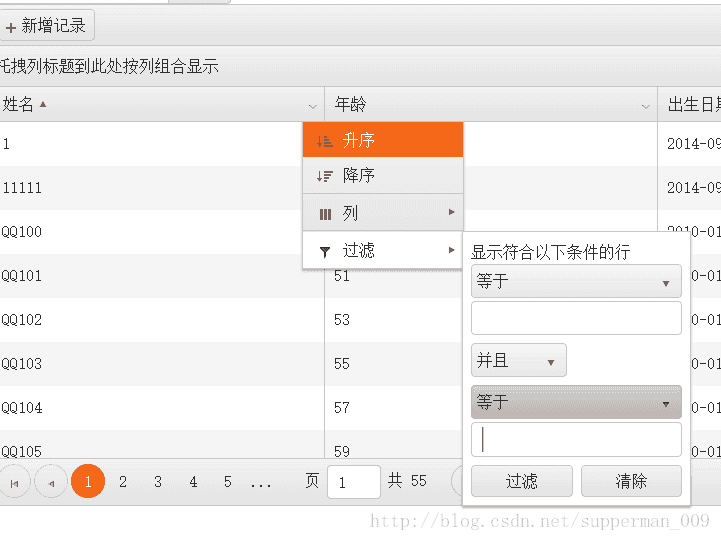
汉化后的Gridview效果,如上述两图所示。效果非常好,并且是全局的,无忧无虑!敬请的使用吧!
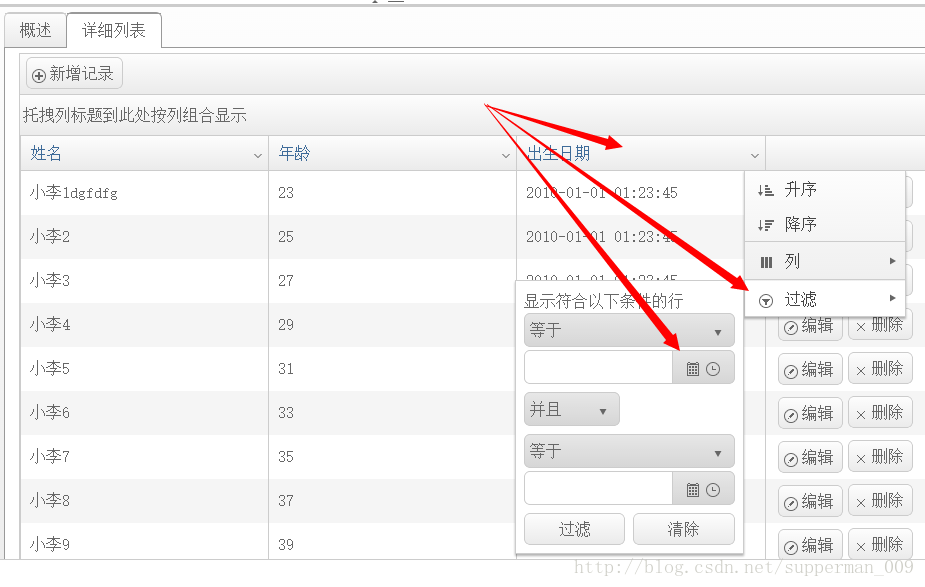
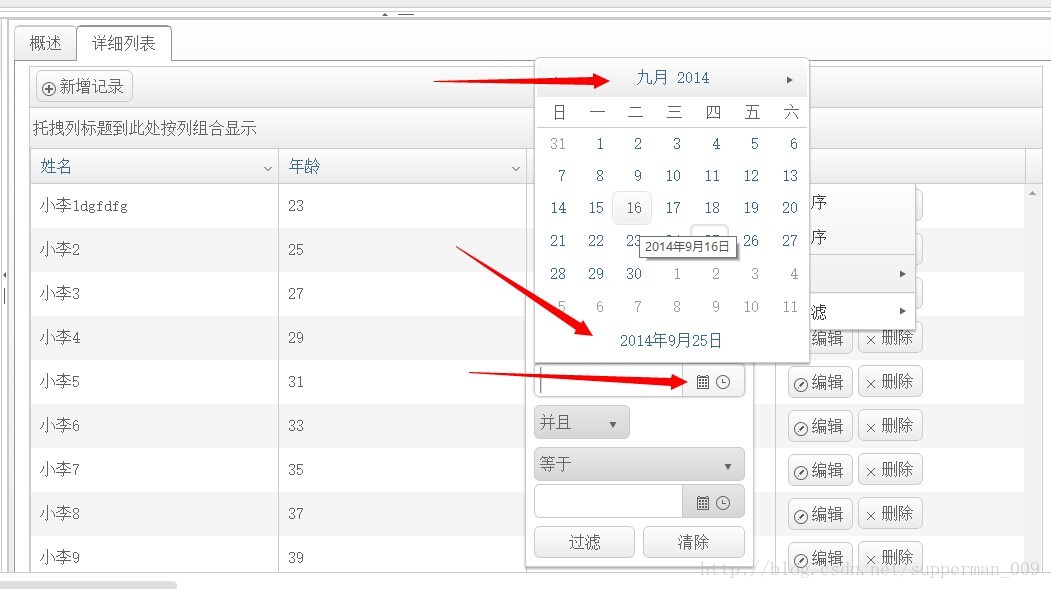
再看看日历控件与Gridview的联合使用,并且配置进入Filter过滤器的效果:
中文化就是这么简单!

