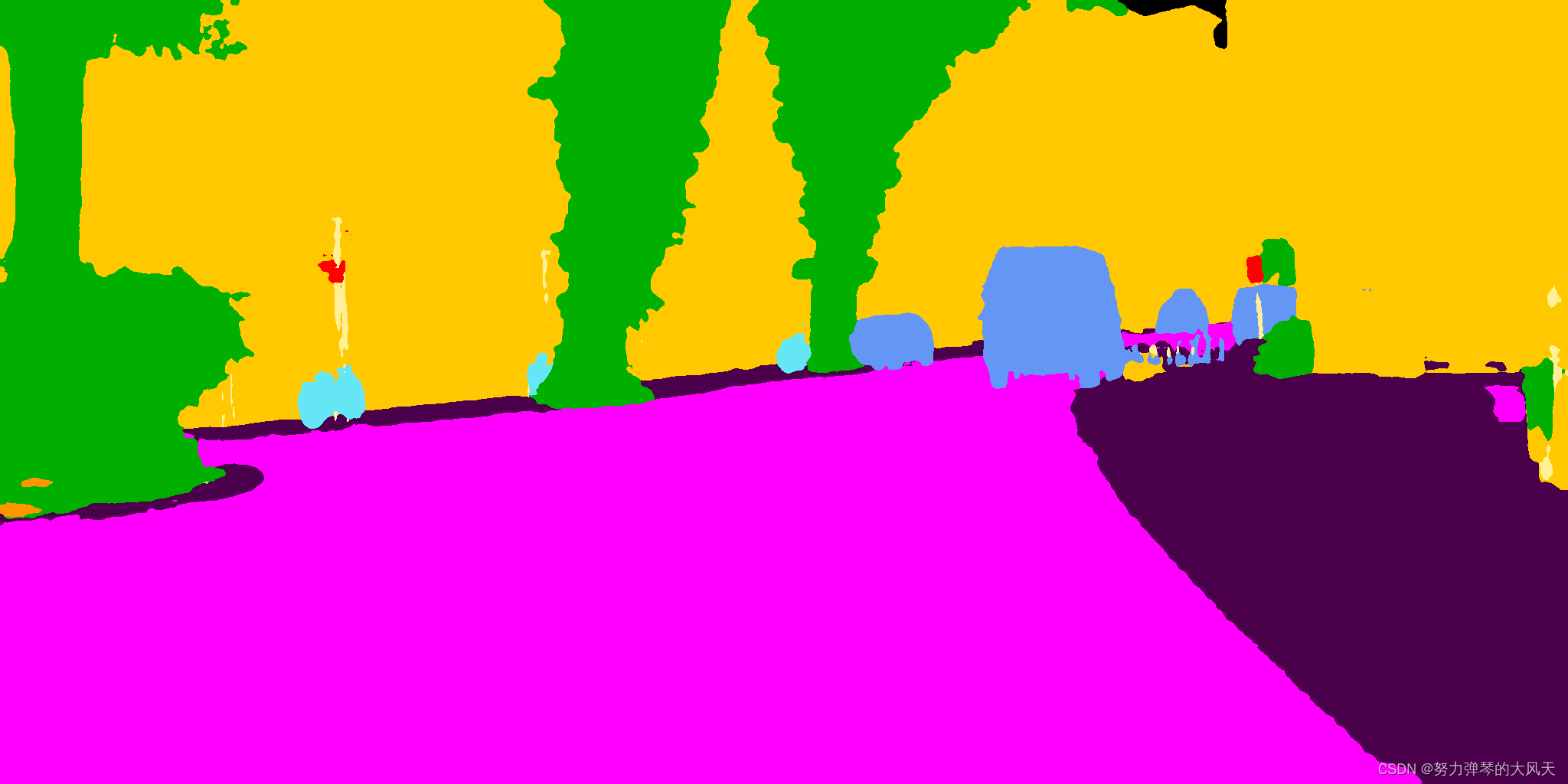
【Deeplabv3+】Ubutu18.04中使用pytorch复现Deeplabv3+第三步)-----CityscapesScripts生成自己的标签
赞
踩
本文是在前面两篇文章的基础上,讲解如何更改训练数据集颜色,需要与前面两篇文章连起来看。
本文用于修改cityscapes数据集的标签颜色与Semankitti数据集的标签一致,对修改后的数据集进行训练。需要下载两个开发工具包和一个数据集,分别是cityscapesScripts-master、semantic-kitti-api-master和cityscapes数据集:
- cityscapesScripts是用于检查、准备和评估 Cityscapes 数据集的脚本。下载路径:
https://github.com/mcordts/cityscapesScripts
- cityscapes数据集需要注册登录才能下载,下载链接:

下载完成后,在cityscapesScripts-master中创建一个cityscapes文件夹,将下载好的两个文件分别放入其中,解压出来的说明文件直接删除即可,最终如下图:

- semantic-kitti-api是用于打开、可视化、处理和评估 SemanticKITTI 数据集中的点云和标签结果的帮助程序脚本。下载路径:
https://github.com/PRBonn/semantic-kitti-api
一、制作标签步骤
1.1 更改标签颜色
进入目录cityscapesScripts-master\cityscapesscripts\helpers\labels.py中修改标签颜色与semantic-kitti-api-master\config\semanic-kitti.yaml中一致。注意:semantic-kitti-api-maste中的颜色是BGR颜色,cityscapesScripts中的颜色是RGB颜色,颠倒一下
cityscapesScripts-master\cityscapesscripts\helpers\labels.py标签:

semantic-kitti-api-master\config\semanic-kitti.yaml标签:

修改后的cityscapesScripts-master\cityscapesscripts\helpers\labels.py标签,可以直接拷贝使用:
- labels = [
- # name id trainId category catId hasInstances ignoreInEval color
- Label( 'unlabeled' , 0 , 255 , 'void' , 0 , False , True , ( 0, 0, 0) ),
- Label( 'ego vehicle' , 1 , 255 , 'void' , 0 , False , True , ( 0, 0, 0) ),
- Label( 'rectification border' , 2 , 255 , 'void' , 0 , False , True , ( 0, 0, 0) ),
- Label( 'out of roi' , 3 , 255 , 'void' , 0 , False , True , ( 0, 0, 0) ),
- Label( 'static' , 4 , 255 , 'void' , 0 , False , True , ( 0, 0, 0) ),
- Label( 'dynamic' , 5 , 255 , 'void' , 0 , False , True , (111, 74, 0) ),
- # Label( 'ground' , 6 , 255 , 'void' , 0 , False , True , ( 81, 0, 81) ),
- Label( 'ground' , 6 , 255 , 'void' , 0 , False , True , ( 175, 0, 75) ),
- # Label( 'road' , 7 , 0 , 'flat' , 1 , False , False , (128, 64,128) ),
- Label( 'road' , 7 , 0 , 'flat' , 1 , False , False , (255, 0,255) ),
- # Label( 'sidewalk' , 8 , 1 , 'flat' , 1 , False , False , (244, 35,232) ),
- Label( 'sidewalk' , 8 , 1 , 'flat' , 1 , False , False , (75, 0,75) ),
- # Label( 'parking' , 9 , 255 , 'flat' , 1 , False , True , (250,170,160) ),
- Label( 'parking' , 9 , 255 , 'flat' , 1 , False , True , (255,150,255) ),
- # Label( 'rail track' , 10 , 255 , 'flat' , 1 , False , True , (230,150,140) ),
- Label( 'rail track' , 10 , 255 , 'flat' , 1 , False , True , (0,0,255) ),
- # Label( 'building' , 11 , 2 , 'construction' , 2 , False , False , ( 70, 70, 70) ),
- Label( 'building' , 11 , 2 , 'construction' , 2 , False , False , ( 255, 200, 0) ),
- # Label( 'wall' , 12 , 3 , 'construction' , 2 , False , False , (102,102,156) ),
- Label( 'wall' , 12 , 3 , 'construction' , 2 , False , False , (255,150,0) ),
- # Label( 'fence' , 13 , 4 , 'construction' , 2 , False , False , (190,153,153) ),
- Label( 'fence' , 13 , 4 , 'construction' , 2 , False , False , (255,120,50) ),
- # Label( 'guard rail' , 14 , 255 , 'construction' , 2 , False , True , (180,165,180) ),
- Label( 'guard rail' , 14 , 255 , 'construction' , 2 , False , True , (255,150,0) ),
- # Label( 'bridge' , 15 , 255 , 'construction' , 2 , False , True , (150,100,100) ),
- Label( 'bridge' , 15 , 255 , 'construction' , 2 , False , True , (255,150,0) ),
- # Label( 'tunnel' , 16 , 255 , 'construction' , 2 , False , True , (150,120, 90) ),
- Label( 'tunnel' , 16 , 255 , 'construction' , 2 , False , True , (255,150, 0) ),
- # Label( 'pole' , 17 , 5 , 'object' , 3 , False , False , (153,153,153) ),
- Label( 'pole' , 17 , 5 , 'object' , 3 , False , False , (255,240,150) ),
- # Label( 'polegroup' , 18 , 255 , 'object' , 3 , False , True , (153,153,153) ),
- Label( 'polegroup' , 18 , 255 , 'object' , 3 , False , True , (50,255,255) ),
- # Label( 'traffic light' , 19 , 6 , 'object' , 3 , False , False , (250,170, 30) ),
- Label( 'traffic light' , 19 , 6 , 'object' , 3 , False , False , (50,255, 255) ),
- # Label( 'traffic sign' , 20 , 7 , 'object' , 3 , False , False , (220,220, 0) ),
- Label( 'traffic sign' , 20 , 7 , 'object' , 3 , False , False , (255,0, 0) ),
- # Label( 'vegetation' , 21 , 8 , 'nature' , 4 , False , False , (107,142, 35) ),
- Label( 'vegetation' , 21 , 8 , 'nature' , 4 , False , False , (0,175, 0) ),
- # Label( 'terrain' , 22 , 9 , 'nature' , 4 , False , False , (152,251,152) ),
- Label( 'terrain' , 22 , 9 , 'nature' , 4 , False , False , (150,240,80) ),
- # Label( 'sky' , 23 , 10 , 'sky' , 5 , False , False , ( 70,130,180) ),
- Label( 'sky' , 23 , 10 , 'sky' , 5 , False , False , ( 0,0,0) ),
- # Label( 'person' , 24 , 11 , 'human' , 6 , True , False , (220, 20, 60) ),
- Label( 'person' , 24 , 11 , 'human' , 6 , True , False , (255, 30, 30) ),
- # Label( 'rider' , 25 , 12 , 'human' , 6 , True , False , (255, 0, 0) ),
- Label( 'rider' , 25 , 12 , 'human' , 6 , True , False , (255, 40, 200) ),
- # Label( 'car' , 26 , 13 , 'vehicle' , 7 , True , False , ( 0, 0,142) ),
- Label( 'car' , 26 , 13 , 'vehicle' , 7 , True , False , ( 100, 150,245) ),
- # Label( 'truck' , 27 , 14 , 'vehicle' , 7 , True , False , ( 0, 0, 70) ),
- Label( 'truck' , 27 , 14 , 'vehicle' , 7 , True , False , ( 80, 30, 180) ),
- # Label( 'bus' , 28 , 15 , 'vehicle' , 7 , True , False , ( 0, 60,100) ),
- Label( 'bus' , 28 , 15 , 'vehicle' , 7 , True , False , ( 100, 80,250) ),
- # Label( 'caravan' , 29 , 255 , 'vehicle' , 7 , True , True , ( 0, 0, 90) ),
- Label( 'caravan' , 29 , 255 , 'vehicle' , 7 , True , True , ( 0, 0, 255) ),
- # Label( 'trailer' , 30 , 255 , 'vehicle' , 7 , True , True , ( 0, 0,110) ),
- Label( 'trailer' , 30 , 255 , 'vehicle' , 7 , True , True , ( 0, 0,255) ),
- # Label( 'train' , 31 , 16 , 'vehicle' , 7 , True , False , ( 0, 80,100) ),
- Label( 'train' , 31 , 16 , 'vehicle' , 7 , True , False , ( 0, 0,255) ),
- # Label( 'motorcycle' , 32 , 17 , 'vehicle' , 7 , True , False , ( 0, 0,230) ),
- Label( 'motorcycle' , 32 , 17 , 'vehicle' , 7 , True , False , ( 30, 60,150) ),
- # Label( 'bicycle' , 33 , 18 , 'vehicle' , 7 , True , False , (119, 11, 32) ),
- Label( 'bicycle' , 33 , 18 , 'vehicle' , 7 , True , False , (100, 230, 245) ),
- # Label( 'license plate' , -1 , -1 , 'vehicle' , 7 , False , True , ( 0, 0,142) ),
- Label( 'license plate' , -1 , -1 , 'vehicle' , 7 , False , True , ( 0, 0,255) ),
- ]

1.2 生成训练标签
1.2.1 生成labelIds标签
进入目录:cityscapesScripts-master\cityscapesscripts\preparation中
运行下面代码:
- # 运行成功后会在cityscapes数据集中生成_labelTrainIds结尾的训练文件
- python .\createTrainIdLabelImgs.py
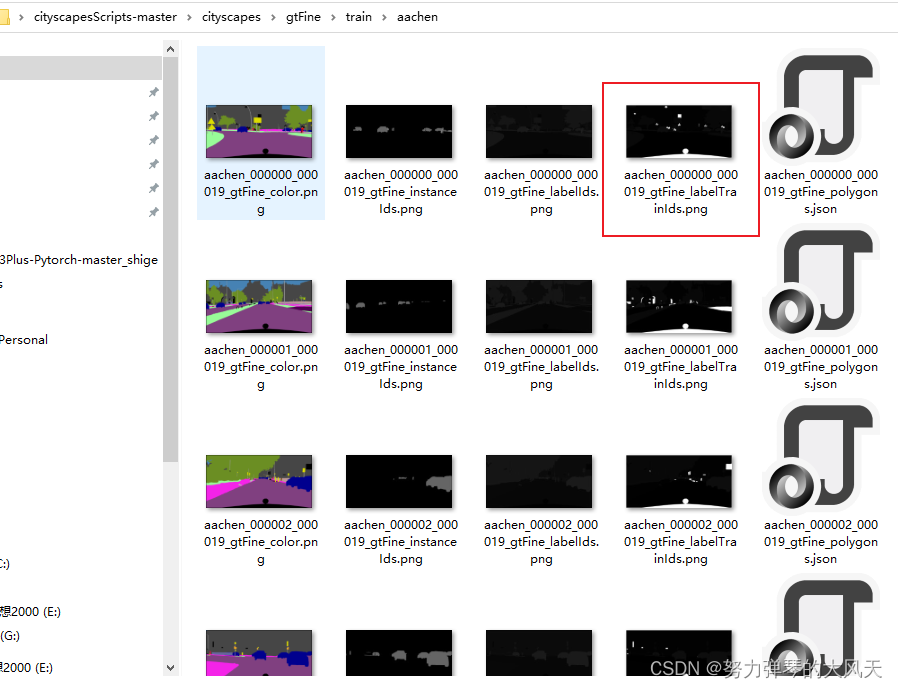
此时进入cityscapesScripts-master\cityscapes\gtFine\train中任何一个城市,会发现多了一个修改好的训练标签(gtFine中test、train和val中均多了一个训练标签,不一一展示):
2.2 生成instanceIds标签
进入目录:cityscapesScripts-master\cityscapesscripts\preparation中
运行下面代码
- # # 运行成功后会在cityscapes数据集中生成_instanceTrainIds结尾的训练文件
- python .\createTrainIdInstanceImgs.py
此时进入cityscapesScripts-master\cityscapes\gtFine\train中任何一个城市,会发现多了一个另一个实例训练标签,(gtFine中test、train和val中均多了一个训练标签,不一一展示):

2.3 修改DeepLabV3Plus-Pytorch中datasets\cityscapes.py中RGB值
训练之前,修改datasets\cityscapes.py文件中标签RGB值与cityscapesScripts-master中一致,可直接使用:

修改好的标签代码如下:
- CityscapesClass = namedtuple('CityscapesClass', ['name', 'id', 'train_id', 'category', 'category_id',
- 'has_instances', 'ignore_in_eval', 'color'])
- classes = [
- CityscapesClass('unlabeled', 0, 255, 'void', 0, False, True, (0, 0, 0)),
- CityscapesClass('ego vehicle', 1, 255, 'void', 0, False, True, (0, 0, 0)),
- CityscapesClass('rectification border', 2, 255, 'void', 0, False, True, (0, 0, 0)),
- CityscapesClass('out of roi', 3, 255, 'void', 0, False, True, (0, 0, 0)),
- CityscapesClass('static', 4, 255, 'void', 0, False, True, (0, 0, 0)),
- CityscapesClass('dynamic', 5, 255, 'void', 0, False, True, (111, 74, 0)),
- # CityscapesClass('ground', 6, 255, 'void', 0, False, True, (81, 0, 81)),
- CityscapesClass('ground', 6, 255, 'void', 0, False, True, (175, 0, 75)),
- # CityscapesClass('road', 7, 0, 'flat', 1, False, False, (128, 64, 128)),
- CityscapesClass('road', 7, 0, 'flat', 1, False, False, (255, 0, 255)),
- # CityscapesClass('sidewalk', 8, 1, 'flat', 1, False, False, (244, 35, 232)),
- CityscapesClass('sidewalk', 8, 1, 'flat', 1, False, False, (75, 0, 75)),
- # CityscapesClass('parking', 9, 255, 'flat', 1, False, True, (250, 170, 160)),
- CityscapesClass('parking', 9, 255, 'flat', 1, False, True, (255, 150, 255)),
- # CityscapesClass('rail track', 10, 255, 'flat', 1, False, True, (230, 150, 140)),
- CityscapesClass('rail track', 10, 255, 'flat', 1, False, True, (0, 0, 255)),
- # CityscapesClass('building', 11, 2, 'construction', 2, False, False, (70, 70, 70)),
- CityscapesClass('building', 11, 2, 'construction', 2, False, False, (255, 200, 0)),
- # CityscapesClass('wall', 12, 3, 'construction', 2, False, False, (102, 102, 156)),
- CityscapesClass('wall', 12, 3, 'construction', 2, False, False, (255, 150, 0)),
- # CityscapesClass('fence', 13, 4, 'construction', 2, False, False, (190, 153, 153)),
- CityscapesClass('fence', 13, 4, 'construction', 2, False, False, (255, 120, 50)),
- # CityscapesClass('guard rail', 14, 255, 'construction', 2, False, True, (180, 165, 180)),
- CityscapesClass('guard rail', 14, 255, 'construction', 2, False, True, (255, 150, 0)),
- # CityscapesClass('bridge', 15, 255, 'construction', 2, False, True, (150, 100, 100)),
- CityscapesClass('bridge', 15, 255, 'construction', 2, False, True, (255, 150, 0)),
- # CityscapesClass('tunnel', 16, 255, 'construction', 2, False, True, (150, 120, 90)),
- CityscapesClass('tunnel', 16, 255, 'construction', 2, False, True, (255, 150, 0)),
- # CityscapesClass('pole', 17, 5, 'object', 3, False, False, (153, 153, 153)),
- CityscapesClass('pole', 17, 5, 'object', 3, False, False, (255, 240, 150)),
- # CityscapesClass('polegroup', 18, 255, 'object', 3, False, True, (153, 153, 153)),
- CityscapesClass('polegroup', 18, 255, 'object', 3, False, True, (50, 255, 255)),
- # CityscapesClass('traffic light', 19, 6, 'object', 3, False, False, (250, 170, 30)),
- CityscapesClass('traffic light', 19, 6, 'object', 3, False, False, (50, 255, 255)),
- # CityscapesClass('traffic sign', 20, 7, 'object', 3, False, False, (220, 220, 0)),
- CityscapesClass('traffic sign', 20, 7, 'object', 3, False, False, (255, 0, 0)),
- # CityscapesClass('vegetation', 21, 8, 'nature', 4, False, False, (107, 142, 35)),
- CityscapesClass('vegetation', 21, 8, 'nature', 4, False, False, (0, 175, 0)),
- # CityscapesClass('terrain', 22, 9, 'nature', 4, False, False, (152, 251, 152)),
- CityscapesClass('terrain', 22, 9, 'nature', 4, False, False, (150, 240, 80)),
- # CityscapesClass('sky', 23, 10, 'sky', 5, False, False, (70, 130, 180)),
- CityscapesClass('sky', 23, 10, 'sky', 5, False, False, (0, 0, 0)),
- # CityscapesClass('person', 24, 11, 'human', 6, True, False, (220, 20, 60)),
- CityscapesClass('person', 24, 11, 'human', 6, True, False, (255, 30, 30)),
- # CityscapesClass('rider', 25, 12, 'human', 6, True, False, (255, 0, 0)),
- CityscapesClass('rider', 25, 12, 'human', 6, True, False, (255, 40, 200)),
- # CityscapesClass('car', 26, 13, 'vehicle', 7, True, False, (0, 0, 142)),
- CityscapesClass('car', 26, 13, 'vehicle', 7, True, False, (100, 150, 245)),
- # CityscapesClass('truck', 27, 14, 'vehicle', 7, True, False, (0, 0, 70)),
- CityscapesClass('truck', 27, 14, 'vehicle', 7, True, False, (80, 30, 180)),
- # CityscapesClass('bus', 28, 15, 'vehicle', 7, True, False, (0, 60, 100)),
- CityscapesClass('bus', 28, 15, 'vehicle', 7, True, False, (100, 80, 250)),
- # CityscapesClass('caravan', 29, 255, 'vehicle', 7, True, True, (0, 0, 90)),
- CityscapesClass('caravan', 29, 255, 'vehicle', 7, True, True, (0, 0, 255)),
- # CityscapesClass('trailer', 30, 255, 'vehicle', 7, True, True, (0, 0, 110)),
- CityscapesClass('trailer', 30, 255, 'vehicle', 7, True, True, (0, 0, 255)),
- # CityscapesClass('train', 31, 16, 'vehicle', 7, True, False, (0, 80, 100)),
- CityscapesClass('train', 31, 16, 'vehicle', 7, True, False, (0, 0, 255)),
- # CityscapesClass('motorcycle', 32, 17, 'vehicle', 7, True, False, (0, 0, 230)),
- CityscapesClass('motorcycle', 32, 17, 'vehicle', 7, True, False, (30, 60, 150)),
- # CityscapesClass('bicycle', 33, 18, 'vehicle', 7, True, False, (119, 11, 32)),
- CityscapesClass('bicycle', 33, 18, 'vehicle', 7, True, False, (100, 230, 245)),
- CityscapesClass('license plate', -1, 255, 'vehicle', 7, False, True, (0, 0, 255)),
- ]
更改完成后,在DeepLabV3Plus-Pytorch-master中训练,即可得到训练后的新结果: