- 1screen的使用方法_screen使用教程
- 2PP-YOLOE 论文学习
- 3LeetCode@Array_136_Single_Number
- 4SpringBoot图书管理系统运行教程_做好的java开发的图书管理系统有源码如何运行
- 5whistle in my eyes_whistle 添加header
- 6mysql addbatch_JDBC批量插入优化addbatch
- 7猿人学试题(非常简单js混淆、雪碧图、样式干扰 css加密、js混淆源码乱码、js混淆动态cookie、访问逻辑)_1.qstv77.xyz
- 8TCP四次挥手详解
- 9ADB 操作命令详解及用法大全_adb 编辑文件
- 10c语言规定scanf实型数据不能规定小数点后面位数, 故scanf(“%6.2f“,&a)错误。_输入实型数据时可以规定小数占后的位数,如scanf(
This error originates from a subprocess Termux matplotlib pandas 编译报错 以及 jupyter 安装问题_termux安装jupyter以及matplotlib安装失败
赞
踩
注意
自己备忘用,因此没有完整复现。
如果你参考的过程中遇到了问题,请你尝试自己解决——但是十分欢迎把问题、解决方法、文章重点补充、纠错之类的贴在评论区,比如这篇文章就是为了补充Termux安装与配置+python环境配置遇到的报错。
问题描述
参考一篇文章Termux安装与配置+python环境配置 做Termux使用配置的时候
遇到问题1:
matplotlib pandas 安装失败。
补充问题2:
jupyter 安装失败。 (见文末)
补充问题3:
openblas 与 libopenblas 冲突,致使libopenblas无法安装
两个东西安装共同点在于,报错点都在 Build 编译阶段
Installing Building Dependencies ... \
- 1
Build半天,然后突然就是千行报错,内容咱也看不懂,编译链的各种依赖的问题。
基本注意到的内容就是(尾部的一部分)
note: This error originates from a subprocess, and is likely not a problem with pip.
error: subprocess-exited-with-error

× Getting requirements to build wheel did not run successfully.
│ exit code: 1
╰─> See above for output.

note: This error originates from a subprocess, and is likely not a problem with pip.
- 1
- 2
- 3
- 4
- 5
- 6
- 7
- 8
问题吐槽
当然不是我们的问题,只是这俩东西就是太难装了。依赖问题,烦的一批。
也许官方给的英文Installation Guide不会出错,但只要看的是别人写的,配置文章就会有出错的可能不是吗。
国内有文章记录自己的解决方案,外网上则有好多关于它们的安装阶段出错的问答串。
好多人都吐槽说pip安装它们的可行依赖很不稳定,基本上这个月好使,下个月哪个部件更新了就又不好使了。也不知道是开发者团队的问题还是网上配置文章质量的问题。
知乎相关文章也有说明termux 23年如何成功安装下来的,但有些文章只说明了,如何从纯洁环境里安装得到结果。甚至要python都是干净的???我不可能因为这个卸载python丢掉所有前面配置安装了的模组吧,我不干!
解决办法 3步
版本记录
成功安装的版本:
python 3.11.6
pip 23.3.1
	numpy 1.23.2
		matplotlib 3.8.1

	Cython 3.0.5
	pytz 2023.3.post1
		pandas 2.1.2
- 1
- 2
- 3
- 4
- 5
- 6
- 7
- 8
1 清除pip缓存
rm -rf ~/.cache/pip
- 1
2 matplotlib 的成功安装
- 直接原因:
23年和21年 matplotlib 安装依赖有差异。
对于matplotlib编译错误,我自己找到的解决办法见https://github.com/termux/termux-app/discussions/3444#discussioncomment-6394303讨论部分 Alekc74 的回答。
此处讨论也有关于大家对于 配置matplotlib 的各种看法 原因 及其他(没细看)。
This resolved it(wheel error for contourpy ninja dependency)
另外我自己加了两行 pkg install matplotlib 和 pkg uninstall matplotlib
后莫名其妙地解决了问题,成功安装matplotlib。
matplotlib补全依赖的命令
前置命令:根据Termux安装与配置+python环境配置的Python包安装与配置部分
配置好matplotlib本身的前置依赖包,即
# 配置pypi源
pip install pip -U
pip config set global.index-url https://pypi.tuna.tsinghua.edu.cn/simple
# 依赖项
pip install wheel
pip install setuptools --upgrade

# 2 Python包安装
# 安装numpy和scipy
# 添加第三方仓库
curl -LO https://its-pointless.github.io/setup-pointless-repo.sh
bash setup-pointless-repo.sh

# 从仓库安装numpy scipy
pkg install -y numpy scipy

# 安装lxml
# 安装lxml的依赖项
pkg install -y libxml2 libxslt

# 安装lxml
pip install lxml
安装pillow


# 安装pillow的依赖项
pkg install -y libjpeg-turbo libtiff
pkg install -y littlecms tk libwebp libsodium

# 安装pillow
pip install pillow

# 安装matplotlib
# 安装matplotlib的依赖项
pkg install -y freetype libpng
pip install kiwisolver cycler
pip install pyparsing python-dateutil

# 这时候执行下面会报错,那就对了
# pip install matplotlib

- 1
- 2
- 3
- 4
- 5
- 6
- 7
- 8
- 9
- 10
- 11
- 12
- 13
- 14
- 15
- 16
- 17
- 18
- 19
- 20
- 21
- 22
- 23
- 24
- 25
- 26
- 27
- 28
- 29
- 30
- 31
- 32
- 33
- 34
- 35
- 36
- 37
- 38
- 39
- 40
- 41
接着使用命令如下(可能不全,因为这之前有依赖过别的参考但是失败)
pip install wheel

pkg i ninja automake cmake binutils patchelf

pkg i libjpeg-turbo

pip install pillow

pip install setuptools==59.8.0

CFLAGS=-Wno-implicit-function-declaration MATHLIB=m pip install numpy==1.23.2

pip install meson

pip install meson-python

pip install pybind11

pip install --no-build-isolation pip install contourpy

pkg install matplotlib
pkg uninstall matplotlib

pip install matplotlib
- 1
- 2
- 3
- 4
- 5
- 6
- 7
- 8
- 9
- 10
- 11
- 12
- 13
- 14
- 15
- 16
- 17
- 18
- 19
- 20
- 21
- 22
- 23
- 24
之后安装、编译matplotlib成功。
3 pandas的成功安装
参考的就是原文,只不过我们已经在第2步顺带解决了依赖问题。 即
matplotlib补全依赖的命令
→
# 安装pandas
# 安装pandas的依赖项
pip install -y pytz cython

# 安装pandas
export CFLAGS="-Wno-deprecated-declarations -Wno-unreachable-code"
pip install pandas
- 1
- 2
- 3
- 4
- 5
- 6
- 7
也能正常安装pandas。
补充问题1: pip install jupyter 报错:
如果你也遇到 pip install jupyter 报错如下 (前半段报错。完整报错往往太长,且越往后越没有意义)
× pip subprocess to install build dependencies did not run successfully.
  │ exit code: 1
  ╰─> [58 lines of output]
      Looking in indexes: https://pypi.tuna.tsinghua.edu.cn/simple
      Collecting maturin<2.0,>=1.0
        Using cached https://pypi.tuna.tsinghua.edu.cn/packages/d6/a3/42ff26b2b3011ada67c73db32a9ccf9fa18d459cbef8ed6eefc3b283ee60/maturin-1.3.1.tar.gz (176 kB)                                              Installing build dependencies: started
        Installing build dependencies: finished with status 'done'
        Getting requirements to build wheel: started
        Getting requirements to build wheel: finished with status 'done'
        Preparing metadata (pyproject.toml): started
        Preparing metadata (pyproject.toml): finished with status 'done'
      Building wheels for collected packages: maturin
        Building wheel for maturin (pyproject.toml): started
        Building wheel for maturin (pyproject.toml): finished with status 'error'                                                           error: subprocess-exited-with-error

        × Building wheel for maturin (pyproject.toml) did not run successfully.                                                             │ exit code: 1
        ╰─> [35 lines of output]
            /data/data/com.termux/files/usr/tmp/pip-build-env-66jbi47_/overlay/lib/python3.11/site-packages/setuptools/config/_apply_pyprojecttoml.py:80: SetuptoolsWarning: `install_requires` overwritten in `pyproject.toml` (dependencies)
              corresp(dist, value, root_dir)                                  running bdist_wheel
            running build
            running build_py
            creating build                                                    creating build/lib.linux-aarch64-cpython-311

            creating build/lib.linux-aarch64-cpython-311/maturin

            copying maturin/__init__.py -> build/lib.linux-aarch64-cpython-311/maturin

            copying maturin/__main__.py -> build/lib.linux-aarch64-cpython-311/maturin

            copying maturin/import_hook.py -> build/lib.linux-aarch64-cpython-311/maturin

            running egg_info
            creating maturin.egg-info
            writing maturin.egg-info/PKG-INFO
            writing dependency_links to maturin.egg-info/dependency_links.txt

            writing requirements to maturin.egg-info/requires.txt

            writing top-level names to maturin.egg-info/top_level.txt

            writing manifest file 'maturin.egg-info/SOURCES.txt'              reading manifest file 'maturin.egg-info/SOURCES.txt'

            reading manifest template 'MANIFEST.in'
            warning: no files found matching '*.json' under directory 'src/python_interpreter'

            writing manifest file 'maturin.egg-info/SOURCES.txt'


            running build_ext                                                 running build_rust


            error: can't find Rust compiler
- 1
- 2
- 3
- 4
- 5
- 6
- 7
- 8
- 9
- 10
- 11
- 12
- 13
- 14
- 15
- 16
- 17
- 18
- 19
- 20
- 21
- 22
- 23
- 24
- 25
- 26
- 27
- 28
- 29
- 30
- 31
- 32
- 33
- 34
- 35
- 36
- 37
- 38
- 39
- 40
- 41
- 42
- 43
- 44
- 45
- 46
- 47
- 48
- 49
- 50
- 51
- 52
就会发现,第一段
	Building wheel for maturin (pyproject.toml): finished with status 'error'
error: subprocess-exited-with-error
- 1
- 2
这里表示一个叫做maturin的组件编译错误。但是我们并不了解这个东西,尝试接着往下看。
第二段有很重要的信息,从
× Building wheel for maturin (pyproject.toml) did not run successfully.

...
error: can't find Rust compiler
- 1
- 2
- 3
- 4
error: can't find Rust compiler
ok, 这一句告诉我们,错误:没有找到Rust编译器。
很奇怪,那我们试一试安装一个Rust环境后再运行呢? 尝试后竟然可以了!
解决方案
# 安装rust环境
pkg install rust

# 然后再执行一次
pip install jupyter

# 成功后可以检查一下效果
jupyter notebook
- 1
- 2
- 3
- 4
- 5
- 6
- 7
- 8
补充问题3 : openblas 和 libopenblas 矛盾,导致 libopenblas无法安装
安装jupyter前置 libzmq 之类的时候,发生的。
这个问题发生的也很莫名奇妙,情况如下
#  先是执行安装命令
# 命令A
~ pkg install libzmq

# 遇到报错,然后 系统 建议我执行 `apt --fix-broken install`,  于是我照做

# 命令B
~ apt --fix-broken install

# 报错出现
...
dpkg: error processing archive /data/data/com.termux/cache/apt/archives/libopenblas_0.3.24_aarch64.deb (--unpack): trying to overwrite '/data/data/com.termux/files/usr/lib/libopenblas.so', which is also in package openblas 0.3.15
...
- 1
- 2
- 3
- 4
- 5
- 6
- 7
- 8
- 9
- 10
- 11
- 12
- 13
清空了termux的历史,因此完整报错找不到了。但解决办法就是出自这一句。
当我执行 命令B 的时候可以看到意思大概是说 apt 想给我安装一个 libopenblas 的版本为 0.3.24 的库,当它到unpack安装环节的时候,它想写入的文件/data/data/com.termux/files/usr/lib/libopenblas.so 是被现有的 openblas 的版本为 0.3.15 的库所持有的。
因此 dpkg 提醒我,正在尝试覆盖写入这个文件。
查看 openblas的来历
pkg list-all | grep openblas
- 1
结果为
WARNING: apt does not have a stable CLI interface. Use with caution in scripts.

libopenblas/stable 0.3.24 aarch64
openblas-static/termux 0.3.15 aarch64
openblas/termux,now 0.3.15 aarch64 [installed,automatic]
- 1
- 2
- 3
- 4
- 5
看起来是不知道什么时候被自动安装的依赖,也许是termux自带的。
走了弯路
中间走了弯路,尝试卸载openblas再安装一下新的,结果麻烦的是已经安装的matplotlib还有python-numpy (这个貌似是termux自带的,不是numpy) 又依赖这个,单独卸载它们不行,两个一起卸载则可以。
但是并没有必要
因为发现还是会一直报错,还都是报错关于上面的overwrite问题,于是最后回到这个问题本身。
解决办法
参考
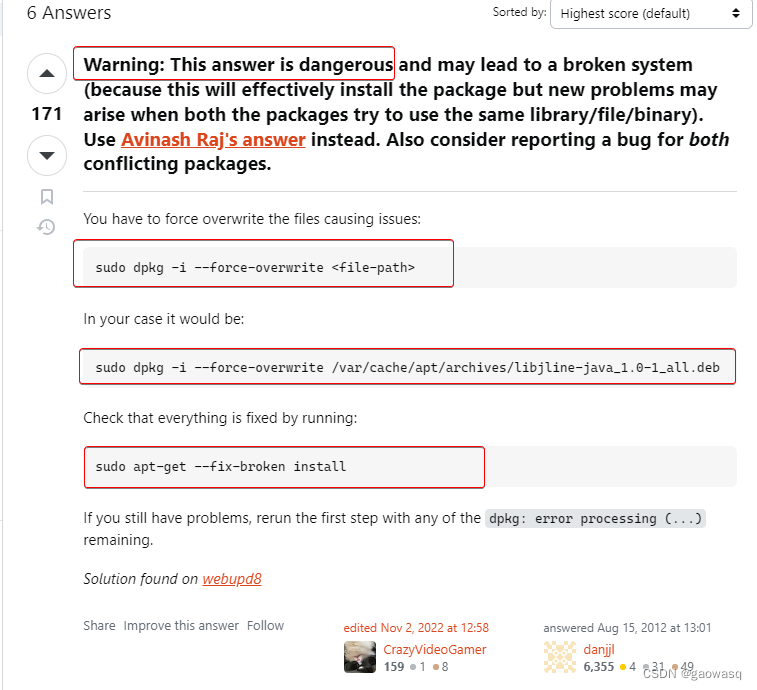
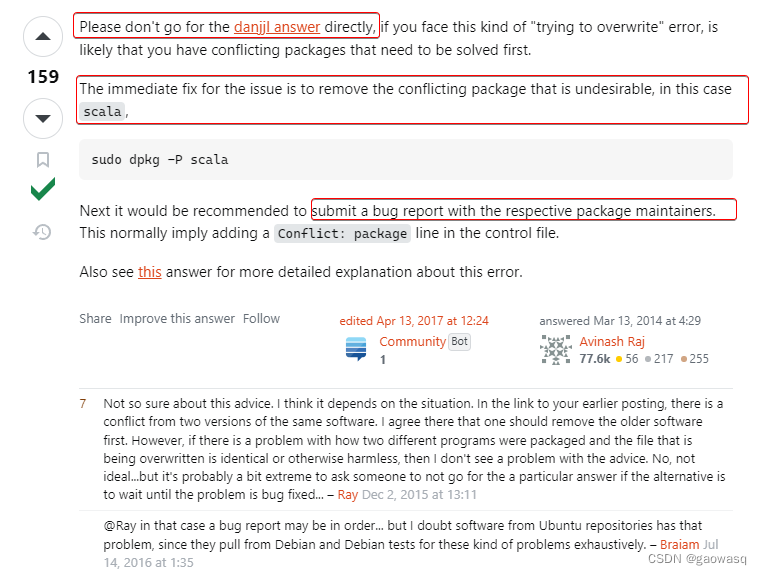
找到文章apt - dpkg error: “trying to overwrite file, which is also in…” - Ask Ubuntu,其中
- 解决办法1是比较简单粗暴——允许dpkg 对现存包的文件进行overwrite,这样可能会造成系统错误的风险;
- 解决方法2是回报bug report,但是这样要等待,而且问题难度将变为如何用英文正确提交bug report。
1
2
最后还是抱着风险,采取了解决办法1,目前可以解决我的问题,但属实无奈之举。
恳请有经验的大佬指点,更合适的办法应是如何。
解决办法如下:
# 允许libopenblas_0.3.24_aarch64.deb安装包对 与现存包相同文件(/data/data/com.termux/files/usr/lib/libopenblas.so)的 覆写

dpkg -i --force-overwrite /data/data/com.termux/cache/apt/archives/libopenblas_0.3.24_aarch64.deb


# 覆写后,重新用 apt修复
apt --fix-broken install

# 这时候可以再次安装 libzmq 等jupyter前置依赖。
pkg install libzmq
...
# (install jupyter 等后续步骤)
pip install jupyter
- 1
- 2
- 3
- 4
- 5
- 6
- 7
- 8
- 9
- 10
- 11
- 12
- 13
查看安装结果:
#  check
pkg list-all | grep openblas
- 1
- 2
输出如下,可见此时libopenblas已经安装。
WARNING: apt does not have a stable CLI interface. Use with caution in scripts.

libopenblas/stable,now 0.3.24 aarch64 [installed]
openblas-static/termux 0.3.15 aarch64
openblas/termux,now 0.3.15 aarch64 [installed,automatic]
- 1
- 2
- 3
- 4
- 5
但是再次强调,笔者不了解这样做的后果,只是临时解决问题不得已,如参考所说,有风险。
在特定评论告知前,请斟酌参考使用dpkg覆写的命令。